Amazon Fulfillment (FBA) in 2026: How It Works, Real Costs, Fulfillment Centers & TikTok Shop
Best Ecommerce Fulfillment Center
Author: Josa
Contents
Amazon Fulfillment (FBA) is for Amazon sellers and brands who want Amazon to run operations instead of doing fulfillment themselves. You send inventory to an Amazon fulfillment center and Amazon handles storage, pick/pack, shipping, customer service and returns.
This guide shows the exact workflow, how to estimate real costs, when FBA is worth it, and the mistakes that kill profit. Your profitability comes down to 3 buckets: fulfillment fees, storage fees and hidden margin leaks like returns, aged inventory and removals. Finally, “TikTok Shop fulfilled by Amazon” usually means shipping off-Amazon orders via Amazon’s network using MCF.
What Is Amazon Fulfillment (FBA)?
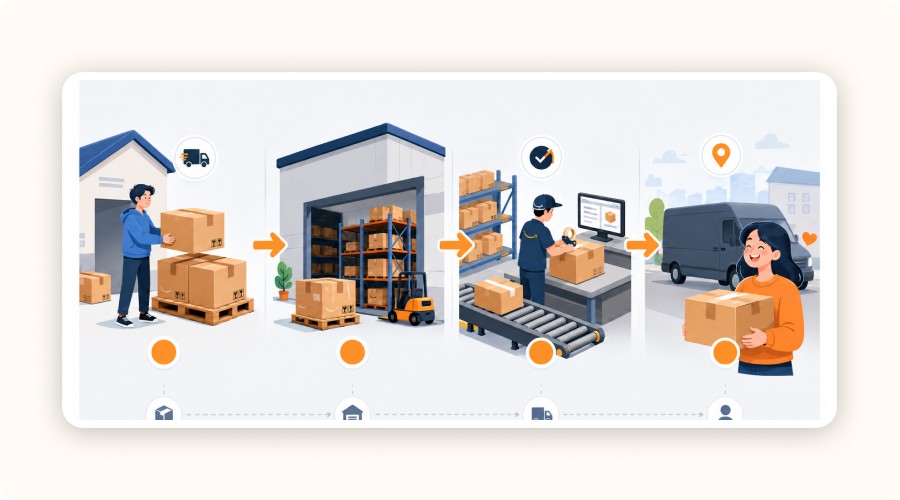
Amazon fulfillment (also called Fulfillment by Amazon / FBA) is a service where you send your inventory to Amazon and Amazon handles storage, pick/pack, shipping, customer service and returns for each order.
What “Fulfilled by Amazon” means (customer-facing impact)
When a listing says fulfilled by Amazon, the customer experience changes immediately. The buyer expects fast, reliable delivery (often aligned with Prime standards), clear tracking and a smoother post-purchase flow. Returns and support are typically handled through Amazon’s process, which reduces friction for the customer and can increase trust at checkout.
For you, the concrete benefit is operational: fewer “where is my order?” tickets, less time spent on shipping issues and more consistency when volume grows.
Important: “fulfilled by Amazon” is not a guarantee of profits. Your margin still depends on fees and return behavior.
Fulfillment center vs amazon fulfillment facility (quick glossary)
Fulfillment center Amazon: the common term for Amazon’s warehouses where orders are processed (receive → store → pick/pack → ship).
Amazon fulfillment facility: basically the same idea, just a more “building-level” wording. In practice, both refer to Amazon’s fulfillment network and where your FBA inventory lives.
How Amazon FBA Works (Step-by-Step)
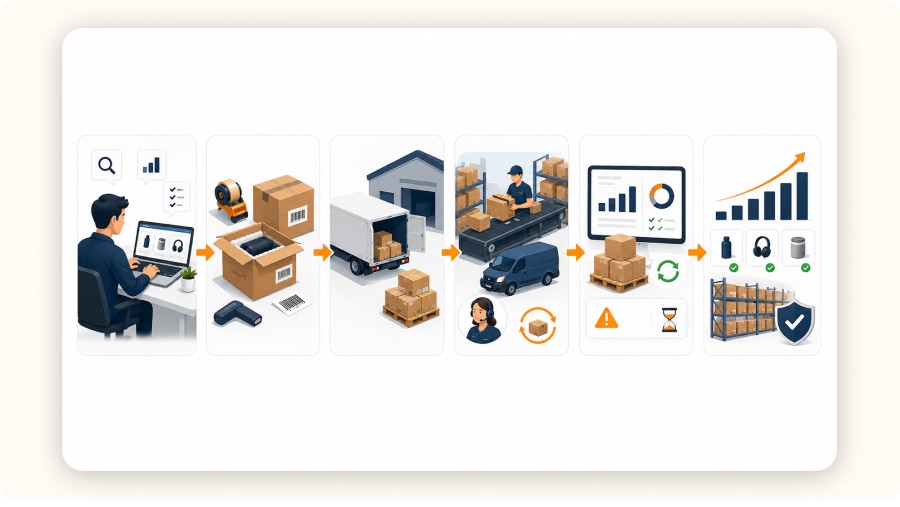
Amazon FBA follows a simple process: you send your products to Amazon and they handle storage, packing, shipping and customer service. Here’s the step-by-step breakdown to understand how it works in practice.
Enroll and choose eligible products
You start inside Seller Central: you enroll in Fulfillment by Amazon (FBA), then decide which SKUs will be handled by Amazon fulfillment. The right move is to send only products that can survive the fee stack and won’t sit in storage.
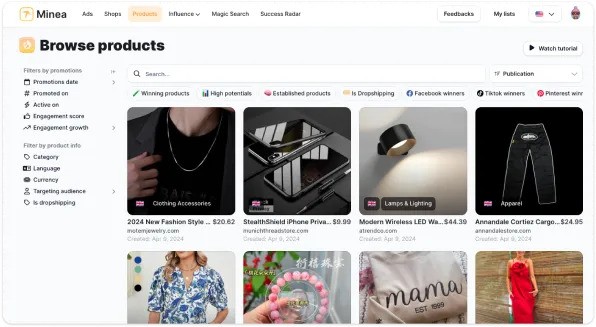
To reduce the risk of sending the wrong inventory, you can validate demand upstream with tools like Minea (ad intelligence + trend spotting), especially when you’re testing new products and want stronger signals before committing units to FBA.
What to check before you enroll a SKU:
Eligibility / restrictions (category rules, prep rules)
Unit economics (margin after fees, not just revenue)
Return risk (high returns = margin gets crushed)


Prep / label / pack inventory (the step that causes most problems)
This is where sellers lose time and money. If prep and labeling are wrong, inventory can be delayed at receiving and won’t become available fast. Amazon also offers FBA Prep Service and FBA Label Service if you want them to handle part of it.
Non-negotiables:
Use the correct unit labels (scannable, consistent)
Match your shipment plan’s quantities + carton count
Keep packaging consistent (size/weight changes can affect fees later)
Send inventory to Amazon (inbound workflow)
You create a shipment with the “Send to Amazon” workflow, then send cartons to Amazon’s receiving locations. Amazon may distribute inventory across its network to place items closer to customers, which supports fast delivery but adds complexity.
What you must track:
Receiving status: shipped → delivered → checked-in → available
Any placement-related choices/costs shown during shipment creation
Inbound timing: if receiving is slow, your sales momentum dies
Amazon fulfills orders (pick / pack / ship + returns)
Once inventory is available, Amazon handles:
Pick & pack
Shipping & handling
Customer service
Returns
Amazon also states that shipping with FBA can cost 70% less per unit than comparable premium options from other major US carriers (their claim).
Don’t treat this as a guaranteed saving. Treat it as a signal that Amazon’s network can be efficient when your SKU fits the right size/weight tier.
Manage inventory (restock + avoid aged stock)
FBA is not “set and forget.” Your biggest risk is inventory sitting too long. Amazon explicitly notes aged inventory fees apply to items stored for more than 181 days.
So the operational job becomes inventory health: keep stock flowing, avoid dead units and plan exits.
Weekly inventory hygiene:
Watch weeks of cover (don’t over-send)
Set restock alerts and keep best sellers in stock
Plan what happens if velocity drops: removal, disposal, liquidation
Optimize & scale (tools/programs that matter)
After you have stable velocity on 1–3 SKUs, then scale volume and expand reach. Amazon points to programs that help you streamline and grow, including options like Amazon Global Logistics, Remote Fulfillment with FBA and Amazon Export.
Before scaling harder, make sure you’re scaling the right products. Tools like Minea can help you validate demand upstream by spotting what’s already working in ads/creatives, so you don’t send inventory that will sit and trigger fees.
Scaling rules (simple):
Scale inventory only after you confirm stable demand
Scale SKUs only if you can keep inventory healthy (no aging)
Scale channels only if your fulfillment workflow stays clean (tracking, returns, availability)
Costs: How to Estimate “Real FBA Profit” (No Guessing)

To price Amazon fulfillment (FBA) correctly, ignore “one fee.” Use a simple framework: your profit is decided by 3 cost buckets.
The 3 cost buckets (framework)
Fulfillment fees (per unit): Amazon’s per-unit cost includes pick/pack, shipping & handling, customer service and returns.
Monthly storage fees: charged based on the space your inventory occupies in Amazon fulfillment centers.
Margin leaks: returns processing, aged inventory (inventory stored 181+ days), plus removal / disposal / liquidation charges.
The simple margin formula (template)
Your real FBA profit per unit is what’s left after you take your selling price and subtract every cost that actually exists in the chain: product cost, inbound shipping to Amazon, the FBA fulfillment fee, your storage estimate and a returns reserve (because returns are a predictable margin leak). What remains is the only number that matters: net profit per unit.
What to confirm before scaling (mini checklist)
Packaged dimensions/weight are accurate
Return rate assumption is realistic
Aging risk is controlled + you have an exit plan (remove/liquidate)
Total cash tied in stock won’t choke your cashflow
Using the Revenue Calculator (how to do it right)
Enter the correct dimensions, weight, category, price, then compare FBA vs your fulfillment. The biggest mistake: using wrong packaged measurements or ignoring returns/aging costs.
Amazon Fulfillment (FBA) is for Amazon sellers and brands who want Amazon to run operations instead of doing fulfillment themselves. You send inventory to an Amazon fulfillment center and Amazon handles storage, pick/pack, shipping, customer service and returns.
This guide shows the exact workflow, how to estimate real costs, when FBA is worth it, and the mistakes that kill profit. Your profitability comes down to 3 buckets: fulfillment fees, storage fees and hidden margin leaks like returns, aged inventory and removals. Finally, “TikTok Shop fulfilled by Amazon” usually means shipping off-Amazon orders via Amazon’s network using MCF.
What Is Amazon Fulfillment (FBA)?
Amazon fulfillment (also called Fulfillment by Amazon / FBA) is a service where you send your inventory to Amazon and Amazon handles storage, pick/pack, shipping, customer service and returns for each order.
What “Fulfilled by Amazon” means (customer-facing impact)
When a listing says fulfilled by Amazon, the customer experience changes immediately. The buyer expects fast, reliable delivery (often aligned with Prime standards), clear tracking and a smoother post-purchase flow. Returns and support are typically handled through Amazon’s process, which reduces friction for the customer and can increase trust at checkout.
For you, the concrete benefit is operational: fewer “where is my order?” tickets, less time spent on shipping issues and more consistency when volume grows.
Important: “fulfilled by Amazon” is not a guarantee of profits. Your margin still depends on fees and return behavior.
Fulfillment center vs amazon fulfillment facility (quick glossary)
Fulfillment center Amazon: the common term for Amazon’s warehouses where orders are processed (receive → store → pick/pack → ship).
Amazon fulfillment facility: basically the same idea, just a more “building-level” wording. In practice, both refer to Amazon’s fulfillment network and where your FBA inventory lives.
How Amazon FBA Works (Step-by-Step)
Amazon FBA follows a simple process: you send your products to Amazon and they handle storage, packing, shipping and customer service. Here’s the step-by-step breakdown to understand how it works in practice.
Enroll and choose eligible products
You start inside Seller Central: you enroll in Fulfillment by Amazon (FBA), then decide which SKUs will be handled by Amazon fulfillment. The right move is to send only products that can survive the fee stack and won’t sit in storage.
To reduce the risk of sending the wrong inventory, you can validate demand upstream with tools like Minea (ad intelligence + trend spotting), especially when you’re testing new products and want stronger signals before committing units to FBA.
What to check before you enroll a SKU:
Eligibility / restrictions (category rules, prep rules)
Unit economics (margin after fees, not just revenue)
Return risk (high returns = margin gets crushed)
Prep / label / pack inventory (the step that causes most problems)
This is where sellers lose time and money. If prep and labeling are wrong, inventory can be delayed at receiving and won’t become available fast. Amazon also offers FBA Prep Service and FBA Label Service if you want them to handle part of it.
Non-negotiables:
Use the correct unit labels (scannable, consistent)
Match your shipment plan’s quantities + carton count
Keep packaging consistent (size/weight changes can affect fees later)
Send inventory to Amazon (inbound workflow)
You create a shipment with the “Send to Amazon” workflow, then send cartons to Amazon’s receiving locations. Amazon may distribute inventory across its network to place items closer to customers, which supports fast delivery but adds complexity.
What you must track:
Receiving status: shipped → delivered → checked-in → available
Any placement-related choices/costs shown during shipment creation
Inbound timing: if receiving is slow, your sales momentum dies
Amazon fulfills orders (pick / pack / ship + returns)
Once inventory is available, Amazon handles:
Pick & pack
Shipping & handling
Customer service
Returns
Amazon also states that shipping with FBA can cost 70% less per unit than comparable premium options from other major US carriers (their claim).
Don’t treat this as a guaranteed saving. Treat it as a signal that Amazon’s network can be efficient when your SKU fits the right size/weight tier.
Manage inventory (restock + avoid aged stock)
FBA is not “set and forget.” Your biggest risk is inventory sitting too long. Amazon explicitly notes aged inventory fees apply to items stored for more than 181 days.
So the operational job becomes inventory health: keep stock flowing, avoid dead units and plan exits.
Weekly inventory hygiene:
Watch weeks of cover (don’t over-send)
Set restock alerts and keep best sellers in stock
Plan what happens if velocity drops: removal, disposal, liquidation
Optimize & scale (tools/programs that matter)
After you have stable velocity on 1–3 SKUs, then scale volume and expand reach. Amazon points to programs that help you streamline and grow, including options like Amazon Global Logistics, Remote Fulfillment with FBA and Amazon Export.
Before scaling harder, make sure you’re scaling the right products. Tools like Minea can help you validate demand upstream by spotting what’s already working in ads/creatives, so you don’t send inventory that will sit and trigger fees.
Scaling rules (simple):
Scale inventory only after you confirm stable demand
Scale SKUs only if you can keep inventory healthy (no aging)
Scale channels only if your fulfillment workflow stays clean (tracking, returns, availability)
Costs: How to Estimate “Real FBA Profit” (No Guessing)
To price Amazon fulfillment (FBA) correctly, ignore “one fee.” Use a simple framework: your profit is decided by 3 cost buckets.
The 3 cost buckets (framework)
Fulfillment fees (per unit): Amazon’s per-unit cost includes pick/pack, shipping & handling, customer service and returns.
Monthly storage fees: charged based on the space your inventory occupies in Amazon fulfillment centers.
Margin leaks: returns processing, aged inventory (inventory stored 181+ days), plus removal / disposal / liquidation charges.
The simple margin formula (template)
Your real FBA profit per unit is what’s left after you take your selling price and subtract every cost that actually exists in the chain: product cost, inbound shipping to Amazon, the FBA fulfillment fee, your storage estimate and a returns reserve (because returns are a predictable margin leak). What remains is the only number that matters: net profit per unit.
What to confirm before scaling (mini checklist)
Packaged dimensions/weight are accurate
Return rate assumption is realistic
Aging risk is controlled + you have an exit plan (remove/liquidate)
Total cash tied in stock won’t choke your cashflow
Using the Revenue Calculator (how to do it right)
Enter the correct dimensions, weight, category, price, then compare FBA vs your fulfillment. The biggest mistake: using wrong packaged measurements or ignoring returns/aging costs.
Amazon Fulfillment (FBA) is for Amazon sellers and brands who want Amazon to run operations instead of doing fulfillment themselves. You send inventory to an Amazon fulfillment center and Amazon handles storage, pick/pack, shipping, customer service and returns.
This guide shows the exact workflow, how to estimate real costs, when FBA is worth it, and the mistakes that kill profit. Your profitability comes down to 3 buckets: fulfillment fees, storage fees and hidden margin leaks like returns, aged inventory and removals. Finally, “TikTok Shop fulfilled by Amazon” usually means shipping off-Amazon orders via Amazon’s network using MCF.
What Is Amazon Fulfillment (FBA)?
Amazon fulfillment (also called Fulfillment by Amazon / FBA) is a service where you send your inventory to Amazon and Amazon handles storage, pick/pack, shipping, customer service and returns for each order.
What “Fulfilled by Amazon” means (customer-facing impact)
When a listing says fulfilled by Amazon, the customer experience changes immediately. The buyer expects fast, reliable delivery (often aligned with Prime standards), clear tracking and a smoother post-purchase flow. Returns and support are typically handled through Amazon’s process, which reduces friction for the customer and can increase trust at checkout.
For you, the concrete benefit is operational: fewer “where is my order?” tickets, less time spent on shipping issues and more consistency when volume grows.
Important: “fulfilled by Amazon” is not a guarantee of profits. Your margin still depends on fees and return behavior.
Fulfillment center vs amazon fulfillment facility (quick glossary)
Fulfillment center Amazon: the common term for Amazon’s warehouses where orders are processed (receive → store → pick/pack → ship).
Amazon fulfillment facility: basically the same idea, just a more “building-level” wording. In practice, both refer to Amazon’s fulfillment network and where your FBA inventory lives.
How Amazon FBA Works (Step-by-Step)
Amazon FBA follows a simple process: you send your products to Amazon and they handle storage, packing, shipping and customer service. Here’s the step-by-step breakdown to understand how it works in practice.
Enroll and choose eligible products
You start inside Seller Central: you enroll in Fulfillment by Amazon (FBA), then decide which SKUs will be handled by Amazon fulfillment. The right move is to send only products that can survive the fee stack and won’t sit in storage.
To reduce the risk of sending the wrong inventory, you can validate demand upstream with tools like Minea (ad intelligence + trend spotting), especially when you’re testing new products and want stronger signals before committing units to FBA.
What to check before you enroll a SKU:
Eligibility / restrictions (category rules, prep rules)
Unit economics (margin after fees, not just revenue)
Return risk (high returns = margin gets crushed)
Prep / label / pack inventory (the step that causes most problems)
This is where sellers lose time and money. If prep and labeling are wrong, inventory can be delayed at receiving and won’t become available fast. Amazon also offers FBA Prep Service and FBA Label Service if you want them to handle part of it.
Non-negotiables:
Use the correct unit labels (scannable, consistent)
Match your shipment plan’s quantities + carton count
Keep packaging consistent (size/weight changes can affect fees later)
Send inventory to Amazon (inbound workflow)
You create a shipment with the “Send to Amazon” workflow, then send cartons to Amazon’s receiving locations. Amazon may distribute inventory across its network to place items closer to customers, which supports fast delivery but adds complexity.
What you must track:
Receiving status: shipped → delivered → checked-in → available
Any placement-related choices/costs shown during shipment creation
Inbound timing: if receiving is slow, your sales momentum dies
Amazon fulfills orders (pick / pack / ship + returns)
Once inventory is available, Amazon handles:
Pick & pack
Shipping & handling
Customer service
Returns
Amazon also states that shipping with FBA can cost 70% less per unit than comparable premium options from other major US carriers (their claim).
Don’t treat this as a guaranteed saving. Treat it as a signal that Amazon’s network can be efficient when your SKU fits the right size/weight tier.
Manage inventory (restock + avoid aged stock)
FBA is not “set and forget.” Your biggest risk is inventory sitting too long. Amazon explicitly notes aged inventory fees apply to items stored for more than 181 days.
So the operational job becomes inventory health: keep stock flowing, avoid dead units and plan exits.
Weekly inventory hygiene:
Watch weeks of cover (don’t over-send)
Set restock alerts and keep best sellers in stock
Plan what happens if velocity drops: removal, disposal, liquidation
Optimize & scale (tools/programs that matter)
After you have stable velocity on 1–3 SKUs, then scale volume and expand reach. Amazon points to programs that help you streamline and grow, including options like Amazon Global Logistics, Remote Fulfillment with FBA and Amazon Export.
Before scaling harder, make sure you’re scaling the right products. Tools like Minea can help you validate demand upstream by spotting what’s already working in ads/creatives, so you don’t send inventory that will sit and trigger fees.
Scaling rules (simple):
Scale inventory only after you confirm stable demand
Scale SKUs only if you can keep inventory healthy (no aging)
Scale channels only if your fulfillment workflow stays clean (tracking, returns, availability)
Costs: How to Estimate “Real FBA Profit” (No Guessing)
To price Amazon fulfillment (FBA) correctly, ignore “one fee.” Use a simple framework: your profit is decided by 3 cost buckets.
The 3 cost buckets (framework)
Fulfillment fees (per unit): Amazon’s per-unit cost includes pick/pack, shipping & handling, customer service and returns.
Monthly storage fees: charged based on the space your inventory occupies in Amazon fulfillment centers.
Margin leaks: returns processing, aged inventory (inventory stored 181+ days), plus removal / disposal / liquidation charges.
The simple margin formula (template)
Your real FBA profit per unit is what’s left after you take your selling price and subtract every cost that actually exists in the chain: product cost, inbound shipping to Amazon, the FBA fulfillment fee, your storage estimate and a returns reserve (because returns are a predictable margin leak). What remains is the only number that matters: net profit per unit.
What to confirm before scaling (mini checklist)
Packaged dimensions/weight are accurate
Return rate assumption is realistic
Aging risk is controlled + you have an exit plan (remove/liquidate)
Total cash tied in stock won’t choke your cashflow
Using the Revenue Calculator (how to do it right)
Enter the correct dimensions, weight, category, price, then compare FBA vs your fulfillment. The biggest mistake: using wrong packaged measurements or ignoring returns/aging costs.
Amazon Fulfillment Centers: What They Change (and What They Don’t)
An Amazon fulfillment center (also called an amazon fulfillment facility) is where your FBA inventory is received, stored, then used for pick/pack/ship and returns. What changes is operational consistency: Amazon can fulfill at scale with standardized processes. What doesn’t change is your responsibility for inventory decisions and margins.
How inventory is distributed in the network
You don’t control exactly where every unit ends up. Amazon can distribute inventory across its network to position products closer to customers. That’s normal. It supports fast delivery, but it also means inbound planning matters and your stock can be split across locations.
What affects delivery speed
Delivery speed is driven by one thing: availability. If your inventory is not checked-in, not available, or you stock out, delivery speed becomes irrelevant. The practical chain is: inbound shipment delivered → received → available → eligible to ship fast. “FBA is fast” is only true when your product is actually available to ship.
Common operational traps
The big mistakes are predictable:
Over-sending stock: you lock cash in inventory and risk long-term holding costs.
Slow movers: they sit, trigger storage pressure and can become aged inventory risk (Amazon flags aged inventory beyond 181 days).
No removal plan: if velocity drops, you need a clear exit (remove, dispose, liquidate) or fees keep stacking.
Minea
Reach $1,000 per day or get your money back

Pros and Cons of Amazon Fulfillment (FBA)
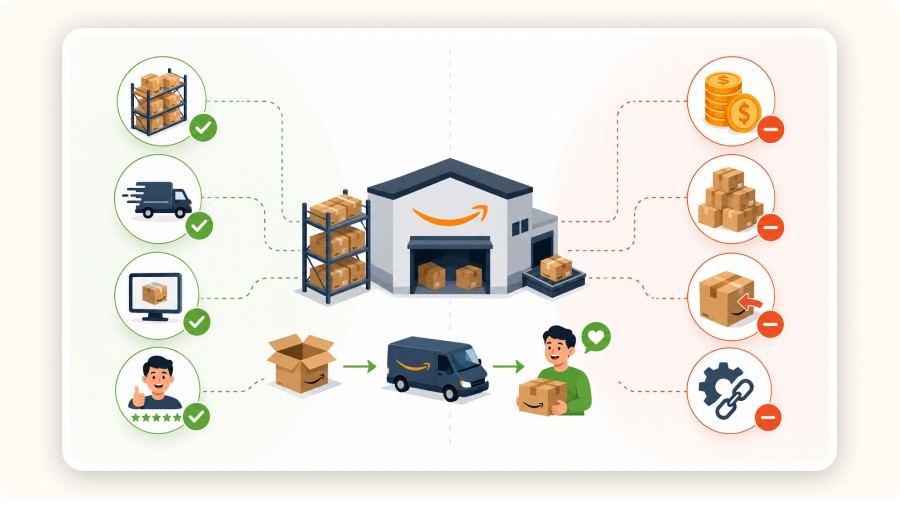
Before using Amazon FBA, it’s important to weigh both its operational benefits and its potential limitations. Here are the main pros and cons to consider before choosing this fulfillment model.
Pros (why people choose it)
Amazon fulfillment (FBA) removes day-to-day operations. You send inventory to an Amazon fulfillment center, then Amazon handles storage, pick/pack, shipping, customer service and returns.
What you get, concretely:
Less operational workload (no daily shipping grind)
More consistency at scale (process + tracking managed by Amazon)
Customer trust when listings are fulfilled by Amazon (delivery + returns feel “Amazon-native”)
Amazon claims shipping with FBA can be 70% less per unit than comparable premium options from other major US carriers (their claim).
Cons (where profit dies)
FBA can also destroy margins if you ignore the fee stack and inventory risk. The problems are predictable.
Main profit killers:
Fees complexity: the “per-unit fee” is not the whole bill. You can also face storage, returns processing and removal/disposal/liquidation costs.
Inventory aging: Amazon applies aged inventory charges after 181 days in storage. Slow movers become expensive.
Returns impact: returns can wipe out profit fast, especially if items can’t be resold.
Cashflow pressure: you pay for inventory upfront. If sales slow down, cash is trapped in stock while fees keep running.
Bottom line: FBA scales winners fast, but it also scales bad economics fast.
Who Should Use FBA (And Who Shouldn’t)

Not every seller needs Amazon FBA, even if it can simplify fulfillment and scale operations fast. Here’s who can benefit from it most and who may be better off choosing another logistics solution.
Best fit
FBA is a strong fit if you want Amazon fulfillment to run like a machine and you have products that can absorb the full fee stack. You’ll benefit most when your SKUs are standard-size, easy to store/ship and sell consistently. FBA also makes sense when you’re spending too much time on ops (shipping, tracking issues, customer emails) and you want predictable execution through Amazon’s network.
Best-fit signals:
Healthy margin buffer (you can survive fees + returns)
Stable demand / velocity (inventory moves every week)
Low complexity (few variants, not fragile, not heavy/bulky)
You want Amazon to handle returns + customer service
Not a great fit
FBA is a bad move if your business model depends on ultra-thin margins or if your products sit in storage. The fastest way to lose money is sending inventory that doesn’t sell fast enough, because storage costs stack and Amazon applies aged inventory charges after 181 days. Heavy, bulky, fragile, or high-return products also get expensive quickly.
Bad-fit signals:
Slow movers / seasonal demand you can’t forecast
High return rate categories
Bulky/heavy SKUs
You can’t afford to tie cash in inventory
Quick “yes/no” checklist
Do I have margin after fees + returns? Yes/No
Will this SKU sell through in < 90 days? Yes/No
Do I have an exit plan (remove/liquidate) if it slows down? Yes/No
Can I fund inventory without killing cashflow? Yes/No
Alternatives (When FBA Isn’t the Best Move)
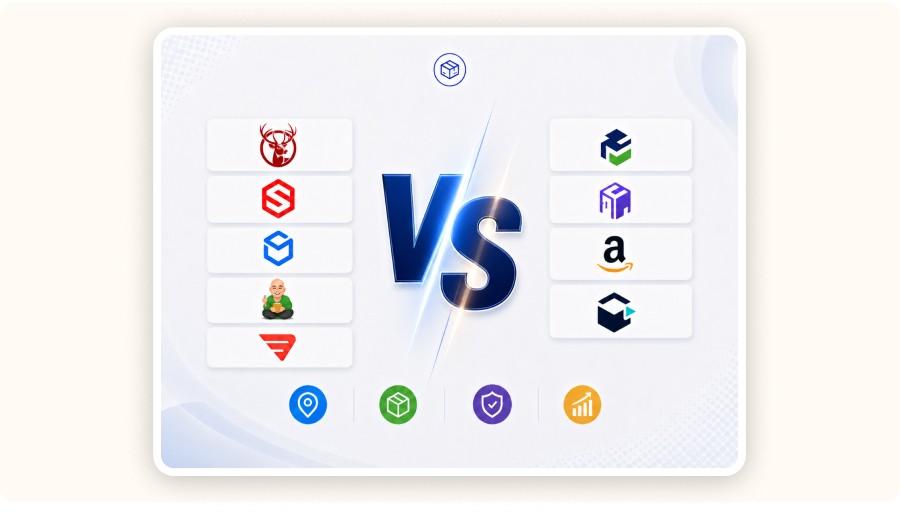
If Amazon Fulfillment (FBA) isn’t a fit (fees, inventory aging, cash tied in stock), pick an alternative based on what you actually need: warehousing, fast shipping, software control, or sourcing + fulfillment.
Classic 3PL fulfillment (warehouse + pick/pack/ship)
Use these if you want DTC shipping outside Amazon with better brand control:
ShipBob: solid for standard DTC fulfillment and quick onboarding.
ShipMonk fulfillment: useful when you need kitting, bundles and a more “ops-heavy” setup.
ShipHero: good if you want stronger WMS-style control and warehouse processes.
Red Stag Fulfillment: often considered for heavy/bulky products where accuracy matters.
Regional / network-style fulfillment
Use these if you want coverage and speed across multiple zones:
Agent + sourcing fulfillment
Use this if your main problem is not warehousing, but product sourcing, QC and shipping lines: Fulfillman dropshipping services
Shipping platform layer
Use this if you already fulfill (yourself or with a warehouse) and need better shipping execution: Easyship fulfillment (labels, carrier options, tracking, cross-border workflows)
Quick rule: the best ecommerce fulfillment center is the one that matches your SKU size/weight, order volume, return rate and target countries.


Create and test your Shopify store for only $1 per day during 90 days
Verdict
Amazon Fulfillment (FBA) is worth it when you have proven demand, a solid margin buffer and standard-size SKUs that move fast. Amazon handles storage, pick/pack/ship, customer service and returns, which can boost trust and conversion. But profit dies when you ignore the full fee stack: fulfillment fees, storage and margin leaks (returns, removals, aged inventory after 181 days). Start with 1–3 SKUs, always model net profit per unit and set a removal plan. For TikTok Shop, think MCF (off-Amazon orders) before scaling. If your margins are thin, items are bulky, or cashflow is tight, use FBM or a 3PL instead.
FAQ
What is Amazon FBA?
Fulfillment by Amazon (FBA) is Amazon fulfillment: you send inventory to Amazon and they handle storage, pick/pack, shipping, customer service and returns.
Where are Amazon warehouses located?
Amazon operates a global network of fulfillment centers (warehouses). Amazon mentions 175 fulfillment centers worldwide in its network overview. In France, Amazon has multiple major distribution sites (examples publicly listed include Boves (BVA1), Lauwin-Planque (LIL1) and Saran (ORY1)).
How can I make a living with Amazon?
The realistic path is to treat Amazon like a business: pick a product with demand, build a clear offer, control margins and manage operations. Common models include selling on Amazon as a third-party seller, using FBA for logistics, or running a brand (private label/wholesale). Your income depends on unit profit, conversion rate, and repeatable supply, not “hacks.”
What is the average salary in an Amazon warehouse in France?
It depends on role and location. On Indeed, warehouse/logistics roles at Amazon in France are reported around €1,671/month for “Préparateur de commandes” and €1,766/month for “Agent de tri” (estimates).
Amazon Fulfillment Centers: What They Change (and What They Don’t)
An Amazon fulfillment center (also called an amazon fulfillment facility) is where your FBA inventory is received, stored, then used for pick/pack/ship and returns. What changes is operational consistency: Amazon can fulfill at scale with standardized processes. What doesn’t change is your responsibility for inventory decisions and margins.
How inventory is distributed in the network
You don’t control exactly where every unit ends up. Amazon can distribute inventory across its network to position products closer to customers. That’s normal. It supports fast delivery, but it also means inbound planning matters and your stock can be split across locations.
What affects delivery speed
Delivery speed is driven by one thing: availability. If your inventory is not checked-in, not available, or you stock out, delivery speed becomes irrelevant. The practical chain is: inbound shipment delivered → received → available → eligible to ship fast. “FBA is fast” is only true when your product is actually available to ship.
Common operational traps
The big mistakes are predictable:
Over-sending stock: you lock cash in inventory and risk long-term holding costs.
Slow movers: they sit, trigger storage pressure and can become aged inventory risk (Amazon flags aged inventory beyond 181 days).
No removal plan: if velocity drops, you need a clear exit (remove, dispose, liquidate) or fees keep stacking.
Minea
Reach $1,000 per day or get your money back
Pros and Cons of Amazon Fulfillment (FBA)
Before using Amazon FBA, it’s important to weigh both its operational benefits and its potential limitations. Here are the main pros and cons to consider before choosing this fulfillment model.
Pros (why people choose it)
Amazon fulfillment (FBA) removes day-to-day operations. You send inventory to an Amazon fulfillment center, then Amazon handles storage, pick/pack, shipping, customer service and returns.
What you get, concretely:
Less operational workload (no daily shipping grind)
More consistency at scale (process + tracking managed by Amazon)
Customer trust when listings are fulfilled by Amazon (delivery + returns feel “Amazon-native”)
Amazon claims shipping with FBA can be 70% less per unit than comparable premium options from other major US carriers (their claim).
Cons (where profit dies)
FBA can also destroy margins if you ignore the fee stack and inventory risk. The problems are predictable.
Main profit killers:
Fees complexity: the “per-unit fee” is not the whole bill. You can also face storage, returns processing and removal/disposal/liquidation costs.
Inventory aging: Amazon applies aged inventory charges after 181 days in storage. Slow movers become expensive.
Returns impact: returns can wipe out profit fast, especially if items can’t be resold.
Cashflow pressure: you pay for inventory upfront. If sales slow down, cash is trapped in stock while fees keep running.
Bottom line: FBA scales winners fast, but it also scales bad economics fast.
Who Should Use FBA (And Who Shouldn’t)
Not every seller needs Amazon FBA, even if it can simplify fulfillment and scale operations fast. Here’s who can benefit from it most and who may be better off choosing another logistics solution.
Best fit
FBA is a strong fit if you want Amazon fulfillment to run like a machine and you have products that can absorb the full fee stack. You’ll benefit most when your SKUs are standard-size, easy to store/ship and sell consistently. FBA also makes sense when you’re spending too much time on ops (shipping, tracking issues, customer emails) and you want predictable execution through Amazon’s network.
Best-fit signals:
Healthy margin buffer (you can survive fees + returns)
Stable demand / velocity (inventory moves every week)
Low complexity (few variants, not fragile, not heavy/bulky)
You want Amazon to handle returns + customer service
Not a great fit
FBA is a bad move if your business model depends on ultra-thin margins or if your products sit in storage. The fastest way to lose money is sending inventory that doesn’t sell fast enough, because storage costs stack and Amazon applies aged inventory charges after 181 days. Heavy, bulky, fragile, or high-return products also get expensive quickly.
Bad-fit signals:
Slow movers / seasonal demand you can’t forecast
High return rate categories
Bulky/heavy SKUs
You can’t afford to tie cash in inventory
Quick “yes/no” checklist
Do I have margin after fees + returns? Yes/No
Will this SKU sell through in < 90 days? Yes/No
Do I have an exit plan (remove/liquidate) if it slows down? Yes/No
Can I fund inventory without killing cashflow? Yes/No
Alternatives (When FBA Isn’t the Best Move)
If Amazon Fulfillment (FBA) isn’t a fit (fees, inventory aging, cash tied in stock), pick an alternative based on what you actually need: warehousing, fast shipping, software control, or sourcing + fulfillment.
Classic 3PL fulfillment (warehouse + pick/pack/ship)
Use these if you want DTC shipping outside Amazon with better brand control:
ShipBob: solid for standard DTC fulfillment and quick onboarding.
ShipMonk fulfillment: useful when you need kitting, bundles and a more “ops-heavy” setup.
ShipHero: good if you want stronger WMS-style control and warehouse processes.
Red Stag Fulfillment: often considered for heavy/bulky products where accuracy matters.
Regional / network-style fulfillment
Use these if you want coverage and speed across multiple zones:
Agent + sourcing fulfillment
Use this if your main problem is not warehousing, but product sourcing, QC and shipping lines: Fulfillman dropshipping services
Shipping platform layer
Use this if you already fulfill (yourself or with a warehouse) and need better shipping execution: Easyship fulfillment (labels, carrier options, tracking, cross-border workflows)
Quick rule: the best ecommerce fulfillment center is the one that matches your SKU size/weight, order volume, return rate and target countries.
Create and test your Shopify store for only $1 per day during 90 days
Verdict
Amazon Fulfillment (FBA) is worth it when you have proven demand, a solid margin buffer and standard-size SKUs that move fast. Amazon handles storage, pick/pack/ship, customer service and returns, which can boost trust and conversion. But profit dies when you ignore the full fee stack: fulfillment fees, storage and margin leaks (returns, removals, aged inventory after 181 days). Start with 1–3 SKUs, always model net profit per unit and set a removal plan. For TikTok Shop, think MCF (off-Amazon orders) before scaling. If your margins are thin, items are bulky, or cashflow is tight, use FBM or a 3PL instead.
FAQ
What is Amazon FBA?
Fulfillment by Amazon (FBA) is Amazon fulfillment: you send inventory to Amazon and they handle storage, pick/pack, shipping, customer service and returns.
Where are Amazon warehouses located?
Amazon operates a global network of fulfillment centers (warehouses). Amazon mentions 175 fulfillment centers worldwide in its network overview. In France, Amazon has multiple major distribution sites (examples publicly listed include Boves (BVA1), Lauwin-Planque (LIL1) and Saran (ORY1)).
How can I make a living with Amazon?
The realistic path is to treat Amazon like a business: pick a product with demand, build a clear offer, control margins and manage operations. Common models include selling on Amazon as a third-party seller, using FBA for logistics, or running a brand (private label/wholesale). Your income depends on unit profit, conversion rate, and repeatable supply, not “hacks.”
What is the average salary in an Amazon warehouse in France?
It depends on role and location. On Indeed, warehouse/logistics roles at Amazon in France are reported around €1,671/month for “Préparateur de commandes” and €1,766/month for “Agent de tri” (estimates).
Amazon Fulfillment Centers: What They Change (and What They Don’t)
An Amazon fulfillment center (also called an amazon fulfillment facility) is where your FBA inventory is received, stored, then used for pick/pack/ship and returns. What changes is operational consistency: Amazon can fulfill at scale with standardized processes. What doesn’t change is your responsibility for inventory decisions and margins.
How inventory is distributed in the network
You don’t control exactly where every unit ends up. Amazon can distribute inventory across its network to position products closer to customers. That’s normal. It supports fast delivery, but it also means inbound planning matters and your stock can be split across locations.
What affects delivery speed
Delivery speed is driven by one thing: availability. If your inventory is not checked-in, not available, or you stock out, delivery speed becomes irrelevant. The practical chain is: inbound shipment delivered → received → available → eligible to ship fast. “FBA is fast” is only true when your product is actually available to ship.
Common operational traps
The big mistakes are predictable:
Over-sending stock: you lock cash in inventory and risk long-term holding costs.
Slow movers: they sit, trigger storage pressure and can become aged inventory risk (Amazon flags aged inventory beyond 181 days).
No removal plan: if velocity drops, you need a clear exit (remove, dispose, liquidate) or fees keep stacking.
Minea
Reach $1,000 per day or get your money back
Pros and Cons of Amazon Fulfillment (FBA)
Before using Amazon FBA, it’s important to weigh both its operational benefits and its potential limitations. Here are the main pros and cons to consider before choosing this fulfillment model.
Pros (why people choose it)
Amazon fulfillment (FBA) removes day-to-day operations. You send inventory to an Amazon fulfillment center, then Amazon handles storage, pick/pack, shipping, customer service and returns.
What you get, concretely:
Less operational workload (no daily shipping grind)
More consistency at scale (process + tracking managed by Amazon)
Customer trust when listings are fulfilled by Amazon (delivery + returns feel “Amazon-native”)
Amazon claims shipping with FBA can be 70% less per unit than comparable premium options from other major US carriers (their claim).
Cons (where profit dies)
FBA can also destroy margins if you ignore the fee stack and inventory risk. The problems are predictable.
Main profit killers:
Fees complexity: the “per-unit fee” is not the whole bill. You can also face storage, returns processing and removal/disposal/liquidation costs.
Inventory aging: Amazon applies aged inventory charges after 181 days in storage. Slow movers become expensive.
Returns impact: returns can wipe out profit fast, especially if items can’t be resold.
Cashflow pressure: you pay for inventory upfront. If sales slow down, cash is trapped in stock while fees keep running.
Bottom line: FBA scales winners fast, but it also scales bad economics fast.
Who Should Use FBA (And Who Shouldn’t)
Not every seller needs Amazon FBA, even if it can simplify fulfillment and scale operations fast. Here’s who can benefit from it most and who may be better off choosing another logistics solution.
Best fit
FBA is a strong fit if you want Amazon fulfillment to run like a machine and you have products that can absorb the full fee stack. You’ll benefit most when your SKUs are standard-size, easy to store/ship and sell consistently. FBA also makes sense when you’re spending too much time on ops (shipping, tracking issues, customer emails) and you want predictable execution through Amazon’s network.
Best-fit signals:
Healthy margin buffer (you can survive fees + returns)
Stable demand / velocity (inventory moves every week)
Low complexity (few variants, not fragile, not heavy/bulky)
You want Amazon to handle returns + customer service
Not a great fit
FBA is a bad move if your business model depends on ultra-thin margins or if your products sit in storage. The fastest way to lose money is sending inventory that doesn’t sell fast enough, because storage costs stack and Amazon applies aged inventory charges after 181 days. Heavy, bulky, fragile, or high-return products also get expensive quickly.
Bad-fit signals:
Slow movers / seasonal demand you can’t forecast
High return rate categories
Bulky/heavy SKUs
You can’t afford to tie cash in inventory
Quick “yes/no” checklist
Do I have margin after fees + returns? Yes/No
Will this SKU sell through in < 90 days? Yes/No
Do I have an exit plan (remove/liquidate) if it slows down? Yes/No
Can I fund inventory without killing cashflow? Yes/No
Alternatives (When FBA Isn’t the Best Move)
If Amazon Fulfillment (FBA) isn’t a fit (fees, inventory aging, cash tied in stock), pick an alternative based on what you actually need: warehousing, fast shipping, software control, or sourcing + fulfillment.
Classic 3PL fulfillment (warehouse + pick/pack/ship)
Use these if you want DTC shipping outside Amazon with better brand control:
ShipBob: solid for standard DTC fulfillment and quick onboarding.
ShipMonk fulfillment: useful when you need kitting, bundles and a more “ops-heavy” setup.
ShipHero: good if you want stronger WMS-style control and warehouse processes.
Red Stag Fulfillment: often considered for heavy/bulky products where accuracy matters.
Regional / network-style fulfillment
Use these if you want coverage and speed across multiple zones:
Agent + sourcing fulfillment
Use this if your main problem is not warehousing, but product sourcing, QC and shipping lines: Fulfillman dropshipping services
Shipping platform layer
Use this if you already fulfill (yourself or with a warehouse) and need better shipping execution: Easyship fulfillment (labels, carrier options, tracking, cross-border workflows)
Quick rule: the best ecommerce fulfillment center is the one that matches your SKU size/weight, order volume, return rate and target countries.
Create and test your Shopify store for only $1 per day during 90 days
Verdict
Amazon Fulfillment (FBA) is worth it when you have proven demand, a solid margin buffer and standard-size SKUs that move fast. Amazon handles storage, pick/pack/ship, customer service and returns, which can boost trust and conversion. But profit dies when you ignore the full fee stack: fulfillment fees, storage and margin leaks (returns, removals, aged inventory after 181 days). Start with 1–3 SKUs, always model net profit per unit and set a removal plan. For TikTok Shop, think MCF (off-Amazon orders) before scaling. If your margins are thin, items are bulky, or cashflow is tight, use FBM or a 3PL instead.
FAQ
What is Amazon FBA?
Fulfillment by Amazon (FBA) is Amazon fulfillment: you send inventory to Amazon and they handle storage, pick/pack, shipping, customer service and returns.
Where are Amazon warehouses located?
Amazon operates a global network of fulfillment centers (warehouses). Amazon mentions 175 fulfillment centers worldwide in its network overview. In France, Amazon has multiple major distribution sites (examples publicly listed include Boves (BVA1), Lauwin-Planque (LIL1) and Saran (ORY1)).
How can I make a living with Amazon?
The realistic path is to treat Amazon like a business: pick a product with demand, build a clear offer, control margins and manage operations. Common models include selling on Amazon as a third-party seller, using FBA for logistics, or running a brand (private label/wholesale). Your income depends on unit profit, conversion rate, and repeatable supply, not “hacks.”
What is the average salary in an Amazon warehouse in France?
It depends on role and location. On Indeed, warehouse/logistics roles at Amazon in France are reported around €1,671/month for “Préparateur de commandes” and €1,766/month for “Agent de tri” (estimates).
Similar articles

Easyship Fulfillment Review 2026: A Practical Ecommerce Pick for Dropshipping
Best Ecommerce Fulfillment Center
Easyship Fulfillment Review 2026: A Practical Ecommerce Pick for Dropshipping
Best Ecommerce Fulfillment Center
Easyship Fulfillment Review 2026: A Practical Ecommerce Pick for Dropshipping
Best Ecommerce Fulfillment Center
Easyship Fulfillment Review 2026: A Practical Ecommerce Pick for Dropshipping
Best Ecommerce Fulfillment Center
Fulfillman Dropshipping Services Review (2026): Speed, Costs, and Fit
Best Ecommerce Fulfillment Center
Fulfillman Dropshipping Services Review (2026): Speed, Costs, and Fit
Best Ecommerce Fulfillment Center
Fulfillman Dropshipping Services Review (2026): Speed, Costs, and Fit
Best Ecommerce Fulfillment Center
Fulfillman Dropshipping Services Review (2026): Speed, Costs, and Fit
Best Ecommerce Fulfillment Center
Deliverr Fulfillment Review 2026 for Dropshipping: The Flexport Reality
Best Ecommerce Fulfillment Center
Deliverr Fulfillment Review 2026 for Dropshipping: The Flexport Reality
Best Ecommerce Fulfillment Center
Deliverr Fulfillment Review 2026 for Dropshipping: The Flexport Reality
Best Ecommerce Fulfillment Center
Deliverr Fulfillment Review 2026 for Dropshipping: The Flexport Reality
Best Ecommerce Fulfillment Center


Our Free Adspys

Find winning products on our Tiktok adspy today!
Find winning products on our Facebook adspy today!
Find winning products on our Tiktok adspy today!
Find winning products on our Facebook adspy today!
Find winning products on our Tiktok adspy today!
Find winning products on our Facebook adspy today!
Find winning products on our Tiktok adspy today!
Find winning products on our Facebook adspy today!
1 winning product everyday.
Follow us!






Find out more
Read more
Minea © 2026
Find out more
Read more
Minea © 2026
Find out more
Read more
Minea © 2026
Find out more
Read more
Minea © 2026
Find out more
Read more
Minea © 2026
Find out more
Read more
Minea © 2026