Later for Dropshipping: How to Run Your E-commerce Social Media in 30 Minutes a Day
Best Management Software Network
Author: Elysa
Contents
If you’re a dropshipper trying to post consistently in 30 minutes a day while juggling ads, suppliers, and customer messages, your real problem usually isn’t a lack of “content ideas.” It’s time and coordination.
Later is a social media management platform built for planning, scheduling, and analyzing posts across the major networks. For e-commerce, the benefit is straightforward: you batch your product content, keep your calendar organized, and stop missing sales because posting slipped through the cracks.
Key takeaways
Later is a solid scheduling platform: publishing, analytics, and an inbox-style workflow for engagement.
The dropshipping advantage is batching: plan two weeks of posts in one sitting, publish on schedule, then review what actually converts.
Use Later to execute, not to decide what to sell. Do your product research upstream to pick winning products and angles.
Start on Free to learn the workflow, then upgrade when analytics, approvals, and multi-profile posting become the limiting factor.
Is Later Social legit?
Later is a legitimate social media management tool that helps you plan, schedule, publish, and analyze content across platforms like Instagram, TikTok, Facebook, Pinterest, LinkedIn, and X. For dropshipping, it’s especially useful when you batch content and want consistent posting without being glued to your phone.
Here’s how to sanity-check “legit” in a way that actually matters for your store:
Product ecosystem: Later has active mobile apps and a full web app, usually a good sign of real product investment.
Business-grade features: approvals, post tagging, analytics, and an engagement inbox are the kind of “boring” features scam tools rarely bother to build.
Clear scope: Later won’t fulfill orders or manage suppliers. It’s not ops software, it’s social execution.
If your store relies on short-form video (TikTok and Reels), you want a scheduler that supports repeatable posting and quick performance review. Later is built for that loop.
Minea
Track Trending Shops
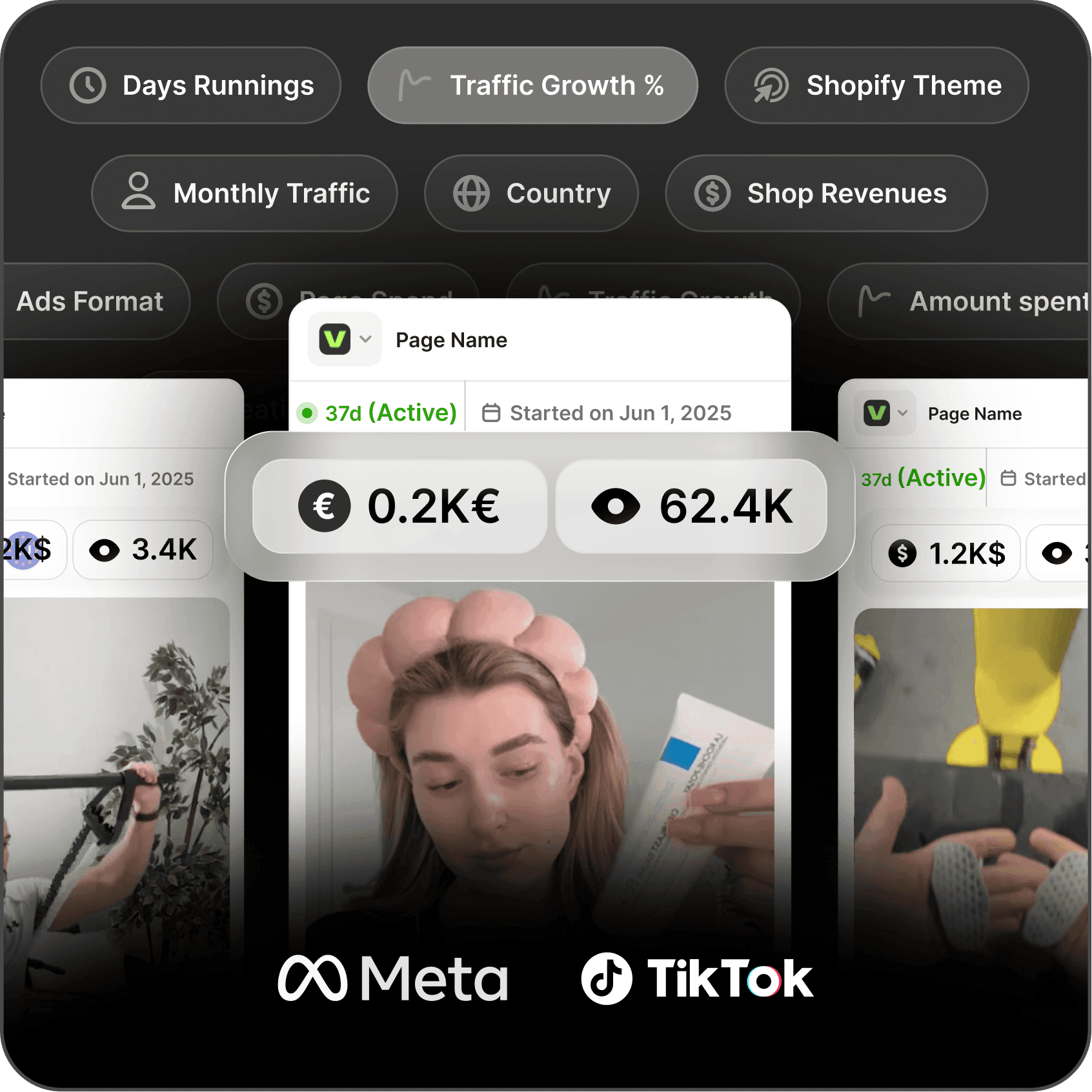
Explore key insights on traffic, revenue, and top ads, plus the vital tools and apps that fuel their success. Leverage theses informations to replicate their winning strategies.
How does Later work for a dropshipping e-commerce business?
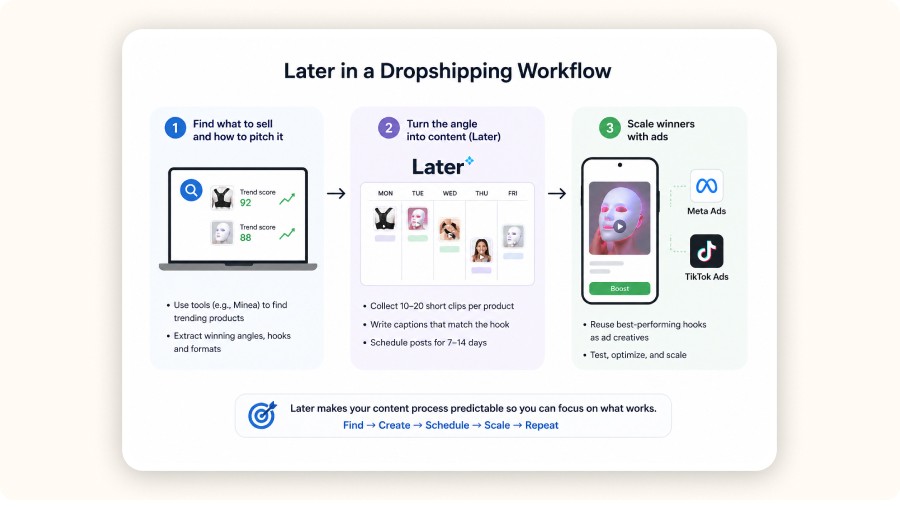
Later lets you plan posts in a visual calendar, prep captions, attach media, publish on schedule, and review analytics so you can repeat the hooks and formats that drive clicks and saves. For dropshipping, the usual workflow is simple: pick a product + angle, batch-create creatives, schedule them for 7–14 days, then scale what wins with paid ads.
If you searched for “later software for dropshipping business,” here’s the clean way to think about it:
Later is your execution layer for Step 2 in a common dropshipping loop:
1) Find what to sell and how to pitch it
This is where sellers often lose weeks.
A tighter approach is to use Minea to spot what’s already working and extract repeatable ad angles.
Example signals (from the dataset you mentioned): trending products like posture corrector belts (trend score 92) and LED face masks (88) tend to sell best with visual proof and transformation-style clips.
2) Turn the angle into content (Later lives here)
Collect 10–20 short clips per product: hooks, demos, objections, social proof.
Write captions that match the hook (don’t fight it, reinforce it).
Schedule the full set so you’re never scrambling day-to-day.
3) Scale winners with ads
Reuse the best-performing hooks as creatives in Meta and TikTok.
Later won’t replace ad managers or product research, it makes your content process predictable.
Does Later have a free plan? And is it enough for beginners?
Later typically offers a Free plan that’s enough to learn the basics: connect profiles, schedule posts, and run a simple content calendar. For a beginner dropshipper, Free usually works fine until you need deeper analytics, more scheduled posts, more social profiles, team approvals, or a proper engagement inbox.
A practical rule:
Use Free if you’re posting a few times per week and you’re still validating a niche.
Upgrade when one of these happens:
You’re posting daily across multiple platforms and you keep hitting limits.
You’re working with a VA or creator and approvals start getting messy.
Most “free” schedulers restrict the features that matter for e-commerce decision-making, especially analytics depth and multi-platform publishing.
Step-by-step: How to set up Later for dropshipping in your first hour
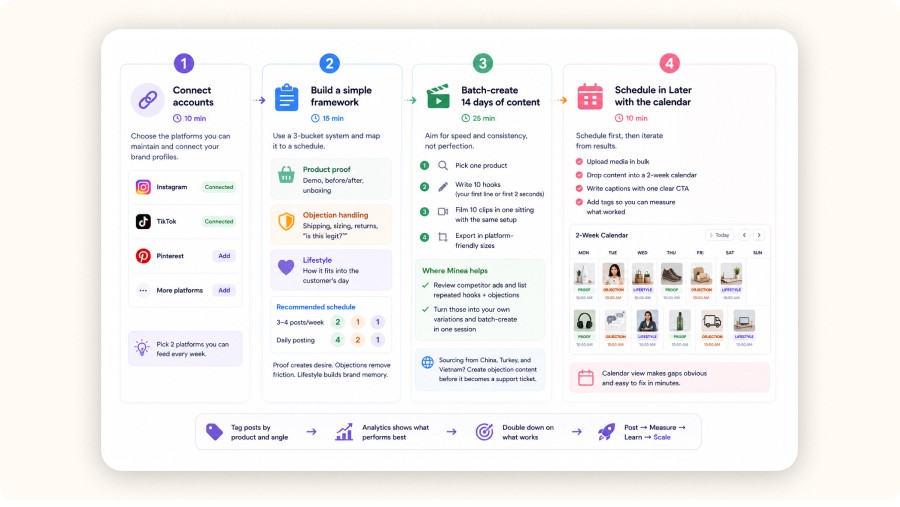
You can set up Later for a dropshipping store in your first hour by connecting your profiles, building a simple content framework, batching 14 days of posts, and scheduling everything in a visual calendar. The real unlock: tag posts by product and angle so your analytics clearly shows what to double down on.
Do this once and social posting stops feeling like a daily fire drill.
Step 1 : Connect your social accounts (10 minutes)
Start with the platforms you can actually maintain.
Connect your brand profiles, begin with Instagram and TikTok.
Add Pinterest if you sell evergreen products (especially home, beauty, fitness).
Don’t connect everything on day one. Pick 2 platforms you can feed every week.
Step 2 : Build a simple posting framework (15 minutes)
Keep it repeatable so you’re not hunting for new ideas every day.
Use a 3-bucket system:
Product proof: demo, before/after, unboxing
Objection handling: shipping times, sizing, returns, “is this legit?”
Lifestyle: how it fits into the customer’s day
Map it to a schedule:
3–4 posts/week: 2 proof, 1 objection, 1 lifestyle
Daily posting: 4 proof, 2 objection, 1 lifestyle
Proof creates desire, objections remove friction, lifestyle builds brand memory.
Step 3 : Batch-create 14 days of content (25 minutes)
Aim for speed and consistency, not perfection.
Fast workflow:
Pick one product.
Write 10 hooks (your first line or first 2 seconds).
Film 10 clips in one sitting with the same setup.
Export in platform-friendly sizes.
Where Minea helps (concretely):
Review competitor ads and list repeated hooks + objections.
Turn those into your own variations and batch-create in one session.
This matters even more if you source from common supplier countries like China, Turkey, and Vietnam, those supply chains shape the comments you’ll get (especially about shipping and returns). Create objection content before it becomes a support ticket.
Minea
Minea takes care of everything for you
Access winning ads, products, and stores in real time, get inspired, learn, then get started.
Step 4 : Schedule in Later with the calendar (10 minutes)
Schedule first, then iterate from results.
Upload media in bulk.
Drop content into a 2-week calendar.
Write captions with one clear CTA.
Add tags so you can measure what worked.
Calendar view makes gaps obvious and easy to fix in minutes.
Use Later features that actually matter for e-commerce

For dropshipping, Later’s highest-leverage features are the visual calendar, post tagging, analytics, and a centralized inbox for comments and DMs. Together, they support a batching workflow: plan 7–14 days of content, publish consistently, then double down on the angles that drive clicks and saves.
Later has a lot of features. As a seller, most of the value comes from a few.
Visual content calendar
The calendar is the main point.
Actionable use: schedule around your funnel.
Monday to Wednesday: product discovery clips
Thursday: objection handling
Weekend: lifestyle montage + testimonials
If you run promos, schedule promo posts first, then fill the rest around them.
Post tagging and analytics
If you don’t tag content, analytics stays fuzzy.
Set tags like:
Product: LED face mask, portable blender, smart ring
Angle: transformation, convenience, pain relief
Format: unboxing, before/after, POV, carousel
Then review monthly:
Which product + angle + format combo drives the most profile visits and link clicks?
Which hooks earn saves and shares?
That turns social into a simple testing system.
Social Inbox
For many stores, the highest-intent leads show up in comments and DMs:
“Is this legit?”
“How long is shipping?”
“Does it work for my case?”
If an inbox helps you reply faster (and consistently), it can directly reduce abandoned carts.
Approvals and workflows
Approvals prevent two common problems when you have help:
off-brand posts
risky claims about shipping times or results
If you’re solo, you can ignore this until it becomes a real friction point.
If you’re a dropshipper trying to post consistently in 30 minutes a day while juggling ads, suppliers, and customer messages, your real problem usually isn’t a lack of “content ideas.” It’s time and coordination.
Later is a social media management platform built for planning, scheduling, and analyzing posts across the major networks. For e-commerce, the benefit is straightforward: you batch your product content, keep your calendar organized, and stop missing sales because posting slipped through the cracks.
Key takeaways
Later is a solid scheduling platform: publishing, analytics, and an inbox-style workflow for engagement.
The dropshipping advantage is batching: plan two weeks of posts in one sitting, publish on schedule, then review what actually converts.
Use Later to execute, not to decide what to sell. Do your product research upstream to pick winning products and angles.
Start on Free to learn the workflow, then upgrade when analytics, approvals, and multi-profile posting become the limiting factor.
Is Later Social legit?
Later is a legitimate social media management tool that helps you plan, schedule, publish, and analyze content across platforms like Instagram, TikTok, Facebook, Pinterest, LinkedIn, and X. For dropshipping, it’s especially useful when you batch content and want consistent posting without being glued to your phone.
Here’s how to sanity-check “legit” in a way that actually matters for your store:
Product ecosystem: Later has active mobile apps and a full web app, usually a good sign of real product investment.
Business-grade features: approvals, post tagging, analytics, and an engagement inbox are the kind of “boring” features scam tools rarely bother to build.
Clear scope: Later won’t fulfill orders or manage suppliers. It’s not ops software, it’s social execution.
If your store relies on short-form video (TikTok and Reels), you want a scheduler that supports repeatable posting and quick performance review. Later is built for that loop.
Minea
Track Trending Shops
Explore key insights on traffic, revenue, and top ads, plus the vital tools and apps that fuel their success. Leverage theses informations to replicate their winning strategies.
How does Later work for a dropshipping e-commerce business?
Later lets you plan posts in a visual calendar, prep captions, attach media, publish on schedule, and review analytics so you can repeat the hooks and formats that drive clicks and saves. For dropshipping, the usual workflow is simple: pick a product + angle, batch-create creatives, schedule them for 7–14 days, then scale what wins with paid ads.
If you searched for “later software for dropshipping business,” here’s the clean way to think about it:
Later is your execution layer for Step 2 in a common dropshipping loop:
1) Find what to sell and how to pitch it
This is where sellers often lose weeks.
A tighter approach is to use Minea to spot what’s already working and extract repeatable ad angles.
Example signals (from the dataset you mentioned): trending products like posture corrector belts (trend score 92) and LED face masks (88) tend to sell best with visual proof and transformation-style clips.
2) Turn the angle into content (Later lives here)
Collect 10–20 short clips per product: hooks, demos, objections, social proof.
Write captions that match the hook (don’t fight it, reinforce it).
Schedule the full set so you’re never scrambling day-to-day.
3) Scale winners with ads
Reuse the best-performing hooks as creatives in Meta and TikTok.
Later won’t replace ad managers or product research, it makes your content process predictable.
Does Later have a free plan? And is it enough for beginners?
Later typically offers a Free plan that’s enough to learn the basics: connect profiles, schedule posts, and run a simple content calendar. For a beginner dropshipper, Free usually works fine until you need deeper analytics, more scheduled posts, more social profiles, team approvals, or a proper engagement inbox.
A practical rule:
Use Free if you’re posting a few times per week and you’re still validating a niche.
Upgrade when one of these happens:
You’re posting daily across multiple platforms and you keep hitting limits.
You’re working with a VA or creator and approvals start getting messy.
Most “free” schedulers restrict the features that matter for e-commerce decision-making, especially analytics depth and multi-platform publishing.
Step-by-step: How to set up Later for dropshipping in your first hour
You can set up Later for a dropshipping store in your first hour by connecting your profiles, building a simple content framework, batching 14 days of posts, and scheduling everything in a visual calendar. The real unlock: tag posts by product and angle so your analytics clearly shows what to double down on.
Do this once and social posting stops feeling like a daily fire drill.
Step 1 : Connect your social accounts (10 minutes)
Start with the platforms you can actually maintain.
Connect your brand profiles, begin with Instagram and TikTok.
Add Pinterest if you sell evergreen products (especially home, beauty, fitness).
Don’t connect everything on day one. Pick 2 platforms you can feed every week.
Step 2 : Build a simple posting framework (15 minutes)
Keep it repeatable so you’re not hunting for new ideas every day.
Use a 3-bucket system:
Product proof: demo, before/after, unboxing
Objection handling: shipping times, sizing, returns, “is this legit?”
Lifestyle: how it fits into the customer’s day
Map it to a schedule:
3–4 posts/week: 2 proof, 1 objection, 1 lifestyle
Daily posting: 4 proof, 2 objection, 1 lifestyle
Proof creates desire, objections remove friction, lifestyle builds brand memory.
Step 3 : Batch-create 14 days of content (25 minutes)
Aim for speed and consistency, not perfection.
Fast workflow:
Pick one product.
Write 10 hooks (your first line or first 2 seconds).
Film 10 clips in one sitting with the same setup.
Export in platform-friendly sizes.
Where Minea helps (concretely):
Review competitor ads and list repeated hooks + objections.
Turn those into your own variations and batch-create in one session.
This matters even more if you source from common supplier countries like China, Turkey, and Vietnam, those supply chains shape the comments you’ll get (especially about shipping and returns). Create objection content before it becomes a support ticket.
Minea
Minea takes care of everything for you
Access winning ads, products, and stores in real time, get inspired, learn, then get started.
Step 4 : Schedule in Later with the calendar (10 minutes)
Schedule first, then iterate from results.
Upload media in bulk.
Drop content into a 2-week calendar.
Write captions with one clear CTA.
Add tags so you can measure what worked.
Calendar view makes gaps obvious and easy to fix in minutes.
Use Later features that actually matter for e-commerce
For dropshipping, Later’s highest-leverage features are the visual calendar, post tagging, analytics, and a centralized inbox for comments and DMs. Together, they support a batching workflow: plan 7–14 days of content, publish consistently, then double down on the angles that drive clicks and saves.
Later has a lot of features. As a seller, most of the value comes from a few.
Visual content calendar
The calendar is the main point.
Actionable use: schedule around your funnel.
Monday to Wednesday: product discovery clips
Thursday: objection handling
Weekend: lifestyle montage + testimonials
If you run promos, schedule promo posts first, then fill the rest around them.
Post tagging and analytics
If you don’t tag content, analytics stays fuzzy.
Set tags like:
Product: LED face mask, portable blender, smart ring
Angle: transformation, convenience, pain relief
Format: unboxing, before/after, POV, carousel
Then review monthly:
Which product + angle + format combo drives the most profile visits and link clicks?
Which hooks earn saves and shares?
That turns social into a simple testing system.
Social Inbox
For many stores, the highest-intent leads show up in comments and DMs:
“Is this legit?”
“How long is shipping?”
“Does it work for my case?”
If an inbox helps you reply faster (and consistently), it can directly reduce abandoned carts.
Approvals and workflows
Approvals prevent two common problems when you have help:
off-brand posts
risky claims about shipping times or results
If you’re solo, you can ignore this until it becomes a real friction point.
Later software for dropshipping business: what Later can’t do
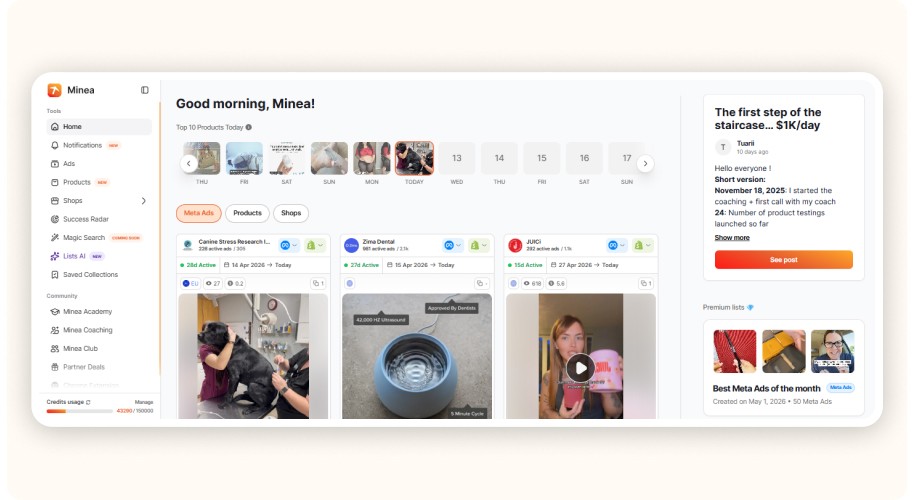
Minea is the research and decision-making layer for a dropshipping business. It helps you find winning products, analyze competitor ads, spot proven hooks, understand which angles are already converting, and decide what to test next.
Minea helps you:
discover trending products
analyze competitor ads
identify winning creatives and hooks
study product angles, offers, and messaging
find inspiration for TikTok, Facebook, Instagram, and Pinterest ads
reduce guesswork before launching content or paid campaigns
Later, on the other hand, is not dropshipping operations software. It won’t manage suppliers, fulfillment, inventory syncing, tracking updates, or pricing. Its role is mainly to help you publish content consistently and review what performs.
Later does not:
manage suppliers or order fulfillment
sync inventory
handle tracking emails
set pricing or optimize margins
replace product research or ad intelligence
A cleaner way to divide the workflow is:
Minea: product research + competitor ad intelligence
Later: organic content planning + scheduling
Meta & TikTok Ads: scaling winning creatives
Shopify: store + checkout
AutoDS or Zendrop: supplier, fulfillment, and operations support
For small dropshipping teams, Minea is the tool that helps you decide what to sell and how to pitch it. Later simply helps you turn those insights into a consistent posting system.


How do I post from Later?
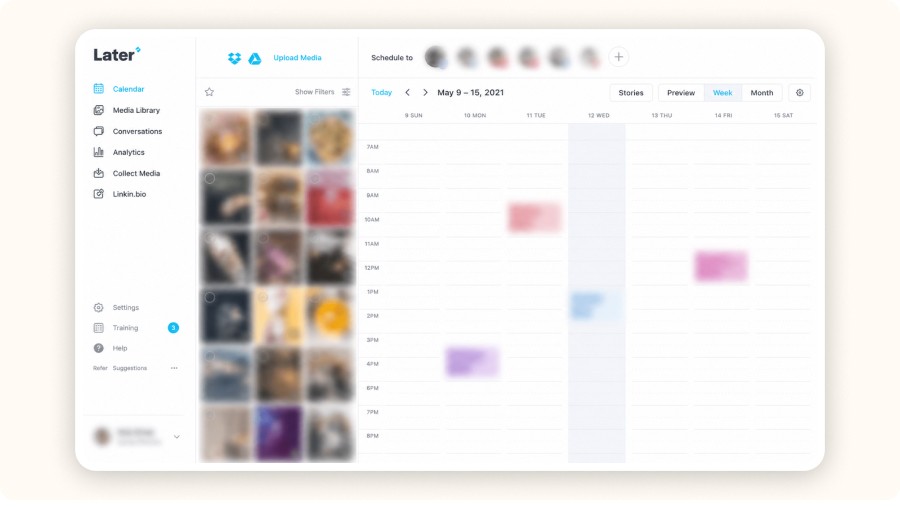
To post from Later, you upload your media, create the post (caption + settings), schedule it for a date and time, then Later either auto-publishes or sends a reminder so you can publish manually from your phone. The practical difference is reliability: your content goes out on schedule instead of “whenever you remember.”
A clean workflow:
1) Create your post
Add video or images
Write a caption + one clear CTA
Add tags
2) Choose the publish method
Auto-publish when supported
Use reminders when it’s not
3) Run a 30-second QA check
Before you schedule, confirm:
the first frame is readable
the product appears within 1–2 seconds
your claim is defensible (especially for beauty and fitness products)
If you want consistent conversions, treat posting like a checklist.
Common mistakes dropshippers make with Later

The biggest mistakes with Later are treating scheduling like the strategy, skipping tagging and analytics, and letting engagement pile up. Fix that by using 3–5 repeatable angles per product, tagging every post, reviewing performance weekly, and setting two daily inbox windows.
Scheduling random content with no angle : pick 3–5 repeatable angles per product.
Posting without a product testing loop : treat organic posts as creative testing. When a hook wins organically, reuse it in paid.
Ignoring comments and DMs for 24–48 hours : set two inbox windows per day. A lot of “Is this legit?” comments are just sales waiting for reassurance.
No compliance discipline : avoid health and finance guarantees. Keep claims conservative and verifiable, especially in beauty and fitness.
Measuring the wrong metric : track saves, shares, profile visits, and link clicks. Likes are weak signals.
Pricing plans: what to compare before you upgrade
Compare Later pricing plans based on the constraints that actually affect your workflow: number of profiles, post limits, analytics depth, inbox features, and approvals. A plan is “worth it” when it saves enough time, or recovers enough missed conversations, to cover its monthly cost.
Later’s exact pricing can change, so compare plans by constraints, not marketing bullets.
Check:
number of social profiles
number of scheduled posts per month
analytics depth (especially post-level and tag-level reporting)
inbox and engagement features
approval workflows
If your average product price is around $29.99, a $25–$50/month subscription can make sense if it prevents a few missed high-intent messages or saves you a couple hours each week.
Later software alternatives
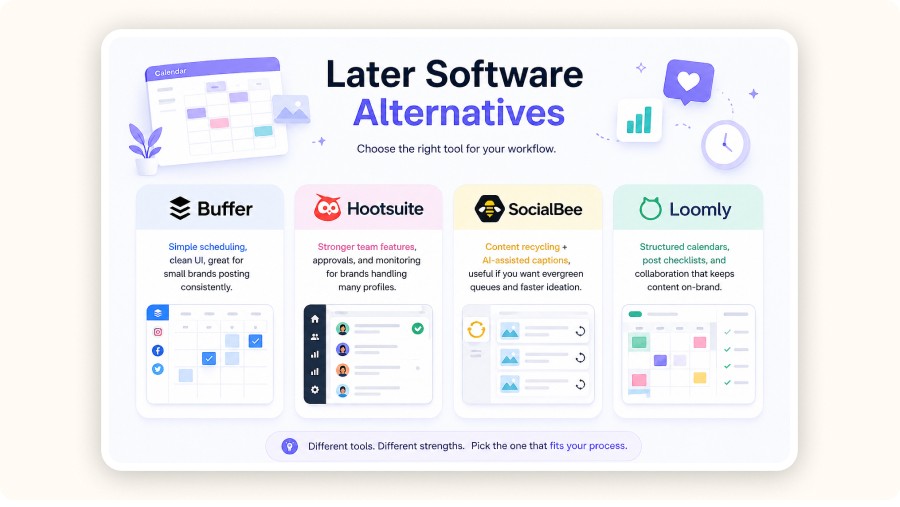
Here are solid Later alternatives, depending on your workflow:
Buffer software: simple scheduling, clean UI, great for small brands posting consistently.
Hootsuite management: stronger team features, approvals, and monitoring for brands handling many profiles.
SocialBee AI: content recycling + AI-assisted captions, useful if you want evergreen queues and faster ideation.
Loomly app: structured calendars, post checklists, and collaboration that keeps content on-brand.
Choose Buffer for simplicity, Hootsuite for teams, SocialBee for repurposing, and Loomly for guided workflows. Before switching, compare analytics depth, post limits, link-in-bio options, and whether DMs/comments are centralized for your store.
Minea
Reach $1,000 per day or get your money back

Verdict
Later won’t pick your next winning product, but it can make your content machine run without chaos. Use it to batch 7–14 days of posts, tag each piece by product and angle, and review what earns saves, shares, and clicks. Keep your inbox tight with two daily check-ins so high-intent questions don’t turn into abandoned carts. Start on the Free plan while you validate your niche, then upgrade when limits, analytics depth, or approvals slow you down. Treat scheduling as execution, not strategy and your socials become predictable, measurable, and scalable. Pair it with product research and ads to scale winners.
FAQ
Is Later social legit?
Yes. Later is a legitimate social media management platform designed for scheduling, publishing, analytics, and engagement workflows. For dropshipping, the value is turning posting into a repeatable 2-week system you can run without daily stress.
Does Later have a free plan?
Later commonly offers a Free plan that lets you learn the basics of scheduling and planning. It’s a solid starting point for new sellers. Upgrade when you need more scheduled posts, more profiles, deeper analytics, or a team workflow.
How do I post from Later?
You post by creating your content in Later, scheduling it, and using auto-publishing when available. If auto-publishing is not supported for a platform or post type, Later sends a reminder so you can publish from your phone at the right time.
How does Later social work?
Later centralizes your media, captions, and publishing schedule in one calendar. You upload content, schedule it, publish on time, then use analytics and tagging to identify what performs and what to scale.
Is Later good for managing multiple dropshipping stores?
It can be, if your main bottleneck is content scheduling and consistent publishing across multiple profiles. The limiting factor is usually plan constraints and your internal workflow. You will still need separate tools for fulfillment and support.
What should I use alongside Later for dropshipping?
Use a product and ad research workflow upstream, for example Minea to spot trending products, analyze competitor ads, and extract winning angles. Then use Later to execute consistent organic publishing. Pair that with Shopify for your storefront and Meta and TikTok Ads to scale creatives that prove demand. This is the most practical way to use later software for dropshipping business without overcomplicating your stack.
Later software for dropshipping business: what Later can’t do
Minea is the research and decision-making layer for a dropshipping business. It helps you find winning products, analyze competitor ads, spot proven hooks, understand which angles are already converting, and decide what to test next.
Minea helps you:
discover trending products
analyze competitor ads
identify winning creatives and hooks
study product angles, offers, and messaging
find inspiration for TikTok, Facebook, Instagram, and Pinterest ads
reduce guesswork before launching content or paid campaigns
Later, on the other hand, is not dropshipping operations software. It won’t manage suppliers, fulfillment, inventory syncing, tracking updates, or pricing. Its role is mainly to help you publish content consistently and review what performs.
Later does not:
manage suppliers or order fulfillment
sync inventory
handle tracking emails
set pricing or optimize margins
replace product research or ad intelligence
A cleaner way to divide the workflow is:
Minea: product research + competitor ad intelligence
Later: organic content planning + scheduling
Meta & TikTok Ads: scaling winning creatives
Shopify: store + checkout
AutoDS or Zendrop: supplier, fulfillment, and operations support
For small dropshipping teams, Minea is the tool that helps you decide what to sell and how to pitch it. Later simply helps you turn those insights into a consistent posting system.
How do I post from Later?
To post from Later, you upload your media, create the post (caption + settings), schedule it for a date and time, then Later either auto-publishes or sends a reminder so you can publish manually from your phone. The practical difference is reliability: your content goes out on schedule instead of “whenever you remember.”
A clean workflow:
1) Create your post
Add video or images
Write a caption + one clear CTA
Add tags
2) Choose the publish method
Auto-publish when supported
Use reminders when it’s not
3) Run a 30-second QA check
Before you schedule, confirm:
the first frame is readable
the product appears within 1–2 seconds
your claim is defensible (especially for beauty and fitness products)
If you want consistent conversions, treat posting like a checklist.
Common mistakes dropshippers make with Later
The biggest mistakes with Later are treating scheduling like the strategy, skipping tagging and analytics, and letting engagement pile up. Fix that by using 3–5 repeatable angles per product, tagging every post, reviewing performance weekly, and setting two daily inbox windows.
Scheduling random content with no angle : pick 3–5 repeatable angles per product.
Posting without a product testing loop : treat organic posts as creative testing. When a hook wins organically, reuse it in paid.
Ignoring comments and DMs for 24–48 hours : set two inbox windows per day. A lot of “Is this legit?” comments are just sales waiting for reassurance.
No compliance discipline : avoid health and finance guarantees. Keep claims conservative and verifiable, especially in beauty and fitness.
Measuring the wrong metric : track saves, shares, profile visits, and link clicks. Likes are weak signals.
Pricing plans: what to compare before you upgrade
Compare Later pricing plans based on the constraints that actually affect your workflow: number of profiles, post limits, analytics depth, inbox features, and approvals. A plan is “worth it” when it saves enough time, or recovers enough missed conversations, to cover its monthly cost.
Later’s exact pricing can change, so compare plans by constraints, not marketing bullets.
Check:
number of social profiles
number of scheduled posts per month
analytics depth (especially post-level and tag-level reporting)
inbox and engagement features
approval workflows
If your average product price is around $29.99, a $25–$50/month subscription can make sense if it prevents a few missed high-intent messages or saves you a couple hours each week.
Later software alternatives
Here are solid Later alternatives, depending on your workflow:
Buffer software: simple scheduling, clean UI, great for small brands posting consistently.
Hootsuite management: stronger team features, approvals, and monitoring for brands handling many profiles.
SocialBee AI: content recycling + AI-assisted captions, useful if you want evergreen queues and faster ideation.
Loomly app: structured calendars, post checklists, and collaboration that keeps content on-brand.
Choose Buffer for simplicity, Hootsuite for teams, SocialBee for repurposing, and Loomly for guided workflows. Before switching, compare analytics depth, post limits, link-in-bio options, and whether DMs/comments are centralized for your store.
Minea
Reach $1,000 per day or get your money back
Verdict
Later won’t pick your next winning product, but it can make your content machine run without chaos. Use it to batch 7–14 days of posts, tag each piece by product and angle, and review what earns saves, shares, and clicks. Keep your inbox tight with two daily check-ins so high-intent questions don’t turn into abandoned carts. Start on the Free plan while you validate your niche, then upgrade when limits, analytics depth, or approvals slow you down. Treat scheduling as execution, not strategy and your socials become predictable, measurable, and scalable. Pair it with product research and ads to scale winners.
FAQ
Is Later social legit?
Yes. Later is a legitimate social media management platform designed for scheduling, publishing, analytics, and engagement workflows. For dropshipping, the value is turning posting into a repeatable 2-week system you can run without daily stress.
Does Later have a free plan?
Later commonly offers a Free plan that lets you learn the basics of scheduling and planning. It’s a solid starting point for new sellers. Upgrade when you need more scheduled posts, more profiles, deeper analytics, or a team workflow.
How do I post from Later?
You post by creating your content in Later, scheduling it, and using auto-publishing when available. If auto-publishing is not supported for a platform or post type, Later sends a reminder so you can publish from your phone at the right time.
How does Later social work?
Later centralizes your media, captions, and publishing schedule in one calendar. You upload content, schedule it, publish on time, then use analytics and tagging to identify what performs and what to scale.
Is Later good for managing multiple dropshipping stores?
It can be, if your main bottleneck is content scheduling and consistent publishing across multiple profiles. The limiting factor is usually plan constraints and your internal workflow. You will still need separate tools for fulfillment and support.
What should I use alongside Later for dropshipping?
Use a product and ad research workflow upstream, for example Minea to spot trending products, analyze competitor ads, and extract winning angles. Then use Later to execute consistent organic publishing. Pair that with Shopify for your storefront and Meta and TikTok Ads to scale creatives that prove demand. This is the most practical way to use later software for dropshipping business without overcomplicating your stack.
Later software for dropshipping business: what Later can’t do
Minea is the research and decision-making layer for a dropshipping business. It helps you find winning products, analyze competitor ads, spot proven hooks, understand which angles are already converting, and decide what to test next.
Minea helps you:
discover trending products
analyze competitor ads
identify winning creatives and hooks
study product angles, offers, and messaging
find inspiration for TikTok, Facebook, Instagram, and Pinterest ads
reduce guesswork before launching content or paid campaigns
Later, on the other hand, is not dropshipping operations software. It won’t manage suppliers, fulfillment, inventory syncing, tracking updates, or pricing. Its role is mainly to help you publish content consistently and review what performs.
Later does not:
manage suppliers or order fulfillment
sync inventory
handle tracking emails
set pricing or optimize margins
replace product research or ad intelligence
A cleaner way to divide the workflow is:
Minea: product research + competitor ad intelligence
Later: organic content planning + scheduling
Meta & TikTok Ads: scaling winning creatives
Shopify: store + checkout
AutoDS or Zendrop: supplier, fulfillment, and operations support
For small dropshipping teams, Minea is the tool that helps you decide what to sell and how to pitch it. Later simply helps you turn those insights into a consistent posting system.
How do I post from Later?
To post from Later, you upload your media, create the post (caption + settings), schedule it for a date and time, then Later either auto-publishes or sends a reminder so you can publish manually from your phone. The practical difference is reliability: your content goes out on schedule instead of “whenever you remember.”
A clean workflow:
1) Create your post
Add video or images
Write a caption + one clear CTA
Add tags
2) Choose the publish method
Auto-publish when supported
Use reminders when it’s not
3) Run a 30-second QA check
Before you schedule, confirm:
the first frame is readable
the product appears within 1–2 seconds
your claim is defensible (especially for beauty and fitness products)
If you want consistent conversions, treat posting like a checklist.
Common mistakes dropshippers make with Later
The biggest mistakes with Later are treating scheduling like the strategy, skipping tagging and analytics, and letting engagement pile up. Fix that by using 3–5 repeatable angles per product, tagging every post, reviewing performance weekly, and setting two daily inbox windows.
Scheduling random content with no angle : pick 3–5 repeatable angles per product.
Posting without a product testing loop : treat organic posts as creative testing. When a hook wins organically, reuse it in paid.
Ignoring comments and DMs for 24–48 hours : set two inbox windows per day. A lot of “Is this legit?” comments are just sales waiting for reassurance.
No compliance discipline : avoid health and finance guarantees. Keep claims conservative and verifiable, especially in beauty and fitness.
Measuring the wrong metric : track saves, shares, profile visits, and link clicks. Likes are weak signals.
Pricing plans: what to compare before you upgrade
Compare Later pricing plans based on the constraints that actually affect your workflow: number of profiles, post limits, analytics depth, inbox features, and approvals. A plan is “worth it” when it saves enough time, or recovers enough missed conversations, to cover its monthly cost.
Later’s exact pricing can change, so compare plans by constraints, not marketing bullets.
Check:
number of social profiles
number of scheduled posts per month
analytics depth (especially post-level and tag-level reporting)
inbox and engagement features
approval workflows
If your average product price is around $29.99, a $25–$50/month subscription can make sense if it prevents a few missed high-intent messages or saves you a couple hours each week.
Later software alternatives
Here are solid Later alternatives, depending on your workflow:
Buffer software: simple scheduling, clean UI, great for small brands posting consistently.
Hootsuite management: stronger team features, approvals, and monitoring for brands handling many profiles.
SocialBee AI: content recycling + AI-assisted captions, useful if you want evergreen queues and faster ideation.
Loomly app: structured calendars, post checklists, and collaboration that keeps content on-brand.
Choose Buffer for simplicity, Hootsuite for teams, SocialBee for repurposing, and Loomly for guided workflows. Before switching, compare analytics depth, post limits, link-in-bio options, and whether DMs/comments are centralized for your store.
Minea
Reach $1,000 per day or get your money back
Verdict
Later won’t pick your next winning product, but it can make your content machine run without chaos. Use it to batch 7–14 days of posts, tag each piece by product and angle, and review what earns saves, shares, and clicks. Keep your inbox tight with two daily check-ins so high-intent questions don’t turn into abandoned carts. Start on the Free plan while you validate your niche, then upgrade when limits, analytics depth, or approvals slow you down. Treat scheduling as execution, not strategy and your socials become predictable, measurable, and scalable. Pair it with product research and ads to scale winners.
FAQ
Is Later social legit?
Yes. Later is a legitimate social media management platform designed for scheduling, publishing, analytics, and engagement workflows. For dropshipping, the value is turning posting into a repeatable 2-week system you can run without daily stress.
Does Later have a free plan?
Later commonly offers a Free plan that lets you learn the basics of scheduling and planning. It’s a solid starting point for new sellers. Upgrade when you need more scheduled posts, more profiles, deeper analytics, or a team workflow.
How do I post from Later?
You post by creating your content in Later, scheduling it, and using auto-publishing when available. If auto-publishing is not supported for a platform or post type, Later sends a reminder so you can publish from your phone at the right time.
How does Later social work?
Later centralizes your media, captions, and publishing schedule in one calendar. You upload content, schedule it, publish on time, then use analytics and tagging to identify what performs and what to scale.
Is Later good for managing multiple dropshipping stores?
It can be, if your main bottleneck is content scheduling and consistent publishing across multiple profiles. The limiting factor is usually plan constraints and your internal workflow. You will still need separate tools for fulfillment and support.
What should I use alongside Later for dropshipping?
Use a product and ad research workflow upstream, for example Minea to spot trending products, analyze competitor ads, and extract winning angles. Then use Later to execute consistent organic publishing. Pair that with Shopify for your storefront and Meta and TikTok Ads to scale creatives that prove demand. This is the most practical way to use later software for dropshipping business without overcomplicating your stack.
Similar articles
SocialBee AI Review for Dropshipping : Copilot, AI Post Generator, Pricing & Real-World Workflow
Best Management Software Network
SocialBee AI Review for Dropshipping : Copilot, AI Post Generator, Pricing & Real-World Workflow
Best Management Software Network
SocialBee AI Review for Dropshipping : Copilot, AI Post Generator, Pricing & Real-World Workflow
Best Management Software Network
SocialBee AI Review for Dropshipping : Copilot, AI Post Generator, Pricing & Real-World Workflow
Best Management Software Network
Buffer software for dropshipping: how to schedule social posts that sell
Best Management Software Network
Buffer software for dropshipping: how to schedule social posts that sell
Best Management Software Network
Buffer software for dropshipping: how to schedule social posts that sell
Best Management Software Network
Buffer software for dropshipping: how to schedule social posts that sell
Best Management Software Network
Loomly app for dropshipping business: review, pricing, and alternatives for 2026
Best Management Software Network
Loomly app for dropshipping business: review, pricing, and alternatives for 2026
Best Management Software Network
Loomly app for dropshipping business: review, pricing, and alternatives for 2026
Best Management Software Network
Loomly app for dropshipping business: review, pricing, and alternatives for 2026
Best Management Software Network
Hootsuite Management for Dropshipping: How to Run Social Media Like a System (2026)
Best Management Software Network
Hootsuite Management for Dropshipping: How to Run Social Media Like a System (2026)
Best Management Software Network
Hootsuite Management for Dropshipping: How to Run Social Media Like a System (2026)
Best Management Software Network
Hootsuite Management for Dropshipping: How to Run Social Media Like a System (2026)
Best Management Software Network


Our Free Adspys

Find winning products on our Tiktok adspy today!
Find winning products on our Facebook adspy today!
Find winning products on our Tiktok adspy today!
Find winning products on our Facebook adspy today!
Find winning products on our Tiktok adspy today!
Find winning products on our Facebook adspy today!
Find winning products on our Tiktok adspy today!
Find winning products on our Facebook adspy today!
1 winning product everyday.
Follow us!






Find out more
Read more
Minea © 2026
Find out more
Read more
Minea © 2026
Find out more
Read more
Minea © 2026
Find out more
Read more
Minea © 2026
Find out more
Read more
Minea © 2026
Find out more
Read more
Minea © 2026