Buffer software for dropshipping: how to schedule social posts that sell
Best Management Software Network
Author: Josa
Contents
If you’re running a Shopify dropshipping store, you don’t need “more content” you need a repeatable way to publish product-driven posts every day without living inside Instagram.
Buffer is a social media scheduling and management tool (a buffer software, buffer software social media) that lets you plan, queue, publish, and analyze posts across multiple channels from one dashboard. Used well, it becomes your distribution engine for product launches, UGC clips, restocks, and offer tests.
Key takeaways
Buffer is best when you already have product angles to push and you need consistent posting across channels.
A realistic starting workflow is: 2 content buckets + 1 posting cadence + 1 queue per channel.
Use Buffer’s analytics to double down on the 2–3 post formats that actually drive clicks to your product pages.
For dropshipping, “schedule” isn’t the end goal linking, tracking, and iterating are.
What is Buffer and how does it work for dropshipping?
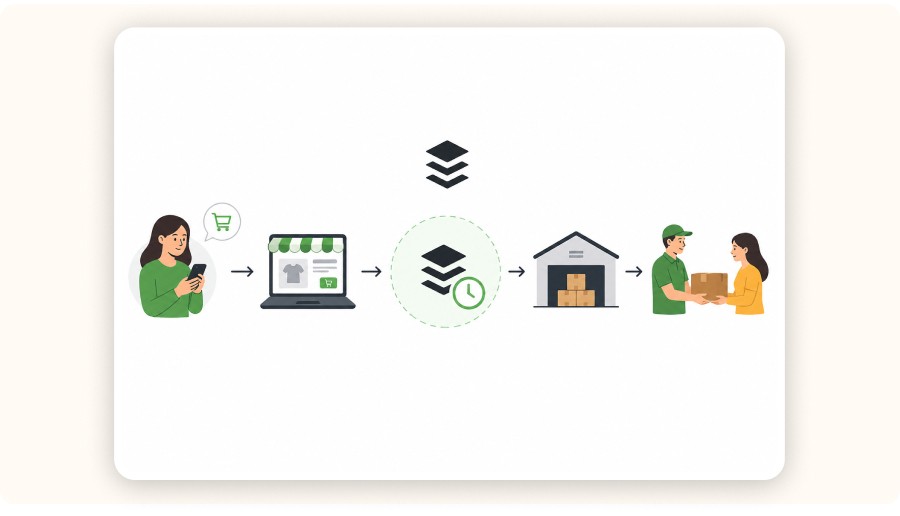
Buffer helps you schedule and publish social posts across multiple platforms from one place. For dropshipping, it’s useful because you can turn one product angle into a week of posts, stick to a fixed cadence, and track which posts drive clicks to your Shopify product pages.
Buffer works like a simple control panel for your social accounts (a buffer software social media tool):
You connect your profiles (Instagram, TikTok, Facebook, X, Pinterest, etc.).
You create posts ahead of time.
You set posting times (a schedule) or add posts to a queue.
Buffer publishes automatically.
You review performance and adjust what you post next.
Where it fits in a real seller workflow
Find what’s working (your product + your angle).
Create variations (hooks, captions, creatives).
Schedule distribution (Buffer).
Watch what earns attention (Buffer analytics + platform insights).
Scale winners (ads, creator UGC, landing page improvements).
If you use Minea, the cleanest sequence is:
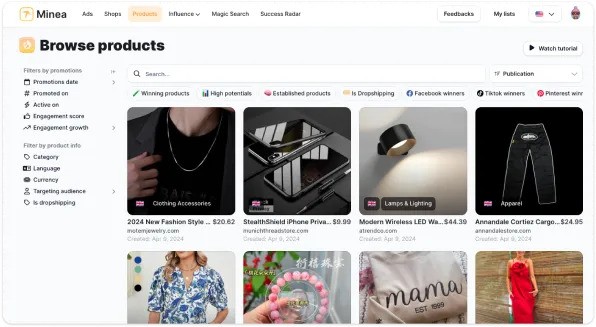
Use Minea to spot winning products and ad angles you can legitimately adapt, mainly by scanning its Ads Library (to see what’s already performing) and cross-checking trends with Success Radar (to catch what’s rising before it’s saturated).
Convert those angles into a content plan (hooks, captions, formats, and a simple weekly sequence per product).
Use Buffer (buffer software) to publish consistently across your organic channels while you test paid ads.


Is Buffer free to use for dropshipping businesses?
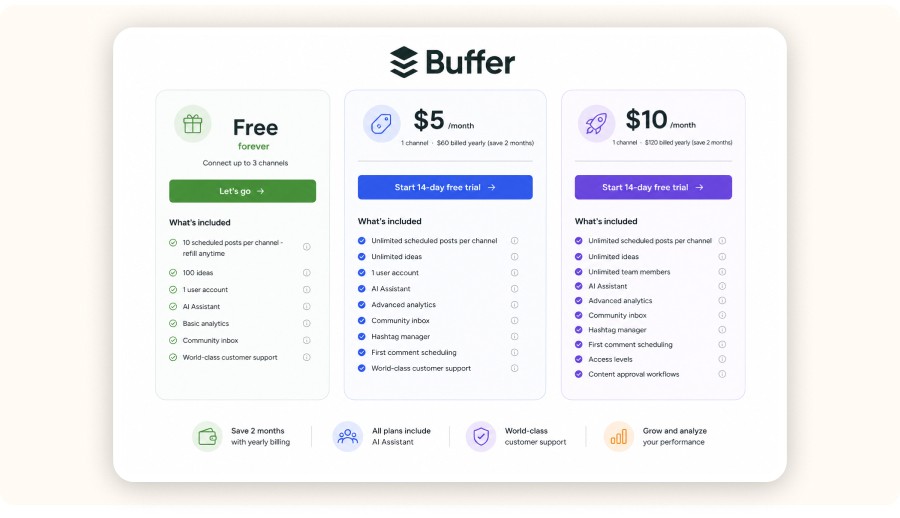
Yes, Buffer offers a free plan that can be enough to prove your workflow (buffer software free download / free plan). Expect limits on how many posts you can schedule per channel, while paid tiers typically unlock higher limits and features that matter when you post daily.
For a new or small dropshipping store, the free plan can still do the job if you keep the system simple:
1–2 channels you can sustain (for many stores: Instagram + TikTok)
3 content formats you can repeat weekly (UGC clip, product benefit carousel, behind-the-scenes)
A small queue you refill twice a week
The moment your store starts testing multiple products at once, you’ll feel the ceiling.
Practical “upgrade” signals
You want to schedule further ahead without hitting caps.
You need stronger analytics to decide what to repeat.
You want a cleaner approval workflow (if you have a VA or editor).
How to set up Buffer for a dropshipping business (step-by-step)
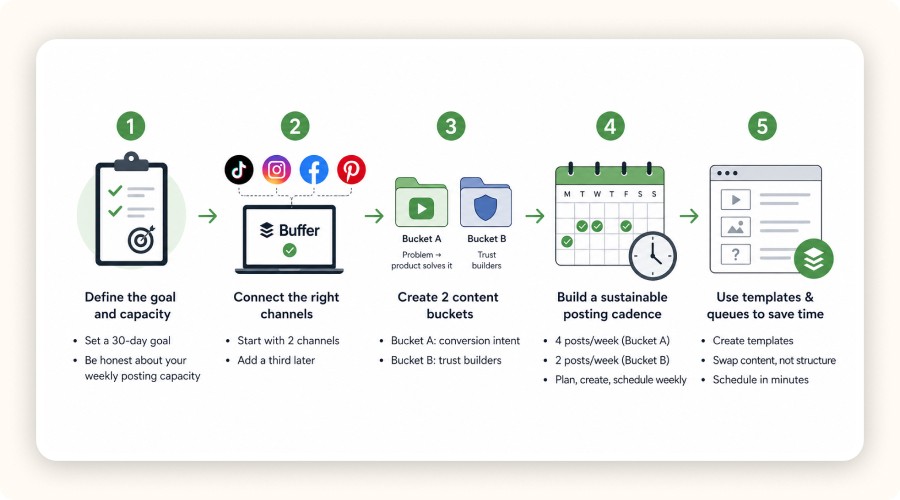
Once your channels are connected, the goal is simple: make posting consistent without turning it into a daily task. The steps below will help you set a setup you can actually maintain, so you can focus on testing products and improving what works.
Step 1: Decide what Buffer is responsible for (and what it isn’t)
Estimated time: 20–30 minutes
Buffer should own one thing: consistent distribution. It shouldn’t be your strategy, your product research, or your creative direction.
Before you connect accounts, answer two questions:
What are you trying to achieve in the next 30 days?
More site clicks to 1–2 products?
More followers in a niche so you can launch future products more easily?
More video “reps” so your edits get better?
What’s your weekly posting capacity?
Be honest. If you can only create 6 good posts per week, don’t set a 3-posts-a-day schedule.
A simple target that works for many intermediate sellers:
TikTok: 1 post/day
Instagram Reels: 1 post/day
Instagram Stories: 3–5 frames/day (repurpose + poll + social proof)
Step 2: Connect the channels that match how your customers actually discover products
Estimated time: 15–30 minutes
Connect the channels you can win on. “Everywhere” only works if you have the creative volume.
In practice, dropshipping discovery is usually driven by:
TikTok and Instagram Reels (short-form video)
Facebook/Instagram for retargeting and proof
Pinterest if you sell evergreen categories (home, beauty, fitness)
Buffer supports publishing across many major networks. Your goal isn’t to connect everything — it’s to connect what you’ll actually use.
Tip: Start with two channels. Build the habit. Add a third later.
Step 3: Create 2 content buckets that map to buyer intent
Estimated time: 45–60 minutes
Most dropshippers post random product clips and wonder why organic doesn’t convert.
Use two buckets instead:
Bucket A : “Problem → product solves it” (conversion intent)
Hook: the problem your customer feels (not the product feature)
Clip: the product in use
Caption: one tangible benefit + proof
CTA: “Link in bio” or “Comment ‘info’” (depending on platform)
Bucket B : “Trust builders” (credibility intent)
Shipping / packaging clips
Before/after
Customer reactions (with permission)
FAQ answers (returns, sizing, warranty)
If you don’t have customers yet, you can still create trust content:
Show your product testing process.
Show how you pick suppliers (and what you reject).
Show how you compare variations.
Step 4: Build a posting cadence you can sustain for 4 weeks
Estimated time: 20 minutes
Pick a cadence and commit to it for 4 weeks before you judge results.
A sustainable cadence for many small teams:
4 posts/week from Bucket A (conversion)
2 posts/week from Bucket B (trust)
Then create a “refill rhythm”:
Monday: plan hooks (30 minutes)
Tuesday: film/collect clips (60 minutes)
Wednesday: edit 6 assets (90 minutes)
Thursday: schedule the next 7 days in Buffer (30 minutes)
This is where Buffer pays off: posting stops being a daily emergency.
Step 5: Use queues and templates so scheduling takes 20 minutes, not 2 hours
Estimated time: 30–45 minutes
Your fastest win in Buffer is to standardize what repeats.
Create a simple template for each content format:
UGC clip template: Hook line + 2 benefit bullets + CTA
Carousel template: Slide 1 hook + slide 2–4 proof + slide 5 CTA
FAQ template: question + 2-sentence answer + CTA
Then, when you schedule posts:
You’re swapping content, not reinventing structure.
Your captions stay consistent with your positioning.
If you’re using an AI assistant to help write captions, treat it like a junior copywriter:
Give it your product’s top 3 benefits.
Give it your audience and tone.
Ask for 10 hook variants and 5 CTA variants.
You pick the best and keep a swipe file.
Minea
Track Trending Shops
Explore key insights on traffic, revenue, and top ads, plus the vital tools and apps that fuel their success. Leverage theses informations to replicate their winning strategies.
How to schedule posts with Buffer for your dropshipping store
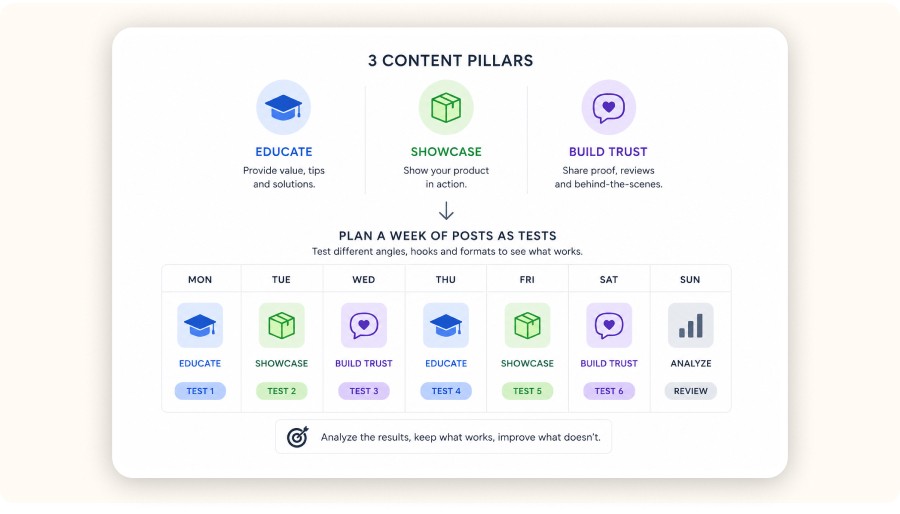
The fastest workflow is: set your posting times, batch-create 6–10 posts, add them to a queue, then let Buffer (buffer software social media) publish automatically while you monitor performance.
Here’s a practical weekly workflow you can run without burning out.
1) Set default posting times per channel
Pick times that match when your audience is likely to scroll. If you don’t know yet:
Start with 2 time slots per day (midday + evening).
Run it for 2 weeks.
Adjust based on the analytics.
The key is consistency. Algorithms reward predictable output.
2) Batch your posts around a product angle
Dropshipping organic works when you repeat the same message in multiple formats.
Example for a portable blender:
Reel/TikTok #1: “Why iced coffee at home tastes better” (hook)
Reel/TikTok #2: “Protein shake in 10 seconds” (demonstration)
Carousel: “3 reasons your shakes are lumpy” (education)
Story: poll + question sticker (“What’s your go-to smoothie?”)
3) Schedule with tracking links so you can measure impact
If you can’t track clicks, you’re posting blind.
At a minimum:
Use a link-in-bio tool or a dedicated landing page.
Add UTM parameters for each channel.
Example UTM pattern:
utm_source=instagram&utm_medium=organic&utm_campaign=blender_launch&utm_content=reel_hook1
This is how you connect Buffer scheduling (buffer software) to revenue.
4) Leave room for reactive posts
Don’t schedule 100% of your feed.
Leave 20–30% of your week for reactive content:
Reply-to-comment videos
Duets/stitches
Trend-driven hooks that match your product
Scheduled content gives you stability. Reactive content gives you spikes.
If you’re running a Shopify dropshipping store, you don’t need “more content” you need a repeatable way to publish product-driven posts every day without living inside Instagram.
Buffer is a social media scheduling and management tool (a buffer software, buffer software social media) that lets you plan, queue, publish, and analyze posts across multiple channels from one dashboard. Used well, it becomes your distribution engine for product launches, UGC clips, restocks, and offer tests.
Key takeaways
Buffer is best when you already have product angles to push and you need consistent posting across channels.
A realistic starting workflow is: 2 content buckets + 1 posting cadence + 1 queue per channel.
Use Buffer’s analytics to double down on the 2–3 post formats that actually drive clicks to your product pages.
For dropshipping, “schedule” isn’t the end goal linking, tracking, and iterating are.
What is Buffer and how does it work for dropshipping?
Buffer helps you schedule and publish social posts across multiple platforms from one place. For dropshipping, it’s useful because you can turn one product angle into a week of posts, stick to a fixed cadence, and track which posts drive clicks to your Shopify product pages.
Buffer works like a simple control panel for your social accounts (a buffer software social media tool):
You connect your profiles (Instagram, TikTok, Facebook, X, Pinterest, etc.).
You create posts ahead of time.
You set posting times (a schedule) or add posts to a queue.
Buffer publishes automatically.
You review performance and adjust what you post next.
Where it fits in a real seller workflow
Find what’s working (your product + your angle).
Create variations (hooks, captions, creatives).
Schedule distribution (Buffer).
Watch what earns attention (Buffer analytics + platform insights).
Scale winners (ads, creator UGC, landing page improvements).
If you use Minea, the cleanest sequence is:
Use Minea to spot winning products and ad angles you can legitimately adapt, mainly by scanning its Ads Library (to see what’s already performing) and cross-checking trends with Success Radar (to catch what’s rising before it’s saturated).
Convert those angles into a content plan (hooks, captions, formats, and a simple weekly sequence per product).
Use Buffer (buffer software) to publish consistently across your organic channels while you test paid ads.
Is Buffer free to use for dropshipping businesses?
Yes, Buffer offers a free plan that can be enough to prove your workflow (buffer software free download / free plan). Expect limits on how many posts you can schedule per channel, while paid tiers typically unlock higher limits and features that matter when you post daily.
For a new or small dropshipping store, the free plan can still do the job if you keep the system simple:
1–2 channels you can sustain (for many stores: Instagram + TikTok)
3 content formats you can repeat weekly (UGC clip, product benefit carousel, behind-the-scenes)
A small queue you refill twice a week
The moment your store starts testing multiple products at once, you’ll feel the ceiling.
Practical “upgrade” signals
You want to schedule further ahead without hitting caps.
You need stronger analytics to decide what to repeat.
You want a cleaner approval workflow (if you have a VA or editor).
How to set up Buffer for a dropshipping business (step-by-step)
Once your channels are connected, the goal is simple: make posting consistent without turning it into a daily task. The steps below will help you set a setup you can actually maintain, so you can focus on testing products and improving what works.
Step 1: Decide what Buffer is responsible for (and what it isn’t)
Estimated time: 20–30 minutes
Buffer should own one thing: consistent distribution. It shouldn’t be your strategy, your product research, or your creative direction.
Before you connect accounts, answer two questions:
What are you trying to achieve in the next 30 days?
More site clicks to 1–2 products?
More followers in a niche so you can launch future products more easily?
More video “reps” so your edits get better?
What’s your weekly posting capacity?
Be honest. If you can only create 6 good posts per week, don’t set a 3-posts-a-day schedule.
A simple target that works for many intermediate sellers:
TikTok: 1 post/day
Instagram Reels: 1 post/day
Instagram Stories: 3–5 frames/day (repurpose + poll + social proof)
Step 2: Connect the channels that match how your customers actually discover products
Estimated time: 15–30 minutes
Connect the channels you can win on. “Everywhere” only works if you have the creative volume.
In practice, dropshipping discovery is usually driven by:
TikTok and Instagram Reels (short-form video)
Facebook/Instagram for retargeting and proof
Pinterest if you sell evergreen categories (home, beauty, fitness)
Buffer supports publishing across many major networks. Your goal isn’t to connect everything — it’s to connect what you’ll actually use.
Tip: Start with two channels. Build the habit. Add a third later.
Step 3: Create 2 content buckets that map to buyer intent
Estimated time: 45–60 minutes
Most dropshippers post random product clips and wonder why organic doesn’t convert.
Use two buckets instead:
Bucket A : “Problem → product solves it” (conversion intent)
Hook: the problem your customer feels (not the product feature)
Clip: the product in use
Caption: one tangible benefit + proof
CTA: “Link in bio” or “Comment ‘info’” (depending on platform)
Bucket B : “Trust builders” (credibility intent)
Shipping / packaging clips
Before/after
Customer reactions (with permission)
FAQ answers (returns, sizing, warranty)
If you don’t have customers yet, you can still create trust content:
Show your product testing process.
Show how you pick suppliers (and what you reject).
Show how you compare variations.
Step 4: Build a posting cadence you can sustain for 4 weeks
Estimated time: 20 minutes
Pick a cadence and commit to it for 4 weeks before you judge results.
A sustainable cadence for many small teams:
4 posts/week from Bucket A (conversion)
2 posts/week from Bucket B (trust)
Then create a “refill rhythm”:
Monday: plan hooks (30 minutes)
Tuesday: film/collect clips (60 minutes)
Wednesday: edit 6 assets (90 minutes)
Thursday: schedule the next 7 days in Buffer (30 minutes)
This is where Buffer pays off: posting stops being a daily emergency.
Step 5: Use queues and templates so scheduling takes 20 minutes, not 2 hours
Estimated time: 30–45 minutes
Your fastest win in Buffer is to standardize what repeats.
Create a simple template for each content format:
UGC clip template: Hook line + 2 benefit bullets + CTA
Carousel template: Slide 1 hook + slide 2–4 proof + slide 5 CTA
FAQ template: question + 2-sentence answer + CTA
Then, when you schedule posts:
You’re swapping content, not reinventing structure.
Your captions stay consistent with your positioning.
If you’re using an AI assistant to help write captions, treat it like a junior copywriter:
Give it your product’s top 3 benefits.
Give it your audience and tone.
Ask for 10 hook variants and 5 CTA variants.
You pick the best and keep a swipe file.
Minea
Track Trending Shops
Explore key insights on traffic, revenue, and top ads, plus the vital tools and apps that fuel their success. Leverage theses informations to replicate their winning strategies.
How to schedule posts with Buffer for your dropshipping store
The fastest workflow is: set your posting times, batch-create 6–10 posts, add them to a queue, then let Buffer (buffer software social media) publish automatically while you monitor performance.
Here’s a practical weekly workflow you can run without burning out.
1) Set default posting times per channel
Pick times that match when your audience is likely to scroll. If you don’t know yet:
Start with 2 time slots per day (midday + evening).
Run it for 2 weeks.
Adjust based on the analytics.
The key is consistency. Algorithms reward predictable output.
2) Batch your posts around a product angle
Dropshipping organic works when you repeat the same message in multiple formats.
Example for a portable blender:
Reel/TikTok #1: “Why iced coffee at home tastes better” (hook)
Reel/TikTok #2: “Protein shake in 10 seconds” (demonstration)
Carousel: “3 reasons your shakes are lumpy” (education)
Story: poll + question sticker (“What’s your go-to smoothie?”)
3) Schedule with tracking links so you can measure impact
If you can’t track clicks, you’re posting blind.
At a minimum:
Use a link-in-bio tool or a dedicated landing page.
Add UTM parameters for each channel.
Example UTM pattern:
utm_source=instagram&utm_medium=organic&utm_campaign=blender_launch&utm_content=reel_hook1
This is how you connect Buffer scheduling (buffer software) to revenue.
4) Leave room for reactive posts
Don’t schedule 100% of your feed.
Leave 20–30% of your week for reactive content:
Reply-to-comment videos
Duets/stitches
Trend-driven hooks that match your product
Scheduled content gives you stability. Reactive content gives you spikes.
If you’re running a Shopify dropshipping store, you don’t need “more content” you need a repeatable way to publish product-driven posts every day without living inside Instagram.
Buffer is a social media scheduling and management tool (a buffer software, buffer software social media) that lets you plan, queue, publish, and analyze posts across multiple channels from one dashboard. Used well, it becomes your distribution engine for product launches, UGC clips, restocks, and offer tests.
Key takeaways
Buffer is best when you already have product angles to push and you need consistent posting across channels.
A realistic starting workflow is: 2 content buckets + 1 posting cadence + 1 queue per channel.
Use Buffer’s analytics to double down on the 2–3 post formats that actually drive clicks to your product pages.
For dropshipping, “schedule” isn’t the end goal linking, tracking, and iterating are.
What is Buffer and how does it work for dropshipping?
Buffer helps you schedule and publish social posts across multiple platforms from one place. For dropshipping, it’s useful because you can turn one product angle into a week of posts, stick to a fixed cadence, and track which posts drive clicks to your Shopify product pages.
Buffer works like a simple control panel for your social accounts (a buffer software social media tool):
You connect your profiles (Instagram, TikTok, Facebook, X, Pinterest, etc.).
You create posts ahead of time.
You set posting times (a schedule) or add posts to a queue.
Buffer publishes automatically.
You review performance and adjust what you post next.
Where it fits in a real seller workflow
Find what’s working (your product + your angle).
Create variations (hooks, captions, creatives).
Schedule distribution (Buffer).
Watch what earns attention (Buffer analytics + platform insights).
Scale winners (ads, creator UGC, landing page improvements).
If you use Minea, the cleanest sequence is:
Use Minea to spot winning products and ad angles you can legitimately adapt, mainly by scanning its Ads Library (to see what’s already performing) and cross-checking trends with Success Radar (to catch what’s rising before it’s saturated).
Convert those angles into a content plan (hooks, captions, formats, and a simple weekly sequence per product).
Use Buffer (buffer software) to publish consistently across your organic channels while you test paid ads.
Is Buffer free to use for dropshipping businesses?
Yes, Buffer offers a free plan that can be enough to prove your workflow (buffer software free download / free plan). Expect limits on how many posts you can schedule per channel, while paid tiers typically unlock higher limits and features that matter when you post daily.
For a new or small dropshipping store, the free plan can still do the job if you keep the system simple:
1–2 channels you can sustain (for many stores: Instagram + TikTok)
3 content formats you can repeat weekly (UGC clip, product benefit carousel, behind-the-scenes)
A small queue you refill twice a week
The moment your store starts testing multiple products at once, you’ll feel the ceiling.
Practical “upgrade” signals
You want to schedule further ahead without hitting caps.
You need stronger analytics to decide what to repeat.
You want a cleaner approval workflow (if you have a VA or editor).
How to set up Buffer for a dropshipping business (step-by-step)
Once your channels are connected, the goal is simple: make posting consistent without turning it into a daily task. The steps below will help you set a setup you can actually maintain, so you can focus on testing products and improving what works.
Step 1: Decide what Buffer is responsible for (and what it isn’t)
Estimated time: 20–30 minutes
Buffer should own one thing: consistent distribution. It shouldn’t be your strategy, your product research, or your creative direction.
Before you connect accounts, answer two questions:
What are you trying to achieve in the next 30 days?
More site clicks to 1–2 products?
More followers in a niche so you can launch future products more easily?
More video “reps” so your edits get better?
What’s your weekly posting capacity?
Be honest. If you can only create 6 good posts per week, don’t set a 3-posts-a-day schedule.
A simple target that works for many intermediate sellers:
TikTok: 1 post/day
Instagram Reels: 1 post/day
Instagram Stories: 3–5 frames/day (repurpose + poll + social proof)
Step 2: Connect the channels that match how your customers actually discover products
Estimated time: 15–30 minutes
Connect the channels you can win on. “Everywhere” only works if you have the creative volume.
In practice, dropshipping discovery is usually driven by:
TikTok and Instagram Reels (short-form video)
Facebook/Instagram for retargeting and proof
Pinterest if you sell evergreen categories (home, beauty, fitness)
Buffer supports publishing across many major networks. Your goal isn’t to connect everything — it’s to connect what you’ll actually use.
Tip: Start with two channels. Build the habit. Add a third later.
Step 3: Create 2 content buckets that map to buyer intent
Estimated time: 45–60 minutes
Most dropshippers post random product clips and wonder why organic doesn’t convert.
Use two buckets instead:
Bucket A : “Problem → product solves it” (conversion intent)
Hook: the problem your customer feels (not the product feature)
Clip: the product in use
Caption: one tangible benefit + proof
CTA: “Link in bio” or “Comment ‘info’” (depending on platform)
Bucket B : “Trust builders” (credibility intent)
Shipping / packaging clips
Before/after
Customer reactions (with permission)
FAQ answers (returns, sizing, warranty)
If you don’t have customers yet, you can still create trust content:
Show your product testing process.
Show how you pick suppliers (and what you reject).
Show how you compare variations.
Step 4: Build a posting cadence you can sustain for 4 weeks
Estimated time: 20 minutes
Pick a cadence and commit to it for 4 weeks before you judge results.
A sustainable cadence for many small teams:
4 posts/week from Bucket A (conversion)
2 posts/week from Bucket B (trust)
Then create a “refill rhythm”:
Monday: plan hooks (30 minutes)
Tuesday: film/collect clips (60 minutes)
Wednesday: edit 6 assets (90 minutes)
Thursday: schedule the next 7 days in Buffer (30 minutes)
This is where Buffer pays off: posting stops being a daily emergency.
Step 5: Use queues and templates so scheduling takes 20 minutes, not 2 hours
Estimated time: 30–45 minutes
Your fastest win in Buffer is to standardize what repeats.
Create a simple template for each content format:
UGC clip template: Hook line + 2 benefit bullets + CTA
Carousel template: Slide 1 hook + slide 2–4 proof + slide 5 CTA
FAQ template: question + 2-sentence answer + CTA
Then, when you schedule posts:
You’re swapping content, not reinventing structure.
Your captions stay consistent with your positioning.
If you’re using an AI assistant to help write captions, treat it like a junior copywriter:
Give it your product’s top 3 benefits.
Give it your audience and tone.
Ask for 10 hook variants and 5 CTA variants.
You pick the best and keep a swipe file.
Minea
Track Trending Shops
Explore key insights on traffic, revenue, and top ads, plus the vital tools and apps that fuel their success. Leverage theses informations to replicate their winning strategies.
How to schedule posts with Buffer for your dropshipping store
The fastest workflow is: set your posting times, batch-create 6–10 posts, add them to a queue, then let Buffer (buffer software social media) publish automatically while you monitor performance.
Here’s a practical weekly workflow you can run without burning out.
1) Set default posting times per channel
Pick times that match when your audience is likely to scroll. If you don’t know yet:
Start with 2 time slots per day (midday + evening).
Run it for 2 weeks.
Adjust based on the analytics.
The key is consistency. Algorithms reward predictable output.
2) Batch your posts around a product angle
Dropshipping organic works when you repeat the same message in multiple formats.
Example for a portable blender:
Reel/TikTok #1: “Why iced coffee at home tastes better” (hook)
Reel/TikTok #2: “Protein shake in 10 seconds” (demonstration)
Carousel: “3 reasons your shakes are lumpy” (education)
Story: poll + question sticker (“What’s your go-to smoothie?”)
3) Schedule with tracking links so you can measure impact
If you can’t track clicks, you’re posting blind.
At a minimum:
Use a link-in-bio tool or a dedicated landing page.
Add UTM parameters for each channel.
Example UTM pattern:
utm_source=instagram&utm_medium=organic&utm_campaign=blender_launch&utm_content=reel_hook1
This is how you connect Buffer scheduling (buffer software) to revenue.
4) Leave room for reactive posts
Don’t schedule 100% of your feed.
Leave 20–30% of your week for reactive content:
Reply-to-comment videos
Duets/stitches
Trend-driven hooks that match your product
Scheduled content gives you stability. Reactive content gives you spikes.
Buffer pricing for dropshipping: how much does Buffer cost per month?
Buffer’s monthly cost depends on the plan and how many channels you manage. If you’re scheduling daily content across multiple profiles, the value is less about the sticker price and more about what it replaces: manual posting time, missed posting days, and weak iteration. (Buffer is buffer software for social media scheduling.)
Two ways to think about cost as a seller:
1) Cost vs your time
If Buffer saves you 20 minutes/day (scheduling + context switching), that’s ~10 hours/month.
Even if you value your time at $25/hour, that’s $250/month in time value.
2) Cost vs creative output
If a tool helps you reliably publish 30–60 posts/month, the better question is:
What’s your average revenue per 1,000 views?
What’s your average conversion rate from social clicks?
If you’re already running paid ads, organic content often improves the entire funnel:
More proof when people check your profile
Better retargeting pools
More brand familiarity (which can lift CTR)
If you’re making $0 from organic today, don’t overspend on software. Use the free tier, prove the workflow, then upgrade.
Is the Buffer app legit?

Yes, Buffer is a long-running, mainstream social media management platform used by freelancers, creators, and teams. Like any tool that connects to social networks, occasional reconnection issues can happen, but the product itself is legit.
A simple legitimacy checklist you can apply to any scheduling tool:
Does it publish via official platform integrations (not sketchy workarounds)?
Can you revoke access from each social platform’s settings?
Does it offer clear billing, support, and documentation?
If a tool fails those checks, don’t connect your business accounts.
Which is better for dropshipping: Hootsuite or Buffer?
For most dropshipping sellers and small teams, Buffer tends to be the cleaner choice for straightforward scheduling and publishing. Hootsuite can make sense if you need deeper, enterprise-style management and you’re willing to pay for it.
Think in terms of your actual needs:
Choose Buffer if you want:
A simple workflow to schedule and stay consistent
A lightweight tool your VA can learn quickly
A focus on publishing + basic performance iteration
Choose Hootsuite if you need:
Heavier monitoring and inbox workflows
More complex team governance
A platform built for managing larger brand operations
For most dropshippers: if you’re under $5K/month ad spend and you’re still building a repeatable creative engine, you’ll usually get more ROI from keeping things simple.
Is Buffer good for small businesses (and small dropshipping stores)?

Buffer can be a strong fit for small businesses because it removes the friction of daily posting. For a small dropshipping store, the biggest benefit is keeping your brand “alive” while you focus on product testing and fulfillment.
Small stores usually fail at organic for one reason: inconsistency.
Buffer solves the mechanics. You still have to solve the inputs:
A product people care about
A believable offer
Creatives that show the product doing the job
If you have those inputs, Buffer helps you turn them into steady, compounding visibility.
Minea
Reach $1,000 per day or get your money back

Advanced Buffer strategies that matter specifically for dropshipping
Strategy 1: Build “launch sequences” instead of random posts
A product launch needs repetition.
Create a 7-day sequence per product:
Day 1: problem hook
Day 2: demonstration
Day 3: proof (review/quote)
Day 4: FAQ (shipping, returns)
Day 5: comparison (old way vs new way)
Day 6: creator-style montage
Day 7: offer reminder
Schedule the sequence in Buffer, then evaluate:
Which day drove the most clicks?
Which hook got the highest retention?
Strategy 2: Use Buffer analytics to pick “winners” like you do with ads
Treat organic content like creative testing.
Your simple KPI stack:
Video: retention and shares (signals of genuine interest)
Profile: follows per post
Store: clicks to product page + add-to-carts
Then make a rule:
Every week, take the top 2 posts and make 3 variations each.
That’s how organic improves without needing new ideas every day.
Strategy 3: Align content with supplier reality
A common dropshipping mistake is content that promises an experience you can’t fulfill.
If your supplier countries are mostly China, Turkey, and Vietnam, your content should be honest about:
delivery windows
tracking updates
return policy
You don’t need to overshare. You just need to avoid mismatch.
Strategy 4: Repurpose one product angle across platforms (without copy-pasting)
Each platform rewards different behavior.
A simple repurpose map:
TikTok: fast hook + raw authenticity
Instagram Reels: polished edit + “saveable” value
Pinterest: evergreen how-to, before/after, checklists
Use the same angle, not the same exact post.
Common mistakes when using Buffer for e-commerce (and how to avoid them)

Scheduling posts without a link or a clear path to purchase
Use a link hub or a dedicated landing page, and track clicks with UTMs so you know what actually drives revenue.Posting only product clips (no trust content)
Add a “trust” bucket alongside product posts (shipping/packaging, testing, quick FAQ answers).Changing the schedule every 3 days
Stick to one cadence for 4 weeks, then adjust based on analytics instead of guessing.Measuring likes instead of business outcomes
Prioritize clicks, saves, shares, and product page behavior after the click.Trying to run five channels with zero creative volume
Dominate 1–2 channels first, then expand once your workflow is stable.
Verdict
Buffer is a practical choice for dropshipping if your main bottleneck is consistent publishing, not “more ideas.” As buffer software social media teams can run daily, it helps you batch, queue, and track posts so organic supports your Shopify funnel.
Start on the free tier, prove a simple cadence, then upgrade only when limits block you. Buffer won’t fix weak products or vague offers your angles, creatives, and tracking links still matter. Pair it with Minea to spot winning angles, then use Buffer to distribute, measure clicks, and iterate weekly on what actually sells. This is the simplest path forward.
FAQ
How can I schedule social media posts with Buffer for my dropshipping store?
Batch-create a week of posts, set default posting times, and add each post to your queue. Use UTMs on your bio link or landing page so you can see which posts drive product page clicks. Review performance weekly and remake variations of your top posts.
How much does Buffer cost per month?
Buffer’s pricing depends on the plan and how many channels you manage. If you’re a new store, start with the free tier to validate your workflow. If you’re posting daily on multiple channels, the right plan is the one that removes scheduling limits and gives you the analytics you need to repeat winners.
Is the Buffer app legit?
Buffer is a long-established social media management platform. As with any app that connects to social networks, you should connect accounts via official integrations and periodically review access permissions. If you ever see unusual posting behavior, revoke access and reset credentials.
Which is better, Hootsuite or Buffer?
For many dropshipping sellers, Buffer is easier to run day to day for scheduling and basic performance iteration. Hootsuite can be a better fit if you need heavier monitoring, inbox features, and team governance and you’re comfortable paying for a more complex platform.
Is Buffer good for small businesses?
Yes, especially if your main problem is inconsistency. Buffer reduces the daily friction of publishing, which helps small teams keep their brand active while they focus on product testing, fulfillment, and customer support.
Buffer pricing for dropshipping: how much does Buffer cost per month?
Buffer’s monthly cost depends on the plan and how many channels you manage. If you’re scheduling daily content across multiple profiles, the value is less about the sticker price and more about what it replaces: manual posting time, missed posting days, and weak iteration. (Buffer is buffer software for social media scheduling.)
Two ways to think about cost as a seller:
1) Cost vs your time
If Buffer saves you 20 minutes/day (scheduling + context switching), that’s ~10 hours/month.
Even if you value your time at $25/hour, that’s $250/month in time value.
2) Cost vs creative output
If a tool helps you reliably publish 30–60 posts/month, the better question is:
What’s your average revenue per 1,000 views?
What’s your average conversion rate from social clicks?
If you’re already running paid ads, organic content often improves the entire funnel:
More proof when people check your profile
Better retargeting pools
More brand familiarity (which can lift CTR)
If you’re making $0 from organic today, don’t overspend on software. Use the free tier, prove the workflow, then upgrade.
Is the Buffer app legit?
Yes, Buffer is a long-running, mainstream social media management platform used by freelancers, creators, and teams. Like any tool that connects to social networks, occasional reconnection issues can happen, but the product itself is legit.
A simple legitimacy checklist you can apply to any scheduling tool:
Does it publish via official platform integrations (not sketchy workarounds)?
Can you revoke access from each social platform’s settings?
Does it offer clear billing, support, and documentation?
If a tool fails those checks, don’t connect your business accounts.
Which is better for dropshipping: Hootsuite or Buffer?
For most dropshipping sellers and small teams, Buffer tends to be the cleaner choice for straightforward scheduling and publishing. Hootsuite can make sense if you need deeper, enterprise-style management and you’re willing to pay for it.
Think in terms of your actual needs:
Choose Buffer if you want:
A simple workflow to schedule and stay consistent
A lightweight tool your VA can learn quickly
A focus on publishing + basic performance iteration
Choose Hootsuite if you need:
Heavier monitoring and inbox workflows
More complex team governance
A platform built for managing larger brand operations
For most dropshippers: if you’re under $5K/month ad spend and you’re still building a repeatable creative engine, you’ll usually get more ROI from keeping things simple.
Is Buffer good for small businesses (and small dropshipping stores)?
Buffer can be a strong fit for small businesses because it removes the friction of daily posting. For a small dropshipping store, the biggest benefit is keeping your brand “alive” while you focus on product testing and fulfillment.
Small stores usually fail at organic for one reason: inconsistency.
Buffer solves the mechanics. You still have to solve the inputs:
A product people care about
A believable offer
Creatives that show the product doing the job
If you have those inputs, Buffer helps you turn them into steady, compounding visibility.
Minea
Reach $1,000 per day or get your money back
Advanced Buffer strategies that matter specifically for dropshipping
Strategy 1: Build “launch sequences” instead of random posts
A product launch needs repetition.
Create a 7-day sequence per product:
Day 1: problem hook
Day 2: demonstration
Day 3: proof (review/quote)
Day 4: FAQ (shipping, returns)
Day 5: comparison (old way vs new way)
Day 6: creator-style montage
Day 7: offer reminder
Schedule the sequence in Buffer, then evaluate:
Which day drove the most clicks?
Which hook got the highest retention?
Strategy 2: Use Buffer analytics to pick “winners” like you do with ads
Treat organic content like creative testing.
Your simple KPI stack:
Video: retention and shares (signals of genuine interest)
Profile: follows per post
Store: clicks to product page + add-to-carts
Then make a rule:
Every week, take the top 2 posts and make 3 variations each.
That’s how organic improves without needing new ideas every day.
Strategy 3: Align content with supplier reality
A common dropshipping mistake is content that promises an experience you can’t fulfill.
If your supplier countries are mostly China, Turkey, and Vietnam, your content should be honest about:
delivery windows
tracking updates
return policy
You don’t need to overshare. You just need to avoid mismatch.
Strategy 4: Repurpose one product angle across platforms (without copy-pasting)
Each platform rewards different behavior.
A simple repurpose map:
TikTok: fast hook + raw authenticity
Instagram Reels: polished edit + “saveable” value
Pinterest: evergreen how-to, before/after, checklists
Use the same angle, not the same exact post.
Common mistakes when using Buffer for e-commerce (and how to avoid them)
Scheduling posts without a link or a clear path to purchase
Use a link hub or a dedicated landing page, and track clicks with UTMs so you know what actually drives revenue.Posting only product clips (no trust content)
Add a “trust” bucket alongside product posts (shipping/packaging, testing, quick FAQ answers).Changing the schedule every 3 days
Stick to one cadence for 4 weeks, then adjust based on analytics instead of guessing.Measuring likes instead of business outcomes
Prioritize clicks, saves, shares, and product page behavior after the click.Trying to run five channels with zero creative volume
Dominate 1–2 channels first, then expand once your workflow is stable.
Verdict
Buffer is a practical choice for dropshipping if your main bottleneck is consistent publishing, not “more ideas.” As buffer software social media teams can run daily, it helps you batch, queue, and track posts so organic supports your Shopify funnel.
Start on the free tier, prove a simple cadence, then upgrade only when limits block you. Buffer won’t fix weak products or vague offers your angles, creatives, and tracking links still matter. Pair it with Minea to spot winning angles, then use Buffer to distribute, measure clicks, and iterate weekly on what actually sells. This is the simplest path forward.
FAQ
How can I schedule social media posts with Buffer for my dropshipping store?
Batch-create a week of posts, set default posting times, and add each post to your queue. Use UTMs on your bio link or landing page so you can see which posts drive product page clicks. Review performance weekly and remake variations of your top posts.
How much does Buffer cost per month?
Buffer’s pricing depends on the plan and how many channels you manage. If you’re a new store, start with the free tier to validate your workflow. If you’re posting daily on multiple channels, the right plan is the one that removes scheduling limits and gives you the analytics you need to repeat winners.
Is the Buffer app legit?
Buffer is a long-established social media management platform. As with any app that connects to social networks, you should connect accounts via official integrations and periodically review access permissions. If you ever see unusual posting behavior, revoke access and reset credentials.
Which is better, Hootsuite or Buffer?
For many dropshipping sellers, Buffer is easier to run day to day for scheduling and basic performance iteration. Hootsuite can be a better fit if you need heavier monitoring, inbox features, and team governance and you’re comfortable paying for a more complex platform.
Is Buffer good for small businesses?
Yes, especially if your main problem is inconsistency. Buffer reduces the daily friction of publishing, which helps small teams keep their brand active while they focus on product testing, fulfillment, and customer support.
Buffer pricing for dropshipping: how much does Buffer cost per month?
Buffer’s monthly cost depends on the plan and how many channels you manage. If you’re scheduling daily content across multiple profiles, the value is less about the sticker price and more about what it replaces: manual posting time, missed posting days, and weak iteration. (Buffer is buffer software for social media scheduling.)
Two ways to think about cost as a seller:
1) Cost vs your time
If Buffer saves you 20 minutes/day (scheduling + context switching), that’s ~10 hours/month.
Even if you value your time at $25/hour, that’s $250/month in time value.
2) Cost vs creative output
If a tool helps you reliably publish 30–60 posts/month, the better question is:
What’s your average revenue per 1,000 views?
What’s your average conversion rate from social clicks?
If you’re already running paid ads, organic content often improves the entire funnel:
More proof when people check your profile
Better retargeting pools
More brand familiarity (which can lift CTR)
If you’re making $0 from organic today, don’t overspend on software. Use the free tier, prove the workflow, then upgrade.
Is the Buffer app legit?
Yes, Buffer is a long-running, mainstream social media management platform used by freelancers, creators, and teams. Like any tool that connects to social networks, occasional reconnection issues can happen, but the product itself is legit.
A simple legitimacy checklist you can apply to any scheduling tool:
Does it publish via official platform integrations (not sketchy workarounds)?
Can you revoke access from each social platform’s settings?
Does it offer clear billing, support, and documentation?
If a tool fails those checks, don’t connect your business accounts.
Which is better for dropshipping: Hootsuite or Buffer?
For most dropshipping sellers and small teams, Buffer tends to be the cleaner choice for straightforward scheduling and publishing. Hootsuite can make sense if you need deeper, enterprise-style management and you’re willing to pay for it.
Think in terms of your actual needs:
Choose Buffer if you want:
A simple workflow to schedule and stay consistent
A lightweight tool your VA can learn quickly
A focus on publishing + basic performance iteration
Choose Hootsuite if you need:
Heavier monitoring and inbox workflows
More complex team governance
A platform built for managing larger brand operations
For most dropshippers: if you’re under $5K/month ad spend and you’re still building a repeatable creative engine, you’ll usually get more ROI from keeping things simple.
Is Buffer good for small businesses (and small dropshipping stores)?
Buffer can be a strong fit for small businesses because it removes the friction of daily posting. For a small dropshipping store, the biggest benefit is keeping your brand “alive” while you focus on product testing and fulfillment.
Small stores usually fail at organic for one reason: inconsistency.
Buffer solves the mechanics. You still have to solve the inputs:
A product people care about
A believable offer
Creatives that show the product doing the job
If you have those inputs, Buffer helps you turn them into steady, compounding visibility.
Minea
Reach $1,000 per day or get your money back
Advanced Buffer strategies that matter specifically for dropshipping
Strategy 1: Build “launch sequences” instead of random posts
A product launch needs repetition.
Create a 7-day sequence per product:
Day 1: problem hook
Day 2: demonstration
Day 3: proof (review/quote)
Day 4: FAQ (shipping, returns)
Day 5: comparison (old way vs new way)
Day 6: creator-style montage
Day 7: offer reminder
Schedule the sequence in Buffer, then evaluate:
Which day drove the most clicks?
Which hook got the highest retention?
Strategy 2: Use Buffer analytics to pick “winners” like you do with ads
Treat organic content like creative testing.
Your simple KPI stack:
Video: retention and shares (signals of genuine interest)
Profile: follows per post
Store: clicks to product page + add-to-carts
Then make a rule:
Every week, take the top 2 posts and make 3 variations each.
That’s how organic improves without needing new ideas every day.
Strategy 3: Align content with supplier reality
A common dropshipping mistake is content that promises an experience you can’t fulfill.
If your supplier countries are mostly China, Turkey, and Vietnam, your content should be honest about:
delivery windows
tracking updates
return policy
You don’t need to overshare. You just need to avoid mismatch.
Strategy 4: Repurpose one product angle across platforms (without copy-pasting)
Each platform rewards different behavior.
A simple repurpose map:
TikTok: fast hook + raw authenticity
Instagram Reels: polished edit + “saveable” value
Pinterest: evergreen how-to, before/after, checklists
Use the same angle, not the same exact post.
Common mistakes when using Buffer for e-commerce (and how to avoid them)
Scheduling posts without a link or a clear path to purchase
Use a link hub or a dedicated landing page, and track clicks with UTMs so you know what actually drives revenue.Posting only product clips (no trust content)
Add a “trust” bucket alongside product posts (shipping/packaging, testing, quick FAQ answers).Changing the schedule every 3 days
Stick to one cadence for 4 weeks, then adjust based on analytics instead of guessing.Measuring likes instead of business outcomes
Prioritize clicks, saves, shares, and product page behavior after the click.Trying to run five channels with zero creative volume
Dominate 1–2 channels first, then expand once your workflow is stable.
Verdict
Buffer is a practical choice for dropshipping if your main bottleneck is consistent publishing, not “more ideas.” As buffer software social media teams can run daily, it helps you batch, queue, and track posts so organic supports your Shopify funnel.
Start on the free tier, prove a simple cadence, then upgrade only when limits block you. Buffer won’t fix weak products or vague offers your angles, creatives, and tracking links still matter. Pair it with Minea to spot winning angles, then use Buffer to distribute, measure clicks, and iterate weekly on what actually sells. This is the simplest path forward.
FAQ
How can I schedule social media posts with Buffer for my dropshipping store?
Batch-create a week of posts, set default posting times, and add each post to your queue. Use UTMs on your bio link or landing page so you can see which posts drive product page clicks. Review performance weekly and remake variations of your top posts.
How much does Buffer cost per month?
Buffer’s pricing depends on the plan and how many channels you manage. If you’re a new store, start with the free tier to validate your workflow. If you’re posting daily on multiple channels, the right plan is the one that removes scheduling limits and gives you the analytics you need to repeat winners.
Is the Buffer app legit?
Buffer is a long-established social media management platform. As with any app that connects to social networks, you should connect accounts via official integrations and periodically review access permissions. If you ever see unusual posting behavior, revoke access and reset credentials.
Which is better, Hootsuite or Buffer?
For many dropshipping sellers, Buffer is easier to run day to day for scheduling and basic performance iteration. Hootsuite can be a better fit if you need heavier monitoring, inbox features, and team governance and you’re comfortable paying for a more complex platform.
Is Buffer good for small businesses?
Yes, especially if your main problem is inconsistency. Buffer reduces the daily friction of publishing, which helps small teams keep their brand active while they focus on product testing, fulfillment, and customer support.
Similar articles

SocialBee AI Review for Dropshipping : Copilot, AI Post Generator, Pricing & Real-World Workflow
Best Management Software Network
SocialBee AI Review for Dropshipping : Copilot, AI Post Generator, Pricing & Real-World Workflow
Best Management Software Network
SocialBee AI Review for Dropshipping : Copilot, AI Post Generator, Pricing & Real-World Workflow
Best Management Software Network
SocialBee AI Review for Dropshipping : Copilot, AI Post Generator, Pricing & Real-World Workflow
Best Management Software Network
Later for Dropshipping: How to Run Your E-commerce Social Media in 30 Minutes a Day
Best Management Software Network
Later for Dropshipping: How to Run Your E-commerce Social Media in 30 Minutes a Day
Best Management Software Network
Later for Dropshipping: How to Run Your E-commerce Social Media in 30 Minutes a Day
Best Management Software Network
Later for Dropshipping: How to Run Your E-commerce Social Media in 30 Minutes a Day
Best Management Software Network

Loomly app for dropshipping business: review, pricing, and alternatives for 2026
Best Management Software Network
Loomly app for dropshipping business: review, pricing, and alternatives for 2026
Best Management Software Network
Loomly app for dropshipping business: review, pricing, and alternatives for 2026
Best Management Software Network
Loomly app for dropshipping business: review, pricing, and alternatives for 2026
Best Management Software Network
Hootsuite Management for Dropshipping: How to Run Social Media Like a System (2026)
Best Management Software Network
Hootsuite Management for Dropshipping: How to Run Social Media Like a System (2026)
Best Management Software Network
Hootsuite Management for Dropshipping: How to Run Social Media Like a System (2026)
Best Management Software Network
Hootsuite Management for Dropshipping: How to Run Social Media Like a System (2026)
Best Management Software Network


Our Free Adspys

Find winning products on our Tiktok adspy today!
Find winning products on our Facebook adspy today!
Find winning products on our Tiktok adspy today!
Find winning products on our Facebook adspy today!
Find winning products on our Tiktok adspy today!
Find winning products on our Facebook adspy today!
Find winning products on our Tiktok adspy today!
Find winning products on our Facebook adspy today!
1 winning product everyday.
Follow us!






Find out more
Read more
Minea © 2026
Find out more
Read more
Minea © 2026
Find out more
Read more
Minea © 2026
Find out more
Read more
Minea © 2026
Find out more
Read more
Minea © 2026
Find out more
Read more
Minea © 2026