
SocialBee AI Review for Dropshipping : Copilot, AI Post Generator, Pricing & Real-World Workflow
Author: Alexandra
Contents
Socialbee ai is SocialBee’s AI-powered social media assistant and one of the best management software options to help you plan, write, and schedule posts faster, especially useful when you’re running a dropshipping store and can’t afford to spend hours on content. In this socialbee review, you’ll see what the AI Copilot actually does (strategy suggestions, captions, and visuals), how evergreen recycling keeps promos and product education on repeat, and where the tool can fall short.
Pros : quicker content batches, clearer posting structure, and less “blank page” time.
Cons: you still need to edit for brand voice and double-check claims and product compliance.
Pricing currently starts at $29/month, with a 14-day free trial (verify at publication). Keep reading if you want a simple setup checklist and realistic expectations before paying.
Quick Verdict for Dropshippers

If you’re publishing across multiple channels and testing products regularly, SocialBee is a solid “system” tool. It’s built for consistent output, and socialbee ai helps you move faster from product angle to scheduled posts, especially when you’re juggling promos and trust-building content at the same time.
Who SocialBee AI is best for (dropshipping use cases)
Best for:
A solo dropshipper testing products weekly and needing fast post production.
A Shopify store with a VA batching content and scheduling it in one workflow.
A small agency running several stores/brands and needing repeatable processes.
Dropshipping-specific wins:
Faster content production (hooks and caption variations without starting from zero)
Evergreen recycling so “trust content” stays live (FAQs, shipping clarity, guarantees, UGC)
Promo cadence without burnout because promos sit alongside education and proof
Example (mandatory): “You’re testing 2 products/week → you need 30 posts/week across IG/TikTok/FB. SocialBee AI helps generate caption variations and schedule them into categories.”
Pitfall (mandatory): Treating AI outputs as final → generic posts → low trust → low conversion.
Action (mandatory): Use SocialBee AI to generate drafts, but lock brand voice + a claims checklist before scheduling.
When to skip it (clear deal-breakers)
In this socialbee review, SocialBee is not the right pick if you:
Need advanced social listening or deep sentiment monitoring
Require enterprise workflows (complex approvals, heavy governance)
Must run strict compliance review and can’t add a human approval step
Post rarely (around 1–2 posts/week)
Minea
Reach $1,000 per day or get your money back

The Dropshipping Content Engine in SocialBee
If you want consistent sales posts without burning out, you need a repeatable setup, not random daily inspiration. Next, we’ll build the dropshipping content engine in SocialBee step by step so you can plan, draft, schedule, and recycle content like a system.
Step 1: Connect channels + set basic brand rules (tone, claims, compliance)

Start with the channels that actually move revenue in dropshipping: TikTok + Instagram, then add Facebook if you run Meta ads or retargeting. After you connect accounts in SocialBee, set “guardrails” before generating anything with socialbee ai. This is especially important in beauty, wellness, and pet products, where careless wording can trigger refunds, ad disapprovals, or chargebacks.
Keep brand rules short and usable:
Tone: friendly/direct, premium, playful, or “no slang”
Words to avoid: cheap, miracle, guaranteed, “FDA-approved” (unless proven)
Claims to avoid: medical outcomes, guaranteed results, “works for everyone”
Guarantee language: the exact wording you allow (returns, warranty, delivery)
Example: define 10 banned phrases the AI must never use. If you skip this, your tone will drift and claims can get risky. Fix it by saving a reusable Brand Voice Prompt your team pastes into every prompt.
Step 2: Build content categories (“buckets”) for dropshipping

Buckets are the system. In SocialBee, create 8–10 categories so you always know what to post and why:
Product demos (hooks): show the result fast, then explain
UGC / proof: customer quotes, unboxings, real use clips
Education: problem → solution, comparisons, “how it works”
Objection killers: shipping, returns, quality, sizing, materials
Offer / promo: bundles, thresholds, limited-time angles
Brand legitimacy: sourcing, QC steps, “why us”
FAQs: shipping times, sizing charts, care instructions
Community: polls, Q&A, “which color next?”
To fill buckets quickly, use socialbee ai to generate 10 caption angles for each category, then keep only the best. Example: a UGC bucket with 20 posts that recycle every 45 days keeps proof running even when products change. The common mistake is overloading promos, which creates audience fatigue. A simple fix is a 60/25/15 mix: value, proof, promo.
Step 3: Scheduling logic (inverted pyramid inside your calendar)

Once buckets exist, scheduling becomes predictable. A clean weekly rhythm is: start with education + proof, move into product demos, then finish with promo + FAQs so buying feels easy.
Inside each post, use an “inverted pyramid”: lead with the biggest benefit, prove it, explain it, then ask.
Example: “Stops pet hair in 30 seconds” → proof (clip/testimonial) → mechanism → CTA to shop.
Most dropshippers lose attention with long captions and no hook. Keep the structure consistent: Hook → Proof → Mechanism → CTA. With socialbee ai, generate two hook options and keep the most specific one.
Step 4: Recycling rules (re-queue without looking spammy)

Recycling is where you win consistency. Recycle only evergreen buckets (education, proof, FAQs, legitimacy) and set expiration rules for promos.
Practical rules:
Evergreen posts: re-queue every 30–60 days
Promos: expire after 7 days (or when the offer ends)
Before recycling: create variants (new hook, new first line, new CTA)
Reposting identical promos looks spammy and hurts trust. In this socialbee review, recycling is the biggest time-saver only if you rotate variants. Use socialbee ai to generate three variants per post before re-queueing.
Step 5: Approval workflow (owner + VA/team collaboration)

Speed is useless without control. A simple workflow is: VA drafts → owner approves → schedule. If you have multiple products live, keep a shared sheet with “current offer,” “current price,” and “current shipping promise” so captions don’t drift week to week.
Use a quick checklist:
Claim compliance (no banned phrases, no medical guarantees)
Link correctness (product page, code, tracking)
Product name/price accuracy (no outdated offers)
Shipping/return alignment (match your policy wording)
A “Do Not Publish” list (risky angles, unverified proof)
Example: a VA generates 30 drafts/day; the owner approves 15 in 20 minutes by scanning the checklist. This is also how you earn better socialbee reviews over time: clean process, fewer mistakes, steady output.
Prompt Packs for Dropshipping (What to feed SocialBee AI)

These packs are reusable “inputs + outputs” you can paste into app.socialbee whenever you test a new product. The goal is simple: give socialbee ai enough context to produce captions that match your store’s reality. If you work with a VA, save each pack as a template so drafts stay consistent week after week.
Pack 1: “3 angles, 3 hooks” for rapid product testing
Input fields
Product + core benefit
ICP (who they are, what they want, what they fear)
Price + offer
Top 3 objections
Example prompt
“Generate 3 marketing angles for [PRODUCT] for [ICP]. Price: [PRICE]. Objections: [O1], [O2], [O3]. For each angle, write 3 hooks, then write 5 IG/TikTok captions. Keep claims realistic and include one clear CTA.”
Output format
3 angles × 3 hooks
5 captions (Hook → Proof → Mechanism → CTA)
Pack 2: UGC request scripts (creators + customers)
Input fields
Product + what to film
Incentive
Deliverables + deadline
Example prompt
“Write 3 UGC scripts for [PRODUCT]: (1) creator DM, (2) customer email, (3) IG Story text. Incentive: [INCENTIVE]. Brief: [3 bullets]. Tone: friendly, direct, short.”
Output format
Creator DM (5–7 lines)
Customer email (subject + short body)
IG Story script (3 frames)
Pack 3: Objection killers (shipping time, quality, returns, trust)
If your content needs a “what to expect” block (like a socialbee review section), this pack turns policies into posts.
Input fields
Shipping window + tracking note
Returns policy
Guarantee wording
One proof asset (UGC quote, review line, QC step)
Example prompt
“Create 6 short posts for [PRODUCT]. Policies: shipping [X–Y days], returns [POLICY], guarantee: [GUARANTEE]. Output: 2 FAQ captions, 2 reassurance posts, 2 proof-led captions. No promises beyond policy.”
Output format
2 FAQ captions
2 reassurance captions
2 proof-led captions
Pack 4: Offer framing (bundles, free shipping thresholds, urgency safely)
Input fields
Offer type
Real deadline or real stock note
One proof line
Example prompt
“Create 6 promo angles for [OFFER] on [PRODUCT]. Include: value, bonus, deadline (only if real), proof, comparison, FAQ. Keep it ethical and short.”
Output format
6 promo angles (hook + 1–2 lines + CTA)
Pack 5: Educational mini-series (7-day value sequence)
Input fields
Topic
7 sub-points
CTA cadence (1 every 2 days)
Example prompt
“Write a 7-day mini-series about [TOPIC] for [ICP]. One practical tip per day with a short example. CTA only on days 2, 4, and 6.”
Output format
Day 1–7 captions (tip-led, CTA on specified days)
Pack 6: Retargeting captions (short, direct, proof-led)
Use proof first, then rotate CTAs. socialbee ai helps you create variations without rewriting from scratch.
Input fields
Proof type
One objection
CTA rotation list (shop / learn / compare / FAQ)
Example prompt
“Create 10 retargeting captions for [PRODUCT]. Each must be under 18 words, include proof, and rotate CTAs: shop now / learn more / compare / read FAQ.”
Output format
10 short captions (proof + CTA), ready to test
Track which proof lines lift CTR; that’s usually what improves socialbee reviews more than any single copy tweak.


Socialbee ai is SocialBee’s AI-powered social media assistant and one of the best management software options to help you plan, write, and schedule posts faster, especially useful when you’re running a dropshipping store and can’t afford to spend hours on content. In this socialbee review, you’ll see what the AI Copilot actually does (strategy suggestions, captions, and visuals), how evergreen recycling keeps promos and product education on repeat, and where the tool can fall short.
Pros : quicker content batches, clearer posting structure, and less “blank page” time.
Cons: you still need to edit for brand voice and double-check claims and product compliance.
Pricing currently starts at $29/month, with a 14-day free trial (verify at publication). Keep reading if you want a simple setup checklist and realistic expectations before paying.
Quick Verdict for Dropshippers
If you’re publishing across multiple channels and testing products regularly, SocialBee is a solid “system” tool. It’s built for consistent output, and socialbee ai helps you move faster from product angle to scheduled posts, especially when you’re juggling promos and trust-building content at the same time.
Who SocialBee AI is best for (dropshipping use cases)
Best for:
A solo dropshipper testing products weekly and needing fast post production.
A Shopify store with a VA batching content and scheduling it in one workflow.
A small agency running several stores/brands and needing repeatable processes.
Dropshipping-specific wins:
Faster content production (hooks and caption variations without starting from zero)
Evergreen recycling so “trust content” stays live (FAQs, shipping clarity, guarantees, UGC)
Promo cadence without burnout because promos sit alongside education and proof
Example (mandatory): “You’re testing 2 products/week → you need 30 posts/week across IG/TikTok/FB. SocialBee AI helps generate caption variations and schedule them into categories.”
Pitfall (mandatory): Treating AI outputs as final → generic posts → low trust → low conversion.
Action (mandatory): Use SocialBee AI to generate drafts, but lock brand voice + a claims checklist before scheduling.
When to skip it (clear deal-breakers)
In this socialbee review, SocialBee is not the right pick if you:
Need advanced social listening or deep sentiment monitoring
Require enterprise workflows (complex approvals, heavy governance)
Must run strict compliance review and can’t add a human approval step
Post rarely (around 1–2 posts/week)
Minea
Reach $1,000 per day or get your money back
The Dropshipping Content Engine in SocialBee
If you want consistent sales posts without burning out, you need a repeatable setup, not random daily inspiration. Next, we’ll build the dropshipping content engine in SocialBee step by step so you can plan, draft, schedule, and recycle content like a system.
Step 1: Connect channels + set basic brand rules (tone, claims, compliance)
Start with the channels that actually move revenue in dropshipping: TikTok + Instagram, then add Facebook if you run Meta ads or retargeting. After you connect accounts in SocialBee, set “guardrails” before generating anything with socialbee ai. This is especially important in beauty, wellness, and pet products, where careless wording can trigger refunds, ad disapprovals, or chargebacks.
Keep brand rules short and usable:
Tone: friendly/direct, premium, playful, or “no slang”
Words to avoid: cheap, miracle, guaranteed, “FDA-approved” (unless proven)
Claims to avoid: medical outcomes, guaranteed results, “works for everyone”
Guarantee language: the exact wording you allow (returns, warranty, delivery)
Example: define 10 banned phrases the AI must never use. If you skip this, your tone will drift and claims can get risky. Fix it by saving a reusable Brand Voice Prompt your team pastes into every prompt.
Step 2: Build content categories (“buckets”) for dropshipping
Buckets are the system. In SocialBee, create 8–10 categories so you always know what to post and why:
Product demos (hooks): show the result fast, then explain
UGC / proof: customer quotes, unboxings, real use clips
Education: problem → solution, comparisons, “how it works”
Objection killers: shipping, returns, quality, sizing, materials
Offer / promo: bundles, thresholds, limited-time angles
Brand legitimacy: sourcing, QC steps, “why us”
FAQs: shipping times, sizing charts, care instructions
Community: polls, Q&A, “which color next?”
To fill buckets quickly, use socialbee ai to generate 10 caption angles for each category, then keep only the best. Example: a UGC bucket with 20 posts that recycle every 45 days keeps proof running even when products change. The common mistake is overloading promos, which creates audience fatigue. A simple fix is a 60/25/15 mix: value, proof, promo.
Step 3: Scheduling logic (inverted pyramid inside your calendar)
Once buckets exist, scheduling becomes predictable. A clean weekly rhythm is: start with education + proof, move into product demos, then finish with promo + FAQs so buying feels easy.
Inside each post, use an “inverted pyramid”: lead with the biggest benefit, prove it, explain it, then ask.
Example: “Stops pet hair in 30 seconds” → proof (clip/testimonial) → mechanism → CTA to shop.
Most dropshippers lose attention with long captions and no hook. Keep the structure consistent: Hook → Proof → Mechanism → CTA. With socialbee ai, generate two hook options and keep the most specific one.
Step 4: Recycling rules (re-queue without looking spammy)
Recycling is where you win consistency. Recycle only evergreen buckets (education, proof, FAQs, legitimacy) and set expiration rules for promos.
Practical rules:
Evergreen posts: re-queue every 30–60 days
Promos: expire after 7 days (or when the offer ends)
Before recycling: create variants (new hook, new first line, new CTA)
Reposting identical promos looks spammy and hurts trust. In this socialbee review, recycling is the biggest time-saver only if you rotate variants. Use socialbee ai to generate three variants per post before re-queueing.
Step 5: Approval workflow (owner + VA/team collaboration)
Speed is useless without control. A simple workflow is: VA drafts → owner approves → schedule. If you have multiple products live, keep a shared sheet with “current offer,” “current price,” and “current shipping promise” so captions don’t drift week to week.
Use a quick checklist:
Claim compliance (no banned phrases, no medical guarantees)
Link correctness (product page, code, tracking)
Product name/price accuracy (no outdated offers)
Shipping/return alignment (match your policy wording)
A “Do Not Publish” list (risky angles, unverified proof)
Example: a VA generates 30 drafts/day; the owner approves 15 in 20 minutes by scanning the checklist. This is also how you earn better socialbee reviews over time: clean process, fewer mistakes, steady output.
Prompt Packs for Dropshipping (What to feed SocialBee AI)
These packs are reusable “inputs + outputs” you can paste into app.socialbee whenever you test a new product. The goal is simple: give socialbee ai enough context to produce captions that match your store’s reality. If you work with a VA, save each pack as a template so drafts stay consistent week after week.
Pack 1: “3 angles, 3 hooks” for rapid product testing
Input fields
Product + core benefit
ICP (who they are, what they want, what they fear)
Price + offer
Top 3 objections
Example prompt
“Generate 3 marketing angles for [PRODUCT] for [ICP]. Price: [PRICE]. Objections: [O1], [O2], [O3]. For each angle, write 3 hooks, then write 5 IG/TikTok captions. Keep claims realistic and include one clear CTA.”
Output format
3 angles × 3 hooks
5 captions (Hook → Proof → Mechanism → CTA)
Pack 2: UGC request scripts (creators + customers)
Input fields
Product + what to film
Incentive
Deliverables + deadline
Example prompt
“Write 3 UGC scripts for [PRODUCT]: (1) creator DM, (2) customer email, (3) IG Story text. Incentive: [INCENTIVE]. Brief: [3 bullets]. Tone: friendly, direct, short.”
Output format
Creator DM (5–7 lines)
Customer email (subject + short body)
IG Story script (3 frames)
Pack 3: Objection killers (shipping time, quality, returns, trust)
If your content needs a “what to expect” block (like a socialbee review section), this pack turns policies into posts.
Input fields
Shipping window + tracking note
Returns policy
Guarantee wording
One proof asset (UGC quote, review line, QC step)
Example prompt
“Create 6 short posts for [PRODUCT]. Policies: shipping [X–Y days], returns [POLICY], guarantee: [GUARANTEE]. Output: 2 FAQ captions, 2 reassurance posts, 2 proof-led captions. No promises beyond policy.”
Output format
2 FAQ captions
2 reassurance captions
2 proof-led captions
Pack 4: Offer framing (bundles, free shipping thresholds, urgency safely)
Input fields
Offer type
Real deadline or real stock note
One proof line
Example prompt
“Create 6 promo angles for [OFFER] on [PRODUCT]. Include: value, bonus, deadline (only if real), proof, comparison, FAQ. Keep it ethical and short.”
Output format
6 promo angles (hook + 1–2 lines + CTA)
Pack 5: Educational mini-series (7-day value sequence)
Input fields
Topic
7 sub-points
CTA cadence (1 every 2 days)
Example prompt
“Write a 7-day mini-series about [TOPIC] for [ICP]. One practical tip per day with a short example. CTA only on days 2, 4, and 6.”
Output format
Day 1–7 captions (tip-led, CTA on specified days)
Pack 6: Retargeting captions (short, direct, proof-led)
Use proof first, then rotate CTAs. socialbee ai helps you create variations without rewriting from scratch.
Input fields
Proof type
One objection
CTA rotation list (shop / learn / compare / FAQ)
Example prompt
“Create 10 retargeting captions for [PRODUCT]. Each must be under 18 words, include proof, and rotate CTAs: shop now / learn more / compare / read FAQ.”
Output format
10 short captions (proof + CTA), ready to test
Track which proof lines lift CTR; that’s usually what improves socialbee reviews more than any single copy tweak.
Socialbee ai is SocialBee’s AI-powered social media assistant and one of the best management software options to help you plan, write, and schedule posts faster, especially useful when you’re running a dropshipping store and can’t afford to spend hours on content. In this socialbee review, you’ll see what the AI Copilot actually does (strategy suggestions, captions, and visuals), how evergreen recycling keeps promos and product education on repeat, and where the tool can fall short.
Pros : quicker content batches, clearer posting structure, and less “blank page” time.
Cons: you still need to edit for brand voice and double-check claims and product compliance.
Pricing currently starts at $29/month, with a 14-day free trial (verify at publication). Keep reading if you want a simple setup checklist and realistic expectations before paying.
Quick Verdict for Dropshippers
If you’re publishing across multiple channels and testing products regularly, SocialBee is a solid “system” tool. It’s built for consistent output, and socialbee ai helps you move faster from product angle to scheduled posts, especially when you’re juggling promos and trust-building content at the same time.
Who SocialBee AI is best for (dropshipping use cases)
Best for:
A solo dropshipper testing products weekly and needing fast post production.
A Shopify store with a VA batching content and scheduling it in one workflow.
A small agency running several stores/brands and needing repeatable processes.
Dropshipping-specific wins:
Faster content production (hooks and caption variations without starting from zero)
Evergreen recycling so “trust content” stays live (FAQs, shipping clarity, guarantees, UGC)
Promo cadence without burnout because promos sit alongside education and proof
Example (mandatory): “You’re testing 2 products/week → you need 30 posts/week across IG/TikTok/FB. SocialBee AI helps generate caption variations and schedule them into categories.”
Pitfall (mandatory): Treating AI outputs as final → generic posts → low trust → low conversion.
Action (mandatory): Use SocialBee AI to generate drafts, but lock brand voice + a claims checklist before scheduling.
When to skip it (clear deal-breakers)
In this socialbee review, SocialBee is not the right pick if you:
Need advanced social listening or deep sentiment monitoring
Require enterprise workflows (complex approvals, heavy governance)
Must run strict compliance review and can’t add a human approval step
Post rarely (around 1–2 posts/week)
Minea
Reach $1,000 per day or get your money back
The Dropshipping Content Engine in SocialBee
If you want consistent sales posts without burning out, you need a repeatable setup, not random daily inspiration. Next, we’ll build the dropshipping content engine in SocialBee step by step so you can plan, draft, schedule, and recycle content like a system.
Step 1: Connect channels + set basic brand rules (tone, claims, compliance)
Start with the channels that actually move revenue in dropshipping: TikTok + Instagram, then add Facebook if you run Meta ads or retargeting. After you connect accounts in SocialBee, set “guardrails” before generating anything with socialbee ai. This is especially important in beauty, wellness, and pet products, where careless wording can trigger refunds, ad disapprovals, or chargebacks.
Keep brand rules short and usable:
Tone: friendly/direct, premium, playful, or “no slang”
Words to avoid: cheap, miracle, guaranteed, “FDA-approved” (unless proven)
Claims to avoid: medical outcomes, guaranteed results, “works for everyone”
Guarantee language: the exact wording you allow (returns, warranty, delivery)
Example: define 10 banned phrases the AI must never use. If you skip this, your tone will drift and claims can get risky. Fix it by saving a reusable Brand Voice Prompt your team pastes into every prompt.
Step 2: Build content categories (“buckets”) for dropshipping
Buckets are the system. In SocialBee, create 8–10 categories so you always know what to post and why:
Product demos (hooks): show the result fast, then explain
UGC / proof: customer quotes, unboxings, real use clips
Education: problem → solution, comparisons, “how it works”
Objection killers: shipping, returns, quality, sizing, materials
Offer / promo: bundles, thresholds, limited-time angles
Brand legitimacy: sourcing, QC steps, “why us”
FAQs: shipping times, sizing charts, care instructions
Community: polls, Q&A, “which color next?”
To fill buckets quickly, use socialbee ai to generate 10 caption angles for each category, then keep only the best. Example: a UGC bucket with 20 posts that recycle every 45 days keeps proof running even when products change. The common mistake is overloading promos, which creates audience fatigue. A simple fix is a 60/25/15 mix: value, proof, promo.
Step 3: Scheduling logic (inverted pyramid inside your calendar)
Once buckets exist, scheduling becomes predictable. A clean weekly rhythm is: start with education + proof, move into product demos, then finish with promo + FAQs so buying feels easy.
Inside each post, use an “inverted pyramid”: lead with the biggest benefit, prove it, explain it, then ask.
Example: “Stops pet hair in 30 seconds” → proof (clip/testimonial) → mechanism → CTA to shop.
Most dropshippers lose attention with long captions and no hook. Keep the structure consistent: Hook → Proof → Mechanism → CTA. With socialbee ai, generate two hook options and keep the most specific one.
Step 4: Recycling rules (re-queue without looking spammy)
Recycling is where you win consistency. Recycle only evergreen buckets (education, proof, FAQs, legitimacy) and set expiration rules for promos.
Practical rules:
Evergreen posts: re-queue every 30–60 days
Promos: expire after 7 days (or when the offer ends)
Before recycling: create variants (new hook, new first line, new CTA)
Reposting identical promos looks spammy and hurts trust. In this socialbee review, recycling is the biggest time-saver only if you rotate variants. Use socialbee ai to generate three variants per post before re-queueing.
Step 5: Approval workflow (owner + VA/team collaboration)
Speed is useless without control. A simple workflow is: VA drafts → owner approves → schedule. If you have multiple products live, keep a shared sheet with “current offer,” “current price,” and “current shipping promise” so captions don’t drift week to week.
Use a quick checklist:
Claim compliance (no banned phrases, no medical guarantees)
Link correctness (product page, code, tracking)
Product name/price accuracy (no outdated offers)
Shipping/return alignment (match your policy wording)
A “Do Not Publish” list (risky angles, unverified proof)
Example: a VA generates 30 drafts/day; the owner approves 15 in 20 minutes by scanning the checklist. This is also how you earn better socialbee reviews over time: clean process, fewer mistakes, steady output.
Prompt Packs for Dropshipping (What to feed SocialBee AI)
These packs are reusable “inputs + outputs” you can paste into app.socialbee whenever you test a new product. The goal is simple: give socialbee ai enough context to produce captions that match your store’s reality. If you work with a VA, save each pack as a template so drafts stay consistent week after week.
Pack 1: “3 angles, 3 hooks” for rapid product testing
Input fields
Product + core benefit
ICP (who they are, what they want, what they fear)
Price + offer
Top 3 objections
Example prompt
“Generate 3 marketing angles for [PRODUCT] for [ICP]. Price: [PRICE]. Objections: [O1], [O2], [O3]. For each angle, write 3 hooks, then write 5 IG/TikTok captions. Keep claims realistic and include one clear CTA.”
Output format
3 angles × 3 hooks
5 captions (Hook → Proof → Mechanism → CTA)
Pack 2: UGC request scripts (creators + customers)
Input fields
Product + what to film
Incentive
Deliverables + deadline
Example prompt
“Write 3 UGC scripts for [PRODUCT]: (1) creator DM, (2) customer email, (3) IG Story text. Incentive: [INCENTIVE]. Brief: [3 bullets]. Tone: friendly, direct, short.”
Output format
Creator DM (5–7 lines)
Customer email (subject + short body)
IG Story script (3 frames)
Pack 3: Objection killers (shipping time, quality, returns, trust)
If your content needs a “what to expect” block (like a socialbee review section), this pack turns policies into posts.
Input fields
Shipping window + tracking note
Returns policy
Guarantee wording
One proof asset (UGC quote, review line, QC step)
Example prompt
“Create 6 short posts for [PRODUCT]. Policies: shipping [X–Y days], returns [POLICY], guarantee: [GUARANTEE]. Output: 2 FAQ captions, 2 reassurance posts, 2 proof-led captions. No promises beyond policy.”
Output format
2 FAQ captions
2 reassurance captions
2 proof-led captions
Pack 4: Offer framing (bundles, free shipping thresholds, urgency safely)
Input fields
Offer type
Real deadline or real stock note
One proof line
Example prompt
“Create 6 promo angles for [OFFER] on [PRODUCT]. Include: value, bonus, deadline (only if real), proof, comparison, FAQ. Keep it ethical and short.”
Output format
6 promo angles (hook + 1–2 lines + CTA)
Pack 5: Educational mini-series (7-day value sequence)
Input fields
Topic
7 sub-points
CTA cadence (1 every 2 days)
Example prompt
“Write a 7-day mini-series about [TOPIC] for [ICP]. One practical tip per day with a short example. CTA only on days 2, 4, and 6.”
Output format
Day 1–7 captions (tip-led, CTA on specified days)
Pack 6: Retargeting captions (short, direct, proof-led)
Use proof first, then rotate CTAs. socialbee ai helps you create variations without rewriting from scratch.
Input fields
Proof type
One objection
CTA rotation list (shop / learn / compare / FAQ)
Example prompt
“Create 10 retargeting captions for [PRODUCT]. Each must be under 18 words, include proof, and rotate CTAs: shop now / learn more / compare / read FAQ.”
Output format
10 short captions (proof + CTA), ready to test
Track which proof lines lift CTR; that’s usually what improves socialbee reviews more than any single copy tweak.
Content Quality & Compliance (Don’t let AI hurt conversions)

Before you publish more, you need to make sure the copy stays credible and compliant. Here’s how to set simple rules so socialbee ai boosts conversions instead of hurting trust.
Brand voice guardrails (do/don’t list)
When you use socialbee ai, consistency matters more than “clever” copy. Keep SocialBee outputs tight and specific.
Do: lead with a clear benefit, add proof (UGC line, demo detail, policy), and remove ambiguity.
Don’t: use exaggerated claims, “miracle” language, or anything that implies guaranteed results.
Style guide snippet: short sentences, no hype, one promise per post, one CTA, and the same words your product page uses.
Dropshipping compliance pitfalls (claims, scarcity, guarantees)
In this socialbee review context, avoid medical claims, fake scarcity, and blanket guarantees. If you mention urgency, tie it to a real deadline or real stock notes. If you mention delivery, use your real shipping window and returns wording.
Human review checklist before scheduling
Before publishing, run a fast check:
Hook is clear in the first line
Proof is included (quote, demo detail, or policy)
Claims are safe and match your store
CTA and link are correct
Post fits the right category/queue
If something feels off, rewrite it before it reaches customers today. This habit reduces refunds and improves socialbee reviews over time.
app.socialbee: Login + Mobile Workflow

If you plan to run approvals and quick edits between ad optimizations and customer support, the next piece is the practical workflow. Here’s how app.socialbee fits into your day-to-day posting routine and when mobile actually saves you time.
What you do in app.socialbee (approve, edit, publish, preview)
You log in to SocialBee through app.socialbee. Once you’re inside, the workflow is mostly “keep the pipeline moving”:
Typical tasks in app.socialbee:
Approve drafts created by you or a VA before they go live
Make quick edits (fix a price, adjust a claim, tighten the hook)
Preview captions and media to avoid formatting surprises
Publish or reschedule when an offer changes or stock updates
Check notifications so nothing sits unapproved for 24 hours
Why it matters: dropshipping is fast. On-the-go approvals help you maintain daily consistency even when you’re busy with ads, suppliers, or customer support. SocialBee becomes less about “creating content” and more about preventing gaps in posting.
When mobile helps vs when desktop is better
Use mobile when you need speed:
Approvals and “yes/no” decisions
Small caption tweaks
Calendar review to ensure today’s post still matches the current offer
Quick checks for links and basic CTA accuracy
Use desktop when you need structure:
Building content categories and recycling rules
Bulk scheduling and batch uploads
Strategy setup (posting mix, category cadence, templates)
Rule of thumb: set the system on desktop, then use app.socialbee on mobile to keep publishing consistent day-to-day.
SocialBee Pricing (US) + Which Plan Fits Dropshipping
Comparisons show what each tool claims to do; real-world feedback shows what actually holds up after weeks of daily posting. Next, we’ll look at the recurring patterns in SocialBee reviews so you can judge reliability, learning curve, and support before committing.
Bootstrap vs Accelerate vs Pro (what changes for a store owner)
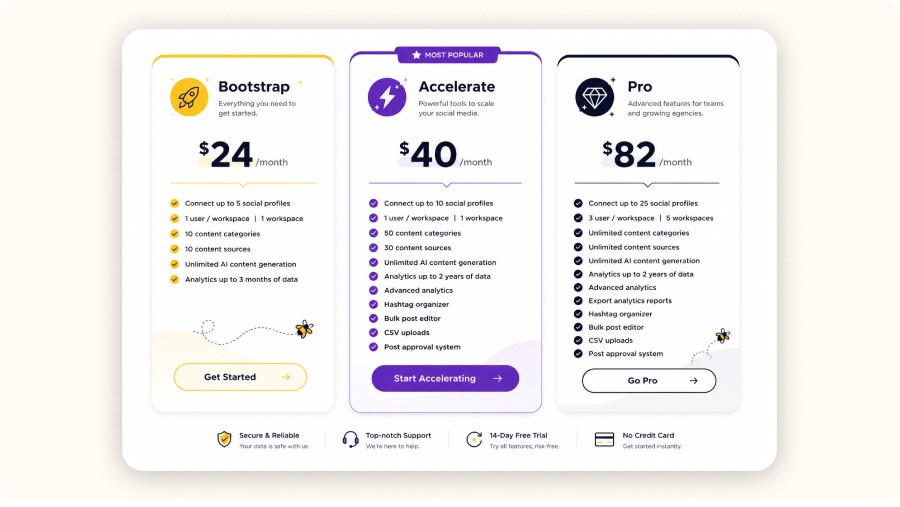
SocialBee’s standard plans (monthly) typically range from $29 to $99. The differences that matter for a dropshipping operator are mostly about how many social profiles you can connect, how many users/workspaces you get, and whether you need approval + bulk workflows.
A simple way to choose:
Bootstrap ($29/month): best when it’s just you, with a small set of channels and a lighter posting system. Limits that matter: up to 5 social profiles, 1 user, 1 workspace, and 10 content categories.
Accelerate ($49/month): best for a store owner who needs more structure and output (more channels, more categories, bulk editing). Key limits: up to 10 social profiles, 1 user, 1 workspace, and 50 content categories plus tools like bulk editing and a post approval system.
Pro ($99/month): best when you’re operating like a team or managing multiple brands. Key limits: up to 25 social profiles, 3 users per workspace, and up to 5 workspaces, with advanced reporting exports.
Example: “Solo store: Bootstrap; store + VA: Accelerate; mini-agency: Pro.” In practice, the mistake is overbuying: pick based on number of brands/workspaces and your weekly posting volume, then use socialbee ai to increase output inside that plan.
When you need higher tiers (multi-store / agency)
If you manage multiple stores/clients and hit the caps (profiles/workspaces/users), SocialBee also lists agency tiers such as Pro50, Pro100, Pro150 with higher allowances and different pricing, verify at publication time because tiers can change.
This is where socialbee ai becomes more valuable, because you’re not just drafting posts, you’re standardizing production across brands.
SocialBee offers a 14-day free trial (no credit card required) that gives access to all features during the trial period.
SocialBee Reviews: What Users Like/Dislike (Patterns)

Once you know how SocialBee stacks up against other tools, the next question is simple: what do real users consistently praise or criticize after using it day to day? That’s where SocialBee reviews are useful, patterns reveal whether the workflow is reliable, not just good on paper.
Common pros (time-saving, recycling, organization, support)
Across socialbee reviews, users commonly highlight:
Time saved from faster drafting and fewer last-minute posts
Evergreen recycling that keeps useful content running between promos
Organization via categories/queues, making posting predictable
Support that resolves issues quickly when something breaks
For a dropshipping store, that usually means less time writing and more time testing products, creatives, and offers. These themes often tie to steadier posting, which builds trust and supports conversion.
Common cons (learning curve, limitations vs all-in-one suites)
In many socialbee review notes, the recurring downsides are:
A learning curve (initial setup can feel dense)
Fewer enterprise extras than big suites (deep social listening, sentiment, heavy governance)
Expect scheduling and consistency first.
Minea
Discover All Performing Ads
Spot trending ads before anyone else, filter by spend, activity, and more to find winning products.

Alternatives & Comparisons

Before choosing a tool, be clear on what you actually need: a simple scheduler, an enterprise suite, or a repeatable content system built for testing products fast. That’s why it helps to compare SocialBee with the most common alternatives, so you pick based on workflow, not hype.
Buffer
Buffer is often better if you want simpler scheduling with fewer moving parts. If your dropshipping calendar is light and you mainly need to queue posts at scale, it can feel faster to learn than SocialBee. The trade-off: it’s not as “category recycling” driven, so you may do more manual planning than with socialbee ai.
Hootsuite
Hootsuite is typically chosen for broader, enterprise-style management: multiple departments, heavier governance, and wider monitoring needs. If your main pain is coordination across a larger org, it can beat what you’d expect from a lean socialbee review.
Sprout Social
Sprout Social is known for premium analytics and collaboration workflows, but pricing can be hard to justify for lean, solo dropshipping operations.
Final verdict
To get value fast, keep week one simple inside SocialBee. Create 8 content categories (demo, proof, education, FAQs, objections, legitimacy, community, promo). Then use socialbee ai with two prompt packs: one for angles + hooks (to generate fresh tests quickly) and one for objection killers (to turn shipping/returns/trust into clear reassurance posts). Batch your drafts, approve them, and schedule 14 days so your posting stays consistent even while you’re testing new products.
Final verdict: if you post 4+ times/week or juggle multiple products and promos, the trial is worth it. Start with one product, run this “content engine” for two weeks, and track consistency, clicks, and comment quality. If it works, scale categories and offers.
FAQ
What is SocialBee AI for a dropshipping store?
socialbee ai helps you generate hooks and caption variants, sort them into categories, and schedule across IG/TikTok/FB with less manual work. Use it to draft 3 angles, pick the strongest, then edit for your brand voice. It keeps your calendar full while you test products weekly.
Where do I log in?
Use app.socialbee to approve drafts, make quick edits, preview posts, and reschedule when an offer changes. Desktop is better for category design and bulk scheduling. On mobile, quick approvals prevent missed posting days.
Does it support evergreen recycling?
Yes, recycle FAQs, proof, and education posts every 30–60 days, and create a few hook variants so repeats don’t look spammy. Set promos to expire quickly. Keep one promo category so value content stays dominant.
How do I stay compliant?
Avoid medical claims, fake scarcity, and “guaranteed results.” Paste your real shipping/returns wording, then review links, price, and guarantee language before publishing.
What do SocialBee reviews usually reveal?
In socialbee reviews, focus on reliability, recycling, approvals, and support speed. Expect a learning curve; don’t judge it like an enterprise suite. A good socialbee review is one that matches your posting volume and workflow.
Content Quality & Compliance (Don’t let AI hurt conversions)
Before you publish more, you need to make sure the copy stays credible and compliant. Here’s how to set simple rules so socialbee ai boosts conversions instead of hurting trust.
Brand voice guardrails (do/don’t list)
When you use socialbee ai, consistency matters more than “clever” copy. Keep SocialBee outputs tight and specific.
Do: lead with a clear benefit, add proof (UGC line, demo detail, policy), and remove ambiguity.
Don’t: use exaggerated claims, “miracle” language, or anything that implies guaranteed results.
Style guide snippet: short sentences, no hype, one promise per post, one CTA, and the same words your product page uses.
Dropshipping compliance pitfalls (claims, scarcity, guarantees)
In this socialbee review context, avoid medical claims, fake scarcity, and blanket guarantees. If you mention urgency, tie it to a real deadline or real stock notes. If you mention delivery, use your real shipping window and returns wording.
Human review checklist before scheduling
Before publishing, run a fast check:
Hook is clear in the first line
Proof is included (quote, demo detail, or policy)
Claims are safe and match your store
CTA and link are correct
Post fits the right category/queue
If something feels off, rewrite it before it reaches customers today. This habit reduces refunds and improves socialbee reviews over time.
app.socialbee: Login + Mobile Workflow
If you plan to run approvals and quick edits between ad optimizations and customer support, the next piece is the practical workflow. Here’s how app.socialbee fits into your day-to-day posting routine and when mobile actually saves you time.
What you do in app.socialbee (approve, edit, publish, preview)
You log in to SocialBee through app.socialbee. Once you’re inside, the workflow is mostly “keep the pipeline moving”:
Typical tasks in app.socialbee:
Approve drafts created by you or a VA before they go live
Make quick edits (fix a price, adjust a claim, tighten the hook)
Preview captions and media to avoid formatting surprises
Publish or reschedule when an offer changes or stock updates
Check notifications so nothing sits unapproved for 24 hours
Why it matters: dropshipping is fast. On-the-go approvals help you maintain daily consistency even when you’re busy with ads, suppliers, or customer support. SocialBee becomes less about “creating content” and more about preventing gaps in posting.
When mobile helps vs when desktop is better
Use mobile when you need speed:
Approvals and “yes/no” decisions
Small caption tweaks
Calendar review to ensure today’s post still matches the current offer
Quick checks for links and basic CTA accuracy
Use desktop when you need structure:
Building content categories and recycling rules
Bulk scheduling and batch uploads
Strategy setup (posting mix, category cadence, templates)
Rule of thumb: set the system on desktop, then use app.socialbee on mobile to keep publishing consistent day-to-day.
SocialBee Pricing (US) + Which Plan Fits Dropshipping
Comparisons show what each tool claims to do; real-world feedback shows what actually holds up after weeks of daily posting. Next, we’ll look at the recurring patterns in SocialBee reviews so you can judge reliability, learning curve, and support before committing.
Bootstrap vs Accelerate vs Pro (what changes for a store owner)
SocialBee’s standard plans (monthly) typically range from $29 to $99. The differences that matter for a dropshipping operator are mostly about how many social profiles you can connect, how many users/workspaces you get, and whether you need approval + bulk workflows.
A simple way to choose:
Bootstrap ($29/month): best when it’s just you, with a small set of channels and a lighter posting system. Limits that matter: up to 5 social profiles, 1 user, 1 workspace, and 10 content categories.
Accelerate ($49/month): best for a store owner who needs more structure and output (more channels, more categories, bulk editing). Key limits: up to 10 social profiles, 1 user, 1 workspace, and 50 content categories plus tools like bulk editing and a post approval system.
Pro ($99/month): best when you’re operating like a team or managing multiple brands. Key limits: up to 25 social profiles, 3 users per workspace, and up to 5 workspaces, with advanced reporting exports.
Example: “Solo store: Bootstrap; store + VA: Accelerate; mini-agency: Pro.” In practice, the mistake is overbuying: pick based on number of brands/workspaces and your weekly posting volume, then use socialbee ai to increase output inside that plan.
When you need higher tiers (multi-store / agency)
If you manage multiple stores/clients and hit the caps (profiles/workspaces/users), SocialBee also lists agency tiers such as Pro50, Pro100, Pro150 with higher allowances and different pricing, verify at publication time because tiers can change.
This is where socialbee ai becomes more valuable, because you’re not just drafting posts, you’re standardizing production across brands.
SocialBee offers a 14-day free trial (no credit card required) that gives access to all features during the trial period.
SocialBee Reviews: What Users Like/Dislike (Patterns)
Once you know how SocialBee stacks up against other tools, the next question is simple: what do real users consistently praise or criticize after using it day to day? That’s where SocialBee reviews are useful, patterns reveal whether the workflow is reliable, not just good on paper.
Common pros (time-saving, recycling, organization, support)
Across socialbee reviews, users commonly highlight:
Time saved from faster drafting and fewer last-minute posts
Evergreen recycling that keeps useful content running between promos
Organization via categories/queues, making posting predictable
Support that resolves issues quickly when something breaks
For a dropshipping store, that usually means less time writing and more time testing products, creatives, and offers. These themes often tie to steadier posting, which builds trust and supports conversion.
Common cons (learning curve, limitations vs all-in-one suites)
In many socialbee review notes, the recurring downsides are:
A learning curve (initial setup can feel dense)
Fewer enterprise extras than big suites (deep social listening, sentiment, heavy governance)
Expect scheduling and consistency first.
Minea
Discover All Performing Ads
Spot trending ads before anyone else, filter by spend, activity, and more to find winning products.
Alternatives & Comparisons
Before choosing a tool, be clear on what you actually need: a simple scheduler, an enterprise suite, or a repeatable content system built for testing products fast. That’s why it helps to compare SocialBee with the most common alternatives, so you pick based on workflow, not hype.
Buffer
Buffer is often better if you want simpler scheduling with fewer moving parts. If your dropshipping calendar is light and you mainly need to queue posts at scale, it can feel faster to learn than SocialBee. The trade-off: it’s not as “category recycling” driven, so you may do more manual planning than with socialbee ai.
Hootsuite
Hootsuite is typically chosen for broader, enterprise-style management: multiple departments, heavier governance, and wider monitoring needs. If your main pain is coordination across a larger org, it can beat what you’d expect from a lean socialbee review.
Sprout Social
Sprout Social is known for premium analytics and collaboration workflows, but pricing can be hard to justify for lean, solo dropshipping operations.
Final verdict
To get value fast, keep week one simple inside SocialBee. Create 8 content categories (demo, proof, education, FAQs, objections, legitimacy, community, promo). Then use socialbee ai with two prompt packs: one for angles + hooks (to generate fresh tests quickly) and one for objection killers (to turn shipping/returns/trust into clear reassurance posts). Batch your drafts, approve them, and schedule 14 days so your posting stays consistent even while you’re testing new products.
Final verdict: if you post 4+ times/week or juggle multiple products and promos, the trial is worth it. Start with one product, run this “content engine” for two weeks, and track consistency, clicks, and comment quality. If it works, scale categories and offers.
FAQ
What is SocialBee AI for a dropshipping store?
socialbee ai helps you generate hooks and caption variants, sort them into categories, and schedule across IG/TikTok/FB with less manual work. Use it to draft 3 angles, pick the strongest, then edit for your brand voice. It keeps your calendar full while you test products weekly.
Where do I log in?
Use app.socialbee to approve drafts, make quick edits, preview posts, and reschedule when an offer changes. Desktop is better for category design and bulk scheduling. On mobile, quick approvals prevent missed posting days.
Does it support evergreen recycling?
Yes, recycle FAQs, proof, and education posts every 30–60 days, and create a few hook variants so repeats don’t look spammy. Set promos to expire quickly. Keep one promo category so value content stays dominant.
How do I stay compliant?
Avoid medical claims, fake scarcity, and “guaranteed results.” Paste your real shipping/returns wording, then review links, price, and guarantee language before publishing.
What do SocialBee reviews usually reveal?
In socialbee reviews, focus on reliability, recycling, approvals, and support speed. Expect a learning curve; don’t judge it like an enterprise suite. A good socialbee review is one that matches your posting volume and workflow.
Similar articles
Later for Dropshipping: How to Run Your E-commerce Social Media in 30 Minutes a Day
Best Management Software Network
Later for Dropshipping: How to Run Your E-commerce Social Media in 30 Minutes a Day
Best Management Software Network
Later for Dropshipping: How to Run Your E-commerce Social Media in 30 Minutes a Day
Best Management Software Network
Later for Dropshipping: How to Run Your E-commerce Social Media in 30 Minutes a Day
Best Management Software Network
Buffer software for dropshipping: how to schedule social posts that sell
Best Management Software Network
Buffer software for dropshipping: how to schedule social posts that sell
Best Management Software Network
Buffer software for dropshipping: how to schedule social posts that sell
Best Management Software Network
Buffer software for dropshipping: how to schedule social posts that sell
Best Management Software Network

Loomly app for dropshipping business: review, pricing, and alternatives for 2026
Best Management Software Network
Loomly app for dropshipping business: review, pricing, and alternatives for 2026
Best Management Software Network
Loomly app for dropshipping business: review, pricing, and alternatives for 2026
Best Management Software Network
Loomly app for dropshipping business: review, pricing, and alternatives for 2026
Best Management Software Network

Hootsuite Management for Dropshipping: How to Run Social Media Like a System (2026)
Best Management Software Network
Hootsuite Management for Dropshipping: How to Run Social Media Like a System (2026)
Best Management Software Network
Hootsuite Management for Dropshipping: How to Run Social Media Like a System (2026)
Best Management Software Network
Hootsuite Management for Dropshipping: How to Run Social Media Like a System (2026)
Best Management Software Network


Our Free Adspys

Find winning products on our Tiktok adspy today!
Find winning products on our Facebook adspy today!
Find winning products on our Tiktok adspy today!
Find winning products on our Facebook adspy today!
Find winning products on our Tiktok adspy today!
Find winning products on our Facebook adspy today!
Find winning products on our Tiktok adspy today!
Find winning products on our Facebook adspy today!
1 winning product everyday.
Follow us!






Find out more
Read more
Minea © 2026
Find out more
Read more
Minea © 2026
Find out more
Read more
Minea © 2026
Find out more
Read more
Minea © 2026
Find out more
Read more
Minea © 2026
Find out more
Read more
Minea © 2026
Best Management Software Network