Hootsuite Management for Dropshipping: How to Run Social Media Like a System (2026)
Best Management Software Network
Author: Josa
Contents
If you’re running a dropshipping store, social can’t be “post when you remember.” You need a system that keeps product tests, promos, and customer DMs moving without eating your whole day.
Hootsuite is one of the few tools built for repeatable social media management: scheduling at scale, a unified inbox, approvals, analytics, and team workflows. The real question is whether it’s the right fit for a dropshipping operation where speed and feedback loops matter more than pretty dashboards.
Key takeaways
If you only change one thing this week: build a 14-day content pipeline (assets → captions → schedule → inbox rules) so you’re never starting from zero.
Hootsuite is strongest when you need bulk scheduling, collaboration, and reporting across multiple channels.
For dropshipping, the bottleneck is rarely posting. It’s turning winning product angles into enough variations to test consistently.
You’ll get better ROI when Hootsuite is paired with a clear workflow: Minea for product/angle discovery → Hootsuite for execution and measurement.
How can Hootsuite help manage a dropshipping business’s social media?
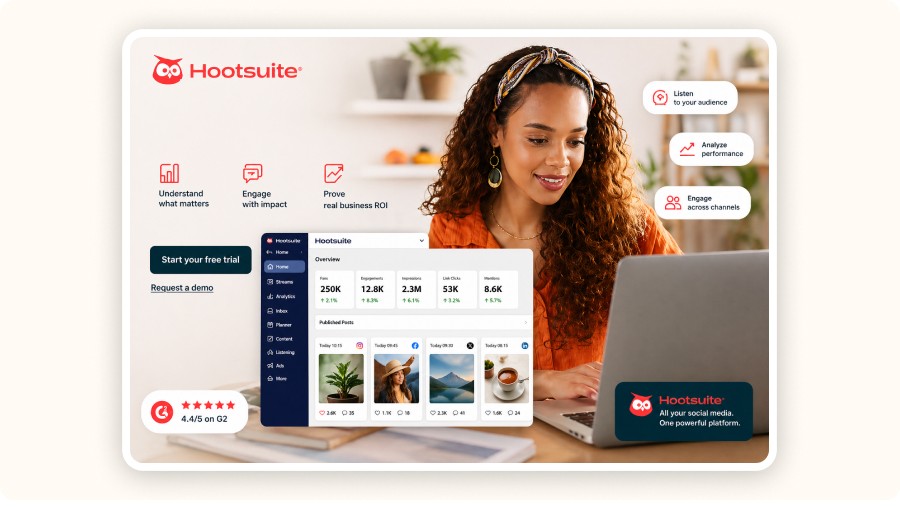
Hootsuite helps dropshipping sellers run social media like an operating system: plan posts in batches, schedule weeks ahead, centralize DMs and comments, route conversations to the right person, and track what content actually drives clicks and sales.
For dropshipping, “social media management” is really four jobs:
Content production (hooks, captions, creatives)
Distribution (publishing at the right times on the right channels)
Conversation handling (DMs, comments, support, pre-sale questions)
Performance feedback (what’s working, what to stop, what to scale)
Hootsuite mainly solves #2–#4. That’s a big deal. It prevents a common failure mode: you launch a new product, post for three days, then the schedule goes quiet and you lose momentum.
Where it can pay off fast for a dropshipping store
Weekly batch scheduling: set your week once, then spend your days improving creatives instead of trying to remember to post.
Unified inbox: don’t miss “Does it ship to the US?” or “Is this legit?” messages that can turn into sales.
Approvals + collaboration: if you work with a VA or a creator, you can approve posts quickly and reuse brand-safe assets.
Analytics: stop guessing. Look at what drives saves, clicks, replies, and profile visits then double down on what’s working.
The dropshipping workflow: Minea → Hootsuite → sales
The best way to use Hootsuite for dropshipping is to plug it into a tight loop: discover what’s already winning, turn it into a content plan, publish consistently, then measure what to scale.
Here’s a practical loop that keeps you out of “random posting” mode:
1) Find a product + angles that already sell
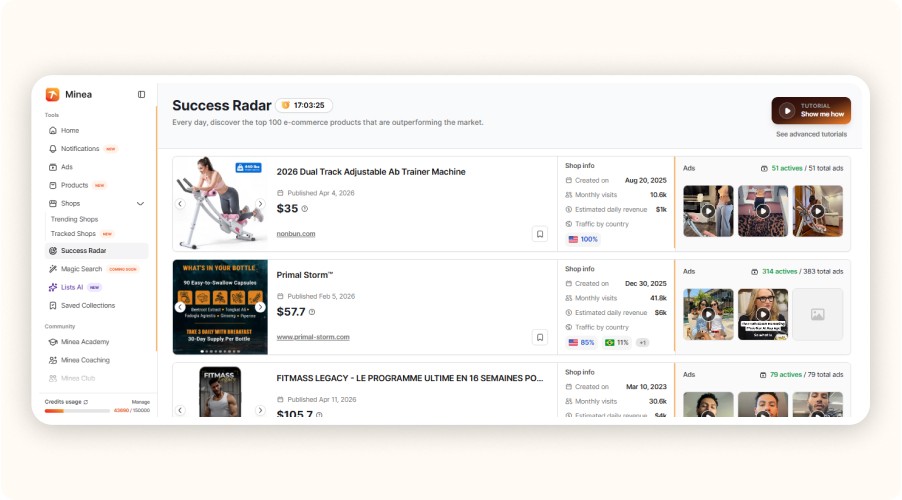
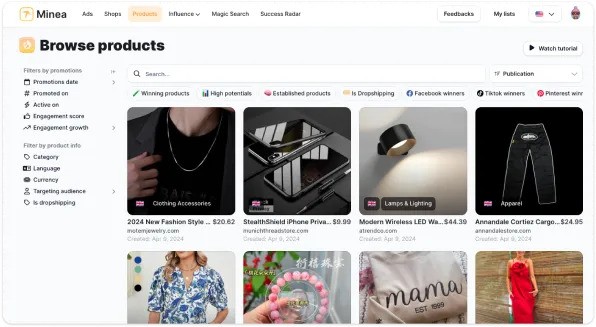
Use Success Radar for trend signals, and Minea’s Ads Library to identify the hooks and ad angles that keep showing up across different advertisers.
Example: in Minea’s trending list, you might see products like a posture corrector belt (trend score 92) or an LED face mask (trend score 88). Treat that as a cue to build multiple angles fast, not one “hero post.”
2) Turn angles into a 14-day plan
You need volume: hooks, objections, UGC-style scripts, before/after, FAQs.
Build a simple matrix: angle × format × CTA.
3) Schedule and repurpose in Hootsuite
Schedule your core posts and repurposed variants across platforms. Your goal is consistency with variation, not perfection.
4) Run an inbox rulebook
Create response templates for shipping, refunds, sizing, and “does it work?” questions.
Route high-intent DMs to a faster workflow (your phone + saved replies).
5) Measure, then rebuild next week around winners
Fast growth comes from repeating what already worked. If a hook drives DMs, build 10 more versions of that hook.
Minea insight (practical sourcing lens): if you’re selling impulse products around $29.99, your content has to do two things quickly: explain the benefit in one sentence, then remove purchase friction (shipping time, trust, returns). And if your suppliers are mainly overseas (often China, Turkey, Vietnam, etc.), your scripts should proactively set expectations on delivery windows and tracking.


How to schedule dropshipping posts in Hootsuite (step-by-step)
If you’re using Hootsuite for dropshipping, the big win is batching: create assets in one sitting, write captions in one sitting, then schedule 1–2 weeks in one go.
Step 1: Pick your “content pillars” for the next 14 days

Estimated time: 25–40 minutes
Stick to 4 pillars. More usually becomes noise.
Product proof: demos, before/after, “what you get” unboxing
Objection killers: shipping time, returns, quality, “does it work?”
Social proof: creator-style testimonials, reviews, stitches/duets (where allowed)
Offer + urgency: bundles, limited-time promos, restocks
If you’re stuck, pull your pillars from your ad-spy work. If an angle is winning in ads, it usually deserves organic support too.
Step 2: Build 20–40 post variations (don’t aim for 20 unique ideas)

Estimated time: 60–120 minutes
In dropshipping, variation beats novelty.
A simple variation recipe:
Same core claim
Different hook
Different visual
Different CTA
Example (posture corrector belt):
Hook A: “Your back pain might be posture, not your chair.”
Hook B: “The 30-second posture test you can do right now.”
Hook C: “Before you buy another pillow, try this.”
Step 3: Create a reusable asset library (and keep it brand-safe)
Estimated time: 30–60 minutes
Set up one folder with:
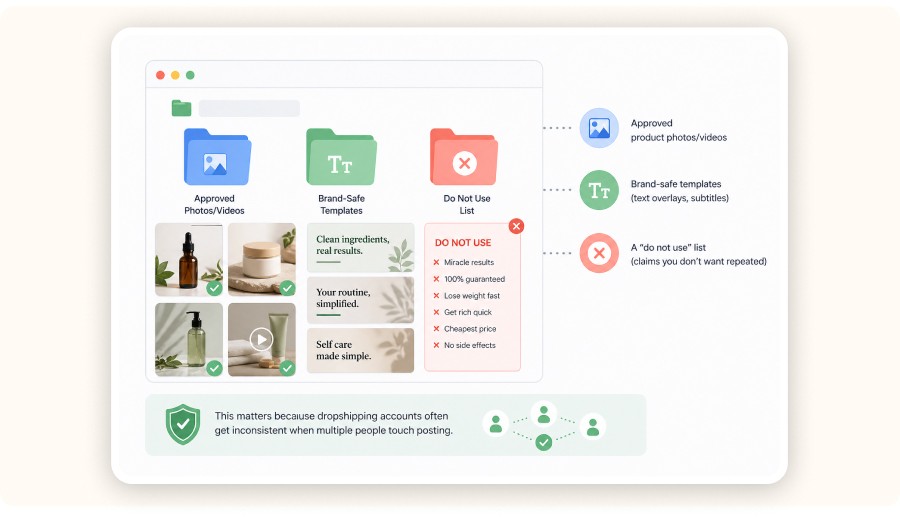
Approved product photos/videos
Brand-safe templates (text overlays, subtitles)
A “do not use” list (claims you don’t want repeated)
This matters because dropshipping accounts often get inconsistent when multiple people touch posting.
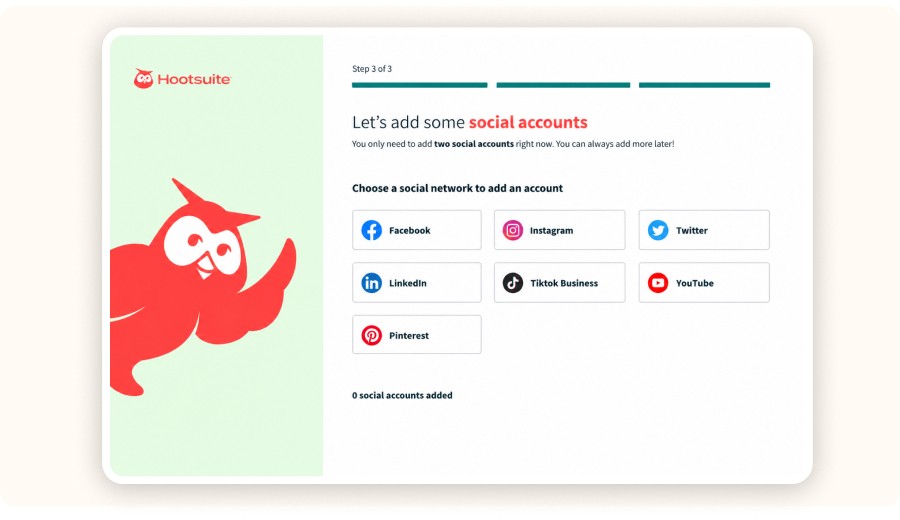
Step 4: Connect your social accounts and set your posting schedule
Estimated time: 15–30 minutes
Inside Hootsuite:
Connect your channels
Decide your cadence per platform
Choose posting windows you can actually sustain
A realistic baseline:
1 post/day on your primary channel
3–5 stories/week
2–3 short videos/week
Only scale cadence after the workflow feels automatic.
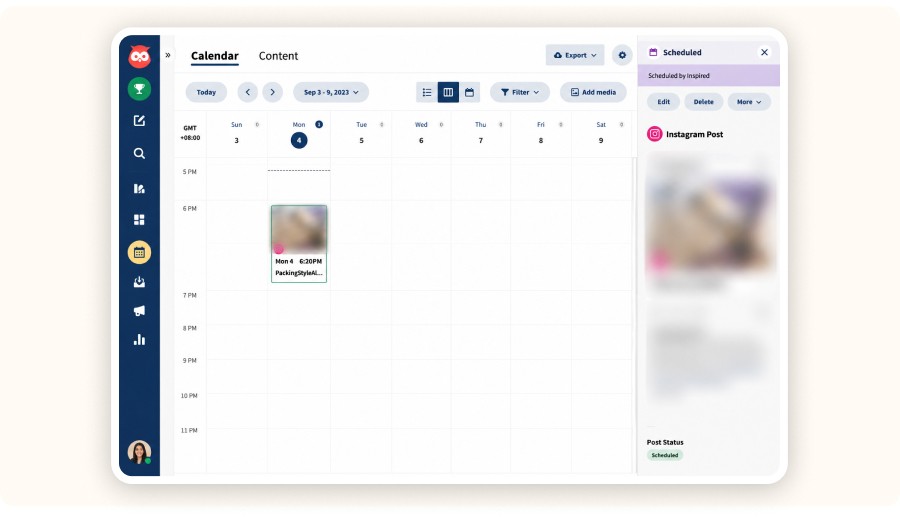
Step 5: Batch schedule and tag content for later analysis
Estimated time: 30–45 minutes
When scheduling, use a simple tagging system so results don’t get blurry:
Product:
[Posture Belt]Angle:
[Pain Relief]/[Confidence]/[Desk Job]Format:
[Demo]/[UGC]/[FAQ]CTA:
[Shop Now]/[DM Us]/[Bundle]
If your plan supports bulk scheduling, use it, the point is to schedule many posts without repetitive manual steps.
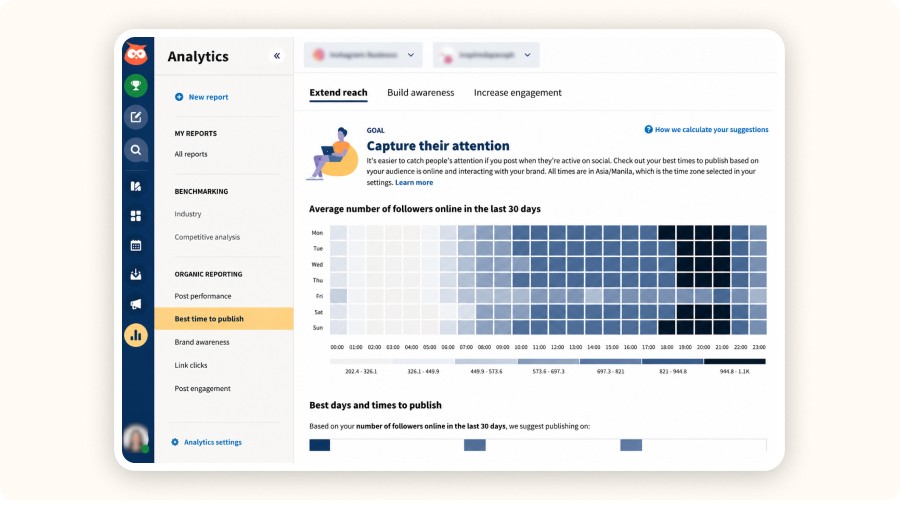
Step 6: Set up a weekly “results review” ritual
Estimated time: 20 minutes/week
Pick one day each week. Review:
Best posts by saves/shares
Posts that triggered DMs
Clicks to your store (if tracking is set up)
Then rebuild next week around the top 2–3 angles.
Minea
Top 100 best-performing products this month
Detected in real time by our AI from market signals: real sales, advertising statistics, and performance
If you’re running a dropshipping store, social can’t be “post when you remember.” You need a system that keeps product tests, promos, and customer DMs moving without eating your whole day.
Hootsuite is one of the few tools built for repeatable social media management: scheduling at scale, a unified inbox, approvals, analytics, and team workflows. The real question is whether it’s the right fit for a dropshipping operation where speed and feedback loops matter more than pretty dashboards.
Key takeaways
If you only change one thing this week: build a 14-day content pipeline (assets → captions → schedule → inbox rules) so you’re never starting from zero.
Hootsuite is strongest when you need bulk scheduling, collaboration, and reporting across multiple channels.
For dropshipping, the bottleneck is rarely posting. It’s turning winning product angles into enough variations to test consistently.
You’ll get better ROI when Hootsuite is paired with a clear workflow: Minea for product/angle discovery → Hootsuite for execution and measurement.
How can Hootsuite help manage a dropshipping business’s social media?
Hootsuite helps dropshipping sellers run social media like an operating system: plan posts in batches, schedule weeks ahead, centralize DMs and comments, route conversations to the right person, and track what content actually drives clicks and sales.
For dropshipping, “social media management” is really four jobs:
Content production (hooks, captions, creatives)
Distribution (publishing at the right times on the right channels)
Conversation handling (DMs, comments, support, pre-sale questions)
Performance feedback (what’s working, what to stop, what to scale)
Hootsuite mainly solves #2–#4. That’s a big deal. It prevents a common failure mode: you launch a new product, post for three days, then the schedule goes quiet and you lose momentum.
Where it can pay off fast for a dropshipping store
Weekly batch scheduling: set your week once, then spend your days improving creatives instead of trying to remember to post.
Unified inbox: don’t miss “Does it ship to the US?” or “Is this legit?” messages that can turn into sales.
Approvals + collaboration: if you work with a VA or a creator, you can approve posts quickly and reuse brand-safe assets.
Analytics: stop guessing. Look at what drives saves, clicks, replies, and profile visits then double down on what’s working.
The dropshipping workflow: Minea → Hootsuite → sales
The best way to use Hootsuite for dropshipping is to plug it into a tight loop: discover what’s already winning, turn it into a content plan, publish consistently, then measure what to scale.
Here’s a practical loop that keeps you out of “random posting” mode:
1) Find a product + angles that already sell
Use Success Radar for trend signals, and Minea’s Ads Library to identify the hooks and ad angles that keep showing up across different advertisers.
Example: in Minea’s trending list, you might see products like a posture corrector belt (trend score 92) or an LED face mask (trend score 88). Treat that as a cue to build multiple angles fast, not one “hero post.”
2) Turn angles into a 14-day plan
You need volume: hooks, objections, UGC-style scripts, before/after, FAQs.
Build a simple matrix: angle × format × CTA.
3) Schedule and repurpose in Hootsuite
Schedule your core posts and repurposed variants across platforms. Your goal is consistency with variation, not perfection.
4) Run an inbox rulebook
Create response templates for shipping, refunds, sizing, and “does it work?” questions.
Route high-intent DMs to a faster workflow (your phone + saved replies).
5) Measure, then rebuild next week around winners
Fast growth comes from repeating what already worked. If a hook drives DMs, build 10 more versions of that hook.
Minea insight (practical sourcing lens): if you’re selling impulse products around $29.99, your content has to do two things quickly: explain the benefit in one sentence, then remove purchase friction (shipping time, trust, returns). And if your suppliers are mainly overseas (often China, Turkey, Vietnam, etc.), your scripts should proactively set expectations on delivery windows and tracking.
How to schedule dropshipping posts in Hootsuite (step-by-step)
If you’re using Hootsuite for dropshipping, the big win is batching: create assets in one sitting, write captions in one sitting, then schedule 1–2 weeks in one go.
Step 1: Pick your “content pillars” for the next 14 days
Estimated time: 25–40 minutes
Stick to 4 pillars. More usually becomes noise.
Product proof: demos, before/after, “what you get” unboxing
Objection killers: shipping time, returns, quality, “does it work?”
Social proof: creator-style testimonials, reviews, stitches/duets (where allowed)
Offer + urgency: bundles, limited-time promos, restocks
If you’re stuck, pull your pillars from your ad-spy work. If an angle is winning in ads, it usually deserves organic support too.
Step 2: Build 20–40 post variations (don’t aim for 20 unique ideas)
Estimated time: 60–120 minutes
In dropshipping, variation beats novelty.
A simple variation recipe:
Same core claim
Different hook
Different visual
Different CTA
Example (posture corrector belt):
Hook A: “Your back pain might be posture, not your chair.”
Hook B: “The 30-second posture test you can do right now.”
Hook C: “Before you buy another pillow, try this.”
Step 3: Create a reusable asset library (and keep it brand-safe)
Estimated time: 30–60 minutes
Set up one folder with:
Approved product photos/videos
Brand-safe templates (text overlays, subtitles)
A “do not use” list (claims you don’t want repeated)
This matters because dropshipping accounts often get inconsistent when multiple people touch posting.
Step 4: Connect your social accounts and set your posting schedule
Estimated time: 15–30 minutes
Inside Hootsuite:
Connect your channels
Decide your cadence per platform
Choose posting windows you can actually sustain
A realistic baseline:
1 post/day on your primary channel
3–5 stories/week
2–3 short videos/week
Only scale cadence after the workflow feels automatic.
Step 5: Batch schedule and tag content for later analysis
Estimated time: 30–45 minutes
When scheduling, use a simple tagging system so results don’t get blurry:
Product:
[Posture Belt]Angle:
[Pain Relief]/[Confidence]/[Desk Job]Format:
[Demo]/[UGC]/[FAQ]CTA:
[Shop Now]/[DM Us]/[Bundle]
If your plan supports bulk scheduling, use it, the point is to schedule many posts without repetitive manual steps.
Step 6: Set up a weekly “results review” ritual
Estimated time: 20 minutes/week
Pick one day each week. Review:
Best posts by saves/shares
Posts that triggered DMs
Clicks to your store (if tracking is set up)
Then rebuild next week around the top 2–3 angles.
Minea
Top 100 best-performing products this month
Detected in real time by our AI from market signals: real sales, advertising statistics, and performance
If you’re running a dropshipping store, social can’t be “post when you remember.” You need a system that keeps product tests, promos, and customer DMs moving without eating your whole day.
Hootsuite is one of the few tools built for repeatable social media management: scheduling at scale, a unified inbox, approvals, analytics, and team workflows. The real question is whether it’s the right fit for a dropshipping operation where speed and feedback loops matter more than pretty dashboards.
Key takeaways
If you only change one thing this week: build a 14-day content pipeline (assets → captions → schedule → inbox rules) so you’re never starting from zero.
Hootsuite is strongest when you need bulk scheduling, collaboration, and reporting across multiple channels.
For dropshipping, the bottleneck is rarely posting. It’s turning winning product angles into enough variations to test consistently.
You’ll get better ROI when Hootsuite is paired with a clear workflow: Minea for product/angle discovery → Hootsuite for execution and measurement.
How can Hootsuite help manage a dropshipping business’s social media?
Hootsuite helps dropshipping sellers run social media like an operating system: plan posts in batches, schedule weeks ahead, centralize DMs and comments, route conversations to the right person, and track what content actually drives clicks and sales.
For dropshipping, “social media management” is really four jobs:
Content production (hooks, captions, creatives)
Distribution (publishing at the right times on the right channels)
Conversation handling (DMs, comments, support, pre-sale questions)
Performance feedback (what’s working, what to stop, what to scale)
Hootsuite mainly solves #2–#4. That’s a big deal. It prevents a common failure mode: you launch a new product, post for three days, then the schedule goes quiet and you lose momentum.
Where it can pay off fast for a dropshipping store
Weekly batch scheduling: set your week once, then spend your days improving creatives instead of trying to remember to post.
Unified inbox: don’t miss “Does it ship to the US?” or “Is this legit?” messages that can turn into sales.
Approvals + collaboration: if you work with a VA or a creator, you can approve posts quickly and reuse brand-safe assets.
Analytics: stop guessing. Look at what drives saves, clicks, replies, and profile visits then double down on what’s working.
The dropshipping workflow: Minea → Hootsuite → sales
The best way to use Hootsuite for dropshipping is to plug it into a tight loop: discover what’s already winning, turn it into a content plan, publish consistently, then measure what to scale.
Here’s a practical loop that keeps you out of “random posting” mode:
1) Find a product + angles that already sell
Use Success Radar for trend signals, and Minea’s Ads Library to identify the hooks and ad angles that keep showing up across different advertisers.
Example: in Minea’s trending list, you might see products like a posture corrector belt (trend score 92) or an LED face mask (trend score 88). Treat that as a cue to build multiple angles fast, not one “hero post.”
2) Turn angles into a 14-day plan
You need volume: hooks, objections, UGC-style scripts, before/after, FAQs.
Build a simple matrix: angle × format × CTA.
3) Schedule and repurpose in Hootsuite
Schedule your core posts and repurposed variants across platforms. Your goal is consistency with variation, not perfection.
4) Run an inbox rulebook
Create response templates for shipping, refunds, sizing, and “does it work?” questions.
Route high-intent DMs to a faster workflow (your phone + saved replies).
5) Measure, then rebuild next week around winners
Fast growth comes from repeating what already worked. If a hook drives DMs, build 10 more versions of that hook.
Minea insight (practical sourcing lens): if you’re selling impulse products around $29.99, your content has to do two things quickly: explain the benefit in one sentence, then remove purchase friction (shipping time, trust, returns). And if your suppliers are mainly overseas (often China, Turkey, Vietnam, etc.), your scripts should proactively set expectations on delivery windows and tracking.
How to schedule dropshipping posts in Hootsuite (step-by-step)
If you’re using Hootsuite for dropshipping, the big win is batching: create assets in one sitting, write captions in one sitting, then schedule 1–2 weeks in one go.
Step 1: Pick your “content pillars” for the next 14 days
Estimated time: 25–40 minutes
Stick to 4 pillars. More usually becomes noise.
Product proof: demos, before/after, “what you get” unboxing
Objection killers: shipping time, returns, quality, “does it work?”
Social proof: creator-style testimonials, reviews, stitches/duets (where allowed)
Offer + urgency: bundles, limited-time promos, restocks
If you’re stuck, pull your pillars from your ad-spy work. If an angle is winning in ads, it usually deserves organic support too.
Step 2: Build 20–40 post variations (don’t aim for 20 unique ideas)
Estimated time: 60–120 minutes
In dropshipping, variation beats novelty.
A simple variation recipe:
Same core claim
Different hook
Different visual
Different CTA
Example (posture corrector belt):
Hook A: “Your back pain might be posture, not your chair.”
Hook B: “The 30-second posture test you can do right now.”
Hook C: “Before you buy another pillow, try this.”
Step 3: Create a reusable asset library (and keep it brand-safe)
Estimated time: 30–60 minutes
Set up one folder with:
Approved product photos/videos
Brand-safe templates (text overlays, subtitles)
A “do not use” list (claims you don’t want repeated)
This matters because dropshipping accounts often get inconsistent when multiple people touch posting.
Step 4: Connect your social accounts and set your posting schedule
Estimated time: 15–30 minutes
Inside Hootsuite:
Connect your channels
Decide your cadence per platform
Choose posting windows you can actually sustain
A realistic baseline:
1 post/day on your primary channel
3–5 stories/week
2–3 short videos/week
Only scale cadence after the workflow feels automatic.
Step 5: Batch schedule and tag content for later analysis
Estimated time: 30–45 minutes
When scheduling, use a simple tagging system so results don’t get blurry:
Product:
[Posture Belt]Angle:
[Pain Relief]/[Confidence]/[Desk Job]Format:
[Demo]/[UGC]/[FAQ]CTA:
[Shop Now]/[DM Us]/[Bundle]
If your plan supports bulk scheduling, use it, the point is to schedule many posts without repetitive manual steps.
Step 6: Set up a weekly “results review” ritual
Estimated time: 20 minutes/week
Pick one day each week. Review:
Best posts by saves/shares
Posts that triggered DMs
Clicks to your store (if tracking is set up)
Then rebuild next week around the top 2–3 angles.
Minea
Top 100 best-performing products this month
Detected in real time by our AI from market signals: real sales, advertising statistics, and performance
Does Hootsuite integrate with Shopify?
Hootsuite can support a Shopify-based dropshipping business even if it doesn’t behave like a “Shopify app” for every workflow. The clean way to think about it is: Shopify runs the store, Hootsuite runs your publishing + inbox routines.
What to do in practice
Use Shopify to manage products, orders, and on-site conversion.
Use Hootsuite to run your social calendar and conversations.
Use UTM links in social posts so you can see traffic and sales performance inside Shopify (and your analytics tools).
If your plan is “connect Shopify and have Hootsuite auto-post products,” be careful. Automated product posting often leads to generic captions and repetitive creatives. For dropshipping, it’s usually better to post curated angles that match what’s already winning.
What are the disadvantages of Hootsuite for a small dropshipping business?

Hootsuite’s main downside for small dropshipping stores is cost-to-value if you’re only using basic scheduling. The ROI shows up when you use collaboration, inbox workflows, and reporting not just posting.
Common downsides to watch
Pricing can feel heavy if you’re solo and just want to schedule posts.
It won’t fix creative strategy. A calendar full of weak hooks still won’t sell.
Setup takes time. Tags, templates, and routines are upfront work.
You can over-operationalize some sellers spend more time managing than creating winners.
A simple decision rule
If you post 3–5×/week and answer DMs manually: start simple.
If you post daily, run multiple channels, and have a VA: Hootsuite becomes easier to justify.
What happened with Hootsuite (and what that means for sellers)
Hootsuite has kept evolving into a more operations-focused social platform: team collaboration, reusable assets, inbox automation, and analytics templates. For sellers, that’s a clear signal it’s built for repeatable workflows, not one-off posting.
What it means in practice
If you’re building a small content machine with help (VA/creator), workflow features actually matter.
If you’re a solo operator with low posting volume, you may get similar results from lighter tools.
What’s a better platform than Hootsuite for dropshipping?
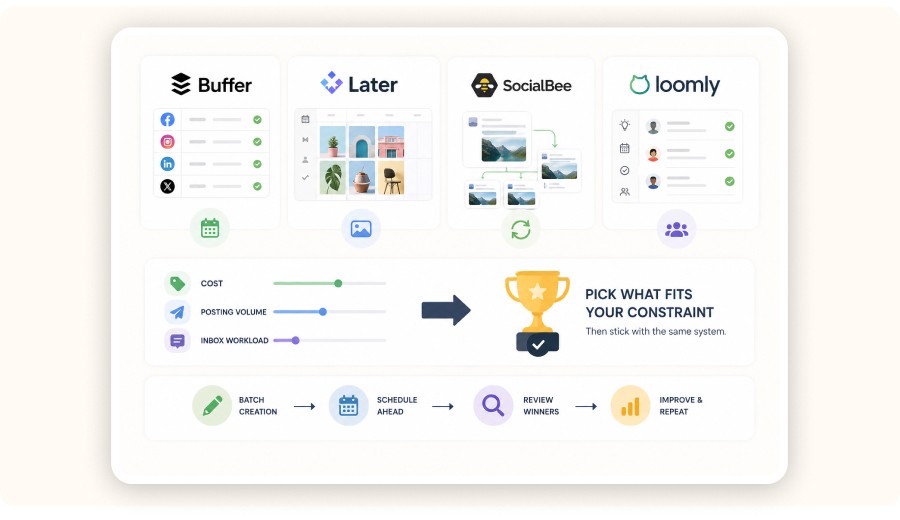
A “better” platform than Hootsuite depends on your constraint: budget, volume, channels, or inbox workload. For many dropshipping stores, the best alternative is the tool that makes posting consistent and keeps DMs from slipping.
Use this quick filter
If your problem is cost: pick a lighter scheduler and keep your process simple.
If your problem is volume: you need bulk workflows and a real calendar.
If your problem is customer conversations: prioritize inbox + routing.
If your problem is strategy: no scheduler will save you, you need better angles and faster iteration.
The most reliable “upgrade” isn’t switching platforms. It’s tightening your weekly loop:
Discover angles faster (Minea)
Produce 20–40 variations
Schedule in batches
Use analytics to pick winners
That’s what makes social compound.
Hootsuite Alternatives for Dropshipping Teams
Buffer software: best if you want simple scheduling and a clean queue with minimal setup.
Later software: strong for visual planning and managing short-form content workflows.
SocialBee AI: useful to recycle evergreen posts and generate variations faster (good for consistency).
Loomly app: great for small teams that need approvals, content ideas, and basic workflow control.
Best network management software (rule of thumb): pick based on your constraint cost, posting volume, or inbox workload then keep the same system: batch creation, schedule ahead, review winners weekly.
Minea
Reach $1,000 per day or get your money back

Common mistakes dropshippers make with Hootsuite (and how to avoid them)

1) Scheduling content before you have enough creative volume
What happens: you run out of posts and go dark.
Fix: commit to two batching sessions per week until you have a 14-day buffer.
2) Tracking posts instead of tracking angles
What happens: you keep repeating the wrong ideas.
Fix: tag by angle and format so you can scale what actually works.
3) Treating the inbox like “support” only
What happens: you miss pre-sale signals that drive revenue.
Fix: build templates that answer objections and move buyers toward checkout.
4) Publishing generic product posts that don’t match buying intent
What happens: views with no clicks.
Fix: open your caption by addressing the #1 objection in the first line.
5) Overbuilding the system
What happens: you spend hours in tools and don’t ship content.
Fix: keep one weekly ritual: schedule + inbox rules + review winners.
Analyst Verdict
If you’re serious about dropshipping growth, the play isn’t “use Hootsuite.” The play is build a weekly content + inbox machine.
Hootsuite is a good fit when you publish frequently, manage multiple channels, and need structure calendar, collaboration, inbox, and reporting. If you’re small and only need basic scheduling, you’ll feel the price faster than the benefit.
The highest-ROI combo is simple: use Minea to identify what’s already working (products and angles), then use Hootsuite to execute consistently and measure which angles deserve more creative.
FAQ
Is Hootsuite worth it for a small dropshipping business?
It can be, but only if you use it for more than scheduling. The value comes from batching your calendar, standardizing inbox responses, and tracking which content angles lead to clicks and DMs. If you post a few times a week and don’t need a unified inbox, a simpler tool often wins on cost.
How can I track sales from Hootsuite posts to my Shopify store?
Use UTM parameters on every link you publish (even in bio tools), then review performance inside your analytics and Shopify reports. The goal is to compare angles and formats over time so you keep producing the content that creates buyer intent.
Does Hootsuite help with influencer or UGC management?
Hootsuite can help you manage the workflow (approvals, asset storage, scheduling), but it doesn’t replace sourcing creators or generating UGC. Treat it as the system that publishes and measures the output of your creative process.
What posting schedule works best for dropshipping?
A sustainable baseline is 1 post/day on your primary channel, 3–5 stories per week, and 2–3 short videos per week. Consistency matters more than spikes. Scale volume only after you can batch-produce variations without burning out.
What’s the fastest way to stop running out of content?
Stop aiming for “new ideas” every day. Build 3–5 repeatable angles per product and create variations (new hooks, new visuals, new CTAs). Then batch schedule 7–14 days at a time.
Does Hootsuite integrate with Shopify?
Hootsuite can support a Shopify-based dropshipping business even if it doesn’t behave like a “Shopify app” for every workflow. The clean way to think about it is: Shopify runs the store, Hootsuite runs your publishing + inbox routines.
What to do in practice
Use Shopify to manage products, orders, and on-site conversion.
Use Hootsuite to run your social calendar and conversations.
Use UTM links in social posts so you can see traffic and sales performance inside Shopify (and your analytics tools).
If your plan is “connect Shopify and have Hootsuite auto-post products,” be careful. Automated product posting often leads to generic captions and repetitive creatives. For dropshipping, it’s usually better to post curated angles that match what’s already winning.
What are the disadvantages of Hootsuite for a small dropshipping business?
Hootsuite’s main downside for small dropshipping stores is cost-to-value if you’re only using basic scheduling. The ROI shows up when you use collaboration, inbox workflows, and reporting not just posting.
Common downsides to watch
Pricing can feel heavy if you’re solo and just want to schedule posts.
It won’t fix creative strategy. A calendar full of weak hooks still won’t sell.
Setup takes time. Tags, templates, and routines are upfront work.
You can over-operationalize some sellers spend more time managing than creating winners.
A simple decision rule
If you post 3–5×/week and answer DMs manually: start simple.
If you post daily, run multiple channels, and have a VA: Hootsuite becomes easier to justify.
What happened with Hootsuite (and what that means for sellers)
Hootsuite has kept evolving into a more operations-focused social platform: team collaboration, reusable assets, inbox automation, and analytics templates. For sellers, that’s a clear signal it’s built for repeatable workflows, not one-off posting.
What it means in practice
If you’re building a small content machine with help (VA/creator), workflow features actually matter.
If you’re a solo operator with low posting volume, you may get similar results from lighter tools.
What’s a better platform than Hootsuite for dropshipping?
A “better” platform than Hootsuite depends on your constraint: budget, volume, channels, or inbox workload. For many dropshipping stores, the best alternative is the tool that makes posting consistent and keeps DMs from slipping.
Use this quick filter
If your problem is cost: pick a lighter scheduler and keep your process simple.
If your problem is volume: you need bulk workflows and a real calendar.
If your problem is customer conversations: prioritize inbox + routing.
If your problem is strategy: no scheduler will save you, you need better angles and faster iteration.
The most reliable “upgrade” isn’t switching platforms. It’s tightening your weekly loop:
Discover angles faster (Minea)
Produce 20–40 variations
Schedule in batches
Use analytics to pick winners
That’s what makes social compound.
Hootsuite Alternatives for Dropshipping Teams
Buffer software: best if you want simple scheduling and a clean queue with minimal setup.
Later software: strong for visual planning and managing short-form content workflows.
SocialBee AI: useful to recycle evergreen posts and generate variations faster (good for consistency).
Loomly app: great for small teams that need approvals, content ideas, and basic workflow control.
Best network management software (rule of thumb): pick based on your constraint cost, posting volume, or inbox workload then keep the same system: batch creation, schedule ahead, review winners weekly.
Minea
Reach $1,000 per day or get your money back
Common mistakes dropshippers make with Hootsuite (and how to avoid them)
1) Scheduling content before you have enough creative volume
What happens: you run out of posts and go dark.
Fix: commit to two batching sessions per week until you have a 14-day buffer.
2) Tracking posts instead of tracking angles
What happens: you keep repeating the wrong ideas.
Fix: tag by angle and format so you can scale what actually works.
3) Treating the inbox like “support” only
What happens: you miss pre-sale signals that drive revenue.
Fix: build templates that answer objections and move buyers toward checkout.
4) Publishing generic product posts that don’t match buying intent
What happens: views with no clicks.
Fix: open your caption by addressing the #1 objection in the first line.
5) Overbuilding the system
What happens: you spend hours in tools and don’t ship content.
Fix: keep one weekly ritual: schedule + inbox rules + review winners.
Analyst Verdict
If you’re serious about dropshipping growth, the play isn’t “use Hootsuite.” The play is build a weekly content + inbox machine.
Hootsuite is a good fit when you publish frequently, manage multiple channels, and need structure calendar, collaboration, inbox, and reporting. If you’re small and only need basic scheduling, you’ll feel the price faster than the benefit.
The highest-ROI combo is simple: use Minea to identify what’s already working (products and angles), then use Hootsuite to execute consistently and measure which angles deserve more creative.
FAQ
Is Hootsuite worth it for a small dropshipping business?
It can be, but only if you use it for more than scheduling. The value comes from batching your calendar, standardizing inbox responses, and tracking which content angles lead to clicks and DMs. If you post a few times a week and don’t need a unified inbox, a simpler tool often wins on cost.
How can I track sales from Hootsuite posts to my Shopify store?
Use UTM parameters on every link you publish (even in bio tools), then review performance inside your analytics and Shopify reports. The goal is to compare angles and formats over time so you keep producing the content that creates buyer intent.
Does Hootsuite help with influencer or UGC management?
Hootsuite can help you manage the workflow (approvals, asset storage, scheduling), but it doesn’t replace sourcing creators or generating UGC. Treat it as the system that publishes and measures the output of your creative process.
What posting schedule works best for dropshipping?
A sustainable baseline is 1 post/day on your primary channel, 3–5 stories per week, and 2–3 short videos per week. Consistency matters more than spikes. Scale volume only after you can batch-produce variations without burning out.
What’s the fastest way to stop running out of content?
Stop aiming for “new ideas” every day. Build 3–5 repeatable angles per product and create variations (new hooks, new visuals, new CTAs). Then batch schedule 7–14 days at a time.
Does Hootsuite integrate with Shopify?
Hootsuite can support a Shopify-based dropshipping business even if it doesn’t behave like a “Shopify app” for every workflow. The clean way to think about it is: Shopify runs the store, Hootsuite runs your publishing + inbox routines.
What to do in practice
Use Shopify to manage products, orders, and on-site conversion.
Use Hootsuite to run your social calendar and conversations.
Use UTM links in social posts so you can see traffic and sales performance inside Shopify (and your analytics tools).
If your plan is “connect Shopify and have Hootsuite auto-post products,” be careful. Automated product posting often leads to generic captions and repetitive creatives. For dropshipping, it’s usually better to post curated angles that match what’s already winning.
What are the disadvantages of Hootsuite for a small dropshipping business?
Hootsuite’s main downside for small dropshipping stores is cost-to-value if you’re only using basic scheduling. The ROI shows up when you use collaboration, inbox workflows, and reporting not just posting.
Common downsides to watch
Pricing can feel heavy if you’re solo and just want to schedule posts.
It won’t fix creative strategy. A calendar full of weak hooks still won’t sell.
Setup takes time. Tags, templates, and routines are upfront work.
You can over-operationalize some sellers spend more time managing than creating winners.
A simple decision rule
If you post 3–5×/week and answer DMs manually: start simple.
If you post daily, run multiple channels, and have a VA: Hootsuite becomes easier to justify.
What happened with Hootsuite (and what that means for sellers)
Hootsuite has kept evolving into a more operations-focused social platform: team collaboration, reusable assets, inbox automation, and analytics templates. For sellers, that’s a clear signal it’s built for repeatable workflows, not one-off posting.
What it means in practice
If you’re building a small content machine with help (VA/creator), workflow features actually matter.
If you’re a solo operator with low posting volume, you may get similar results from lighter tools.
What’s a better platform than Hootsuite for dropshipping?
A “better” platform than Hootsuite depends on your constraint: budget, volume, channels, or inbox workload. For many dropshipping stores, the best alternative is the tool that makes posting consistent and keeps DMs from slipping.
Use this quick filter
If your problem is cost: pick a lighter scheduler and keep your process simple.
If your problem is volume: you need bulk workflows and a real calendar.
If your problem is customer conversations: prioritize inbox + routing.
If your problem is strategy: no scheduler will save you, you need better angles and faster iteration.
The most reliable “upgrade” isn’t switching platforms. It’s tightening your weekly loop:
Discover angles faster (Minea)
Produce 20–40 variations
Schedule in batches
Use analytics to pick winners
That’s what makes social compound.
Hootsuite Alternatives for Dropshipping Teams
Buffer software: best if you want simple scheduling and a clean queue with minimal setup.
Later software: strong for visual planning and managing short-form content workflows.
SocialBee AI: useful to recycle evergreen posts and generate variations faster (good for consistency).
Loomly app: great for small teams that need approvals, content ideas, and basic workflow control.
Best network management software (rule of thumb): pick based on your constraint cost, posting volume, or inbox workload then keep the same system: batch creation, schedule ahead, review winners weekly.
Minea
Reach $1,000 per day or get your money back
Common mistakes dropshippers make with Hootsuite (and how to avoid them)
1) Scheduling content before you have enough creative volume
What happens: you run out of posts and go dark.
Fix: commit to two batching sessions per week until you have a 14-day buffer.
2) Tracking posts instead of tracking angles
What happens: you keep repeating the wrong ideas.
Fix: tag by angle and format so you can scale what actually works.
3) Treating the inbox like “support” only
What happens: you miss pre-sale signals that drive revenue.
Fix: build templates that answer objections and move buyers toward checkout.
4) Publishing generic product posts that don’t match buying intent
What happens: views with no clicks.
Fix: open your caption by addressing the #1 objection in the first line.
5) Overbuilding the system
What happens: you spend hours in tools and don’t ship content.
Fix: keep one weekly ritual: schedule + inbox rules + review winners.
Analyst Verdict
If you’re serious about dropshipping growth, the play isn’t “use Hootsuite.” The play is build a weekly content + inbox machine.
Hootsuite is a good fit when you publish frequently, manage multiple channels, and need structure calendar, collaboration, inbox, and reporting. If you’re small and only need basic scheduling, you’ll feel the price faster than the benefit.
The highest-ROI combo is simple: use Minea to identify what’s already working (products and angles), then use Hootsuite to execute consistently and measure which angles deserve more creative.
FAQ
Is Hootsuite worth it for a small dropshipping business?
It can be, but only if you use it for more than scheduling. The value comes from batching your calendar, standardizing inbox responses, and tracking which content angles lead to clicks and DMs. If you post a few times a week and don’t need a unified inbox, a simpler tool often wins on cost.
How can I track sales from Hootsuite posts to my Shopify store?
Use UTM parameters on every link you publish (even in bio tools), then review performance inside your analytics and Shopify reports. The goal is to compare angles and formats over time so you keep producing the content that creates buyer intent.
Does Hootsuite help with influencer or UGC management?
Hootsuite can help you manage the workflow (approvals, asset storage, scheduling), but it doesn’t replace sourcing creators or generating UGC. Treat it as the system that publishes and measures the output of your creative process.
What posting schedule works best for dropshipping?
A sustainable baseline is 1 post/day on your primary channel, 3–5 stories per week, and 2–3 short videos per week. Consistency matters more than spikes. Scale volume only after you can batch-produce variations without burning out.
What’s the fastest way to stop running out of content?
Stop aiming for “new ideas” every day. Build 3–5 repeatable angles per product and create variations (new hooks, new visuals, new CTAs). Then batch schedule 7–14 days at a time.
Similar articles

SocialBee AI Review for Dropshipping : Copilot, AI Post Generator, Pricing & Real-World Workflow
Best Management Software Network
SocialBee AI Review for Dropshipping : Copilot, AI Post Generator, Pricing & Real-World Workflow
Best Management Software Network
SocialBee AI Review for Dropshipping : Copilot, AI Post Generator, Pricing & Real-World Workflow
Best Management Software Network
SocialBee AI Review for Dropshipping : Copilot, AI Post Generator, Pricing & Real-World Workflow
Best Management Software Network
Later for Dropshipping: How to Run Your E-commerce Social Media in 30 Minutes a Day
Best Management Software Network
Later for Dropshipping: How to Run Your E-commerce Social Media in 30 Minutes a Day
Best Management Software Network
Later for Dropshipping: How to Run Your E-commerce Social Media in 30 Minutes a Day
Best Management Software Network
Later for Dropshipping: How to Run Your E-commerce Social Media in 30 Minutes a Day
Best Management Software Network
Buffer software for dropshipping: how to schedule social posts that sell
Best Management Software Network
Buffer software for dropshipping: how to schedule social posts that sell
Best Management Software Network
Buffer software for dropshipping: how to schedule social posts that sell
Best Management Software Network
Buffer software for dropshipping: how to schedule social posts that sell
Best Management Software Network

Loomly app for dropshipping business: review, pricing, and alternatives for 2026
Best Management Software Network
Loomly app for dropshipping business: review, pricing, and alternatives for 2026
Best Management Software Network
Loomly app for dropshipping business: review, pricing, and alternatives for 2026
Best Management Software Network
Loomly app for dropshipping business: review, pricing, and alternatives for 2026
Best Management Software Network


Our Free Adspys

Find winning products on our Tiktok adspy today!
Find winning products on our Facebook adspy today!
Find winning products on our Tiktok adspy today!
Find winning products on our Facebook adspy today!
Find winning products on our Tiktok adspy today!
Find winning products on our Facebook adspy today!
Find winning products on our Tiktok adspy today!
Find winning products on our Facebook adspy today!
1 winning product everyday.
Follow us!






Find out more
Read more
Minea © 2026
Find out more
Read more
Minea © 2026
Find out more
Read more
Minea © 2026
Find out more
Read more
Minea © 2026
Find out more
Read more
Minea © 2026
Find out more
Read more
Minea © 2026