Loomly app for dropshipping business: review, pricing, and alternatives for 2026
Best Management Software Network
Author: Elysa
Contents
If you’re a dropshipper trying to post consistently while juggling creatives, suppliers, and customer support, Loomly is often seen as one of the best management software options for the part that usually slips: turning “we should post more” into a repeatable content calendar.
The baseline cost most sellers start with is around $49/month on annual billing for an entry plan, then it scales up as you add users and social accounts.
Key Takeaways
Loomly is strongest for structured planning and approvals, not deep ecommerce attribution.
If you run multiple stores or brands, the multi-calendar setup helps cut down on posting mistakes.
Pricing can be reasonable for a small team, but it climbs quickly as you add more users and accounts.
For dropshipping, Loomly works best when you pair it with a product-and-angle workflow, then schedule variations and iterate.
Loomly fit for dropshipping businesses
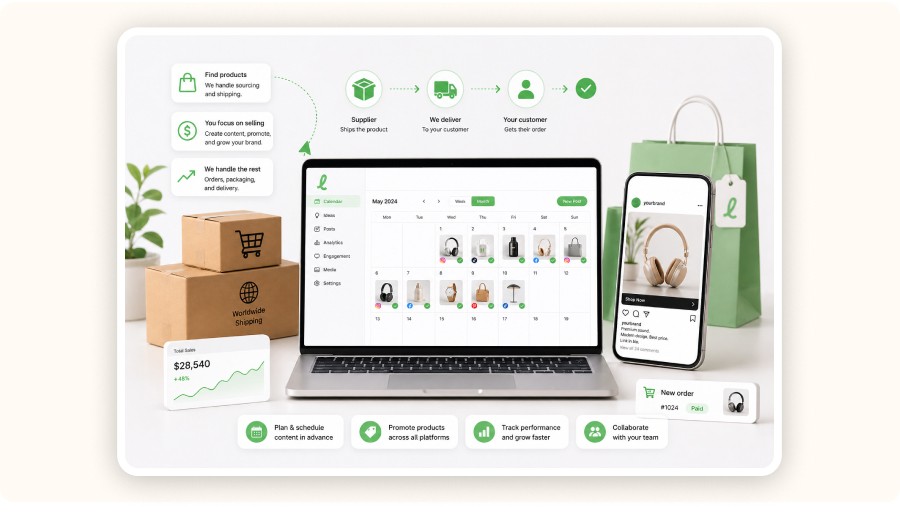
Loomly can be a solid fit for dropshipping when your main bottleneck is content operations: planning, approvals, and publishing on a consistent rhythm. It helps you keep posts going without the usual last-minute scramble, especially if you manage multiple pages.
Dropshipping content tends to be high-volume by nature. You’re constantly testing new offers, new angles, and new creative formats.
Where Loomly helps in practice
Consistency for organic and community content. A calendar stops you from going silent for 10 days, then dumping 12 posts at once.
Approval flow for creative. If you work with a VA, editor, or partner, a review step reduces “wrong price / wrong link” mistakes.
Multi-brand organization. If you run 2–5 stores, separate calendars help prevent cross-posting errors.
Where Loomly is weaker for dropshipping
Paid ads workflow. Loomly doesn’t replace Meta Ads Manager or TikTok Ads Manager.
Attribution depth. If you need purchase-level attribution per post, you’ll still rely on platform analytics, Shopify analytics, and tracking.
Minea
Reach $1,000 per day or get your money back

What Loomly does and how it works
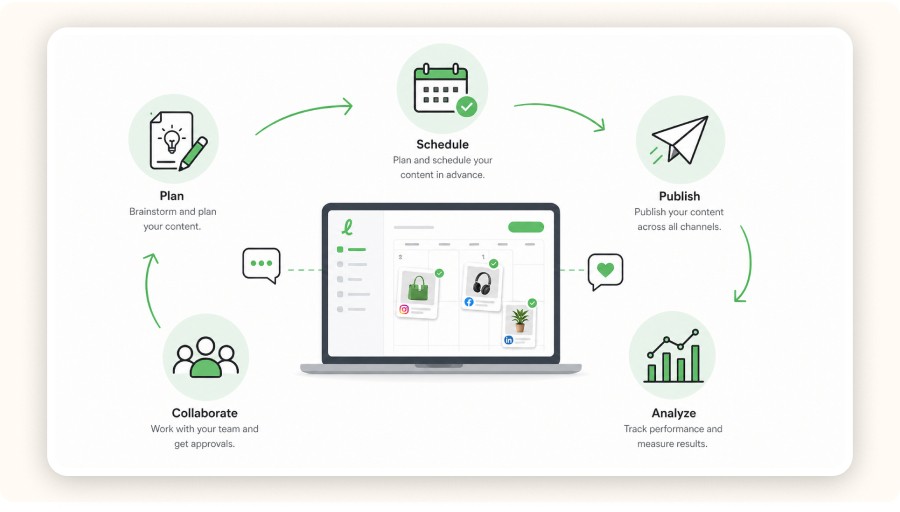
Loomly is a social media scheduling platform that brings planning, content creation, collaboration, and publishing into one calendar-based workflow. You draft posts, assign tasks, collect approvals, and publish across supported channels, plus you get reminders and notifications so things don’t slip.
If you ignore the marketing fluff and focus on what it actually helps you do, Loomly covers four practical jobs:
1) Calendar-based planning
Plan weekly or monthly content tied to promotions, restocks, and product drops.
2) Post creation and previews
Draft posts and preview them before publishing, which matters when your creatives include prices, discount codes, or shipping claims (the stuff you really don’t want to get wrong).
3) Collaboration and approvals
Teammates can comment, suggest edits, and approve content. Loomly also supports notifications and common collaboration integrations like Slack and Microsoft Teams.
4) Publishing and reminders
For supported channels, Loomly can publish directly. For channels with restrictions, it helps you stage content and prompts manual publishing when needed.
Mobile matters more than most sellers admit. When a trend spikes, you often need to schedule and approve posts from your phone. Loomly’s Android and iOS apps are built for post creation, previews, and push notifications tied to the main calendar.
Loomly pricing for dropshippers
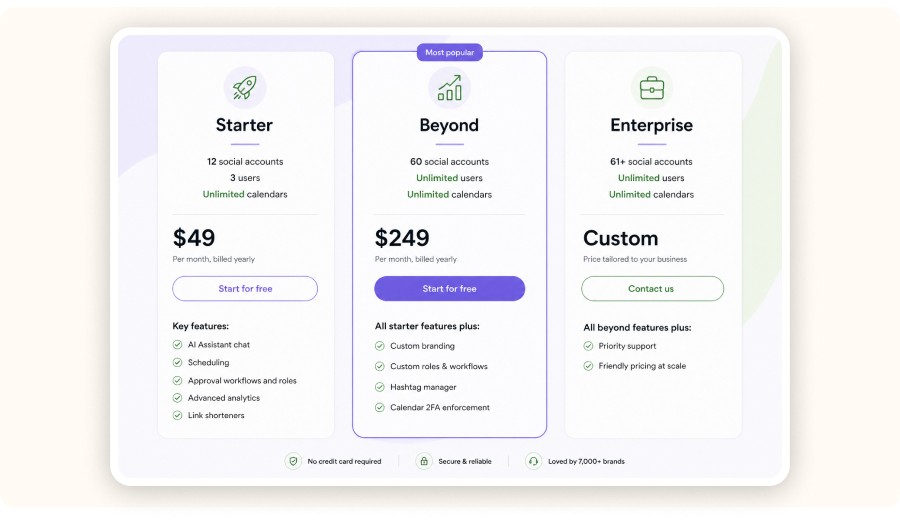
Loomly’s entry pricing is usually listed around $49/month on annual billing for a Starter plan, with caps on users and social accounts. Your real cost depends on how many stores, brands, accounts, and collaborators you’re managing.
Pricing is also where a lot of dropshippers misjudge the tool.
You’re not paying for Loomly because it can schedule an Instagram post. You’re paying because it helps reduce:
weekly planning time
missed promo posting windows
coordination overhead with freelancers
costly mistakes (like wrong links or wrong offers)
A simple way to sanity-check the value
If Loomly saves you 2 hours/week in planning and coordination, and you value your time at $50/hour, that’s about $400/month in time you get back.
If your Loomly plan costs $49–$150/month, it can pay for itself fast—but only if you actually use the calendar and approvals.
If you’re solo and inconsistent, Loomly can easily become just another subscription you end up resenting.
A dropshipping workflow that makes Loomly worth it
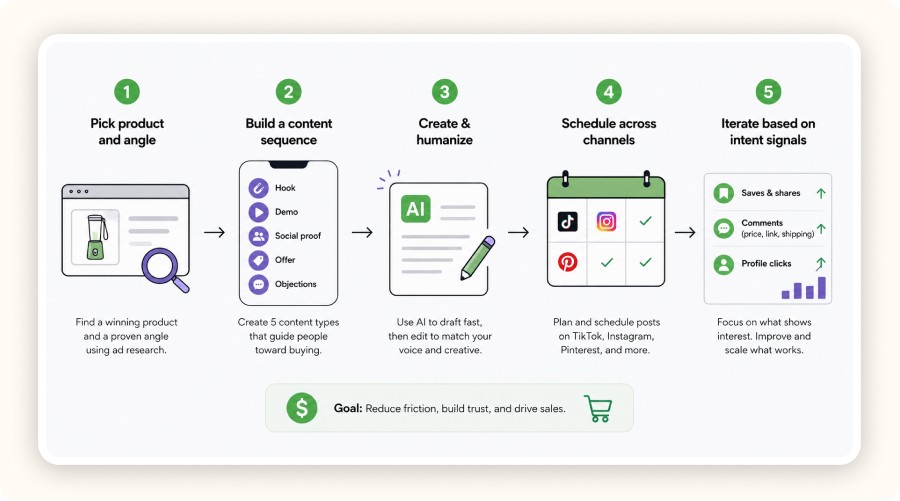
The Loomly setup that tends to work best for dropshipping is straightforward: choose one product and one angle, create 10–20 variations, schedule them over 2–4 weeks, then iterate based on saves, shares, profile clicks, and comment intent.
It matches how sellers actually operate day-to-day.
Step 1: Pick what to promote, then pick the angle
If you try to promote everything, nothing really lands. Start with a single product focus and one clear angle.
A practical approach is to use Minea’s AdSpy library. Use its advanced filters (keywords, country, engagement/ad spend). Then lean on Success Radar to spot what’s trending. Extract the angles that already work in ads. Translate those insights into an organic posting plan.


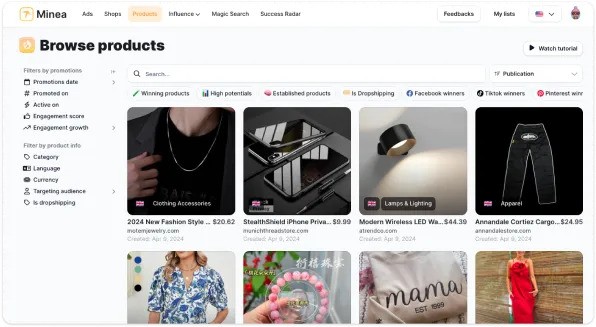
Examples (from your brief’s Minea dataset):
Posture corrector belt (trend score 92)
LED face mask (trend score 88)
Portable blender (trend score 85)
Smart ring fitness tracker (trend score 81)
Heated eyelash curler (trend score 78)
Step 2: Turn one angle into a sequence, not a one-off post
Don’t schedule a single post and hope for the best.
Build a sequence that mirrors how people buy:
Hook variations that lead with the problem
A demo post that shows the result
A social proof post that reduces trust friction
An offer post with a clear CTA
An objection-handling post (shipping, returns, sizing, guarantees)
This is where Loomly helps: you can see the full month at a glance and assign different parts of the sequence to different collaborators.
Step 3: Draft fast, then humanize hard
Loomly’s AI assistant can help generate ideas and draft copy, treat it like a first draft, not the final.
Dropshipping rule: your copy has to match the creative. If your video is a before/after demo, the caption shouldn’t read like a product spec sheet.
Step 4: Schedule based on channel behavior
TikTok rewards volume and strong hooks
Instagram rewards Reels + Story follow-ups + comment activity
Pinterest rewards consistency over time
Loomly’s value here is coordination: you can run a coherent push instead of posting at random.
Step 5: Iterate based on intent signals
Stop obsessing over vanity metrics. Track intent signals:
Saves and shares (content resonates)
Comments asking price, link, shipping (purchase intent)
Profile clicks (curiosity)
If your average product price is around $29.99 (as in the brief’s dataset), organic content’s job is to reduce friction and build trust fast.
If you’re a dropshipper trying to post consistently while juggling creatives, suppliers, and customer support, Loomly is often seen as one of the best management software options for the part that usually slips: turning “we should post more” into a repeatable content calendar.
The baseline cost most sellers start with is around $49/month on annual billing for an entry plan, then it scales up as you add users and social accounts.
Key Takeaways
Loomly is strongest for structured planning and approvals, not deep ecommerce attribution.
If you run multiple stores or brands, the multi-calendar setup helps cut down on posting mistakes.
Pricing can be reasonable for a small team, but it climbs quickly as you add more users and accounts.
For dropshipping, Loomly works best when you pair it with a product-and-angle workflow, then schedule variations and iterate.
Loomly fit for dropshipping businesses
Loomly can be a solid fit for dropshipping when your main bottleneck is content operations: planning, approvals, and publishing on a consistent rhythm. It helps you keep posts going without the usual last-minute scramble, especially if you manage multiple pages.
Dropshipping content tends to be high-volume by nature. You’re constantly testing new offers, new angles, and new creative formats.
Where Loomly helps in practice
Consistency for organic and community content. A calendar stops you from going silent for 10 days, then dumping 12 posts at once.
Approval flow for creative. If you work with a VA, editor, or partner, a review step reduces “wrong price / wrong link” mistakes.
Multi-brand organization. If you run 2–5 stores, separate calendars help prevent cross-posting errors.
Where Loomly is weaker for dropshipping
Paid ads workflow. Loomly doesn’t replace Meta Ads Manager or TikTok Ads Manager.
Attribution depth. If you need purchase-level attribution per post, you’ll still rely on platform analytics, Shopify analytics, and tracking.
Minea
Reach $1,000 per day or get your money back
What Loomly does and how it works
Loomly is a social media scheduling platform that brings planning, content creation, collaboration, and publishing into one calendar-based workflow. You draft posts, assign tasks, collect approvals, and publish across supported channels, plus you get reminders and notifications so things don’t slip.
If you ignore the marketing fluff and focus on what it actually helps you do, Loomly covers four practical jobs:
1) Calendar-based planning
Plan weekly or monthly content tied to promotions, restocks, and product drops.
2) Post creation and previews
Draft posts and preview them before publishing, which matters when your creatives include prices, discount codes, or shipping claims (the stuff you really don’t want to get wrong).
3) Collaboration and approvals
Teammates can comment, suggest edits, and approve content. Loomly also supports notifications and common collaboration integrations like Slack and Microsoft Teams.
4) Publishing and reminders
For supported channels, Loomly can publish directly. For channels with restrictions, it helps you stage content and prompts manual publishing when needed.
Mobile matters more than most sellers admit. When a trend spikes, you often need to schedule and approve posts from your phone. Loomly’s Android and iOS apps are built for post creation, previews, and push notifications tied to the main calendar.
Loomly pricing for dropshippers
Loomly’s entry pricing is usually listed around $49/month on annual billing for a Starter plan, with caps on users and social accounts. Your real cost depends on how many stores, brands, accounts, and collaborators you’re managing.
Pricing is also where a lot of dropshippers misjudge the tool.
You’re not paying for Loomly because it can schedule an Instagram post. You’re paying because it helps reduce:
weekly planning time
missed promo posting windows
coordination overhead with freelancers
costly mistakes (like wrong links or wrong offers)
A simple way to sanity-check the value
If Loomly saves you 2 hours/week in planning and coordination, and you value your time at $50/hour, that’s about $400/month in time you get back.
If your Loomly plan costs $49–$150/month, it can pay for itself fast—but only if you actually use the calendar and approvals.
If you’re solo and inconsistent, Loomly can easily become just another subscription you end up resenting.
A dropshipping workflow that makes Loomly worth it
The Loomly setup that tends to work best for dropshipping is straightforward: choose one product and one angle, create 10–20 variations, schedule them over 2–4 weeks, then iterate based on saves, shares, profile clicks, and comment intent.
It matches how sellers actually operate day-to-day.
Step 1: Pick what to promote, then pick the angle
If you try to promote everything, nothing really lands. Start with a single product focus and one clear angle.
A practical approach is to use Minea’s AdSpy library. Use its advanced filters (keywords, country, engagement/ad spend). Then lean on Success Radar to spot what’s trending. Extract the angles that already work in ads. Translate those insights into an organic posting plan.
Examples (from your brief’s Minea dataset):
Posture corrector belt (trend score 92)
LED face mask (trend score 88)
Portable blender (trend score 85)
Smart ring fitness tracker (trend score 81)
Heated eyelash curler (trend score 78)
Step 2: Turn one angle into a sequence, not a one-off post
Don’t schedule a single post and hope for the best.
Build a sequence that mirrors how people buy:
Hook variations that lead with the problem
A demo post that shows the result
A social proof post that reduces trust friction
An offer post with a clear CTA
An objection-handling post (shipping, returns, sizing, guarantees)
This is where Loomly helps: you can see the full month at a glance and assign different parts of the sequence to different collaborators.
Step 3: Draft fast, then humanize hard
Loomly’s AI assistant can help generate ideas and draft copy, treat it like a first draft, not the final.
Dropshipping rule: your copy has to match the creative. If your video is a before/after demo, the caption shouldn’t read like a product spec sheet.
Step 4: Schedule based on channel behavior
TikTok rewards volume and strong hooks
Instagram rewards Reels + Story follow-ups + comment activity
Pinterest rewards consistency over time
Loomly’s value here is coordination: you can run a coherent push instead of posting at random.
Step 5: Iterate based on intent signals
Stop obsessing over vanity metrics. Track intent signals:
Saves and shares (content resonates)
Comments asking price, link, shipping (purchase intent)
Profile clicks (curiosity)
If your average product price is around $29.99 (as in the brief’s dataset), organic content’s job is to reduce friction and build trust fast.
If you’re a dropshipper trying to post consistently while juggling creatives, suppliers, and customer support, Loomly is often seen as one of the best management software options for the part that usually slips: turning “we should post more” into a repeatable content calendar.
The baseline cost most sellers start with is around $49/month on annual billing for an entry plan, then it scales up as you add users and social accounts.
Key Takeaways
Loomly is strongest for structured planning and approvals, not deep ecommerce attribution.
If you run multiple stores or brands, the multi-calendar setup helps cut down on posting mistakes.
Pricing can be reasonable for a small team, but it climbs quickly as you add more users and accounts.
For dropshipping, Loomly works best when you pair it with a product-and-angle workflow, then schedule variations and iterate.
Loomly fit for dropshipping businesses
Loomly can be a solid fit for dropshipping when your main bottleneck is content operations: planning, approvals, and publishing on a consistent rhythm. It helps you keep posts going without the usual last-minute scramble, especially if you manage multiple pages.
Dropshipping content tends to be high-volume by nature. You’re constantly testing new offers, new angles, and new creative formats.
Where Loomly helps in practice
Consistency for organic and community content. A calendar stops you from going silent for 10 days, then dumping 12 posts at once.
Approval flow for creative. If you work with a VA, editor, or partner, a review step reduces “wrong price / wrong link” mistakes.
Multi-brand organization. If you run 2–5 stores, separate calendars help prevent cross-posting errors.
Where Loomly is weaker for dropshipping
Paid ads workflow. Loomly doesn’t replace Meta Ads Manager or TikTok Ads Manager.
Attribution depth. If you need purchase-level attribution per post, you’ll still rely on platform analytics, Shopify analytics, and tracking.
Minea
Reach $1,000 per day or get your money back
What Loomly does and how it works
Loomly is a social media scheduling platform that brings planning, content creation, collaboration, and publishing into one calendar-based workflow. You draft posts, assign tasks, collect approvals, and publish across supported channels, plus you get reminders and notifications so things don’t slip.
If you ignore the marketing fluff and focus on what it actually helps you do, Loomly covers four practical jobs:
1) Calendar-based planning
Plan weekly or monthly content tied to promotions, restocks, and product drops.
2) Post creation and previews
Draft posts and preview them before publishing, which matters when your creatives include prices, discount codes, or shipping claims (the stuff you really don’t want to get wrong).
3) Collaboration and approvals
Teammates can comment, suggest edits, and approve content. Loomly also supports notifications and common collaboration integrations like Slack and Microsoft Teams.
4) Publishing and reminders
For supported channels, Loomly can publish directly. For channels with restrictions, it helps you stage content and prompts manual publishing when needed.
Mobile matters more than most sellers admit. When a trend spikes, you often need to schedule and approve posts from your phone. Loomly’s Android and iOS apps are built for post creation, previews, and push notifications tied to the main calendar.
Loomly pricing for dropshippers
Loomly’s entry pricing is usually listed around $49/month on annual billing for a Starter plan, with caps on users and social accounts. Your real cost depends on how many stores, brands, accounts, and collaborators you’re managing.
Pricing is also where a lot of dropshippers misjudge the tool.
You’re not paying for Loomly because it can schedule an Instagram post. You’re paying because it helps reduce:
weekly planning time
missed promo posting windows
coordination overhead with freelancers
costly mistakes (like wrong links or wrong offers)
A simple way to sanity-check the value
If Loomly saves you 2 hours/week in planning and coordination, and you value your time at $50/hour, that’s about $400/month in time you get back.
If your Loomly plan costs $49–$150/month, it can pay for itself fast—but only if you actually use the calendar and approvals.
If you’re solo and inconsistent, Loomly can easily become just another subscription you end up resenting.
A dropshipping workflow that makes Loomly worth it
The Loomly setup that tends to work best for dropshipping is straightforward: choose one product and one angle, create 10–20 variations, schedule them over 2–4 weeks, then iterate based on saves, shares, profile clicks, and comment intent.
It matches how sellers actually operate day-to-day.
Step 1: Pick what to promote, then pick the angle
If you try to promote everything, nothing really lands. Start with a single product focus and one clear angle.
A practical approach is to use Minea’s AdSpy library. Use its advanced filters (keywords, country, engagement/ad spend). Then lean on Success Radar to spot what’s trending. Extract the angles that already work in ads. Translate those insights into an organic posting plan.
Examples (from your brief’s Minea dataset):
Posture corrector belt (trend score 92)
LED face mask (trend score 88)
Portable blender (trend score 85)
Smart ring fitness tracker (trend score 81)
Heated eyelash curler (trend score 78)
Step 2: Turn one angle into a sequence, not a one-off post
Don’t schedule a single post and hope for the best.
Build a sequence that mirrors how people buy:
Hook variations that lead with the problem
A demo post that shows the result
A social proof post that reduces trust friction
An offer post with a clear CTA
An objection-handling post (shipping, returns, sizing, guarantees)
This is where Loomly helps: you can see the full month at a glance and assign different parts of the sequence to different collaborators.
Step 3: Draft fast, then humanize hard
Loomly’s AI assistant can help generate ideas and draft copy, treat it like a first draft, not the final.
Dropshipping rule: your copy has to match the creative. If your video is a before/after demo, the caption shouldn’t read like a product spec sheet.
Step 4: Schedule based on channel behavior
TikTok rewards volume and strong hooks
Instagram rewards Reels + Story follow-ups + comment activity
Pinterest rewards consistency over time
Loomly’s value here is coordination: you can run a coherent push instead of posting at random.
Step 5: Iterate based on intent signals
Stop obsessing over vanity metrics. Track intent signals:
Saves and shares (content resonates)
Comments asking price, link, shipping (purchase intent)
Profile clicks (curiosity)
If your average product price is around $29.99 (as in the brief’s dataset), organic content’s job is to reduce friction and build trust fast.
Multi-store and multi-brand content management
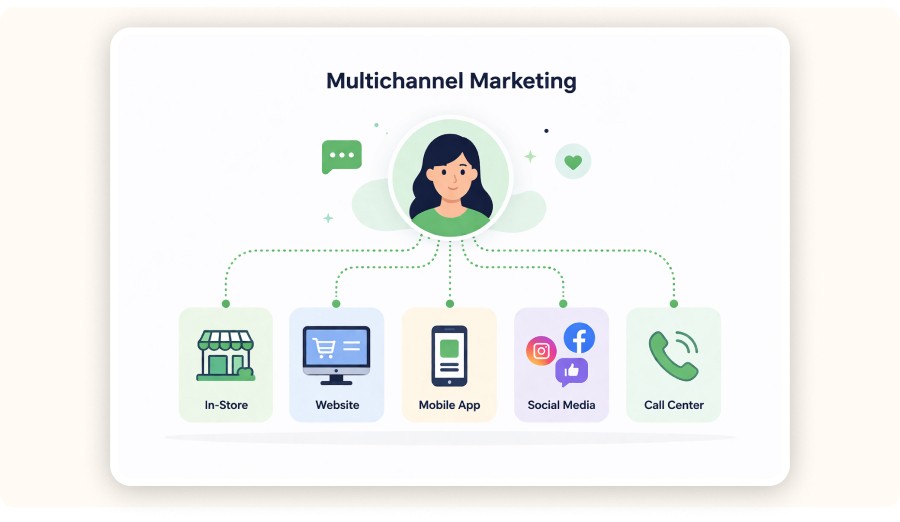
Loomly is at its best when you’re juggling multiple calendars across several stores, brands, or product lines. That’s where it really cuts down on operational mistakes and makes approvals feel routine instead of chaotic.
Most sellers who scale run into at least one of these situations
Store A and Store B speak to different audiences.
You test products in a general store, then move winners into a niche brand.
You run a main brand plus a clearance or offer account.
Multi-calendar management isn’t glamorous, but it prevents the kind of embarrassing errors that cost you trust (and sometimes money).
Why collaboration features matter
Assign content tasks to a VA or editor.
Require approval before anything goes live.
Use notifications so posts don’t get stuck waiting on someone.
And if your team already lives in Slack or Microsoft Teams, Loomly notifications can help reduce back-and-forth and speed up execution.
Loomly limitations for high-volume dropshipping
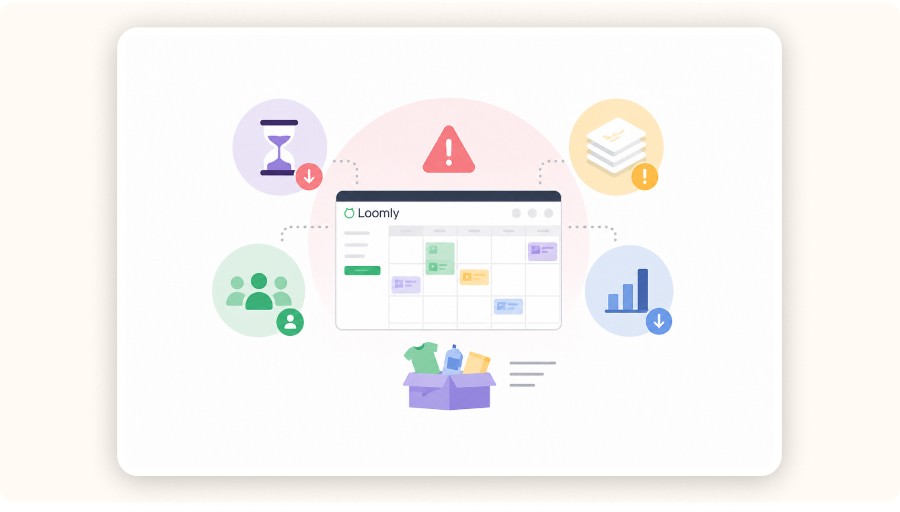
Loomly can start to feel limited when you need deep ecommerce attribution, automation beyond publishing, or a content system that can keep up with large catalogs and frequent inventory changes.
Dropshipping catalogs can get big fast, and content gets repetitive even faster. Here are three common friction points:
1) Large catalog operations
If you rotate 50–200 SKUs, you may need workflows that pull from product feeds, bundles, and inventory updates. Loomly is calendar-first, not product-feed-first.
2) Automation beyond publishing
Loomly helps you plan and schedule content. It doesn’t automate things like ad testing, landing page iteration, or customer support.
3) The “one dashboard” expectation
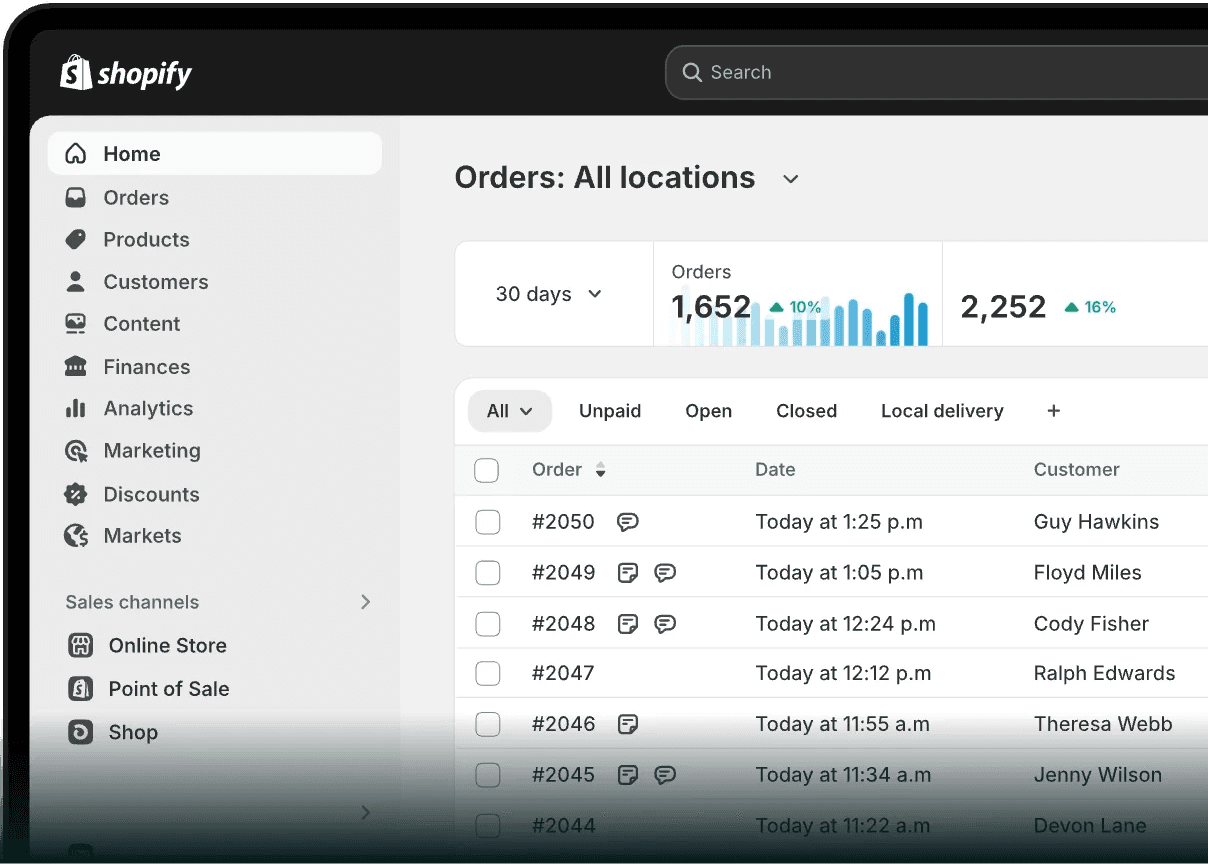
A lot of sellers want one place for ideas, publishing, attribution, and revenue. In practice, you’ll still rely on Shopify analytics, ad dashboards, and platform analytics for the full picture.
Loomly alternatives and what to look for
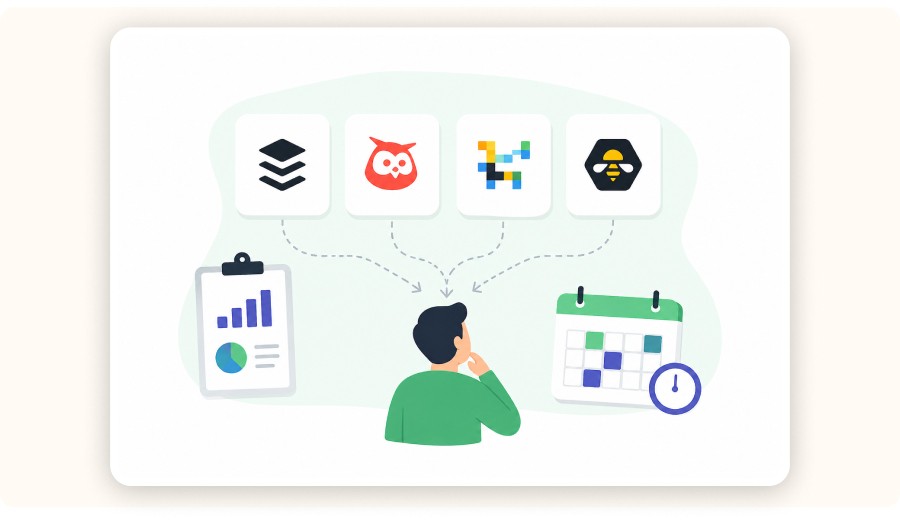
Loomly is a planning-first scheduler. Alternatives like Buffer, Hootsuite, Later, or SocialBee can be a better fit if you need deeper analytics, heavier automation, stronger social listening, or a cheaper tool that mainly schedules.
Think about alternatives by bottleneck.
If you want stronger analytics and reporting, choose a tool that goes deeper on reporting automation and performance dashboards.
If you want heavier marketing automation, choose a tool that supports sequences, inbox workflows, and automation rules that match your support and engagement needs.
If you want a simpler scheduler, choose a lightweight tool that schedules reliably and stays out of your way.
Dropshipping-specific recommendation: pick a tool based on how many weekly posts you can realistically produce.
If you can only ship 3 posts per week, you do not need enterprise workflows.
If you can ship 15 to 30 posts per week across accounts, collaboration and approvals become the bottleneck, which is where Loomly earns its keep.


Create and test your Shopify store for only $1 per day during 90 days
Loomly ROI and when it is worth paying for

Loomly tends to be worth it when it removes a measurable bottleneck like inconsistent posting, missed promotions, or messy collaboration. It won’t create discipline for you, but it can systemize discipline you already have.
Use this decision test
Worth it if you have at least one of these:
2+ people touching content
2+ brands or stores, or multiple social pages
weekly promotions where timing matters
Skip it for now if:
you do not post consistently at all
you do not have a repeatable product and creative testing loop
your bigger lever is offer, creative, or landing page improvements
Fulfillment reality still matters. The brief’s supplier-country mix includes China, Turkey, and Vietnam. That impacts shipping time expectations and the claims you make in content. Loomly helps you plan and coordinate what you publish, not solve shipping constraints.
Verdict for dropshippers
Loomly is operational leverage, not a growth hack. If your content engine exists but feels messy, Loomly can turn it into a calendar with approvals and predictable output.
If your problem is that you never post consistently, Loomly helps you fix that with structure.
If your problem is that your ads are not converting, Loomly is not the fix. Your fix is product selection, angles, creative testing, and landing pages.
A strong weekly workflow looks like this:
Use Minea to identify a product trend and capture angles that already work in ads.
Build 10 to 20 creative variations.
Use Loomly to schedule the sequence and manage approvals.
Measure intent signals on each platform, then iterate.
FAQ
How much does Loomly cost per month?
Loomly is commonly listed starting around $49 per month on annual billing for an entry plan, with limits on social accounts and users. Your real monthly cost depends on how many accounts and users you need and whether you pay monthly or annually.
Is Loomly good for small businesses?
It can be a strong fit when you need a consistent posting system and basic collaboration. Loomly becomes more valuable as soon as you have even one freelancer involved, because approvals and task assignment reduce mistakes.
Is Loomly a good fit for dropshipping businesses?
It can be. Loomly supports dropshipping best when you treat social posting like a testing system. You schedule product hooks, demos, offers, and objection-handling posts in a structured calendar, then iterate.
What is better than Loomly?
Better depends on your bottleneck. If you need deeper analytics or broader marketing automation beyond scheduling, alternatives may fit better. If you mainly need a planning-first calendar and approvals, Loomly is often the simpler choice.
Is Loomly worth the investment?
It is worth it if Loomly saves you measurable time each week or prevents costly coordination errors, especially with multiple stores or multiple people working on content. If you are not posting at all, fix the workflow first, then add a scheduler.
Multi-store and multi-brand content management
Loomly is at its best when you’re juggling multiple calendars across several stores, brands, or product lines. That’s where it really cuts down on operational mistakes and makes approvals feel routine instead of chaotic.
Most sellers who scale run into at least one of these situations
Store A and Store B speak to different audiences.
You test products in a general store, then move winners into a niche brand.
You run a main brand plus a clearance or offer account.
Multi-calendar management isn’t glamorous, but it prevents the kind of embarrassing errors that cost you trust (and sometimes money).
Why collaboration features matter
Assign content tasks to a VA or editor.
Require approval before anything goes live.
Use notifications so posts don’t get stuck waiting on someone.
And if your team already lives in Slack or Microsoft Teams, Loomly notifications can help reduce back-and-forth and speed up execution.
Loomly limitations for high-volume dropshipping
Loomly can start to feel limited when you need deep ecommerce attribution, automation beyond publishing, or a content system that can keep up with large catalogs and frequent inventory changes.
Dropshipping catalogs can get big fast, and content gets repetitive even faster. Here are three common friction points:
1) Large catalog operations
If you rotate 50–200 SKUs, you may need workflows that pull from product feeds, bundles, and inventory updates. Loomly is calendar-first, not product-feed-first.
2) Automation beyond publishing
Loomly helps you plan and schedule content. It doesn’t automate things like ad testing, landing page iteration, or customer support.
3) The “one dashboard” expectation
A lot of sellers want one place for ideas, publishing, attribution, and revenue. In practice, you’ll still rely on Shopify analytics, ad dashboards, and platform analytics for the full picture.
Loomly alternatives and what to look for
Loomly is a planning-first scheduler. Alternatives like Buffer, Hootsuite, Later, or SocialBee can be a better fit if you need deeper analytics, heavier automation, stronger social listening, or a cheaper tool that mainly schedules.
Think about alternatives by bottleneck.
If you want stronger analytics and reporting, choose a tool that goes deeper on reporting automation and performance dashboards.
If you want heavier marketing automation, choose a tool that supports sequences, inbox workflows, and automation rules that match your support and engagement needs.
If you want a simpler scheduler, choose a lightweight tool that schedules reliably and stays out of your way.
Dropshipping-specific recommendation: pick a tool based on how many weekly posts you can realistically produce.
If you can only ship 3 posts per week, you do not need enterprise workflows.
If you can ship 15 to 30 posts per week across accounts, collaboration and approvals become the bottleneck, which is where Loomly earns its keep.
Create and test your Shopify store for only $1 per day during 90 days
Loomly ROI and when it is worth paying for
Loomly tends to be worth it when it removes a measurable bottleneck like inconsistent posting, missed promotions, or messy collaboration. It won’t create discipline for you, but it can systemize discipline you already have.
Use this decision test
Worth it if you have at least one of these:
2+ people touching content
2+ brands or stores, or multiple social pages
weekly promotions where timing matters
Skip it for now if:
you do not post consistently at all
you do not have a repeatable product and creative testing loop
your bigger lever is offer, creative, or landing page improvements
Fulfillment reality still matters. The brief’s supplier-country mix includes China, Turkey, and Vietnam. That impacts shipping time expectations and the claims you make in content. Loomly helps you plan and coordinate what you publish, not solve shipping constraints.
Verdict for dropshippers
Loomly is operational leverage, not a growth hack. If your content engine exists but feels messy, Loomly can turn it into a calendar with approvals and predictable output.
If your problem is that you never post consistently, Loomly helps you fix that with structure.
If your problem is that your ads are not converting, Loomly is not the fix. Your fix is product selection, angles, creative testing, and landing pages.
A strong weekly workflow looks like this:
Use Minea to identify a product trend and capture angles that already work in ads.
Build 10 to 20 creative variations.
Use Loomly to schedule the sequence and manage approvals.
Measure intent signals on each platform, then iterate.
FAQ
How much does Loomly cost per month?
Loomly is commonly listed starting around $49 per month on annual billing for an entry plan, with limits on social accounts and users. Your real monthly cost depends on how many accounts and users you need and whether you pay monthly or annually.
Is Loomly good for small businesses?
It can be a strong fit when you need a consistent posting system and basic collaboration. Loomly becomes more valuable as soon as you have even one freelancer involved, because approvals and task assignment reduce mistakes.
Is Loomly a good fit for dropshipping businesses?
It can be. Loomly supports dropshipping best when you treat social posting like a testing system. You schedule product hooks, demos, offers, and objection-handling posts in a structured calendar, then iterate.
What is better than Loomly?
Better depends on your bottleneck. If you need deeper analytics or broader marketing automation beyond scheduling, alternatives may fit better. If you mainly need a planning-first calendar and approvals, Loomly is often the simpler choice.
Is Loomly worth the investment?
It is worth it if Loomly saves you measurable time each week or prevents costly coordination errors, especially with multiple stores or multiple people working on content. If you are not posting at all, fix the workflow first, then add a scheduler.
Multi-store and multi-brand content management
Loomly is at its best when you’re juggling multiple calendars across several stores, brands, or product lines. That’s where it really cuts down on operational mistakes and makes approvals feel routine instead of chaotic.
Most sellers who scale run into at least one of these situations
Store A and Store B speak to different audiences.
You test products in a general store, then move winners into a niche brand.
You run a main brand plus a clearance or offer account.
Multi-calendar management isn’t glamorous, but it prevents the kind of embarrassing errors that cost you trust (and sometimes money).
Why collaboration features matter
Assign content tasks to a VA or editor.
Require approval before anything goes live.
Use notifications so posts don’t get stuck waiting on someone.
And if your team already lives in Slack or Microsoft Teams, Loomly notifications can help reduce back-and-forth and speed up execution.
Loomly limitations for high-volume dropshipping
Loomly can start to feel limited when you need deep ecommerce attribution, automation beyond publishing, or a content system that can keep up with large catalogs and frequent inventory changes.
Dropshipping catalogs can get big fast, and content gets repetitive even faster. Here are three common friction points:
1) Large catalog operations
If you rotate 50–200 SKUs, you may need workflows that pull from product feeds, bundles, and inventory updates. Loomly is calendar-first, not product-feed-first.
2) Automation beyond publishing
Loomly helps you plan and schedule content. It doesn’t automate things like ad testing, landing page iteration, or customer support.
3) The “one dashboard” expectation
A lot of sellers want one place for ideas, publishing, attribution, and revenue. In practice, you’ll still rely on Shopify analytics, ad dashboards, and platform analytics for the full picture.
Loomly alternatives and what to look for
Loomly is a planning-first scheduler. Alternatives like Buffer, Hootsuite, Later, or SocialBee can be a better fit if you need deeper analytics, heavier automation, stronger social listening, or a cheaper tool that mainly schedules.
Think about alternatives by bottleneck.
If you want stronger analytics and reporting, choose a tool that goes deeper on reporting automation and performance dashboards.
If you want heavier marketing automation, choose a tool that supports sequences, inbox workflows, and automation rules that match your support and engagement needs.
If you want a simpler scheduler, choose a lightweight tool that schedules reliably and stays out of your way.
Dropshipping-specific recommendation: pick a tool based on how many weekly posts you can realistically produce.
If you can only ship 3 posts per week, you do not need enterprise workflows.
If you can ship 15 to 30 posts per week across accounts, collaboration and approvals become the bottleneck, which is where Loomly earns its keep.
Create and test your Shopify store for only $1 per day during 90 days
Loomly ROI and when it is worth paying for
Loomly tends to be worth it when it removes a measurable bottleneck like inconsistent posting, missed promotions, or messy collaboration. It won’t create discipline for you, but it can systemize discipline you already have.
Use this decision test
Worth it if you have at least one of these:
2+ people touching content
2+ brands or stores, or multiple social pages
weekly promotions where timing matters
Skip it for now if:
you do not post consistently at all
you do not have a repeatable product and creative testing loop
your bigger lever is offer, creative, or landing page improvements
Fulfillment reality still matters. The brief’s supplier-country mix includes China, Turkey, and Vietnam. That impacts shipping time expectations and the claims you make in content. Loomly helps you plan and coordinate what you publish, not solve shipping constraints.
Verdict for dropshippers
Loomly is operational leverage, not a growth hack. If your content engine exists but feels messy, Loomly can turn it into a calendar with approvals and predictable output.
If your problem is that you never post consistently, Loomly helps you fix that with structure.
If your problem is that your ads are not converting, Loomly is not the fix. Your fix is product selection, angles, creative testing, and landing pages.
A strong weekly workflow looks like this:
Use Minea to identify a product trend and capture angles that already work in ads.
Build 10 to 20 creative variations.
Use Loomly to schedule the sequence and manage approvals.
Measure intent signals on each platform, then iterate.
FAQ
How much does Loomly cost per month?
Loomly is commonly listed starting around $49 per month on annual billing for an entry plan, with limits on social accounts and users. Your real monthly cost depends on how many accounts and users you need and whether you pay monthly or annually.
Is Loomly good for small businesses?
It can be a strong fit when you need a consistent posting system and basic collaboration. Loomly becomes more valuable as soon as you have even one freelancer involved, because approvals and task assignment reduce mistakes.
Is Loomly a good fit for dropshipping businesses?
It can be. Loomly supports dropshipping best when you treat social posting like a testing system. You schedule product hooks, demos, offers, and objection-handling posts in a structured calendar, then iterate.
What is better than Loomly?
Better depends on your bottleneck. If you need deeper analytics or broader marketing automation beyond scheduling, alternatives may fit better. If you mainly need a planning-first calendar and approvals, Loomly is often the simpler choice.
Is Loomly worth the investment?
It is worth it if Loomly saves you measurable time each week or prevents costly coordination errors, especially with multiple stores or multiple people working on content. If you are not posting at all, fix the workflow first, then add a scheduler.
Similar articles

SocialBee AI Review for Dropshipping : Copilot, AI Post Generator, Pricing & Real-World Workflow
Best Management Software Network
SocialBee AI Review for Dropshipping : Copilot, AI Post Generator, Pricing & Real-World Workflow
Best Management Software Network
SocialBee AI Review for Dropshipping : Copilot, AI Post Generator, Pricing & Real-World Workflow
Best Management Software Network
SocialBee AI Review for Dropshipping : Copilot, AI Post Generator, Pricing & Real-World Workflow
Best Management Software Network
Later for Dropshipping: How to Run Your E-commerce Social Media in 30 Minutes a Day
Best Management Software Network
Later for Dropshipping: How to Run Your E-commerce Social Media in 30 Minutes a Day
Best Management Software Network
Later for Dropshipping: How to Run Your E-commerce Social Media in 30 Minutes a Day
Best Management Software Network
Later for Dropshipping: How to Run Your E-commerce Social Media in 30 Minutes a Day
Best Management Software Network

Buffer software for dropshipping: how to schedule social posts that sell
Best Management Software Network
Buffer software for dropshipping: how to schedule social posts that sell
Best Management Software Network
Buffer software for dropshipping: how to schedule social posts that sell
Best Management Software Network
Buffer software for dropshipping: how to schedule social posts that sell
Best Management Software Network
Hootsuite Management for Dropshipping: How to Run Social Media Like a System (2026)
Best Management Software Network
Hootsuite Management for Dropshipping: How to Run Social Media Like a System (2026)
Best Management Software Network
Hootsuite Management for Dropshipping: How to Run Social Media Like a System (2026)
Best Management Software Network
Hootsuite Management for Dropshipping: How to Run Social Media Like a System (2026)
Best Management Software Network


Our Free Adspys

Find winning products on our Tiktok adspy today!
Find winning products on our Facebook adspy today!
Find winning products on our Tiktok adspy today!
Find winning products on our Facebook adspy today!
Find winning products on our Tiktok adspy today!
Find winning products on our Facebook adspy today!
Find winning products on our Tiktok adspy today!
Find winning products on our Facebook adspy today!
1 winning product everyday.
Follow us!






Find out more
Read more
Minea © 2026
Find out more
Read more
Minea © 2026
Find out more
Read more
Minea © 2026
Find out more
Read more
Minea © 2026
Find out more
Read more
Minea © 2026
Find out more
Read more
Minea © 2026