How to Use Facebook Ad Library in 2025 to Find Competitors and Boost Your Campaigns?
Competitor Spy Tools
Author:
November 13, 2025
Contents
Since its launch in 2019, the Facebook Ads Library has completely transformed how businesses advertise on the platform. And now, in 2025, thanks to its proven effectiveness, it’s become an essential tool for dropshippers looking to analyze competitors’ ad strategies and stay ahead of the game.
The Facebook Ad Library is one of the most powerful tools available to marketers today. It gives you access to all active ads running across Meta platforms, including Facebook, Instagram, and Messenger.
Originally created to promote political transparency, it has evolved into a must-have resource for competitive analysis. With it, you can:
Find your competitors’ ads,
Track current market trends,
And improve your own advertising campaigns with real data and insights.
But how to use the Facebook Ad library to promote your dropshipping store?
In this guide, you’ll learn how to use the library to:
analyze ad creatives and copy for what actually gets engagement,
identify winning products before they saturate,
refine targeting and messaging so you stop burning money and start scaling with data.
What Is Facebook Ad Library?
The Facebook Ads Library is a public, searchable database that displays every active ad running across Meta’s platforms, including Facebook, Instagram, Messenger, and the Audience Network. It’s updated in real time, giving advertisers a live look at campaigns worldwide. And here’s the best part: you don’t even need a Facebook account to use it.
Originally launched to increase transparency in political ads and combat misinformation, the tool quickly became a favorite among marketers. Today, the Facebook Ads Library is widely recognized as an ad intelligence tool not just for monitoring political ads, but also for competitor research and trend analysis. For e-commerce brands and dropshippers, it’s now on par with advanced spy tools like Minea.
How to Access Facebook Ad Library

Accessing the Facebook Ad Library is simple and free. Just head to facebook.com/ads/library or search “Facebook Ads Library” directly in the Facebook search bar.
You don’t need to create an account or log in to see active ads. The tool is available across all countries where Meta’s advertising platforms operate. Whether you’re in the U.S. or running global campaigns, you can tap into this public resource to explore ad campaigns and generate new ideas.
Why Facebook Ad Library Is Essential for Dropshippers in 2025

Competition in e-commerce, especially in dropshipping, has never been tougher. Success now depends on leveraging data-driven insights instead of guesswork. This is exactly where the Facebook Ads Library shines.
Here’s what it enables you to do:
Track competitors’ ads: Enter a brand name or a product keyword and instantly view all their active ads.
Analyze ad creatives: From video ads and carousels to static images, quickly identify which formats dominate in your niche.
Spot product trends: Look at ad frequency and ad duration to uncover which products are driving sales.
Refine your targeting: While the library doesn’t show direct audience targeting data, ad copy and creative choices provide enough signals to reverse engineer the intended audience.
For dropshippers, that means discovering winning products, saving time, and scaling campaigns with less wasted spend.
Since its launch in 2019, the Facebook Ads Library has completely transformed how businesses advertise on the platform. And now, in 2025, thanks to its proven effectiveness, it’s become an essential tool for dropshippers looking to analyze competitors’ ad strategies and stay ahead of the game.
The Facebook Ad Library is one of the most powerful tools available to marketers today. It gives you access to all active ads running across Meta platforms, including Facebook, Instagram, and Messenger.
Originally created to promote political transparency, it has evolved into a must-have resource for competitive analysis. With it, you can:
Find your competitors’ ads,
Track current market trends,
And improve your own advertising campaigns with real data and insights.
But how to use the Facebook Ad library to promote your dropshipping store?
In this guide, you’ll learn how to use the library to:
analyze ad creatives and copy for what actually gets engagement,
identify winning products before they saturate,
refine targeting and messaging so you stop burning money and start scaling with data.
What Is Facebook Ad Library?
The Facebook Ads Library is a public, searchable database that displays every active ad running across Meta’s platforms, including Facebook, Instagram, Messenger, and the Audience Network. It’s updated in real time, giving advertisers a live look at campaigns worldwide. And here’s the best part: you don’t even need a Facebook account to use it.
Originally launched to increase transparency in political ads and combat misinformation, the tool quickly became a favorite among marketers. Today, the Facebook Ads Library is widely recognized as an ad intelligence tool not just for monitoring political ads, but also for competitor research and trend analysis. For e-commerce brands and dropshippers, it’s now on par with advanced spy tools like Minea.
How to Access Facebook Ad Library

Accessing the Facebook Ad Library is simple and free. Just head to facebook.com/ads/library or search “Facebook Ads Library” directly in the Facebook search bar.
You don’t need to create an account or log in to see active ads. The tool is available across all countries where Meta’s advertising platforms operate. Whether you’re in the U.S. or running global campaigns, you can tap into this public resource to explore ad campaigns and generate new ideas.
Why Facebook Ad Library Is Essential for Dropshippers in 2025

Competition in e-commerce, especially in dropshipping, has never been tougher. Success now depends on leveraging data-driven insights instead of guesswork. This is exactly where the Facebook Ads Library shines.
Here’s what it enables you to do:
Track competitors’ ads: Enter a brand name or a product keyword and instantly view all their active ads.
Analyze ad creatives: From video ads and carousels to static images, quickly identify which formats dominate in your niche.
Spot product trends: Look at ad frequency and ad duration to uncover which products are driving sales.
Refine your targeting: While the library doesn’t show direct audience targeting data, ad copy and creative choices provide enough signals to reverse engineer the intended audience.
For dropshippers, that means discovering winning products, saving time, and scaling campaigns with less wasted spend.
Since its launch in 2019, the Facebook Ads Library has completely transformed how businesses advertise on the platform. And now, in 2025, thanks to its proven effectiveness, it’s become an essential tool for dropshippers looking to analyze competitors’ ad strategies and stay ahead of the game.
The Facebook Ad Library is one of the most powerful tools available to marketers today. It gives you access to all active ads running across Meta platforms, including Facebook, Instagram, and Messenger.
Originally created to promote political transparency, it has evolved into a must-have resource for competitive analysis. With it, you can:
Find your competitors’ ads,
Track current market trends,
And improve your own advertising campaigns with real data and insights.
But how to use the Facebook Ad library to promote your dropshipping store?
In this guide, you’ll learn how to use the library to:
analyze ad creatives and copy for what actually gets engagement,
identify winning products before they saturate,
refine targeting and messaging so you stop burning money and start scaling with data.
What Is Facebook Ad Library?
The Facebook Ads Library is a public, searchable database that displays every active ad running across Meta’s platforms, including Facebook, Instagram, Messenger, and the Audience Network. It’s updated in real time, giving advertisers a live look at campaigns worldwide. And here’s the best part: you don’t even need a Facebook account to use it.
Originally launched to increase transparency in political ads and combat misinformation, the tool quickly became a favorite among marketers. Today, the Facebook Ads Library is widely recognized as an ad intelligence tool not just for monitoring political ads, but also for competitor research and trend analysis. For e-commerce brands and dropshippers, it’s now on par with advanced spy tools like Minea.
How to Access Facebook Ad Library

Accessing the Facebook Ad Library is simple and free. Just head to facebook.com/ads/library or search “Facebook Ads Library” directly in the Facebook search bar.
You don’t need to create an account or log in to see active ads. The tool is available across all countries where Meta’s advertising platforms operate. Whether you’re in the U.S. or running global campaigns, you can tap into this public resource to explore ad campaigns and generate new ideas.
Why Facebook Ad Library Is Essential for Dropshippers in 2025

Competition in e-commerce, especially in dropshipping, has never been tougher. Success now depends on leveraging data-driven insights instead of guesswork. This is exactly where the Facebook Ads Library shines.
Here’s what it enables you to do:
Track competitors’ ads: Enter a brand name or a product keyword and instantly view all their active ads.
Analyze ad creatives: From video ads and carousels to static images, quickly identify which formats dominate in your niche.
Spot product trends: Look at ad frequency and ad duration to uncover which products are driving sales.
Refine your targeting: While the library doesn’t show direct audience targeting data, ad copy and creative choices provide enough signals to reverse engineer the intended audience.
For dropshippers, that means discovering winning products, saving time, and scaling campaigns with less wasted spend.
Since its launch in 2019, the Facebook Ads Library has completely transformed how businesses advertise on the platform. And now, in 2025, thanks to its proven effectiveness, it’s become an essential tool for dropshippers looking to analyze competitors’ ad strategies and stay ahead of the game.
The Facebook Ad Library is one of the most powerful tools available to marketers today. It gives you access to all active ads running across Meta platforms, including Facebook, Instagram, and Messenger.
Originally created to promote political transparency, it has evolved into a must-have resource for competitive analysis. With it, you can:
Find your competitors’ ads,
Track current market trends,
And improve your own advertising campaigns with real data and insights.
But how to use the Facebook Ad library to promote your dropshipping store?
In this guide, you’ll learn how to use the library to:
analyze ad creatives and copy for what actually gets engagement,
identify winning products before they saturate,
refine targeting and messaging so you stop burning money and start scaling with data.
What Is Facebook Ad Library?
The Facebook Ads Library is a public, searchable database that displays every active ad running across Meta’s platforms, including Facebook, Instagram, Messenger, and the Audience Network. It’s updated in real time, giving advertisers a live look at campaigns worldwide. And here’s the best part: you don’t even need a Facebook account to use it.
Originally launched to increase transparency in political ads and combat misinformation, the tool quickly became a favorite among marketers. Today, the Facebook Ads Library is widely recognized as an ad intelligence tool not just for monitoring political ads, but also for competitor research and trend analysis. For e-commerce brands and dropshippers, it’s now on par with advanced spy tools like Minea.
How to Access Facebook Ad Library

Accessing the Facebook Ad Library is simple and free. Just head to facebook.com/ads/library or search “Facebook Ads Library” directly in the Facebook search bar.
You don’t need to create an account or log in to see active ads. The tool is available across all countries where Meta’s advertising platforms operate. Whether you’re in the U.S. or running global campaigns, you can tap into this public resource to explore ad campaigns and generate new ideas.
Why Facebook Ad Library Is Essential for Dropshippers in 2025

Competition in e-commerce, especially in dropshipping, has never been tougher. Success now depends on leveraging data-driven insights instead of guesswork. This is exactly where the Facebook Ads Library shines.
Here’s what it enables you to do:
Track competitors’ ads: Enter a brand name or a product keyword and instantly view all their active ads.
Analyze ad creatives: From video ads and carousels to static images, quickly identify which formats dominate in your niche.
Spot product trends: Look at ad frequency and ad duration to uncover which products are driving sales.
Refine your targeting: While the library doesn’t show direct audience targeting data, ad copy and creative choices provide enough signals to reverse engineer the intended audience.
For dropshippers, that means discovering winning products, saving time, and scaling campaigns with less wasted spend.
Since its launch in 2019, the Facebook Ads Library has completely transformed how businesses advertise on the platform. And now, in 2025, thanks to its proven effectiveness, it’s become an essential tool for dropshippers looking to analyze competitors’ ad strategies and stay ahead of the game.
The Facebook Ad Library is one of the most powerful tools available to marketers today. It gives you access to all active ads running across Meta platforms, including Facebook, Instagram, and Messenger.
Originally created to promote political transparency, it has evolved into a must-have resource for competitive analysis. With it, you can:
Find your competitors’ ads,
Track current market trends,
And improve your own advertising campaigns with real data and insights.
But how to use the Facebook Ad library to promote your dropshipping store?
In this guide, you’ll learn how to use the library to:
analyze ad creatives and copy for what actually gets engagement,
identify winning products before they saturate,
refine targeting and messaging so you stop burning money and start scaling with data.
What Is Facebook Ad Library?
The Facebook Ads Library is a public, searchable database that displays every active ad running across Meta’s platforms, including Facebook, Instagram, Messenger, and the Audience Network. It’s updated in real time, giving advertisers a live look at campaigns worldwide. And here’s the best part: you don’t even need a Facebook account to use it.
Originally launched to increase transparency in political ads and combat misinformation, the tool quickly became a favorite among marketers. Today, the Facebook Ads Library is widely recognized as an ad intelligence tool not just for monitoring political ads, but also for competitor research and trend analysis. For e-commerce brands and dropshippers, it’s now on par with advanced spy tools like Minea.
How to Access Facebook Ad Library

Accessing the Facebook Ad Library is simple and free. Just head to facebook.com/ads/library or search “Facebook Ads Library” directly in the Facebook search bar.
You don’t need to create an account or log in to see active ads. The tool is available across all countries where Meta’s advertising platforms operate. Whether you’re in the U.S. or running global campaigns, you can tap into this public resource to explore ad campaigns and generate new ideas.
Why Facebook Ad Library Is Essential for Dropshippers in 2025

Competition in e-commerce, especially in dropshipping, has never been tougher. Success now depends on leveraging data-driven insights instead of guesswork. This is exactly where the Facebook Ads Library shines.
Here’s what it enables you to do:
Track competitors’ ads: Enter a brand name or a product keyword and instantly view all their active ads.
Analyze ad creatives: From video ads and carousels to static images, quickly identify which formats dominate in your niche.
Spot product trends: Look at ad frequency and ad duration to uncover which products are driving sales.
Refine your targeting: While the library doesn’t show direct audience targeting data, ad copy and creative choices provide enough signals to reverse engineer the intended audience.
For dropshippers, that means discovering winning products, saving time, and scaling campaigns with less wasted spend.
Since its launch in 2019, the Facebook Ads Library has completely transformed how businesses advertise on the platform. And now, in 2025, thanks to its proven effectiveness, it’s become an essential tool for dropshippers looking to analyze competitors’ ad strategies and stay ahead of the game.
The Facebook Ad Library is one of the most powerful tools available to marketers today. It gives you access to all active ads running across Meta platforms, including Facebook, Instagram, and Messenger.
Originally created to promote political transparency, it has evolved into a must-have resource for competitive analysis. With it, you can:
Find your competitors’ ads,
Track current market trends,
And improve your own advertising campaigns with real data and insights.
But how to use the Facebook Ad library to promote your dropshipping store?
In this guide, you’ll learn how to use the library to:
analyze ad creatives and copy for what actually gets engagement,
identify winning products before they saturate,
refine targeting and messaging so you stop burning money and start scaling with data.
What Is Facebook Ad Library?
The Facebook Ads Library is a public, searchable database that displays every active ad running across Meta’s platforms, including Facebook, Instagram, Messenger, and the Audience Network. It’s updated in real time, giving advertisers a live look at campaigns worldwide. And here’s the best part: you don’t even need a Facebook account to use it.
Originally launched to increase transparency in political ads and combat misinformation, the tool quickly became a favorite among marketers. Today, the Facebook Ads Library is widely recognized as an ad intelligence tool not just for monitoring political ads, but also for competitor research and trend analysis. For e-commerce brands and dropshippers, it’s now on par with advanced spy tools like Minea.
How to Access Facebook Ad Library

Accessing the Facebook Ad Library is simple and free. Just head to facebook.com/ads/library or search “Facebook Ads Library” directly in the Facebook search bar.
You don’t need to create an account or log in to see active ads. The tool is available across all countries where Meta’s advertising platforms operate. Whether you’re in the U.S. or running global campaigns, you can tap into this public resource to explore ad campaigns and generate new ideas.
Why Facebook Ad Library Is Essential for Dropshippers in 2025

Competition in e-commerce, especially in dropshipping, has never been tougher. Success now depends on leveraging data-driven insights instead of guesswork. This is exactly where the Facebook Ads Library shines.
Here’s what it enables you to do:
Track competitors’ ads: Enter a brand name or a product keyword and instantly view all their active ads.
Analyze ad creatives: From video ads and carousels to static images, quickly identify which formats dominate in your niche.
Spot product trends: Look at ad frequency and ad duration to uncover which products are driving sales.
Refine your targeting: While the library doesn’t show direct audience targeting data, ad copy and creative choices provide enough signals to reverse engineer the intended audience.
For dropshippers, that means discovering winning products, saving time, and scaling campaigns with less wasted spend.

Take a Shortcut
Intensive coaching, $1,000/day guaranteed or your money back


Take a Shortcut
Intensive coaching, $1,000/day guaranteed or your money back


Take a Shortcut
Intensive coaching, $1,000/day guaranteed or your money back


Take a Shortcut
Intensive coaching, $1,000/day guaranteed or your money back


Take a Shortcut
Intensive coaching, $1,000/day guaranteed or your money back


Take a Shortcut
Intensive coaching, $1,000/day guaranteed or your money back

How to Use Facebook Ad Library Like a Pro

Using the Facebook Ad Library isn’t just about typing a keyword in the search bar. To really get results, you need to know how to apply filters, recognize performance signals, and spot campaigns with strong potential. Most importantly, you must learn how to interpret the data to gain strategic insights.
By mastering the tool, you can:
Anticipate market trends by tracking the most common ad formats.
Get inspired by visuals, messaging, and ad structures that generate engagement.
Avoid costly mistakes by studying what competitors test and abandon.
Here’s how to use the Facebook Ads Library effectively!
Accessing Facebook Ad Library

Here’s the step-by-step process:
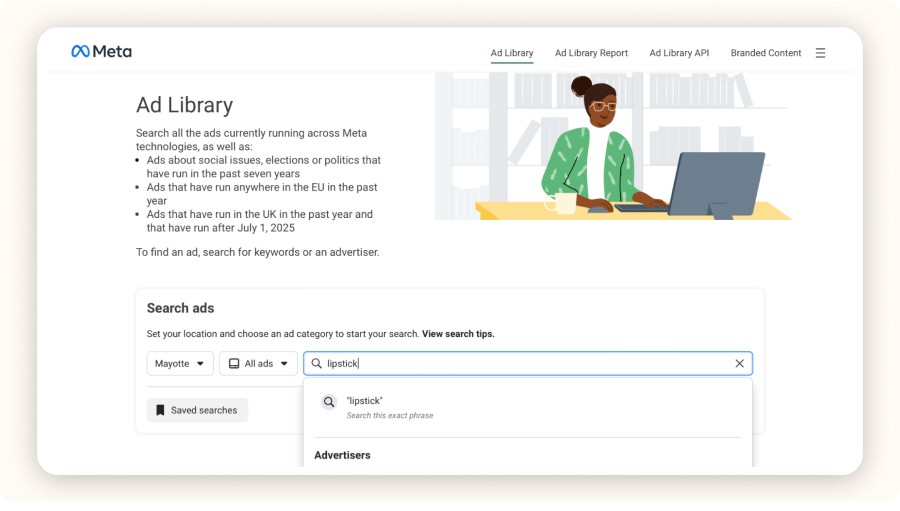
Go to facebook.com/ads/library.
Select the country and ad category you want to explore.
Type in a brand name or a relevant keyword to display active ads.
Searching for Competitor Ads
Currently, you can’t search for an ad by ID in the library, but there are three main ways to uncover competitors’ ads.
Keyword Search

Want to find ads for a specific type of product? Just type in relevant keywords.
Example: Enter “pet accessories” to see ads from stores selling pet products.
Example: Use “home fitness equipment” to uncover ads for workout gear.
Brand Search

By typing a competitor’s brand name, you can view every active ad they’re running. This gives you direct insight into their messaging, offers, and creative styles.
Filters by Country & Category
Use filters to narrow your research:
By country, if you want to analyze a specific regional market.
By ad category, to focus on industries like e-commerce, fashion, or fitness.
Identifying Dropshipping Ads
To refine your store dropshipping strategy, you can:
Search for keywords like “free shipping” or “limited offer.”
Look at product descriptions. Many dropshipping ads use generic supplier copy with little storytelling.
Check delivery times. Longer shipping windows often indicate dropshipping fulfillment through third-party suppliers.
Analyzing Ad Creatives and Copy

Studying ad creatives is essential if you want to improve your own campaigns. Pay attention to the colors, formats, and layouts that capture attention. Look at how competitors structure their copy: the hook, the CTA, and the benefits highlighted.
Best-Performing Ad Formats
Image ads: Simple and direct, they deliver a clear message.
Video ads: Highly engaging, they demonstrate products and tell stories.
Carousel ads: Great for showcasing multiple products or features at once.
Stories ads: Immersive, full-screen format ideal for time-sensitive promotions.
Optimizing CTAs (Calls to Action)
A strong CTA is what drives clicks and conversions. Brands often:
Use clear action verbs like “Buy Now” or “Discover.”
Create urgency with lines like “Limited Offer” or “Last Chance.”
Match the CTA with the landing page for a seamless user journey.
Leveraging Ad Library Data to Improve Your Campaigns

By reviewing competitor ads in detail, you can extract valuable lessons for your own campaigns. Focus on:
Visuals: Which colors, themes, and layouts stand out.
Messaging: Which tones, lengths, and claims generate engagement.
Offers: Which promotions and discounts consistently drive conversions.
The more systematically you analyze competitor ads, the faster you can optimize your campaigns and scale with confidence.
Checking Ad Duration and Spotting Trends

One of the most overlooked features in the Facebook Ad Library is ad duration. For beginners, it may seem irrelevant, but it’s a powerful signal for identifying which ads actually deliver a profitable return on investment.
Here’s why it matters: underperforming ads are usually shut down quickly. If a campaign stays active for weeks or even months, it’s a clear sign the ad is meeting its objectives, whether that’s driving conversions, boosting brand awareness, or generating engagement.
Long-Running Ads as Performance Indicators
When you see an ad running for a long time, take note. Longevity often means:
Efficiency: The campaign is profitable and worth keeping live.
Relevance: The ad message continues to resonate with its target audience.
Consistency: The offer remains attractive over time, suggesting stable demand.
For dropshippers and e-commerce brands, identifying these evergreen ads can be a shortcut to finding winning products and proven ad strategies.
Understanding Seasonal Campaigns
Not all ads are meant to last. Many are designed around seasonal events and short-term sales pushes. Watch for these patterns to anticipate market shifts:
Black Friday: Aggressive promotions to capture deal-hungry shoppers.
Christmas: Campaigns centered on gifts, family, and festive spirit.
Summer Sales: Discounts on seasonal products or stock clearances.
By recognizing these seasonal ad strategies, you can align your campaigns with consumer demand at the right time, maximizing both reach and ROI.
How to Use Facebook Ad Library Like a Pro

Using the Facebook Ad Library isn’t just about typing a keyword in the search bar. To really get results, you need to know how to apply filters, recognize performance signals, and spot campaigns with strong potential. Most importantly, you must learn how to interpret the data to gain strategic insights.
By mastering the tool, you can:
Anticipate market trends by tracking the most common ad formats.
Get inspired by visuals, messaging, and ad structures that generate engagement.
Avoid costly mistakes by studying what competitors test and abandon.
Here’s how to use the Facebook Ads Library effectively!
Accessing Facebook Ad Library

Here’s the step-by-step process:
Go to facebook.com/ads/library.
Select the country and ad category you want to explore.
Type in a brand name or a relevant keyword to display active ads.
Searching for Competitor Ads
Currently, you can’t search for an ad by ID in the library, but there are three main ways to uncover competitors’ ads.
Keyword Search

Want to find ads for a specific type of product? Just type in relevant keywords.
Example: Enter “pet accessories” to see ads from stores selling pet products.
Example: Use “home fitness equipment” to uncover ads for workout gear.
Brand Search

By typing a competitor’s brand name, you can view every active ad they’re running. This gives you direct insight into their messaging, offers, and creative styles.
Filters by Country & Category
Use filters to narrow your research:
By country, if you want to analyze a specific regional market.
By ad category, to focus on industries like e-commerce, fashion, or fitness.
Identifying Dropshipping Ads
To refine your store dropshipping strategy, you can:
Search for keywords like “free shipping” or “limited offer.”
Look at product descriptions. Many dropshipping ads use generic supplier copy with little storytelling.
Check delivery times. Longer shipping windows often indicate dropshipping fulfillment through third-party suppliers.
Analyzing Ad Creatives and Copy

Studying ad creatives is essential if you want to improve your own campaigns. Pay attention to the colors, formats, and layouts that capture attention. Look at how competitors structure their copy: the hook, the CTA, and the benefits highlighted.
Best-Performing Ad Formats
Image ads: Simple and direct, they deliver a clear message.
Video ads: Highly engaging, they demonstrate products and tell stories.
Carousel ads: Great for showcasing multiple products or features at once.
Stories ads: Immersive, full-screen format ideal for time-sensitive promotions.
Optimizing CTAs (Calls to Action)
A strong CTA is what drives clicks and conversions. Brands often:
Use clear action verbs like “Buy Now” or “Discover.”
Create urgency with lines like “Limited Offer” or “Last Chance.”
Match the CTA with the landing page for a seamless user journey.
Leveraging Ad Library Data to Improve Your Campaigns

By reviewing competitor ads in detail, you can extract valuable lessons for your own campaigns. Focus on:
Visuals: Which colors, themes, and layouts stand out.
Messaging: Which tones, lengths, and claims generate engagement.
Offers: Which promotions and discounts consistently drive conversions.
The more systematically you analyze competitor ads, the faster you can optimize your campaigns and scale with confidence.
Checking Ad Duration and Spotting Trends

One of the most overlooked features in the Facebook Ad Library is ad duration. For beginners, it may seem irrelevant, but it’s a powerful signal for identifying which ads actually deliver a profitable return on investment.
Here’s why it matters: underperforming ads are usually shut down quickly. If a campaign stays active for weeks or even months, it’s a clear sign the ad is meeting its objectives, whether that’s driving conversions, boosting brand awareness, or generating engagement.
Long-Running Ads as Performance Indicators
When you see an ad running for a long time, take note. Longevity often means:
Efficiency: The campaign is profitable and worth keeping live.
Relevance: The ad message continues to resonate with its target audience.
Consistency: The offer remains attractive over time, suggesting stable demand.
For dropshippers and e-commerce brands, identifying these evergreen ads can be a shortcut to finding winning products and proven ad strategies.
Understanding Seasonal Campaigns
Not all ads are meant to last. Many are designed around seasonal events and short-term sales pushes. Watch for these patterns to anticipate market shifts:
Black Friday: Aggressive promotions to capture deal-hungry shoppers.
Christmas: Campaigns centered on gifts, family, and festive spirit.
Summer Sales: Discounts on seasonal products or stock clearances.
By recognizing these seasonal ad strategies, you can align your campaigns with consumer demand at the right time, maximizing both reach and ROI.
How to Use Facebook Ad Library Like a Pro

Using the Facebook Ad Library isn’t just about typing a keyword in the search bar. To really get results, you need to know how to apply filters, recognize performance signals, and spot campaigns with strong potential. Most importantly, you must learn how to interpret the data to gain strategic insights.
By mastering the tool, you can:
Anticipate market trends by tracking the most common ad formats.
Get inspired by visuals, messaging, and ad structures that generate engagement.
Avoid costly mistakes by studying what competitors test and abandon.
Here’s how to use the Facebook Ads Library effectively!
Accessing Facebook Ad Library

Here’s the step-by-step process:
Go to facebook.com/ads/library.
Select the country and ad category you want to explore.
Type in a brand name or a relevant keyword to display active ads.
Searching for Competitor Ads
Currently, you can’t search for an ad by ID in the library, but there are three main ways to uncover competitors’ ads.
Keyword Search

Want to find ads for a specific type of product? Just type in relevant keywords.
Example: Enter “pet accessories” to see ads from stores selling pet products.
Example: Use “home fitness equipment” to uncover ads for workout gear.
Brand Search

By typing a competitor’s brand name, you can view every active ad they’re running. This gives you direct insight into their messaging, offers, and creative styles.
Filters by Country & Category
Use filters to narrow your research:
By country, if you want to analyze a specific regional market.
By ad category, to focus on industries like e-commerce, fashion, or fitness.
Identifying Dropshipping Ads
To refine your store dropshipping strategy, you can:
Search for keywords like “free shipping” or “limited offer.”
Look at product descriptions. Many dropshipping ads use generic supplier copy with little storytelling.
Check delivery times. Longer shipping windows often indicate dropshipping fulfillment through third-party suppliers.
Analyzing Ad Creatives and Copy

Studying ad creatives is essential if you want to improve your own campaigns. Pay attention to the colors, formats, and layouts that capture attention. Look at how competitors structure their copy: the hook, the CTA, and the benefits highlighted.
Best-Performing Ad Formats
Image ads: Simple and direct, they deliver a clear message.
Video ads: Highly engaging, they demonstrate products and tell stories.
Carousel ads: Great for showcasing multiple products or features at once.
Stories ads: Immersive, full-screen format ideal for time-sensitive promotions.
Optimizing CTAs (Calls to Action)
A strong CTA is what drives clicks and conversions. Brands often:
Use clear action verbs like “Buy Now” or “Discover.”
Create urgency with lines like “Limited Offer” or “Last Chance.”
Match the CTA with the landing page for a seamless user journey.
Leveraging Ad Library Data to Improve Your Campaigns

By reviewing competitor ads in detail, you can extract valuable lessons for your own campaigns. Focus on:
Visuals: Which colors, themes, and layouts stand out.
Messaging: Which tones, lengths, and claims generate engagement.
Offers: Which promotions and discounts consistently drive conversions.
The more systematically you analyze competitor ads, the faster you can optimize your campaigns and scale with confidence.
Checking Ad Duration and Spotting Trends

One of the most overlooked features in the Facebook Ad Library is ad duration. For beginners, it may seem irrelevant, but it’s a powerful signal for identifying which ads actually deliver a profitable return on investment.
Here’s why it matters: underperforming ads are usually shut down quickly. If a campaign stays active for weeks or even months, it’s a clear sign the ad is meeting its objectives, whether that’s driving conversions, boosting brand awareness, or generating engagement.
Long-Running Ads as Performance Indicators
When you see an ad running for a long time, take note. Longevity often means:
Efficiency: The campaign is profitable and worth keeping live.
Relevance: The ad message continues to resonate with its target audience.
Consistency: The offer remains attractive over time, suggesting stable demand.
For dropshippers and e-commerce brands, identifying these evergreen ads can be a shortcut to finding winning products and proven ad strategies.
Understanding Seasonal Campaigns
Not all ads are meant to last. Many are designed around seasonal events and short-term sales pushes. Watch for these patterns to anticipate market shifts:
Black Friday: Aggressive promotions to capture deal-hungry shoppers.
Christmas: Campaigns centered on gifts, family, and festive spirit.
Summer Sales: Discounts on seasonal products or stock clearances.
By recognizing these seasonal ad strategies, you can align your campaigns with consumer demand at the right time, maximizing both reach and ROI.
How to Use Facebook Ad Library Like a Pro

Using the Facebook Ad Library isn’t just about typing a keyword in the search bar. To really get results, you need to know how to apply filters, recognize performance signals, and spot campaigns with strong potential. Most importantly, you must learn how to interpret the data to gain strategic insights.
By mastering the tool, you can:
Anticipate market trends by tracking the most common ad formats.
Get inspired by visuals, messaging, and ad structures that generate engagement.
Avoid costly mistakes by studying what competitors test and abandon.
Here’s how to use the Facebook Ads Library effectively!
Accessing Facebook Ad Library

Here’s the step-by-step process:
Go to facebook.com/ads/library.
Select the country and ad category you want to explore.
Type in a brand name or a relevant keyword to display active ads.
Searching for Competitor Ads
Currently, you can’t search for an ad by ID in the library, but there are three main ways to uncover competitors’ ads.
Keyword Search

Want to find ads for a specific type of product? Just type in relevant keywords.
Example: Enter “pet accessories” to see ads from stores selling pet products.
Example: Use “home fitness equipment” to uncover ads for workout gear.
Brand Search

By typing a competitor’s brand name, you can view every active ad they’re running. This gives you direct insight into their messaging, offers, and creative styles.
Filters by Country & Category
Use filters to narrow your research:
By country, if you want to analyze a specific regional market.
By ad category, to focus on industries like e-commerce, fashion, or fitness.
Identifying Dropshipping Ads
To refine your store dropshipping strategy, you can:
Search for keywords like “free shipping” or “limited offer.”
Look at product descriptions. Many dropshipping ads use generic supplier copy with little storytelling.
Check delivery times. Longer shipping windows often indicate dropshipping fulfillment through third-party suppliers.
Analyzing Ad Creatives and Copy

Studying ad creatives is essential if you want to improve your own campaigns. Pay attention to the colors, formats, and layouts that capture attention. Look at how competitors structure their copy: the hook, the CTA, and the benefits highlighted.
Best-Performing Ad Formats
Image ads: Simple and direct, they deliver a clear message.
Video ads: Highly engaging, they demonstrate products and tell stories.
Carousel ads: Great for showcasing multiple products or features at once.
Stories ads: Immersive, full-screen format ideal for time-sensitive promotions.
Optimizing CTAs (Calls to Action)
A strong CTA is what drives clicks and conversions. Brands often:
Use clear action verbs like “Buy Now” or “Discover.”
Create urgency with lines like “Limited Offer” or “Last Chance.”
Match the CTA with the landing page for a seamless user journey.
Leveraging Ad Library Data to Improve Your Campaigns

By reviewing competitor ads in detail, you can extract valuable lessons for your own campaigns. Focus on:
Visuals: Which colors, themes, and layouts stand out.
Messaging: Which tones, lengths, and claims generate engagement.
Offers: Which promotions and discounts consistently drive conversions.
The more systematically you analyze competitor ads, the faster you can optimize your campaigns and scale with confidence.
Checking Ad Duration and Spotting Trends

One of the most overlooked features in the Facebook Ad Library is ad duration. For beginners, it may seem irrelevant, but it’s a powerful signal for identifying which ads actually deliver a profitable return on investment.
Here’s why it matters: underperforming ads are usually shut down quickly. If a campaign stays active for weeks or even months, it’s a clear sign the ad is meeting its objectives, whether that’s driving conversions, boosting brand awareness, or generating engagement.
Long-Running Ads as Performance Indicators
When you see an ad running for a long time, take note. Longevity often means:
Efficiency: The campaign is profitable and worth keeping live.
Relevance: The ad message continues to resonate with its target audience.
Consistency: The offer remains attractive over time, suggesting stable demand.
For dropshippers and e-commerce brands, identifying these evergreen ads can be a shortcut to finding winning products and proven ad strategies.
Understanding Seasonal Campaigns
Not all ads are meant to last. Many are designed around seasonal events and short-term sales pushes. Watch for these patterns to anticipate market shifts:
Black Friday: Aggressive promotions to capture deal-hungry shoppers.
Christmas: Campaigns centered on gifts, family, and festive spirit.
Summer Sales: Discounts on seasonal products or stock clearances.
By recognizing these seasonal ad strategies, you can align your campaigns with consumer demand at the right time, maximizing both reach and ROI.
How to Use Facebook Ad Library Like a Pro

Using the Facebook Ad Library isn’t just about typing a keyword in the search bar. To really get results, you need to know how to apply filters, recognize performance signals, and spot campaigns with strong potential. Most importantly, you must learn how to interpret the data to gain strategic insights.
By mastering the tool, you can:
Anticipate market trends by tracking the most common ad formats.
Get inspired by visuals, messaging, and ad structures that generate engagement.
Avoid costly mistakes by studying what competitors test and abandon.
Here’s how to use the Facebook Ads Library effectively!
Accessing Facebook Ad Library

Here’s the step-by-step process:
Go to facebook.com/ads/library.
Select the country and ad category you want to explore.
Type in a brand name or a relevant keyword to display active ads.
Searching for Competitor Ads
Currently, you can’t search for an ad by ID in the library, but there are three main ways to uncover competitors’ ads.
Keyword Search

Want to find ads for a specific type of product? Just type in relevant keywords.
Example: Enter “pet accessories” to see ads from stores selling pet products.
Example: Use “home fitness equipment” to uncover ads for workout gear.
Brand Search

By typing a competitor’s brand name, you can view every active ad they’re running. This gives you direct insight into their messaging, offers, and creative styles.
Filters by Country & Category
Use filters to narrow your research:
By country, if you want to analyze a specific regional market.
By ad category, to focus on industries like e-commerce, fashion, or fitness.
Identifying Dropshipping Ads
To refine your store dropshipping strategy, you can:
Search for keywords like “free shipping” or “limited offer.”
Look at product descriptions. Many dropshipping ads use generic supplier copy with little storytelling.
Check delivery times. Longer shipping windows often indicate dropshipping fulfillment through third-party suppliers.
Analyzing Ad Creatives and Copy

Studying ad creatives is essential if you want to improve your own campaigns. Pay attention to the colors, formats, and layouts that capture attention. Look at how competitors structure their copy: the hook, the CTA, and the benefits highlighted.
Best-Performing Ad Formats
Image ads: Simple and direct, they deliver a clear message.
Video ads: Highly engaging, they demonstrate products and tell stories.
Carousel ads: Great for showcasing multiple products or features at once.
Stories ads: Immersive, full-screen format ideal for time-sensitive promotions.
Optimizing CTAs (Calls to Action)
A strong CTA is what drives clicks and conversions. Brands often:
Use clear action verbs like “Buy Now” or “Discover.”
Create urgency with lines like “Limited Offer” or “Last Chance.”
Match the CTA with the landing page for a seamless user journey.
Leveraging Ad Library Data to Improve Your Campaigns

By reviewing competitor ads in detail, you can extract valuable lessons for your own campaigns. Focus on:
Visuals: Which colors, themes, and layouts stand out.
Messaging: Which tones, lengths, and claims generate engagement.
Offers: Which promotions and discounts consistently drive conversions.
The more systematically you analyze competitor ads, the faster you can optimize your campaigns and scale with confidence.
Checking Ad Duration and Spotting Trends

One of the most overlooked features in the Facebook Ad Library is ad duration. For beginners, it may seem irrelevant, but it’s a powerful signal for identifying which ads actually deliver a profitable return on investment.
Here’s why it matters: underperforming ads are usually shut down quickly. If a campaign stays active for weeks or even months, it’s a clear sign the ad is meeting its objectives, whether that’s driving conversions, boosting brand awareness, or generating engagement.
Long-Running Ads as Performance Indicators
When you see an ad running for a long time, take note. Longevity often means:
Efficiency: The campaign is profitable and worth keeping live.
Relevance: The ad message continues to resonate with its target audience.
Consistency: The offer remains attractive over time, suggesting stable demand.
For dropshippers and e-commerce brands, identifying these evergreen ads can be a shortcut to finding winning products and proven ad strategies.
Understanding Seasonal Campaigns
Not all ads are meant to last. Many are designed around seasonal events and short-term sales pushes. Watch for these patterns to anticipate market shifts:
Black Friday: Aggressive promotions to capture deal-hungry shoppers.
Christmas: Campaigns centered on gifts, family, and festive spirit.
Summer Sales: Discounts on seasonal products or stock clearances.
By recognizing these seasonal ad strategies, you can align your campaigns with consumer demand at the right time, maximizing both reach and ROI.
How to Use Facebook Ad Library Like a Pro

Using the Facebook Ad Library isn’t just about typing a keyword in the search bar. To really get results, you need to know how to apply filters, recognize performance signals, and spot campaigns with strong potential. Most importantly, you must learn how to interpret the data to gain strategic insights.
By mastering the tool, you can:
Anticipate market trends by tracking the most common ad formats.
Get inspired by visuals, messaging, and ad structures that generate engagement.
Avoid costly mistakes by studying what competitors test and abandon.
Here’s how to use the Facebook Ads Library effectively!
Accessing Facebook Ad Library

Here’s the step-by-step process:
Go to facebook.com/ads/library.
Select the country and ad category you want to explore.
Type in a brand name or a relevant keyword to display active ads.
Searching for Competitor Ads
Currently, you can’t search for an ad by ID in the library, but there are three main ways to uncover competitors’ ads.
Keyword Search

Want to find ads for a specific type of product? Just type in relevant keywords.
Example: Enter “pet accessories” to see ads from stores selling pet products.
Example: Use “home fitness equipment” to uncover ads for workout gear.
Brand Search

By typing a competitor’s brand name, you can view every active ad they’re running. This gives you direct insight into their messaging, offers, and creative styles.
Filters by Country & Category
Use filters to narrow your research:
By country, if you want to analyze a specific regional market.
By ad category, to focus on industries like e-commerce, fashion, or fitness.
Identifying Dropshipping Ads
To refine your store dropshipping strategy, you can:
Search for keywords like “free shipping” or “limited offer.”
Look at product descriptions. Many dropshipping ads use generic supplier copy with little storytelling.
Check delivery times. Longer shipping windows often indicate dropshipping fulfillment through third-party suppliers.
Analyzing Ad Creatives and Copy

Studying ad creatives is essential if you want to improve your own campaigns. Pay attention to the colors, formats, and layouts that capture attention. Look at how competitors structure their copy: the hook, the CTA, and the benefits highlighted.
Best-Performing Ad Formats
Image ads: Simple and direct, they deliver a clear message.
Video ads: Highly engaging, they demonstrate products and tell stories.
Carousel ads: Great for showcasing multiple products or features at once.
Stories ads: Immersive, full-screen format ideal for time-sensitive promotions.
Optimizing CTAs (Calls to Action)
A strong CTA is what drives clicks and conversions. Brands often:
Use clear action verbs like “Buy Now” or “Discover.”
Create urgency with lines like “Limited Offer” or “Last Chance.”
Match the CTA with the landing page for a seamless user journey.
Leveraging Ad Library Data to Improve Your Campaigns

By reviewing competitor ads in detail, you can extract valuable lessons for your own campaigns. Focus on:
Visuals: Which colors, themes, and layouts stand out.
Messaging: Which tones, lengths, and claims generate engagement.
Offers: Which promotions and discounts consistently drive conversions.
The more systematically you analyze competitor ads, the faster you can optimize your campaigns and scale with confidence.
Checking Ad Duration and Spotting Trends

One of the most overlooked features in the Facebook Ad Library is ad duration. For beginners, it may seem irrelevant, but it’s a powerful signal for identifying which ads actually deliver a profitable return on investment.
Here’s why it matters: underperforming ads are usually shut down quickly. If a campaign stays active for weeks or even months, it’s a clear sign the ad is meeting its objectives, whether that’s driving conversions, boosting brand awareness, or generating engagement.
Long-Running Ads as Performance Indicators
When you see an ad running for a long time, take note. Longevity often means:
Efficiency: The campaign is profitable and worth keeping live.
Relevance: The ad message continues to resonate with its target audience.
Consistency: The offer remains attractive over time, suggesting stable demand.
For dropshippers and e-commerce brands, identifying these evergreen ads can be a shortcut to finding winning products and proven ad strategies.
Understanding Seasonal Campaigns
Not all ads are meant to last. Many are designed around seasonal events and short-term sales pushes. Watch for these patterns to anticipate market shifts:
Black Friday: Aggressive promotions to capture deal-hungry shoppers.
Christmas: Campaigns centered on gifts, family, and festive spirit.
Summer Sales: Discounts on seasonal products or stock clearances.
By recognizing these seasonal ad strategies, you can align your campaigns with consumer demand at the right time, maximizing both reach and ROI.
Top 10 Facebook ads
Top 10 Facebook ads
Top 10 Facebook ads
Top 10 Facebook ads
Top 10 Facebook ads
Top 10 Facebook ads
Reverse Engineering a Competitor’s Ad Strategy
One of the fastest ways to reduce marketing guesswork is to analyze your competitors’ ad strategies. By watching what they test, scale, or abandon, you cut down on trial-and-error and gain insights into proven tactics.
This process helps you:
Identify formats, visuals, and copy that already work with a similar audience.
Understand your competitors’ positioning, value propositions, and messaging.
Spot gaps and opportunities they’ve overlooked products, creative angles, or ad channels.
Avoid repeating mistakes by studying ads that were quickly deactivated.
Here’s how to use the Facebook Ads Library for a deeper competitor study.
Tracking a Competitor’s Ad History
The Facebook Ad Library lets you see when a campaign was launched and how long it stayed active. Reviewing multiple ads from the same period reveals how a brand’s messaging and creative evolve over time.
Key insights you can extract:
Messaging evolution: Brands adapt copy based on seasonality, campaign results, or customer feedback. By watching these shifts, you can anticipate which angles are likely to work.
A/B testing: Variations in visuals, headlines, or CTAs usually mean the advertiser is running split tests. This shows which combinations they’re testing to maximize conversions.
Frequency and pacing: How often do they release new ads? Do they push heavily at the start of each month, season, or during big sales events? Understanding this rhythm helps you adjust your own calendar to compete strategically.
Interpreting When an Ad Disappears
If an ad disappears from the Facebook Ads Library, it signals something. The reasons vary, but each carries a lesson:
Poor performance: Ads that vanish within days usually failed to drive clicks, conversions, or engagement.
Strategic shift: A brand may pause campaigns to adjust targeting, reposition a product, or respond to market changes.
Time-limited promotions: Seasonal sales like Black Friday, product launches, or clearance offers naturally end, explaining why ads get pulled.
Learning to read these signals saves you from making the same mistakes and accelerates your testing cycle.
Choosing the Right Platforms for Each Industry
By studying competitors’ ads, you’ll also see which Meta platforms are most effective for different sectors:
Fashion & beauty: Instagram dominates thanks to its visual-first design.
Technology & B2B services: Facebook and LinkedIn (outside Meta) often perform better because they reach professionals.
Gaming & entertainment: Stories and short-form videos on Facebook and Instagram capture younger audiences.
Advanced Strategies to Get the Most from Facebook Ad Library

Used smartly, the Facebook Ad Library can turn browsing into actionable insights you can apply to improve campaigns, find winning products, and tighten your marketing approach. These tactics help you build better ad campaigns fast.
Finding Winning Dropshipping Products in the Library
If you want to beat competitors, you need to spot winning products early. In the Facebook Ads Library (also called the Meta Ads Library), the frequency with which a product appears across multiple advertisers in a short time window is a strong demand signal.
To surface these products:
Search broad product keywords, not only brand names.
Check how many advertisers promote the item, how diverse the ad creatives are, and how long the active ads have been running.
Watch for similar copy or identical supplier images. That often indicates a common source such as AliExpress or CJdropshipping.
Validate potential: Is the product running in several countries? Are creatives localized for different segments? Do you see improved versions and stronger promises that stand out?
Use the Library to Optimize Your Own Campaigns
To improve your ad creatives, you can also draw inspiration from what the Facebook Ad Library has to offer.
But how exactly can you use it to your advantage? Here are the strategies you should apply.
Strategy 1: Evidence-based A/B testing

Instead of testing random variations blindly, base your experiments on the formats, headlines, and visuals already used by your top-performing competitors. This approach reduces mistakes and speeds up the entire optimization process.
Strategy 2: Copywriting that converts
Mine the library for:
Promises teams lean on (“relieve pain,” “ships in 24 hours,” “proven results”).
Message styles such as questions, quick benefits, or simple storytelling.
Proof elements like guarantees, testimonials, and numbers.
You can also infer targeting even without audience data. Look at media types (Stories, Reels, carousels), languages and cultural cues, and where the ads most often appear, including the Audience Network. These clues point to the audience each brand is after.
Combine Facebook Ad Library with Minea for Deeper Analysis

The Facebook Ad Library is a great starting point, but it has limits: no CTR (Click-Through Rate), ROAS (Return On Ad Spend), or conversion data, little to no audience detail, and no impression counts.
To overcome the limitations of the Facebook Ads Library, combine it with a more comprehensive competitive analysis tool like Minea.
This pairing gives you deeper insights into your competitors’ strategies and helps you make smarter marketing decisions.
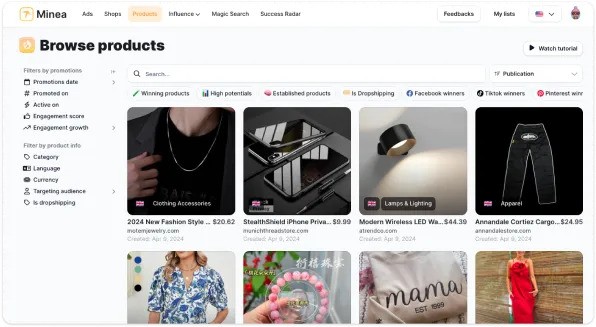
Minea aggregates ads from Facebook, TikTok, and Pinterest, enriches them with engagement signals like likes, shares, comments, and surfaces ad age, frequency, format, and store type (dropshipping, brand, print-on-demand). It enhances the data with key metrics such as:
Number of interactions (likes, shares, comments)
Ad longevity
Frequency of appearance
Formats used
Type of store (dropshipping, native brand, or print-on-demand)
By combining the insights from the Facebook Ads Library with the data provided by Minea, you get a complete view of the advertising landscape.
This helps you understand what truly works so you can build a high-performing, data-driven marketing strategy.
As a result, your campaigns will be based on real, up-to-date insights, not assumptions.
In addition, this combination allows you to:
Make faster decisions
Test strategies more efficiently
Spot opportunities before your competitors do.
Limitations and Challenges of the Facebook Ad Library

The Facebook Ads Library is a powerful resource, but it’s not perfect. Knowing its limitations helps you use it more strategically and avoid blind spots.
What Facebook Ad Library Doesn’t Show You
The library was designed for transparency, not full ad intelligence. Here are the main gaps:
No performance metrics
You won’t see CTR (Click-Through Rate), ROAS (Return On Ad Spend), or conversion data. Without these metrics, it’s impossible to measure the true effectiveness of an ad directly in the library.
No audience targeting insights
The tool doesn’t reveal demographic or interest-based targeting. That means you can’t know exactly which audience segments brands are reaching, making competitor targeting harder to analyze.
Use of secondary accounts
Some brands run ads through secondary or backup accounts. This can hide part of their activity and make competitor research less reliable, since not all campaigns are visible.
Workarounds to Overcome the Gaps
Fortunately, to overcome the gap you have two solutions:
Solution 1: Use complementary tools
Pair the facebook ads library search with tools like Meta Business Manager, or third-party platforms such as Minea. These offer deeper data on ad campaigns, audience behaviors, and creative trends.
Solution 2: Analyze social interactions
Even without CTR (Click-Through Rate) or ROAS (Return On Ad Spend), you can gauge impact by looking at likes, shares, and comments. High engagement usually signals strong ad copy and relevant ad creatives, giving you clues about what resonates.
By combining the library with social proof and advanced analytics tools, you turn it into a much more actionable resource for your marketing strategy.
Reverse Engineering a Competitor’s Ad Strategy
One of the fastest ways to reduce marketing guesswork is to analyze your competitors’ ad strategies. By watching what they test, scale, or abandon, you cut down on trial-and-error and gain insights into proven tactics.
This process helps you:
Identify formats, visuals, and copy that already work with a similar audience.
Understand your competitors’ positioning, value propositions, and messaging.
Spot gaps and opportunities they’ve overlooked products, creative angles, or ad channels.
Avoid repeating mistakes by studying ads that were quickly deactivated.
Here’s how to use the Facebook Ads Library for a deeper competitor study.
Tracking a Competitor’s Ad History
The Facebook Ad Library lets you see when a campaign was launched and how long it stayed active. Reviewing multiple ads from the same period reveals how a brand’s messaging and creative evolve over time.
Key insights you can extract:
Messaging evolution: Brands adapt copy based on seasonality, campaign results, or customer feedback. By watching these shifts, you can anticipate which angles are likely to work.
A/B testing: Variations in visuals, headlines, or CTAs usually mean the advertiser is running split tests. This shows which combinations they’re testing to maximize conversions.
Frequency and pacing: How often do they release new ads? Do they push heavily at the start of each month, season, or during big sales events? Understanding this rhythm helps you adjust your own calendar to compete strategically.
Interpreting When an Ad Disappears
If an ad disappears from the Facebook Ads Library, it signals something. The reasons vary, but each carries a lesson:
Poor performance: Ads that vanish within days usually failed to drive clicks, conversions, or engagement.
Strategic shift: A brand may pause campaigns to adjust targeting, reposition a product, or respond to market changes.
Time-limited promotions: Seasonal sales like Black Friday, product launches, or clearance offers naturally end, explaining why ads get pulled.
Learning to read these signals saves you from making the same mistakes and accelerates your testing cycle.
Choosing the Right Platforms for Each Industry
By studying competitors’ ads, you’ll also see which Meta platforms are most effective for different sectors:
Fashion & beauty: Instagram dominates thanks to its visual-first design.
Technology & B2B services: Facebook and LinkedIn (outside Meta) often perform better because they reach professionals.
Gaming & entertainment: Stories and short-form videos on Facebook and Instagram capture younger audiences.
Advanced Strategies to Get the Most from Facebook Ad Library

Used smartly, the Facebook Ad Library can turn browsing into actionable insights you can apply to improve campaigns, find winning products, and tighten your marketing approach. These tactics help you build better ad campaigns fast.
Finding Winning Dropshipping Products in the Library
If you want to beat competitors, you need to spot winning products early. In the Facebook Ads Library (also called the Meta Ads Library), the frequency with which a product appears across multiple advertisers in a short time window is a strong demand signal.
To surface these products:
Search broad product keywords, not only brand names.
Check how many advertisers promote the item, how diverse the ad creatives are, and how long the active ads have been running.
Watch for similar copy or identical supplier images. That often indicates a common source such as AliExpress or CJdropshipping.
Validate potential: Is the product running in several countries? Are creatives localized for different segments? Do you see improved versions and stronger promises that stand out?
Use the Library to Optimize Your Own Campaigns
To improve your ad creatives, you can also draw inspiration from what the Facebook Ad Library has to offer.
But how exactly can you use it to your advantage? Here are the strategies you should apply.
Strategy 1: Evidence-based A/B testing

Instead of testing random variations blindly, base your experiments on the formats, headlines, and visuals already used by your top-performing competitors. This approach reduces mistakes and speeds up the entire optimization process.
Strategy 2: Copywriting that converts
Mine the library for:
Promises teams lean on (“relieve pain,” “ships in 24 hours,” “proven results”).
Message styles such as questions, quick benefits, or simple storytelling.
Proof elements like guarantees, testimonials, and numbers.
You can also infer targeting even without audience data. Look at media types (Stories, Reels, carousels), languages and cultural cues, and where the ads most often appear, including the Audience Network. These clues point to the audience each brand is after.
Combine Facebook Ad Library with Minea for Deeper Analysis

The Facebook Ad Library is a great starting point, but it has limits: no CTR (Click-Through Rate), ROAS (Return On Ad Spend), or conversion data, little to no audience detail, and no impression counts.
To overcome the limitations of the Facebook Ads Library, combine it with a more comprehensive competitive analysis tool like Minea.
This pairing gives you deeper insights into your competitors’ strategies and helps you make smarter marketing decisions.
Minea aggregates ads from Facebook, TikTok, and Pinterest, enriches them with engagement signals like likes, shares, comments, and surfaces ad age, frequency, format, and store type (dropshipping, brand, print-on-demand). It enhances the data with key metrics such as:
Number of interactions (likes, shares, comments)
Ad longevity
Frequency of appearance
Formats used
Type of store (dropshipping, native brand, or print-on-demand)
By combining the insights from the Facebook Ads Library with the data provided by Minea, you get a complete view of the advertising landscape.
This helps you understand what truly works so you can build a high-performing, data-driven marketing strategy.
As a result, your campaigns will be based on real, up-to-date insights, not assumptions.
In addition, this combination allows you to:
Make faster decisions
Test strategies more efficiently
Spot opportunities before your competitors do.
Limitations and Challenges of the Facebook Ad Library

The Facebook Ads Library is a powerful resource, but it’s not perfect. Knowing its limitations helps you use it more strategically and avoid blind spots.
What Facebook Ad Library Doesn’t Show You
The library was designed for transparency, not full ad intelligence. Here are the main gaps:
No performance metrics
You won’t see CTR (Click-Through Rate), ROAS (Return On Ad Spend), or conversion data. Without these metrics, it’s impossible to measure the true effectiveness of an ad directly in the library.
No audience targeting insights
The tool doesn’t reveal demographic or interest-based targeting. That means you can’t know exactly which audience segments brands are reaching, making competitor targeting harder to analyze.
Use of secondary accounts
Some brands run ads through secondary or backup accounts. This can hide part of their activity and make competitor research less reliable, since not all campaigns are visible.
Workarounds to Overcome the Gaps
Fortunately, to overcome the gap you have two solutions:
Solution 1: Use complementary tools
Pair the facebook ads library search with tools like Meta Business Manager, or third-party platforms such as Minea. These offer deeper data on ad campaigns, audience behaviors, and creative trends.
Solution 2: Analyze social interactions
Even without CTR (Click-Through Rate) or ROAS (Return On Ad Spend), you can gauge impact by looking at likes, shares, and comments. High engagement usually signals strong ad copy and relevant ad creatives, giving you clues about what resonates.
By combining the library with social proof and advanced analytics tools, you turn it into a much more actionable resource for your marketing strategy.
Reverse Engineering a Competitor’s Ad Strategy
One of the fastest ways to reduce marketing guesswork is to analyze your competitors’ ad strategies. By watching what they test, scale, or abandon, you cut down on trial-and-error and gain insights into proven tactics.
This process helps you:
Identify formats, visuals, and copy that already work with a similar audience.
Understand your competitors’ positioning, value propositions, and messaging.
Spot gaps and opportunities they’ve overlooked products, creative angles, or ad channels.
Avoid repeating mistakes by studying ads that were quickly deactivated.
Here’s how to use the Facebook Ads Library for a deeper competitor study.
Tracking a Competitor’s Ad History
The Facebook Ad Library lets you see when a campaign was launched and how long it stayed active. Reviewing multiple ads from the same period reveals how a brand’s messaging and creative evolve over time.
Key insights you can extract:
Messaging evolution: Brands adapt copy based on seasonality, campaign results, or customer feedback. By watching these shifts, you can anticipate which angles are likely to work.
A/B testing: Variations in visuals, headlines, or CTAs usually mean the advertiser is running split tests. This shows which combinations they’re testing to maximize conversions.
Frequency and pacing: How often do they release new ads? Do they push heavily at the start of each month, season, or during big sales events? Understanding this rhythm helps you adjust your own calendar to compete strategically.
Interpreting When an Ad Disappears
If an ad disappears from the Facebook Ads Library, it signals something. The reasons vary, but each carries a lesson:
Poor performance: Ads that vanish within days usually failed to drive clicks, conversions, or engagement.
Strategic shift: A brand may pause campaigns to adjust targeting, reposition a product, or respond to market changes.
Time-limited promotions: Seasonal sales like Black Friday, product launches, or clearance offers naturally end, explaining why ads get pulled.
Learning to read these signals saves you from making the same mistakes and accelerates your testing cycle.
Choosing the Right Platforms for Each Industry
By studying competitors’ ads, you’ll also see which Meta platforms are most effective for different sectors:
Fashion & beauty: Instagram dominates thanks to its visual-first design.
Technology & B2B services: Facebook and LinkedIn (outside Meta) often perform better because they reach professionals.
Gaming & entertainment: Stories and short-form videos on Facebook and Instagram capture younger audiences.
Advanced Strategies to Get the Most from Facebook Ad Library

Used smartly, the Facebook Ad Library can turn browsing into actionable insights you can apply to improve campaigns, find winning products, and tighten your marketing approach. These tactics help you build better ad campaigns fast.
Finding Winning Dropshipping Products in the Library
If you want to beat competitors, you need to spot winning products early. In the Facebook Ads Library (also called the Meta Ads Library), the frequency with which a product appears across multiple advertisers in a short time window is a strong demand signal.
To surface these products:
Search broad product keywords, not only brand names.
Check how many advertisers promote the item, how diverse the ad creatives are, and how long the active ads have been running.
Watch for similar copy or identical supplier images. That often indicates a common source such as AliExpress or CJdropshipping.
Validate potential: Is the product running in several countries? Are creatives localized for different segments? Do you see improved versions and stronger promises that stand out?
Use the Library to Optimize Your Own Campaigns
To improve your ad creatives, you can also draw inspiration from what the Facebook Ad Library has to offer.
But how exactly can you use it to your advantage? Here are the strategies you should apply.
Strategy 1: Evidence-based A/B testing

Instead of testing random variations blindly, base your experiments on the formats, headlines, and visuals already used by your top-performing competitors. This approach reduces mistakes and speeds up the entire optimization process.
Strategy 2: Copywriting that converts
Mine the library for:
Promises teams lean on (“relieve pain,” “ships in 24 hours,” “proven results”).
Message styles such as questions, quick benefits, or simple storytelling.
Proof elements like guarantees, testimonials, and numbers.
You can also infer targeting even without audience data. Look at media types (Stories, Reels, carousels), languages and cultural cues, and where the ads most often appear, including the Audience Network. These clues point to the audience each brand is after.
Combine Facebook Ad Library with Minea for Deeper Analysis

The Facebook Ad Library is a great starting point, but it has limits: no CTR (Click-Through Rate), ROAS (Return On Ad Spend), or conversion data, little to no audience detail, and no impression counts.
To overcome the limitations of the Facebook Ads Library, combine it with a more comprehensive competitive analysis tool like Minea.
This pairing gives you deeper insights into your competitors’ strategies and helps you make smarter marketing decisions.
Minea aggregates ads from Facebook, TikTok, and Pinterest, enriches them with engagement signals like likes, shares, comments, and surfaces ad age, frequency, format, and store type (dropshipping, brand, print-on-demand). It enhances the data with key metrics such as:
Number of interactions (likes, shares, comments)
Ad longevity
Frequency of appearance
Formats used
Type of store (dropshipping, native brand, or print-on-demand)
By combining the insights from the Facebook Ads Library with the data provided by Minea, you get a complete view of the advertising landscape.
This helps you understand what truly works so you can build a high-performing, data-driven marketing strategy.
As a result, your campaigns will be based on real, up-to-date insights, not assumptions.
In addition, this combination allows you to:
Make faster decisions
Test strategies more efficiently
Spot opportunities before your competitors do.
Limitations and Challenges of the Facebook Ad Library

The Facebook Ads Library is a powerful resource, but it’s not perfect. Knowing its limitations helps you use it more strategically and avoid blind spots.
What Facebook Ad Library Doesn’t Show You
The library was designed for transparency, not full ad intelligence. Here are the main gaps:
No performance metrics
You won’t see CTR (Click-Through Rate), ROAS (Return On Ad Spend), or conversion data. Without these metrics, it’s impossible to measure the true effectiveness of an ad directly in the library.
No audience targeting insights
The tool doesn’t reveal demographic or interest-based targeting. That means you can’t know exactly which audience segments brands are reaching, making competitor targeting harder to analyze.
Use of secondary accounts
Some brands run ads through secondary or backup accounts. This can hide part of their activity and make competitor research less reliable, since not all campaigns are visible.
Workarounds to Overcome the Gaps
Fortunately, to overcome the gap you have two solutions:
Solution 1: Use complementary tools
Pair the facebook ads library search with tools like Meta Business Manager, or third-party platforms such as Minea. These offer deeper data on ad campaigns, audience behaviors, and creative trends.
Solution 2: Analyze social interactions
Even without CTR (Click-Through Rate) or ROAS (Return On Ad Spend), you can gauge impact by looking at likes, shares, and comments. High engagement usually signals strong ad copy and relevant ad creatives, giving you clues about what resonates.
By combining the library with social proof and advanced analytics tools, you turn it into a much more actionable resource for your marketing strategy.
Reverse Engineering a Competitor’s Ad Strategy
One of the fastest ways to reduce marketing guesswork is to analyze your competitors’ ad strategies. By watching what they test, scale, or abandon, you cut down on trial-and-error and gain insights into proven tactics.
This process helps you:
Identify formats, visuals, and copy that already work with a similar audience.
Understand your competitors’ positioning, value propositions, and messaging.
Spot gaps and opportunities they’ve overlooked products, creative angles, or ad channels.
Avoid repeating mistakes by studying ads that were quickly deactivated.
Here’s how to use the Facebook Ads Library for a deeper competitor study.
Tracking a Competitor’s Ad History
The Facebook Ad Library lets you see when a campaign was launched and how long it stayed active. Reviewing multiple ads from the same period reveals how a brand’s messaging and creative evolve over time.
Key insights you can extract:
Messaging evolution: Brands adapt copy based on seasonality, campaign results, or customer feedback. By watching these shifts, you can anticipate which angles are likely to work.
A/B testing: Variations in visuals, headlines, or CTAs usually mean the advertiser is running split tests. This shows which combinations they’re testing to maximize conversions.
Frequency and pacing: How often do they release new ads? Do they push heavily at the start of each month, season, or during big sales events? Understanding this rhythm helps you adjust your own calendar to compete strategically.
Interpreting When an Ad Disappears
If an ad disappears from the Facebook Ads Library, it signals something. The reasons vary, but each carries a lesson:
Poor performance: Ads that vanish within days usually failed to drive clicks, conversions, or engagement.
Strategic shift: A brand may pause campaigns to adjust targeting, reposition a product, or respond to market changes.
Time-limited promotions: Seasonal sales like Black Friday, product launches, or clearance offers naturally end, explaining why ads get pulled.
Learning to read these signals saves you from making the same mistakes and accelerates your testing cycle.
Choosing the Right Platforms for Each Industry
By studying competitors’ ads, you’ll also see which Meta platforms are most effective for different sectors:
Fashion & beauty: Instagram dominates thanks to its visual-first design.
Technology & B2B services: Facebook and LinkedIn (outside Meta) often perform better because they reach professionals.
Gaming & entertainment: Stories and short-form videos on Facebook and Instagram capture younger audiences.
Advanced Strategies to Get the Most from Facebook Ad Library

Used smartly, the Facebook Ad Library can turn browsing into actionable insights you can apply to improve campaigns, find winning products, and tighten your marketing approach. These tactics help you build better ad campaigns fast.
Finding Winning Dropshipping Products in the Library
If you want to beat competitors, you need to spot winning products early. In the Facebook Ads Library (also called the Meta Ads Library), the frequency with which a product appears across multiple advertisers in a short time window is a strong demand signal.
To surface these products:
Search broad product keywords, not only brand names.
Check how many advertisers promote the item, how diverse the ad creatives are, and how long the active ads have been running.
Watch for similar copy or identical supplier images. That often indicates a common source such as AliExpress or CJdropshipping.
Validate potential: Is the product running in several countries? Are creatives localized for different segments? Do you see improved versions and stronger promises that stand out?
Use the Library to Optimize Your Own Campaigns
To improve your ad creatives, you can also draw inspiration from what the Facebook Ad Library has to offer.
But how exactly can you use it to your advantage? Here are the strategies you should apply.
Strategy 1: Evidence-based A/B testing

Instead of testing random variations blindly, base your experiments on the formats, headlines, and visuals already used by your top-performing competitors. This approach reduces mistakes and speeds up the entire optimization process.
Strategy 2: Copywriting that converts
Mine the library for:
Promises teams lean on (“relieve pain,” “ships in 24 hours,” “proven results”).
Message styles such as questions, quick benefits, or simple storytelling.
Proof elements like guarantees, testimonials, and numbers.
You can also infer targeting even without audience data. Look at media types (Stories, Reels, carousels), languages and cultural cues, and where the ads most often appear, including the Audience Network. These clues point to the audience each brand is after.
Combine Facebook Ad Library with Minea for Deeper Analysis

The Facebook Ad Library is a great starting point, but it has limits: no CTR (Click-Through Rate), ROAS (Return On Ad Spend), or conversion data, little to no audience detail, and no impression counts.
To overcome the limitations of the Facebook Ads Library, combine it with a more comprehensive competitive analysis tool like Minea.
This pairing gives you deeper insights into your competitors’ strategies and helps you make smarter marketing decisions.
Minea aggregates ads from Facebook, TikTok, and Pinterest, enriches them with engagement signals like likes, shares, comments, and surfaces ad age, frequency, format, and store type (dropshipping, brand, print-on-demand). It enhances the data with key metrics such as:
Number of interactions (likes, shares, comments)
Ad longevity
Frequency of appearance
Formats used
Type of store (dropshipping, native brand, or print-on-demand)
By combining the insights from the Facebook Ads Library with the data provided by Minea, you get a complete view of the advertising landscape.
This helps you understand what truly works so you can build a high-performing, data-driven marketing strategy.
As a result, your campaigns will be based on real, up-to-date insights, not assumptions.
In addition, this combination allows you to:
Make faster decisions
Test strategies more efficiently
Spot opportunities before your competitors do.
Limitations and Challenges of the Facebook Ad Library

The Facebook Ads Library is a powerful resource, but it’s not perfect. Knowing its limitations helps you use it more strategically and avoid blind spots.
What Facebook Ad Library Doesn’t Show You
The library was designed for transparency, not full ad intelligence. Here are the main gaps:
No performance metrics
You won’t see CTR (Click-Through Rate), ROAS (Return On Ad Spend), or conversion data. Without these metrics, it’s impossible to measure the true effectiveness of an ad directly in the library.
No audience targeting insights
The tool doesn’t reveal demographic or interest-based targeting. That means you can’t know exactly which audience segments brands are reaching, making competitor targeting harder to analyze.
Use of secondary accounts
Some brands run ads through secondary or backup accounts. This can hide part of their activity and make competitor research less reliable, since not all campaigns are visible.
Workarounds to Overcome the Gaps
Fortunately, to overcome the gap you have two solutions:
Solution 1: Use complementary tools
Pair the facebook ads library search with tools like Meta Business Manager, or third-party platforms such as Minea. These offer deeper data on ad campaigns, audience behaviors, and creative trends.
Solution 2: Analyze social interactions
Even without CTR (Click-Through Rate) or ROAS (Return On Ad Spend), you can gauge impact by looking at likes, shares, and comments. High engagement usually signals strong ad copy and relevant ad creatives, giving you clues about what resonates.
By combining the library with social proof and advanced analytics tools, you turn it into a much more actionable resource for your marketing strategy.
Reverse Engineering a Competitor’s Ad Strategy
One of the fastest ways to reduce marketing guesswork is to analyze your competitors’ ad strategies. By watching what they test, scale, or abandon, you cut down on trial-and-error and gain insights into proven tactics.
This process helps you:
Identify formats, visuals, and copy that already work with a similar audience.
Understand your competitors’ positioning, value propositions, and messaging.
Spot gaps and opportunities they’ve overlooked products, creative angles, or ad channels.
Avoid repeating mistakes by studying ads that were quickly deactivated.
Here’s how to use the Facebook Ads Library for a deeper competitor study.
Tracking a Competitor’s Ad History
The Facebook Ad Library lets you see when a campaign was launched and how long it stayed active. Reviewing multiple ads from the same period reveals how a brand’s messaging and creative evolve over time.
Key insights you can extract:
Messaging evolution: Brands adapt copy based on seasonality, campaign results, or customer feedback. By watching these shifts, you can anticipate which angles are likely to work.
A/B testing: Variations in visuals, headlines, or CTAs usually mean the advertiser is running split tests. This shows which combinations they’re testing to maximize conversions.
Frequency and pacing: How often do they release new ads? Do they push heavily at the start of each month, season, or during big sales events? Understanding this rhythm helps you adjust your own calendar to compete strategically.
Interpreting When an Ad Disappears
If an ad disappears from the Facebook Ads Library, it signals something. The reasons vary, but each carries a lesson:
Poor performance: Ads that vanish within days usually failed to drive clicks, conversions, or engagement.
Strategic shift: A brand may pause campaigns to adjust targeting, reposition a product, or respond to market changes.
Time-limited promotions: Seasonal sales like Black Friday, product launches, or clearance offers naturally end, explaining why ads get pulled.
Learning to read these signals saves you from making the same mistakes and accelerates your testing cycle.
Choosing the Right Platforms for Each Industry
By studying competitors’ ads, you’ll also see which Meta platforms are most effective for different sectors:
Fashion & beauty: Instagram dominates thanks to its visual-first design.
Technology & B2B services: Facebook and LinkedIn (outside Meta) often perform better because they reach professionals.
Gaming & entertainment: Stories and short-form videos on Facebook and Instagram capture younger audiences.
Advanced Strategies to Get the Most from Facebook Ad Library

Used smartly, the Facebook Ad Library can turn browsing into actionable insights you can apply to improve campaigns, find winning products, and tighten your marketing approach. These tactics help you build better ad campaigns fast.
Finding Winning Dropshipping Products in the Library
If you want to beat competitors, you need to spot winning products early. In the Facebook Ads Library (also called the Meta Ads Library), the frequency with which a product appears across multiple advertisers in a short time window is a strong demand signal.
To surface these products:
Search broad product keywords, not only brand names.
Check how many advertisers promote the item, how diverse the ad creatives are, and how long the active ads have been running.
Watch for similar copy or identical supplier images. That often indicates a common source such as AliExpress or CJdropshipping.
Validate potential: Is the product running in several countries? Are creatives localized for different segments? Do you see improved versions and stronger promises that stand out?
Use the Library to Optimize Your Own Campaigns
To improve your ad creatives, you can also draw inspiration from what the Facebook Ad Library has to offer.
But how exactly can you use it to your advantage? Here are the strategies you should apply.
Strategy 1: Evidence-based A/B testing

Instead of testing random variations blindly, base your experiments on the formats, headlines, and visuals already used by your top-performing competitors. This approach reduces mistakes and speeds up the entire optimization process.
Strategy 2: Copywriting that converts
Mine the library for:
Promises teams lean on (“relieve pain,” “ships in 24 hours,” “proven results”).
Message styles such as questions, quick benefits, or simple storytelling.
Proof elements like guarantees, testimonials, and numbers.
You can also infer targeting even without audience data. Look at media types (Stories, Reels, carousels), languages and cultural cues, and where the ads most often appear, including the Audience Network. These clues point to the audience each brand is after.
Combine Facebook Ad Library with Minea for Deeper Analysis

The Facebook Ad Library is a great starting point, but it has limits: no CTR (Click-Through Rate), ROAS (Return On Ad Spend), or conversion data, little to no audience detail, and no impression counts.
To overcome the limitations of the Facebook Ads Library, combine it with a more comprehensive competitive analysis tool like Minea.
This pairing gives you deeper insights into your competitors’ strategies and helps you make smarter marketing decisions.
Minea aggregates ads from Facebook, TikTok, and Pinterest, enriches them with engagement signals like likes, shares, comments, and surfaces ad age, frequency, format, and store type (dropshipping, brand, print-on-demand). It enhances the data with key metrics such as:
Number of interactions (likes, shares, comments)
Ad longevity
Frequency of appearance
Formats used
Type of store (dropshipping, native brand, or print-on-demand)
By combining the insights from the Facebook Ads Library with the data provided by Minea, you get a complete view of the advertising landscape.
This helps you understand what truly works so you can build a high-performing, data-driven marketing strategy.
As a result, your campaigns will be based on real, up-to-date insights, not assumptions.
In addition, this combination allows you to:
Make faster decisions
Test strategies more efficiently
Spot opportunities before your competitors do.
Limitations and Challenges of the Facebook Ad Library

The Facebook Ads Library is a powerful resource, but it’s not perfect. Knowing its limitations helps you use it more strategically and avoid blind spots.
What Facebook Ad Library Doesn’t Show You
The library was designed for transparency, not full ad intelligence. Here are the main gaps:
No performance metrics
You won’t see CTR (Click-Through Rate), ROAS (Return On Ad Spend), or conversion data. Without these metrics, it’s impossible to measure the true effectiveness of an ad directly in the library.
No audience targeting insights
The tool doesn’t reveal demographic or interest-based targeting. That means you can’t know exactly which audience segments brands are reaching, making competitor targeting harder to analyze.
Use of secondary accounts
Some brands run ads through secondary or backup accounts. This can hide part of their activity and make competitor research less reliable, since not all campaigns are visible.
Workarounds to Overcome the Gaps
Fortunately, to overcome the gap you have two solutions:
Solution 1: Use complementary tools
Pair the facebook ads library search with tools like Meta Business Manager, or third-party platforms such as Minea. These offer deeper data on ad campaigns, audience behaviors, and creative trends.
Solution 2: Analyze social interactions
Even without CTR (Click-Through Rate) or ROAS (Return On Ad Spend), you can gauge impact by looking at likes, shares, and comments. High engagement usually signals strong ad copy and relevant ad creatives, giving you clues about what resonates.
By combining the library with social proof and advanced analytics tools, you turn it into a much more actionable resource for your marketing strategy.
Reverse Engineering a Competitor’s Ad Strategy
One of the fastest ways to reduce marketing guesswork is to analyze your competitors’ ad strategies. By watching what they test, scale, or abandon, you cut down on trial-and-error and gain insights into proven tactics.
This process helps you:
Identify formats, visuals, and copy that already work with a similar audience.
Understand your competitors’ positioning, value propositions, and messaging.
Spot gaps and opportunities they’ve overlooked products, creative angles, or ad channels.
Avoid repeating mistakes by studying ads that were quickly deactivated.
Here’s how to use the Facebook Ads Library for a deeper competitor study.
Tracking a Competitor’s Ad History
The Facebook Ad Library lets you see when a campaign was launched and how long it stayed active. Reviewing multiple ads from the same period reveals how a brand’s messaging and creative evolve over time.
Key insights you can extract:
Messaging evolution: Brands adapt copy based on seasonality, campaign results, or customer feedback. By watching these shifts, you can anticipate which angles are likely to work.
A/B testing: Variations in visuals, headlines, or CTAs usually mean the advertiser is running split tests. This shows which combinations they’re testing to maximize conversions.
Frequency and pacing: How often do they release new ads? Do they push heavily at the start of each month, season, or during big sales events? Understanding this rhythm helps you adjust your own calendar to compete strategically.
Interpreting When an Ad Disappears
If an ad disappears from the Facebook Ads Library, it signals something. The reasons vary, but each carries a lesson:
Poor performance: Ads that vanish within days usually failed to drive clicks, conversions, or engagement.
Strategic shift: A brand may pause campaigns to adjust targeting, reposition a product, or respond to market changes.
Time-limited promotions: Seasonal sales like Black Friday, product launches, or clearance offers naturally end, explaining why ads get pulled.
Learning to read these signals saves you from making the same mistakes and accelerates your testing cycle.
Choosing the Right Platforms for Each Industry
By studying competitors’ ads, you’ll also see which Meta platforms are most effective for different sectors:
Fashion & beauty: Instagram dominates thanks to its visual-first design.
Technology & B2B services: Facebook and LinkedIn (outside Meta) often perform better because they reach professionals.
Gaming & entertainment: Stories and short-form videos on Facebook and Instagram capture younger audiences.
Advanced Strategies to Get the Most from Facebook Ad Library

Used smartly, the Facebook Ad Library can turn browsing into actionable insights you can apply to improve campaigns, find winning products, and tighten your marketing approach. These tactics help you build better ad campaigns fast.
Finding Winning Dropshipping Products in the Library
If you want to beat competitors, you need to spot winning products early. In the Facebook Ads Library (also called the Meta Ads Library), the frequency with which a product appears across multiple advertisers in a short time window is a strong demand signal.
To surface these products:
Search broad product keywords, not only brand names.
Check how many advertisers promote the item, how diverse the ad creatives are, and how long the active ads have been running.
Watch for similar copy or identical supplier images. That often indicates a common source such as AliExpress or CJdropshipping.
Validate potential: Is the product running in several countries? Are creatives localized for different segments? Do you see improved versions and stronger promises that stand out?
Use the Library to Optimize Your Own Campaigns
To improve your ad creatives, you can also draw inspiration from what the Facebook Ad Library has to offer.
But how exactly can you use it to your advantage? Here are the strategies you should apply.
Strategy 1: Evidence-based A/B testing

Instead of testing random variations blindly, base your experiments on the formats, headlines, and visuals already used by your top-performing competitors. This approach reduces mistakes and speeds up the entire optimization process.
Strategy 2: Copywriting that converts
Mine the library for:
Promises teams lean on (“relieve pain,” “ships in 24 hours,” “proven results”).
Message styles such as questions, quick benefits, or simple storytelling.
Proof elements like guarantees, testimonials, and numbers.
You can also infer targeting even without audience data. Look at media types (Stories, Reels, carousels), languages and cultural cues, and where the ads most often appear, including the Audience Network. These clues point to the audience each brand is after.
Combine Facebook Ad Library with Minea for Deeper Analysis

The Facebook Ad Library is a great starting point, but it has limits: no CTR (Click-Through Rate), ROAS (Return On Ad Spend), or conversion data, little to no audience detail, and no impression counts.
To overcome the limitations of the Facebook Ads Library, combine it with a more comprehensive competitive analysis tool like Minea.
This pairing gives you deeper insights into your competitors’ strategies and helps you make smarter marketing decisions.
Minea aggregates ads from Facebook, TikTok, and Pinterest, enriches them with engagement signals like likes, shares, comments, and surfaces ad age, frequency, format, and store type (dropshipping, brand, print-on-demand). It enhances the data with key metrics such as:
Number of interactions (likes, shares, comments)
Ad longevity
Frequency of appearance
Formats used
Type of store (dropshipping, native brand, or print-on-demand)
By combining the insights from the Facebook Ads Library with the data provided by Minea, you get a complete view of the advertising landscape.
This helps you understand what truly works so you can build a high-performing, data-driven marketing strategy.
As a result, your campaigns will be based on real, up-to-date insights, not assumptions.
In addition, this combination allows you to:
Make faster decisions
Test strategies more efficiently
Spot opportunities before your competitors do.
Limitations and Challenges of the Facebook Ad Library

The Facebook Ads Library is a powerful resource, but it’s not perfect. Knowing its limitations helps you use it more strategically and avoid blind spots.
What Facebook Ad Library Doesn’t Show You
The library was designed for transparency, not full ad intelligence. Here are the main gaps:
No performance metrics
You won’t see CTR (Click-Through Rate), ROAS (Return On Ad Spend), or conversion data. Without these metrics, it’s impossible to measure the true effectiveness of an ad directly in the library.
No audience targeting insights
The tool doesn’t reveal demographic or interest-based targeting. That means you can’t know exactly which audience segments brands are reaching, making competitor targeting harder to analyze.
Use of secondary accounts
Some brands run ads through secondary or backup accounts. This can hide part of their activity and make competitor research less reliable, since not all campaigns are visible.
Workarounds to Overcome the Gaps
Fortunately, to overcome the gap you have two solutions:
Solution 1: Use complementary tools
Pair the facebook ads library search with tools like Meta Business Manager, or third-party platforms such as Minea. These offer deeper data on ad campaigns, audience behaviors, and creative trends.
Solution 2: Analyze social interactions
Even without CTR (Click-Through Rate) or ROAS (Return On Ad Spend), you can gauge impact by looking at likes, shares, and comments. High engagement usually signals strong ad copy and relevant ad creatives, giving you clues about what resonates.
By combining the library with social proof and advanced analytics tools, you turn it into a much more actionable resource for your marketing strategy.
The Future of Facebook Ad Library and Artificial Intelligence

Like every digital tool, the Facebook Ads Library keeps evolving. In the coming years, expect deeper integration of AI-powered features to improve ad analysis and transparency.
Including AI in dropshipping ad
Artificial intelligence has redefined ad analysis by automating data processing and delivering predictive insights. Here’s what that means for advertisers:
Predictive analytics: AI can forecast which ad formats and creatives are likely to perform before you even launch a campaign.
Automated tracking: Instead of manually checking the library, AI tools can monitor competitor ads, flag changes, and identify new product trends in real time.
Generative AI: Meta recently rolled out generative AI tools inside Ads Manager, allowing brands to create ad copy and visuals tailored to specific audiences automatically. This not only saves time but also improves campaign performance at scale.
Upcoming Updates to Facebook Ads Library
Meta has signaled plans to expand the Facebook Ads Library with:
More advanced filters for drilling down into ads by targeting, industry, or ad type.
Additional data points, potentially including audience-related transparency or performance signals.
Enhanced competitor tracking, making it easier for advertisers to benchmark against industry leaders.
These changes aim to strengthen the library as a true business intelligence resource rather than just a transparency tool.
Meta’s Transparency Commitments
Meta is under growing pressure from regulators worldwide to increase ad transparency. Examples include:
In Canada, political advertisers must disclose if AI-generated content is used in campaigns, helping combat misinformation.
In the European Union, new rules force Meta to give users the option to see less personalized ads, relying only on minimal contextual data.
Expect similar policies to expand globally, shaping how advertisers disclose their methods and how users experience ads.
Conclusion
By 2025, The Facebook Ads Library for dropshippers has become an essential tool for marketers and business owners looking to analyze competitor ads and improve their campaigns. It gives full visibility into competitors’ ads, reveals market trends, and helps optimize campaigns by learning from what already works. Its free, public access makes it a no-brainer resource for refining your ad strategies, no matter the niche.
Ready to try it yourself? Start exploring ads today at facebook.com/ads/library and see what’s working in your niche right now. For deeper insights, combine it with tools like Minea, which adds engagement data and trend analysis to take your research further.
FAQ
What is the Facebook Ads Library?
The Meta Ad Library (also called Facebook Ad Library) is a public, searchable database of all active ads across Meta platforms such as Facebook, Instagram, Messenger, and the Audience Network.
Is Facebook Ads Library free?
Yes, it’s completely free and publicly accessible. You don’t need to log in or create an account to browse active ads.
Does the Facebook Ad Library include performance data (CTR, ROAS)?
No. The library does not show click-through rates, return on ad spend, or conversion metrics.
Can I use the Ad Library API to extract ads?
Yes. Meta provides an Ads Archive API to query ads based on keywords, page IDs, or filters. Not all metrics are included, and some restrictions apply.
The Future of Facebook Ad Library and Artificial Intelligence

Like every digital tool, the Facebook Ads Library keeps evolving. In the coming years, expect deeper integration of AI-powered features to improve ad analysis and transparency.
Including AI in dropshipping ad
Artificial intelligence has redefined ad analysis by automating data processing and delivering predictive insights. Here’s what that means for advertisers:
Predictive analytics: AI can forecast which ad formats and creatives are likely to perform before you even launch a campaign.
Automated tracking: Instead of manually checking the library, AI tools can monitor competitor ads, flag changes, and identify new product trends in real time.
Generative AI: Meta recently rolled out generative AI tools inside Ads Manager, allowing brands to create ad copy and visuals tailored to specific audiences automatically. This not only saves time but also improves campaign performance at scale.
Upcoming Updates to Facebook Ads Library
Meta has signaled plans to expand the Facebook Ads Library with:
More advanced filters for drilling down into ads by targeting, industry, or ad type.
Additional data points, potentially including audience-related transparency or performance signals.
Enhanced competitor tracking, making it easier for advertisers to benchmark against industry leaders.
These changes aim to strengthen the library as a true business intelligence resource rather than just a transparency tool.
Meta’s Transparency Commitments
Meta is under growing pressure from regulators worldwide to increase ad transparency. Examples include:
In Canada, political advertisers must disclose if AI-generated content is used in campaigns, helping combat misinformation.
In the European Union, new rules force Meta to give users the option to see less personalized ads, relying only on minimal contextual data.
Expect similar policies to expand globally, shaping how advertisers disclose their methods and how users experience ads.
Conclusion
By 2025, The Facebook Ads Library for dropshippers has become an essential tool for marketers and business owners looking to analyze competitor ads and improve their campaigns. It gives full visibility into competitors’ ads, reveals market trends, and helps optimize campaigns by learning from what already works. Its free, public access makes it a no-brainer resource for refining your ad strategies, no matter the niche.
Ready to try it yourself? Start exploring ads today at facebook.com/ads/library and see what’s working in your niche right now. For deeper insights, combine it with tools like Minea, which adds engagement data and trend analysis to take your research further.
FAQ
What is the Facebook Ads Library?
The Meta Ad Library (also called Facebook Ad Library) is a public, searchable database of all active ads across Meta platforms such as Facebook, Instagram, Messenger, and the Audience Network.
Is Facebook Ads Library free?
Yes, it’s completely free and publicly accessible. You don’t need to log in or create an account to browse active ads.
Does the Facebook Ad Library include performance data (CTR, ROAS)?
No. The library does not show click-through rates, return on ad spend, or conversion metrics.
Can I use the Ad Library API to extract ads?
Yes. Meta provides an Ads Archive API to query ads based on keywords, page IDs, or filters. Not all metrics are included, and some restrictions apply.
The Future of Facebook Ad Library and Artificial Intelligence

Like every digital tool, the Facebook Ads Library keeps evolving. In the coming years, expect deeper integration of AI-powered features to improve ad analysis and transparency.
Including AI in dropshipping ad
Artificial intelligence has redefined ad analysis by automating data processing and delivering predictive insights. Here’s what that means for advertisers:
Predictive analytics: AI can forecast which ad formats and creatives are likely to perform before you even launch a campaign.
Automated tracking: Instead of manually checking the library, AI tools can monitor competitor ads, flag changes, and identify new product trends in real time.
Generative AI: Meta recently rolled out generative AI tools inside Ads Manager, allowing brands to create ad copy and visuals tailored to specific audiences automatically. This not only saves time but also improves campaign performance at scale.
Upcoming Updates to Facebook Ads Library
Meta has signaled plans to expand the Facebook Ads Library with:
More advanced filters for drilling down into ads by targeting, industry, or ad type.
Additional data points, potentially including audience-related transparency or performance signals.
Enhanced competitor tracking, making it easier for advertisers to benchmark against industry leaders.
These changes aim to strengthen the library as a true business intelligence resource rather than just a transparency tool.
Meta’s Transparency Commitments
Meta is under growing pressure from regulators worldwide to increase ad transparency. Examples include:
In Canada, political advertisers must disclose if AI-generated content is used in campaigns, helping combat misinformation.
In the European Union, new rules force Meta to give users the option to see less personalized ads, relying only on minimal contextual data.
Expect similar policies to expand globally, shaping how advertisers disclose their methods and how users experience ads.
Conclusion
By 2025, The Facebook Ads Library for dropshippers has become an essential tool for marketers and business owners looking to analyze competitor ads and improve their campaigns. It gives full visibility into competitors’ ads, reveals market trends, and helps optimize campaigns by learning from what already works. Its free, public access makes it a no-brainer resource for refining your ad strategies, no matter the niche.
Ready to try it yourself? Start exploring ads today at facebook.com/ads/library and see what’s working in your niche right now. For deeper insights, combine it with tools like Minea, which adds engagement data and trend analysis to take your research further.
FAQ
What is the Facebook Ads Library?
The Meta Ad Library (also called Facebook Ad Library) is a public, searchable database of all active ads across Meta platforms such as Facebook, Instagram, Messenger, and the Audience Network.
Is Facebook Ads Library free?
Yes, it’s completely free and publicly accessible. You don’t need to log in or create an account to browse active ads.
Does the Facebook Ad Library include performance data (CTR, ROAS)?
No. The library does not show click-through rates, return on ad spend, or conversion metrics.
Can I use the Ad Library API to extract ads?
Yes. Meta provides an Ads Archive API to query ads based on keywords, page IDs, or filters. Not all metrics are included, and some restrictions apply.
The Future of Facebook Ad Library and Artificial Intelligence

Like every digital tool, the Facebook Ads Library keeps evolving. In the coming years, expect deeper integration of AI-powered features to improve ad analysis and transparency.
Including AI in dropshipping ad
Artificial intelligence has redefined ad analysis by automating data processing and delivering predictive insights. Here’s what that means for advertisers:
Predictive analytics: AI can forecast which ad formats and creatives are likely to perform before you even launch a campaign.
Automated tracking: Instead of manually checking the library, AI tools can monitor competitor ads, flag changes, and identify new product trends in real time.
Generative AI: Meta recently rolled out generative AI tools inside Ads Manager, allowing brands to create ad copy and visuals tailored to specific audiences automatically. This not only saves time but also improves campaign performance at scale.
Upcoming Updates to Facebook Ads Library
Meta has signaled plans to expand the Facebook Ads Library with:
More advanced filters for drilling down into ads by targeting, industry, or ad type.
Additional data points, potentially including audience-related transparency or performance signals.
Enhanced competitor tracking, making it easier for advertisers to benchmark against industry leaders.
These changes aim to strengthen the library as a true business intelligence resource rather than just a transparency tool.
Meta’s Transparency Commitments
Meta is under growing pressure from regulators worldwide to increase ad transparency. Examples include:
In Canada, political advertisers must disclose if AI-generated content is used in campaigns, helping combat misinformation.
In the European Union, new rules force Meta to give users the option to see less personalized ads, relying only on minimal contextual data.
Expect similar policies to expand globally, shaping how advertisers disclose their methods and how users experience ads.
Conclusion
By 2025, The Facebook Ads Library for dropshippers has become an essential tool for marketers and business owners looking to analyze competitor ads and improve their campaigns. It gives full visibility into competitors’ ads, reveals market trends, and helps optimize campaigns by learning from what already works. Its free, public access makes it a no-brainer resource for refining your ad strategies, no matter the niche.
Ready to try it yourself? Start exploring ads today at facebook.com/ads/library and see what’s working in your niche right now. For deeper insights, combine it with tools like Minea, which adds engagement data and trend analysis to take your research further.
FAQ
What is the Facebook Ads Library?
The Meta Ad Library (also called Facebook Ad Library) is a public, searchable database of all active ads across Meta platforms such as Facebook, Instagram, Messenger, and the Audience Network.
Is Facebook Ads Library free?
Yes, it’s completely free and publicly accessible. You don’t need to log in or create an account to browse active ads.
Does the Facebook Ad Library include performance data (CTR, ROAS)?
No. The library does not show click-through rates, return on ad spend, or conversion metrics.
Can I use the Ad Library API to extract ads?
Yes. Meta provides an Ads Archive API to query ads based on keywords, page IDs, or filters. Not all metrics are included, and some restrictions apply.
The Future of Facebook Ad Library and Artificial Intelligence

Like every digital tool, the Facebook Ads Library keeps evolving. In the coming years, expect deeper integration of AI-powered features to improve ad analysis and transparency.
Including AI in dropshipping ad
Artificial intelligence has redefined ad analysis by automating data processing and delivering predictive insights. Here’s what that means for advertisers:
Predictive analytics: AI can forecast which ad formats and creatives are likely to perform before you even launch a campaign.
Automated tracking: Instead of manually checking the library, AI tools can monitor competitor ads, flag changes, and identify new product trends in real time.
Generative AI: Meta recently rolled out generative AI tools inside Ads Manager, allowing brands to create ad copy and visuals tailored to specific audiences automatically. This not only saves time but also improves campaign performance at scale.
Upcoming Updates to Facebook Ads Library
Meta has signaled plans to expand the Facebook Ads Library with:
More advanced filters for drilling down into ads by targeting, industry, or ad type.
Additional data points, potentially including audience-related transparency or performance signals.
Enhanced competitor tracking, making it easier for advertisers to benchmark against industry leaders.
These changes aim to strengthen the library as a true business intelligence resource rather than just a transparency tool.
Meta’s Transparency Commitments
Meta is under growing pressure from regulators worldwide to increase ad transparency. Examples include:
In Canada, political advertisers must disclose if AI-generated content is used in campaigns, helping combat misinformation.
In the European Union, new rules force Meta to give users the option to see less personalized ads, relying only on minimal contextual data.
Expect similar policies to expand globally, shaping how advertisers disclose their methods and how users experience ads.
Conclusion
By 2025, The Facebook Ads Library for dropshippers has become an essential tool for marketers and business owners looking to analyze competitor ads and improve their campaigns. It gives full visibility into competitors’ ads, reveals market trends, and helps optimize campaigns by learning from what already works. Its free, public access makes it a no-brainer resource for refining your ad strategies, no matter the niche.
Ready to try it yourself? Start exploring ads today at facebook.com/ads/library and see what’s working in your niche right now. For deeper insights, combine it with tools like Minea, which adds engagement data and trend analysis to take your research further.
FAQ
What is the Facebook Ads Library?
The Meta Ad Library (also called Facebook Ad Library) is a public, searchable database of all active ads across Meta platforms such as Facebook, Instagram, Messenger, and the Audience Network.
Is Facebook Ads Library free?
Yes, it’s completely free and publicly accessible. You don’t need to log in or create an account to browse active ads.
Does the Facebook Ad Library include performance data (CTR, ROAS)?
No. The library does not show click-through rates, return on ad spend, or conversion metrics.
Can I use the Ad Library API to extract ads?
Yes. Meta provides an Ads Archive API to query ads based on keywords, page IDs, or filters. Not all metrics are included, and some restrictions apply.
The Future of Facebook Ad Library and Artificial Intelligence

Like every digital tool, the Facebook Ads Library keeps evolving. In the coming years, expect deeper integration of AI-powered features to improve ad analysis and transparency.
Including AI in dropshipping ad
Artificial intelligence has redefined ad analysis by automating data processing and delivering predictive insights. Here’s what that means for advertisers:
Predictive analytics: AI can forecast which ad formats and creatives are likely to perform before you even launch a campaign.
Automated tracking: Instead of manually checking the library, AI tools can monitor competitor ads, flag changes, and identify new product trends in real time.
Generative AI: Meta recently rolled out generative AI tools inside Ads Manager, allowing brands to create ad copy and visuals tailored to specific audiences automatically. This not only saves time but also improves campaign performance at scale.
Upcoming Updates to Facebook Ads Library
Meta has signaled plans to expand the Facebook Ads Library with:
More advanced filters for drilling down into ads by targeting, industry, or ad type.
Additional data points, potentially including audience-related transparency or performance signals.
Enhanced competitor tracking, making it easier for advertisers to benchmark against industry leaders.
These changes aim to strengthen the library as a true business intelligence resource rather than just a transparency tool.
Meta’s Transparency Commitments
Meta is under growing pressure from regulators worldwide to increase ad transparency. Examples include:
In Canada, political advertisers must disclose if AI-generated content is used in campaigns, helping combat misinformation.
In the European Union, new rules force Meta to give users the option to see less personalized ads, relying only on minimal contextual data.
Expect similar policies to expand globally, shaping how advertisers disclose their methods and how users experience ads.
Conclusion
By 2025, The Facebook Ads Library for dropshippers has become an essential tool for marketers and business owners looking to analyze competitor ads and improve their campaigns. It gives full visibility into competitors’ ads, reveals market trends, and helps optimize campaigns by learning from what already works. Its free, public access makes it a no-brainer resource for refining your ad strategies, no matter the niche.
Ready to try it yourself? Start exploring ads today at facebook.com/ads/library and see what’s working in your niche right now. For deeper insights, combine it with tools like Minea, which adds engagement data and trend analysis to take your research further.
FAQ
What is the Facebook Ads Library?
The Meta Ad Library (also called Facebook Ad Library) is a public, searchable database of all active ads across Meta platforms such as Facebook, Instagram, Messenger, and the Audience Network.
Is Facebook Ads Library free?
Yes, it’s completely free and publicly accessible. You don’t need to log in or create an account to browse active ads.
Does the Facebook Ad Library include performance data (CTR, ROAS)?
No. The library does not show click-through rates, return on ad spend, or conversion metrics.
Can I use the Ad Library API to extract ads?
Yes. Meta provides an Ads Archive API to query ads based on keywords, page IDs, or filters. Not all metrics are included, and some restrictions apply.
Similar articles


Our Free Adspys


Our Free Adspys


Our Free Adspys

Find out more
Read more
Minea © 2025

Find out more
Read more
Minea © 2025

Find out more
Read more
Minea © 2025

Find out more
Read more
Minea © 2025

Find out more
Read more
Minea © 2025

Find out more
Read more
Minea © 2025

Find out more
Read more
Minea © 2025