PageFly Shopify App Review for Ecommerce Sellers (2026)
Best Shopify apps
Author: Prince
Contents
If you’re a Shopify seller trying to launch better product pages without hiring a developer, PageFly is probably already one of the best Shopify Apps.
PageFly is a no-code landing page builder for Shopify that lets you design custom product pages, landing pages, and homepages with a drag-and-drop editor. It’s popular for a simple reason: it helps you publish conversion-focused pages quickly and then tweak and test them without touching your theme code.
Key takeaways
Best fit: ecommerce sellers who want fast iteration (funnels, product page testing, seasonal promos) without rebuilding their theme.
Proof of adoption: PageFly sits at 4.9/5 on the Shopify App Store with 5,714 reviews (as of this writing).
Ecosystem strength: It claims 130+ integrations with common Shopify apps (reviews, upsells, personalization).
Watch-out: Pagefly Page Shopify builders can hurt performance if you overload pages with heavy sections, large images, and third-party scripts.
What is PageFly on Shopify?

PageFly is a Shopify page builder app that can replace, or simply complement, your theme editor. With its drag-and-drop builder, you can publish custom landing pages and product pages without writing code.
In practice, PageFly makes three things much easier than Shopify’s default editor:
Layout freedom: add sections where you want them, not only where your theme allows.
Reusable blocks: save and reuse winning sections (so you can roll out a proven layout across multiple products).
Speed of testing: launch a new offer page in hours, not days.
If you run a dropshipping or direct-to-consumer (DTC) store, this matters because testing doesn’t end with ads you’re also testing what happens after the click, like:
Pricing anchors ($29.99 vs $34.99)
Bundles (2-pack, 3-pack)
Offer framing (problem-first vs feature-first)
Trust elements (reviews, guarantees, shipping clarity)
Pagefly page builder shopify becomes a real conversion-rate lever only if it helps you run those tests faster and more consistently.
Top 10 Best Stores of the Day
Every day, new e-commerce sellers launch highly profitable products thanks to effective ads. Get inspired and be the next one 👇
Is PageFly a good Shopify app?

PageFly is a strong choice if you want to build high-converting pages quickly as long as you stay disciplined about performance (compressed images, fewer widgets, and lean sections).
PageFly’s core value is straightforward: it reduces your time-to-launch for new page layouts. That’s real ROI when you run paid traffic, because delays get expensive fast.
A practical benchmark:
If you’re testing 3–5 products per month, you’ll often build multiple page variants per product (new angles, bundles, seasonal hooks).
If PageFly saves you 2–3 hours per page versus theme edits and dev handoffs, it can pay for itself quickly.
Where people get disappointed is expecting a page builder to magically boost conversion. PageFly doesn’t fix:
weak product-market fit
unclear offers
slow shipping expectations
poor creative hooks
It simply helps you iterate on the page layer faster.
PageFly features that actually matter for conversion
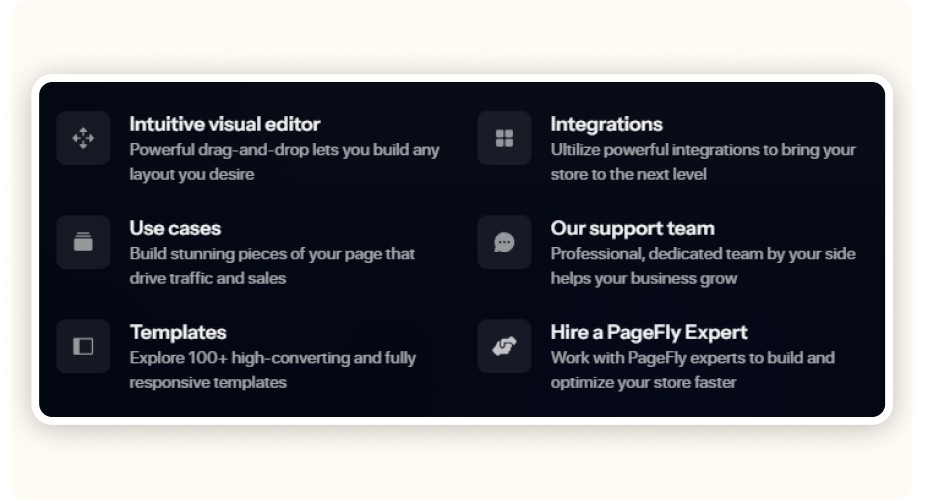
When you’re judging PageFly, focus on the features that reduce friction: templates/sections, mobile editing, integrations, and reusable elements.
Here’s what usually matters most for ecommerce sellers:
1) Templates and prebuilt sections (speed to first draft)
PageFly promotes 100+ templates and 100+ premade sections. The exact number matters less than the workflow: start with a proven layout, then tailor it to your offer.
What to look for in a template (no matter the library size):
Above-the-fold structure: headline + primary benefit + price anchor + CTA
Social proof placement: reviews close to the first CTA
Objection handling: shipping, returns, guarantee, FAQ
Mobile layout: thumb-friendly CTAs and clean spacing
2) Mobile-first editing (where most traffic lives)
Most Shopify stores are mobile-heavy. A page builder only helps if mobile isn’t treated like a “nice-to-have.”
A quick test before you commit:
Build one product page variant
Preview it on mobile
Check the first screen: can a buyer understand the product, price, and offer in 5 seconds?
3) Integrations (the “real stack” test)
PageFly claims 130+ app integrations. That matters because a lot of conversion gains come from stacking the basics:
reviews (Loox, Judge.me, Yotpo, etc.)
upsells and bundles
email capture
post-purchase offers
If PageFly doesn’t play nicely with your existing stack, you can end up swapping theme friction for integration friction.
4) Reusable blocks (how you scale winners)
If you launch multiple products, reusable sections are a quiet superpower.
Example: you build a “shipping + guarantee + trust” block that improves conversion. You can reuse it across every product page and update it once.
Does PageFly slow down my Shopify store?

PageFly can slow down your store especially if your pages rely on heavy images, too many third-party widgets, or overly complex sections. Used with a performance-first mindset, it can still be fast enough for paid traffic.
A page builder adds an extra layer on top of Shopify. Most speed issues come from what sellers stack inside it:
uncompressed images
multiple review widgets
too many tracking scripts
animations
embedded videos above the fold
A performance-first PageFly checklist (use this every time)
Compress images before uploading. Aim for WebP when possible.
Keep above-the-fold scripts to a minimum. One extra widget can add more delay than you think.
Keep the first section simple so the page becomes usable quickly.
Reuse sections instead of rebuilding them to keep pages consistent and easier to optimize.
Test on mobile data. If it feels slow on 4G, it’s slow.
If you’re serious about scaling paid traffic, treat performance as part of CRO. A page that converts better but loads 2 seconds slower can still lose money.
How much does PageFly cost? Is PageFly free or paid?
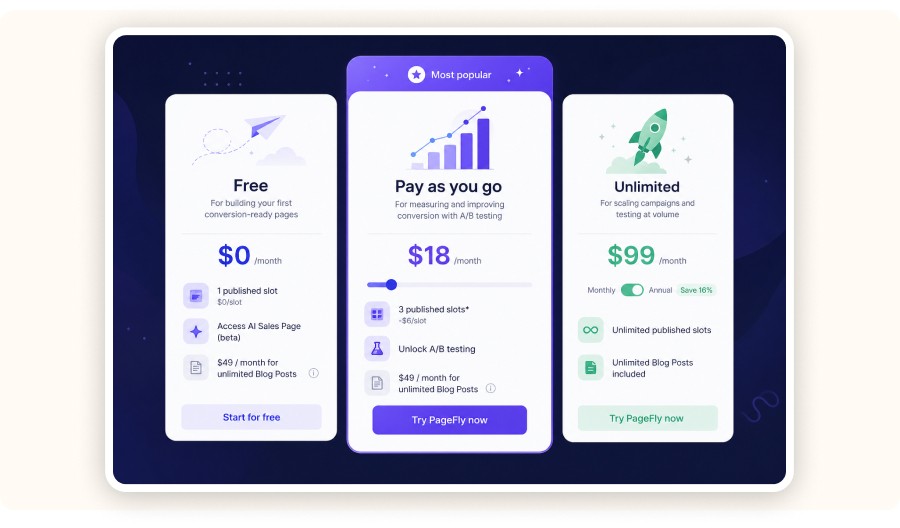
PageFly offers a free plan and paid plans. The free tier is great for testing the builder on a small number of pages, while paid plans make sense once page building becomes a regular workflow.
Most Shopify sellers should think about PageFly pricing as cost per experiment.
A simple way to decide:
If you’ll publish 1–2 pages and rarely update them, stick to the free plan (or a low tier).
If you’re iterating weekly (new offers, seasonal promos, split tests), a paid plan is usually worth it.
What to check on the pricing page before picking a plan:
the limit on published pages or page types
whether product/collection page building is included
whether key features (templates, sections, saving, exporting) are locked
support priority (important when something breaks during a launch)
If your store makes money from speed, don’t over-optimize the subscription cost. One missed weekend promo can cost more than a monthly plan.


Create and test your Shopify store for only $1 per day during 90 days
If you’re a Shopify seller trying to launch better product pages without hiring a developer, PageFly is probably already one of the best Shopify Apps.
PageFly is a no-code landing page builder for Shopify that lets you design custom product pages, landing pages, and homepages with a drag-and-drop editor. It’s popular for a simple reason: it helps you publish conversion-focused pages quickly and then tweak and test them without touching your theme code.
Key takeaways
Best fit: ecommerce sellers who want fast iteration (funnels, product page testing, seasonal promos) without rebuilding their theme.
Proof of adoption: PageFly sits at 4.9/5 on the Shopify App Store with 5,714 reviews (as of this writing).
Ecosystem strength: It claims 130+ integrations with common Shopify apps (reviews, upsells, personalization).
Watch-out: Pagefly Page Shopify builders can hurt performance if you overload pages with heavy sections, large images, and third-party scripts.
What is PageFly on Shopify?
PageFly is a Shopify page builder app that can replace, or simply complement, your theme editor. With its drag-and-drop builder, you can publish custom landing pages and product pages without writing code.
In practice, PageFly makes three things much easier than Shopify’s default editor:
Layout freedom: add sections where you want them, not only where your theme allows.
Reusable blocks: save and reuse winning sections (so you can roll out a proven layout across multiple products).
Speed of testing: launch a new offer page in hours, not days.
If you run a dropshipping or direct-to-consumer (DTC) store, this matters because testing doesn’t end with ads you’re also testing what happens after the click, like:
Pricing anchors ($29.99 vs $34.99)
Bundles (2-pack, 3-pack)
Offer framing (problem-first vs feature-first)
Trust elements (reviews, guarantees, shipping clarity)
Pagefly page builder shopify becomes a real conversion-rate lever only if it helps you run those tests faster and more consistently.
Minea
Top 10 Best Stores of the Day
Every day, new e-commerce sellers launch highly profitable products thanks to effective ads. Get inspired and be the next one 👇
Is PageFly a good Shopify app?
PageFly is a strong choice if you want to build high-converting pages quickly as long as you stay disciplined about performance (compressed images, fewer widgets, and lean sections).
PageFly’s core value is straightforward: it reduces your time-to-launch for new page layouts. That’s real ROI when you run paid traffic, because delays get expensive fast.
A practical benchmark:
If you’re testing 3–5 products per month, you’ll often build multiple page variants per product (new angles, bundles, seasonal hooks).
If PageFly saves you 2–3 hours per page versus theme edits and dev handoffs, it can pay for itself quickly.
Where people get disappointed is expecting a page builder to magically boost conversion. PageFly doesn’t fix:
weak product-market fit
unclear offers
slow shipping expectations
poor creative hooks
It simply helps you iterate on the page layer faster.
PageFly features that actually matter for conversion
When you’re judging PageFly, focus on the features that reduce friction: templates/sections, mobile editing, integrations, and reusable elements.
Here’s what usually matters most for ecommerce sellers:
1) Templates and prebuilt sections (speed to first draft)
PageFly promotes 100+ templates and 100+ premade sections. The exact number matters less than the workflow: start with a proven layout, then tailor it to your offer.
What to look for in a template (no matter the library size):
Above-the-fold structure: headline + primary benefit + price anchor + CTA
Social proof placement: reviews close to the first CTA
Objection handling: shipping, returns, guarantee, FAQ
Mobile layout: thumb-friendly CTAs and clean spacing
2) Mobile-first editing (where most traffic lives)
Most Shopify stores are mobile-heavy. A page builder only helps if mobile isn’t treated like a “nice-to-have.”
A quick test before you commit:
Build one product page variant
Preview it on mobile
Check the first screen: can a buyer understand the product, price, and offer in 5 seconds?
3) Integrations (the “real stack” test)
PageFly claims 130+ app integrations. That matters because a lot of conversion gains come from stacking the basics:
reviews (Loox, Judge.me, Yotpo, etc.)
upsells and bundles
email capture
post-purchase offers
If PageFly doesn’t play nicely with your existing stack, you can end up swapping theme friction for integration friction.
4) Reusable blocks (how you scale winners)
If you launch multiple products, reusable sections are a quiet superpower.
Example: you build a “shipping + guarantee + trust” block that improves conversion. You can reuse it across every product page and update it once.
Does PageFly slow down my Shopify store?
PageFly can slow down your store especially if your pages rely on heavy images, too many third-party widgets, or overly complex sections. Used with a performance-first mindset, it can still be fast enough for paid traffic.
A page builder adds an extra layer on top of Shopify. Most speed issues come from what sellers stack inside it:
uncompressed images
multiple review widgets
too many tracking scripts
animations
embedded videos above the fold
A performance-first PageFly checklist (use this every time)
Compress images before uploading. Aim for WebP when possible.
Keep above-the-fold scripts to a minimum. One extra widget can add more delay than you think.
Keep the first section simple so the page becomes usable quickly.
Reuse sections instead of rebuilding them to keep pages consistent and easier to optimize.
Test on mobile data. If it feels slow on 4G, it’s slow.
If you’re serious about scaling paid traffic, treat performance as part of CRO. A page that converts better but loads 2 seconds slower can still lose money.
How much does PageFly cost? Is PageFly free or paid?
PageFly offers a free plan and paid plans. The free tier is great for testing the builder on a small number of pages, while paid plans make sense once page building becomes a regular workflow.
Most Shopify sellers should think about PageFly pricing as cost per experiment.
A simple way to decide:
If you’ll publish 1–2 pages and rarely update them, stick to the free plan (or a low tier).
If you’re iterating weekly (new offers, seasonal promos, split tests), a paid plan is usually worth it.
What to check on the pricing page before picking a plan:
the limit on published pages or page types
whether product/collection page building is included
whether key features (templates, sections, saving, exporting) are locked
support priority (important when something breaks during a launch)
If your store makes money from speed, don’t over-optimize the subscription cost. One missed weekend promo can cost more than a monthly plan.
Create and test your Shopify store for only $1 per day during 90 days
If you’re a Shopify seller trying to launch better product pages without hiring a developer, PageFly is probably already one of the best Shopify Apps.
PageFly is a no-code landing page builder for Shopify that lets you design custom product pages, landing pages, and homepages with a drag-and-drop editor. It’s popular for a simple reason: it helps you publish conversion-focused pages quickly and then tweak and test them without touching your theme code.
Key takeaways
Best fit: ecommerce sellers who want fast iteration (funnels, product page testing, seasonal promos) without rebuilding their theme.
Proof of adoption: PageFly sits at 4.9/5 on the Shopify App Store with 5,714 reviews (as of this writing).
Ecosystem strength: It claims 130+ integrations with common Shopify apps (reviews, upsells, personalization).
Watch-out: Pagefly Page Shopify builders can hurt performance if you overload pages with heavy sections, large images, and third-party scripts.
What is PageFly on Shopify?
PageFly is a Shopify page builder app that can replace, or simply complement, your theme editor. With its drag-and-drop builder, you can publish custom landing pages and product pages without writing code.
In practice, PageFly makes three things much easier than Shopify’s default editor:
Layout freedom: add sections where you want them, not only where your theme allows.
Reusable blocks: save and reuse winning sections (so you can roll out a proven layout across multiple products).
Speed of testing: launch a new offer page in hours, not days.
If you run a dropshipping or direct-to-consumer (DTC) store, this matters because testing doesn’t end with ads you’re also testing what happens after the click, like:
Pricing anchors ($29.99 vs $34.99)
Bundles (2-pack, 3-pack)
Offer framing (problem-first vs feature-first)
Trust elements (reviews, guarantees, shipping clarity)
Pagefly page builder shopify becomes a real conversion-rate lever only if it helps you run those tests faster and more consistently.
Top 10 Best Stores of the Day
Every day, new e-commerce sellers launch highly profitable products thanks to effective ads. Get inspired and be the next one 👇
Is PageFly a good Shopify app?
PageFly is a strong choice if you want to build high-converting pages quickly as long as you stay disciplined about performance (compressed images, fewer widgets, and lean sections).
PageFly’s core value is straightforward: it reduces your time-to-launch for new page layouts. That’s real ROI when you run paid traffic, because delays get expensive fast.
A practical benchmark:
If you’re testing 3–5 products per month, you’ll often build multiple page variants per product (new angles, bundles, seasonal hooks).
If PageFly saves you 2–3 hours per page versus theme edits and dev handoffs, it can pay for itself quickly.
Where people get disappointed is expecting a page builder to magically boost conversion. PageFly doesn’t fix:
weak product-market fit
unclear offers
slow shipping expectations
poor creative hooks
It simply helps you iterate on the page layer faster.
PageFly features that actually matter for conversion
When you’re judging PageFly, focus on the features that reduce friction: templates/sections, mobile editing, integrations, and reusable elements.
Here’s what usually matters most for ecommerce sellers:
1) Templates and prebuilt sections (speed to first draft)
PageFly promotes 100+ templates and 100+ premade sections. The exact number matters less than the workflow: start with a proven layout, then tailor it to your offer.
What to look for in a template (no matter the library size):
Above-the-fold structure: headline + primary benefit + price anchor + CTA
Social proof placement: reviews close to the first CTA
Objection handling: shipping, returns, guarantee, FAQ
Mobile layout: thumb-friendly CTAs and clean spacing
2) Mobile-first editing (where most traffic lives)
Most Shopify stores are mobile-heavy. A page builder only helps if mobile isn’t treated like a “nice-to-have.”
A quick test before you commit:
Build one product page variant
Preview it on mobile
Check the first screen: can a buyer understand the product, price, and offer in 5 seconds?
3) Integrations (the “real stack” test)
PageFly claims 130+ app integrations. That matters because a lot of conversion gains come from stacking the basics:
reviews (Loox, Judge.me, Yotpo, etc.)
upsells and bundles
email capture
post-purchase offers
If PageFly doesn’t play nicely with your existing stack, you can end up swapping theme friction for integration friction.
4) Reusable blocks (how you scale winners)
If you launch multiple products, reusable sections are a quiet superpower.
Example: you build a “shipping + guarantee + trust” block that improves conversion. You can reuse it across every product page and update it once.
Does PageFly slow down my Shopify store?
PageFly can slow down your store especially if your pages rely on heavy images, too many third-party widgets, or overly complex sections. Used with a performance-first mindset, it can still be fast enough for paid traffic.
A page builder adds an extra layer on top of Shopify. Most speed issues come from what sellers stack inside it:
uncompressed images
multiple review widgets
too many tracking scripts
animations
embedded videos above the fold
A performance-first PageFly checklist (use this every time)
Compress images before uploading. Aim for WebP when possible.
Keep above-the-fold scripts to a minimum. One extra widget can add more delay than you think.
Keep the first section simple so the page becomes usable quickly.
Reuse sections instead of rebuilding them to keep pages consistent and easier to optimize.
Test on mobile data. If it feels slow on 4G, it’s slow.
If you’re serious about scaling paid traffic, treat performance as part of CRO. A page that converts better but loads 2 seconds slower can still lose money.
How much does PageFly cost? Is PageFly free or paid?
PageFly offers a free plan and paid plans. The free tier is great for testing the builder on a small number of pages, while paid plans make sense once page building becomes a regular workflow.
Most Shopify sellers should think about PageFly pricing as cost per experiment.
A simple way to decide:
If you’ll publish 1–2 pages and rarely update them, stick to the free plan (or a low tier).
If you’re iterating weekly (new offers, seasonal promos, split tests), a paid plan is usually worth it.
What to check on the pricing page before picking a plan:
the limit on published pages or page types
whether product/collection page building is included
whether key features (templates, sections, saving, exporting) are locked
support priority (important when something breaks during a launch)
If your store makes money from speed, don’t over-optimize the subscription cost. One missed weekend promo can cost more than a monthly plan.
Create and test your Shopify store for only $1 per day during 90 days
How do I add a PageFly page to Shopify?
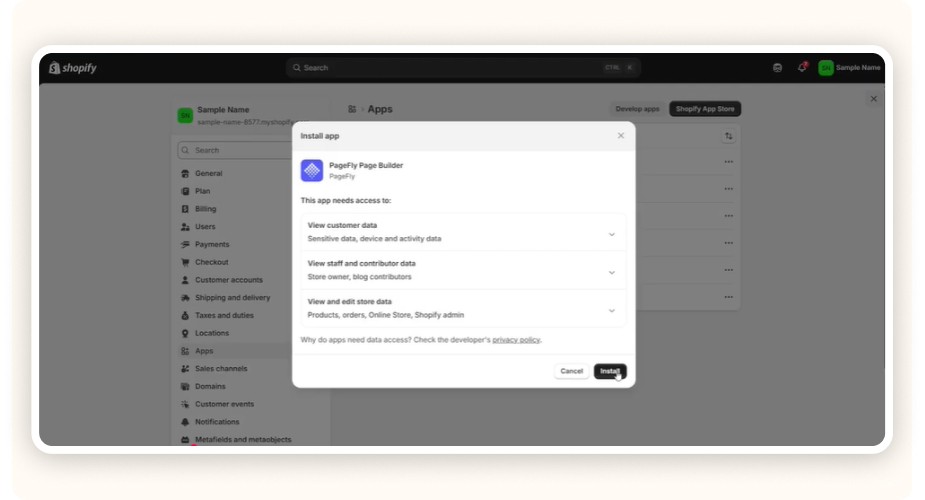
To add a PageFly page to Shopify, install the app, create a new page in PageFly, publish it, then connect it to your Shopify navigation or to the right product/collection route depending on what you built.
A clean setup workflow that avoids common mistakes
Install PageFly from the Shopify App Store.
Start with one goal page (don’t rebuild your whole store on day one).
For most dropshippers, the best first project is a single product page variant for your main traffic product.
Create the page in PageFly using a template.
Build the offer structure, not just the design:
headline = the outcome
bullets = the mechanism + proof
trust = reviews, guarantee, shipping clarity
CTA = clear and repeated
Publish and connect it:
If it’s a landing page: add it to navigation or use it as your ad destination URL.
If it’s a product page layout: make sure it’s properly linked to the product and works with your theme’s behavior.
QA on mobile:
check ATC works
check variants work
check sticky ATC (if used) doesn’t cover key info
The biggest mistake is treating PageFly like a design project. Treat it like a revenue project.
The “real” PageFly use cases for dropshipping and ecommerce (PageFly Shopify trial)
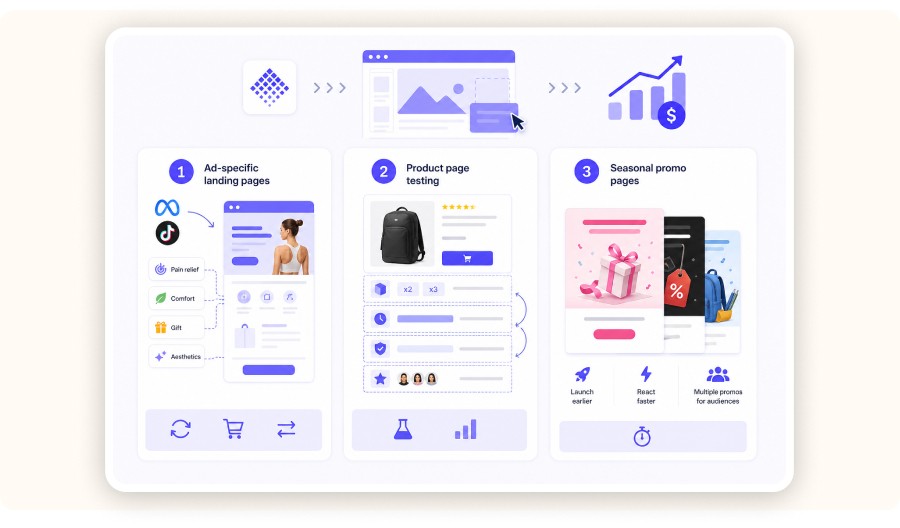
PageFly is most valuable when you’re running paid traffic and need faster testing loops: ad-specific landing pages, product page redesigns, and promo pages.
Use case 1: Ad-specific landing pages (angle match)
When you run Meta or TikTok ads, the page has to match the angle.
If your ad hook is “posture pain,” your first section should talk about posture pain—not “premium materials.”
A PageFly landing page lets you:
create one page per angle (pain relief, comfort, gift, aesthetics)
keep the checkout flow consistent
swap sections based on what’s working
Use case 2: Product page testing (bundles and offers)
Most sellers stick to a single product page layout. That often leaves money on the table.
PageFly makes it easier to test:
bundle blocks (2-pack / 3-pack)
urgency blocks (limited inventory, shipping cutoff)
guarantee blocks (30-day vs 60-day)
review positioning (near top vs mid-page)
Use case 3: Seasonal promo pages (speed)
Black Friday, Mother’s Day, back-to-school these are page-building sprints.
If you can ship a promo page in a few hours, you can:
launch earlier
react faster to competitors
create multiple promos for different audiences
Where PageFly fits in a modern ecommerce workflow with
Minea
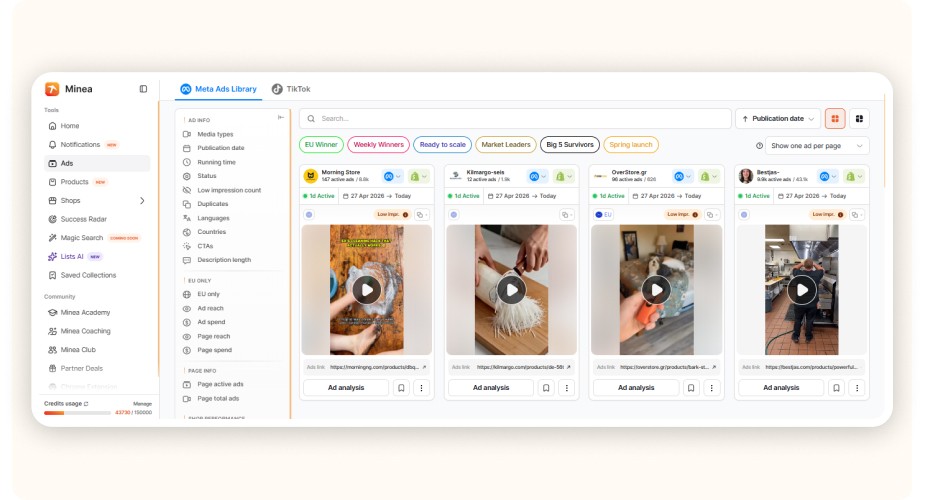
The fastest way to waste a page builder is building pages for products you shouldn’t be selling. Validate the product and the angle first, then build the page.
Here’s a practical workflow for a typical dropshipping store:
Find demand and angles with Minea Ads Library
Pick one product + one offer to test.
Build one high-intent page in PageFly (one angle, one CTA).
Launch ads, then evaluate page metrics (ATC rate, checkout initiation, conversion).
Iterate the page using what you learn from traffic and competitor moves.
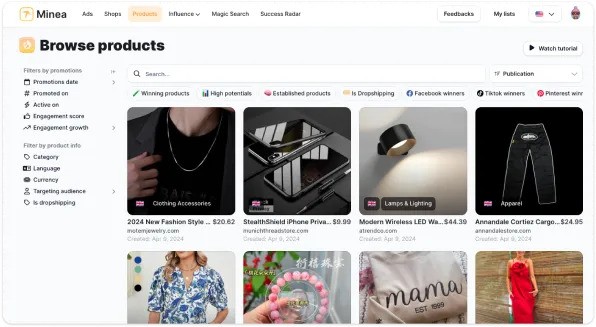
To make this concrete, here are three examples based on current product patterns Minea tracks:
Posture corrector belt (trend score 92): lead with pain relief, then add before/after-style benefit bullets and a sizing section.
LED face mask (trend score 88): explain safety, usage time, and the expected results timeline, then reinforce it with a strong returns policy.
Portable blender (trend score 85): optimize for mobile, place a short demo video below the fold, and test a bundle offer for gifting.
Minea’s dataset also shows an average “impulse-friendly” product price around $29.99 in this cluster. At that price point, your offer usually needs to reduce risk with clear shipping expectations, guarantee language, and proof.
If PageFly helps you test those blocks faster, it’s doing its job.


Support, onboarding, and learning curve

PageFly is known for responsive support, and that matters more than people admit because page builders become mission-critical once you rely on them for launches.
A realistic learning curve for a competent Shopify seller:
Day 1: build a basic landing page from a template
Week 1: build a product page variant and reuse sections
Week 2: standardize your “winning” blocks (trust, shipping, FAQ) and clone them
What to look for in onboarding resources:
up-to-date tutorials (especially for the current UI)
examples of ecommerce layouts (not generic “portfolio pages”)
guidance on performance best practices
If you’re choosing between builders, strong support can be the difference between “we ship pages weekly” and “we stopped using it after two weeks.”
Pros and cons (honest take)

Pros
Fast iteration without theme edits or dev tickets
Template-driven workflow that gets you to a first draft quickly
Integrations with common Shopify conversion apps
Reusable blocks that help you scale layouts across products
Cons
Performance risk if you stack too many heavy sections and scripts
Builder lock-in: if you build everything inside the app, migrating later takes effort
Quality depends on your discipline: a nice template with weak structure can still convert poorly
PageFly alternatives (when you should consider switching)
If you need deeper theme-level control, a simpler editor, or just a different workflow, a PageFly alternative may be a better fit.
Here are common reasons to look elsewhere:
You want a lighter builder and care obsessively about speed.
You prefer a different editing experience or template approach.
You’re already committed to another builder ecosystem.
When comparing alternatives, evaluate the same three things:
Speed to publish (time to ship a page)
Performance impact (real-world loading experience)
Stack compatibility (reviews, bundles, upsells, tracking)
The “best” alternative depends on how you work. If you build a new page every month, optimize for ease. If you build a new page every week, optimize for repeatability and templates.
For example, you might compare PageFly with tools like Zipify Pages for landing pages, Debutify for theme-based optimization, or apps like ReConvert, Loox Reviews, and bundle apps if your priority is upsells, reviews, or average order value rather than full page building.
Verdict: should you use PageFly for your Shopify store?
If you’re only going to test one page builder, PageFly is a safe pick for Shopify sellers who want to ship conversion-focused pages fast and keep iterating week to week.
My recommendation is simple:
Choose PageFly if you run paid traffic, build promo pages regularly, or want to A/B test your product page structure.
Skip a page builder (for now) if you’re still validating your first product and you’re not ready to optimize the page layer yet.
A page builder is leverage. It makes a good process faster and it can also make a messy process easier to repeat.
If you’re already doing the Minea loop (spy angles, launch ads, iterate), PageFly fits neatly into the execution step because it shortens the time between insight and implementation.
FAQ
What is PageFly on Shopify?
PageFly is a Shopify app that lets you build custom pages with a drag-and-drop editor. Sellers use it for landing pages, product pages, and promo pages when the default theme editor feels limiting.
How do I add a PageFly page to Shopify?
Install the app, create a page in PageFly, publish it, then connect it via navigation or product/page settings depending on the page type. Always QA mobile add-to-cart, variants, and checkout flow after publishing.
Auto ds or pagefly to build my shopify store ?
AutoDS and PageFly don’t serve the same purpose, so it’s not really one or the other. Use AutoDS for product sourcing, importing, and order automation. Use PageFly to design and optimize your store pages and improve conversions.
Is PageFly free or paid?
PageFly offers a free plan and paid plans. Free works for testing the builder on a limited setup, while paid plans make sense when you’re publishing multiple pages and iterating on offers weekly.
Does PageFly slow down Shopify stores?
It can if you overload your pages with heavy images, embedded media, and multiple third-party widgets. Keep above-the-fold sections simple, compress images, and avoid stacking redundant scripts to protect load speed.
What are the alternatives to PageFly?
Other Shopify page builders may be a better fit if you prioritize a different editing workflow, need different templates, or want a lighter setup. Compare alternatives on speed to publish, performance impact, and compatibility with your existing Shopify app stack.
How do I add a PageFly page to Shopify?
To add a PageFly page to Shopify, install the app, create a new page in PageFly, publish it, then connect it to your Shopify navigation or to the right product/collection route depending on what you built.
A clean setup workflow that avoids common mistakes
Install PageFly from the Shopify App Store.
Start with one goal page (don’t rebuild your whole store on day one).
For most dropshippers, the best first project is a single product page variant for your main traffic product.
Create the page in PageFly using a template.
Build the offer structure, not just the design:
headline = the outcome
bullets = the mechanism + proof
trust = reviews, guarantee, shipping clarity
CTA = clear and repeated
Publish and connect it:
If it’s a landing page: add it to navigation or use it as your ad destination URL.
If it’s a product page layout: make sure it’s properly linked to the product and works with your theme’s behavior.
QA on mobile:
check ATC works
check variants work
check sticky ATC (if used) doesn’t cover key info
The biggest mistake is treating PageFly like a design project. Treat it like a revenue project.
The “real” PageFly use cases for dropshipping and ecommerce (PageFly Shopify trial)
PageFly is most valuable when you’re running paid traffic and need faster testing loops: ad-specific landing pages, product page redesigns, and promo pages.
Use case 1: Ad-specific landing pages (angle match)
When you run Meta or TikTok ads, the page has to match the angle.
If your ad hook is “posture pain,” your first section should talk about posture pain—not “premium materials.”
A PageFly landing page lets you:
create one page per angle (pain relief, comfort, gift, aesthetics)
keep the checkout flow consistent
swap sections based on what’s working
Use case 2: Product page testing (bundles and offers)
Most sellers stick to a single product page layout. That often leaves money on the table.
PageFly makes it easier to test:
bundle blocks (2-pack / 3-pack)
urgency blocks (limited inventory, shipping cutoff)
guarantee blocks (30-day vs 60-day)
review positioning (near top vs mid-page)
Use case 3: Seasonal promo pages (speed)
Black Friday, Mother’s Day, back-to-school these are page-building sprints.
If you can ship a promo page in a few hours, you can:
launch earlier
react faster to competitors
create multiple promos for different audiences
Where PageFly fits in a modern ecommerce workflow with
Minea
The fastest way to waste a page builder is building pages for products you shouldn’t be selling. Validate the product and the angle first, then build the page.
Here’s a practical workflow for a typical dropshipping store:
Find demand and angles with Minea Ads Library
Pick one product + one offer to test.
Build one high-intent page in PageFly (one angle, one CTA).
Launch ads, then evaluate page metrics (ATC rate, checkout initiation, conversion).
Iterate the page using what you learn from traffic and competitor moves.
To make this concrete, here are three examples based on current product patterns Minea tracks:
Posture corrector belt (trend score 92): lead with pain relief, then add before/after-style benefit bullets and a sizing section.
LED face mask (trend score 88): explain safety, usage time, and the expected results timeline, then reinforce it with a strong returns policy.
Portable blender (trend score 85): optimize for mobile, place a short demo video below the fold, and test a bundle offer for gifting.
Minea’s dataset also shows an average “impulse-friendly” product price around $29.99 in this cluster. At that price point, your offer usually needs to reduce risk with clear shipping expectations, guarantee language, and proof.
If PageFly helps you test those blocks faster, it’s doing its job.
Support, onboarding, and learning curve
PageFly is known for responsive support, and that matters more than people admit because page builders become mission-critical once you rely on them for launches.
A realistic learning curve for a competent Shopify seller:
Day 1: build a basic landing page from a template
Week 1: build a product page variant and reuse sections
Week 2: standardize your “winning” blocks (trust, shipping, FAQ) and clone them
What to look for in onboarding resources:
up-to-date tutorials (especially for the current UI)
examples of ecommerce layouts (not generic “portfolio pages”)
guidance on performance best practices
If you’re choosing between builders, strong support can be the difference between “we ship pages weekly” and “we stopped using it after two weeks.”
Pros and cons (honest take)
Pros
Fast iteration without theme edits or dev tickets
Template-driven workflow that gets you to a first draft quickly
Integrations with common Shopify conversion apps
Reusable blocks that help you scale layouts across products
Cons
Performance risk if you stack too many heavy sections and scripts
Builder lock-in: if you build everything inside the app, migrating later takes effort
Quality depends on your discipline: a nice template with weak structure can still convert poorly
PageFly alternatives (when you should consider switching)
If you need deeper theme-level control, a simpler editor, or just a different workflow, a PageFly alternative may be a better fit.
Here are common reasons to look elsewhere:
You want a lighter builder and care obsessively about speed.
You prefer a different editing experience or template approach.
You’re already committed to another builder ecosystem.
When comparing alternatives, evaluate the same three things:
Speed to publish (time to ship a page)
Performance impact (real-world loading experience)
Stack compatibility (reviews, bundles, upsells, tracking)
The “best” alternative depends on how you work. If you build a new page every month, optimize for ease. If you build a new page every week, optimize for repeatability and templates.
For example, you might compare PageFly with tools like Zipify Pages for landing pages, Debutify for theme-based optimization, or apps like ReConvert, Loox Reviews, and bundle apps if your priority is upsells, reviews, or average order value rather than full page building.
Verdict: should you use PageFly for your Shopify store?
If you’re only going to test one page builder, PageFly is a safe pick for Shopify sellers who want to ship conversion-focused pages fast and keep iterating week to week.
My recommendation is simple:
Choose PageFly if you run paid traffic, build promo pages regularly, or want to A/B test your product page structure.
Skip a page builder (for now) if you’re still validating your first product and you’re not ready to optimize the page layer yet.
A page builder is leverage. It makes a good process faster and it can also make a messy process easier to repeat.
If you’re already doing the Minea loop (spy angles, launch ads, iterate), PageFly fits neatly into the execution step because it shortens the time between insight and implementation.
FAQ
What is PageFly on Shopify?
PageFly is a Shopify app that lets you build custom pages with a drag-and-drop editor. Sellers use it for landing pages, product pages, and promo pages when the default theme editor feels limiting.
How do I add a PageFly page to Shopify?
Install the app, create a page in PageFly, publish it, then connect it via navigation or product/page settings depending on the page type. Always QA mobile add-to-cart, variants, and checkout flow after publishing.
Auto ds or pagefly to build my shopify store ?
AutoDS and PageFly don’t serve the same purpose, so it’s not really one or the other. Use AutoDS for product sourcing, importing, and order automation. Use PageFly to design and optimize your store pages and improve conversions.
Is PageFly free or paid?
PageFly offers a free plan and paid plans. Free works for testing the builder on a limited setup, while paid plans make sense when you’re publishing multiple pages and iterating on offers weekly.
Does PageFly slow down Shopify stores?
It can if you overload your pages with heavy images, embedded media, and multiple third-party widgets. Keep above-the-fold sections simple, compress images, and avoid stacking redundant scripts to protect load speed.
What are the alternatives to PageFly?
Other Shopify page builders may be a better fit if you prioritize a different editing workflow, need different templates, or want a lighter setup. Compare alternatives on speed to publish, performance impact, and compatibility with your existing Shopify app stack.
How do I add a PageFly page to Shopify?
To add a PageFly page to Shopify, install the app, create a new page in PageFly, publish it, then connect it to your Shopify navigation or to the right product/collection route depending on what you built.
A clean setup workflow that avoids common mistakes
Install PageFly from the Shopify App Store.
Start with one goal page (don’t rebuild your whole store on day one).
For most dropshippers, the best first project is a single product page variant for your main traffic product.
Create the page in PageFly using a template.
Build the offer structure, not just the design:
headline = the outcome
bullets = the mechanism + proof
trust = reviews, guarantee, shipping clarity
CTA = clear and repeated
Publish and connect it:
If it’s a landing page: add it to navigation or use it as your ad destination URL.
If it’s a product page layout: make sure it’s properly linked to the product and works with your theme’s behavior.
QA on mobile:
check ATC works
check variants work
check sticky ATC (if used) doesn’t cover key info
The biggest mistake is treating PageFly like a design project. Treat it like a revenue project.
The “real” PageFly use cases for dropshipping and ecommerce (PageFly Shopify trial)
PageFly is most valuable when you’re running paid traffic and need faster testing loops: ad-specific landing pages, product page redesigns, and promo pages.
Use case 1: Ad-specific landing pages (angle match)
When you run Meta or TikTok ads, the page has to match the angle.
If your ad hook is “posture pain,” your first section should talk about posture pain—not “premium materials.”
A PageFly landing page lets you:
create one page per angle (pain relief, comfort, gift, aesthetics)
keep the checkout flow consistent
swap sections based on what’s working
Use case 2: Product page testing (bundles and offers)
Most sellers stick to a single product page layout. That often leaves money on the table.
PageFly makes it easier to test:
bundle blocks (2-pack / 3-pack)
urgency blocks (limited inventory, shipping cutoff)
guarantee blocks (30-day vs 60-day)
review positioning (near top vs mid-page)
Use case 3: Seasonal promo pages (speed)
Black Friday, Mother’s Day, back-to-school these are page-building sprints.
If you can ship a promo page in a few hours, you can:
launch earlier
react faster to competitors
create multiple promos for different audiences
Where PageFly fits in a modern ecommerce workflow with
Minea
The fastest way to waste a page builder is building pages for products you shouldn’t be selling. Validate the product and the angle first, then build the page.
Here’s a practical workflow for a typical dropshipping store:
Find demand and angles with Minea Ads Library
Pick one product + one offer to test.
Build one high-intent page in PageFly (one angle, one CTA).
Launch ads, then evaluate page metrics (ATC rate, checkout initiation, conversion).
Iterate the page using what you learn from traffic and competitor moves.
To make this concrete, here are three examples based on current product patterns Minea tracks:
Posture corrector belt (trend score 92): lead with pain relief, then add before/after-style benefit bullets and a sizing section.
LED face mask (trend score 88): explain safety, usage time, and the expected results timeline, then reinforce it with a strong returns policy.
Portable blender (trend score 85): optimize for mobile, place a short demo video below the fold, and test a bundle offer for gifting.
Minea’s dataset also shows an average “impulse-friendly” product price around $29.99 in this cluster. At that price point, your offer usually needs to reduce risk with clear shipping expectations, guarantee language, and proof.
If PageFly helps you test those blocks faster, it’s doing its job.
Support, onboarding, and learning curve
PageFly is known for responsive support, and that matters more than people admit because page builders become mission-critical once you rely on them for launches.
A realistic learning curve for a competent Shopify seller:
Day 1: build a basic landing page from a template
Week 1: build a product page variant and reuse sections
Week 2: standardize your “winning” blocks (trust, shipping, FAQ) and clone them
What to look for in onboarding resources:
up-to-date tutorials (especially for the current UI)
examples of ecommerce layouts (not generic “portfolio pages”)
guidance on performance best practices
If you’re choosing between builders, strong support can be the difference between “we ship pages weekly” and “we stopped using it after two weeks.”
Pros and cons (honest take)
Pros
Fast iteration without theme edits or dev tickets
Template-driven workflow that gets you to a first draft quickly
Integrations with common Shopify conversion apps
Reusable blocks that help you scale layouts across products
Cons
Performance risk if you stack too many heavy sections and scripts
Builder lock-in: if you build everything inside the app, migrating later takes effort
Quality depends on your discipline: a nice template with weak structure can still convert poorly
PageFly alternatives (when you should consider switching)
If you need deeper theme-level control, a simpler editor, or just a different workflow, a PageFly alternative may be a better fit.
Here are common reasons to look elsewhere:
You want a lighter builder and care obsessively about speed.
You prefer a different editing experience or template approach.
You’re already committed to another builder ecosystem.
When comparing alternatives, evaluate the same three things:
Speed to publish (time to ship a page)
Performance impact (real-world loading experience)
Stack compatibility (reviews, bundles, upsells, tracking)
The “best” alternative depends on how you work. If you build a new page every month, optimize for ease. If you build a new page every week, optimize for repeatability and templates.
For example, you might compare PageFly with tools like Zipify Pages for landing pages, Debutify for theme-based optimization, or apps like ReConvert, Loox Reviews, and bundle apps if your priority is upsells, reviews, or average order value rather than full page building.
Verdict: should you use PageFly for your Shopify store?
If you’re only going to test one page builder, PageFly is a safe pick for Shopify sellers who want to ship conversion-focused pages fast and keep iterating week to week.
My recommendation is simple:
Choose PageFly if you run paid traffic, build promo pages regularly, or want to A/B test your product page structure.
Skip a page builder (for now) if you’re still validating your first product and you’re not ready to optimize the page layer yet.
A page builder is leverage. It makes a good process faster and it can also make a messy process easier to repeat.
If you’re already doing the Minea loop (spy angles, launch ads, iterate), PageFly fits neatly into the execution step because it shortens the time between insight and implementation.
FAQ
What is PageFly on Shopify?
PageFly is a Shopify app that lets you build custom pages with a drag-and-drop editor. Sellers use it for landing pages, product pages, and promo pages when the default theme editor feels limiting.
How do I add a PageFly page to Shopify?
Install the app, create a page in PageFly, publish it, then connect it via navigation or product/page settings depending on the page type. Always QA mobile add-to-cart, variants, and checkout flow after publishing.
Auto ds or pagefly to build my shopify store ?
AutoDS and PageFly don’t serve the same purpose, so it’s not really one or the other. Use AutoDS for product sourcing, importing, and order automation. Use PageFly to design and optimize your store pages and improve conversions.
Is PageFly free or paid?
PageFly offers a free plan and paid plans. Free works for testing the builder on a limited setup, while paid plans make sense when you’re publishing multiple pages and iterating on offers weekly.
Does PageFly slow down Shopify stores?
It can if you overload your pages with heavy images, embedded media, and multiple third-party widgets. Keep above-the-fold sections simple, compress images, and avoid stacking redundant scripts to protect load speed.
What are the alternatives to PageFly?
Other Shopify page builders may be a better fit if you prioritize a different editing workflow, need different templates, or want a lighter setup. Compare alternatives on speed to publish, performance impact, and compatibility with your existing Shopify app stack.
Similar articles


Our Free Adspys

Find winning products on our Tiktok adspy today!
Find winning products on our Facebook adspy today!
Find winning products on our Tiktok adspy today!
Find winning products on our Facebook adspy today!
Find winning products on our Tiktok adspy today!
Find winning products on our Facebook adspy today!
Find winning products on our Tiktok adspy today!
Find winning products on our Facebook adspy today!
1 winning product everyday.
Follow us!






Find out more
Read more
Minea © 2026
Find out more
Read more
Minea © 2026
Find out more
Read more
Minea © 2026
Find out more
Read more
Minea © 2026
Find out more
Read more
Minea © 2026
Find out more
Read more
Minea © 2026