How to Use ActiveCampaign for a Dropshipping Business in 2 Hours, 2026
Best Email Marketing Tools
Author: Alexandra
Contents
If you run a Shopify dropshipping store, a well-timed abandoned cart sequence can realistically recover 10–15% of abandoned carts, when the timing and the offer are right. That’s why so many sellers compare the best email marketing tools for Shopify: the real difference isn’t who sends prettier newsletters, it’s who reacts fastest to buyer behavior.
Most stores don’t lose revenue because they “don’t send enough newsletters.” They lose it because they don’t react fast enough when a shopper browses, abandons a cart, or buys once and disappears. That’s where ActiveCampaign shines: it triggers emails based on store behavior, not generic broadcast blasts.
What you’ll achieve
A working Shopify → ActiveCampaign connection that syncs customers and orders
A clean list + tag structure that matches a real dropshipping lifecycle
Three core automations: Abandoned cart, Post-purchase and Win-back
A simple weekly review routine so you improve one lever at a time
Setup snapshot
Time: about 2 hours for a solid first setup
Cost: your ActiveCampaign plan (plus optional SMS fees)
Skill level: intermediate Shopify seller
Before you start: what you need and what to decide
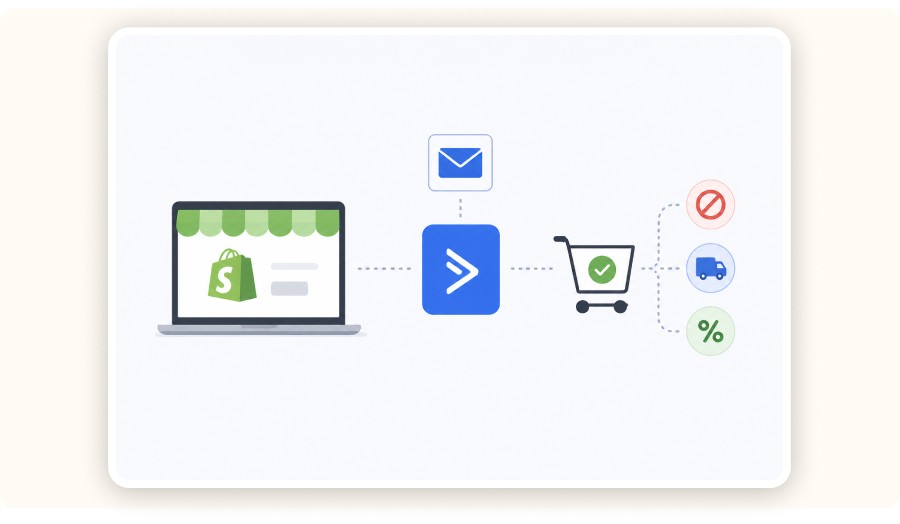
ActiveCampaign works especially well for dropshipping when your Shopify events actually show up in your account, your tagging stays simple, and your first automation stops the moment someone buys.
To set this up properly, you’ll need a Shopify store, an ActiveCampaign account, a working checkout opt-in, and a clear cart recovery stance you can confidently stick to.
You need
A Shopify store with products and checkout enabled
An ActiveCampaign account with e-commerce data enabled (depending on your plan)
A signup source, such as a form, pop-up, or checkout opt-in
A clear cart recovery stance: no discount, free shipping, or a small % off
Make these two decisions now
Discount timing
If you discount, keep it for the last email. It protects your margin and trains fewer shoppers to wait for a deal.
How often you change offers
Dropshippers rotate products constantly. Your flows should be reusable, so you can swap product blocks without rebuilding the automation logic every time.


Create and test your Shopify store for only $1 per day during 90 days
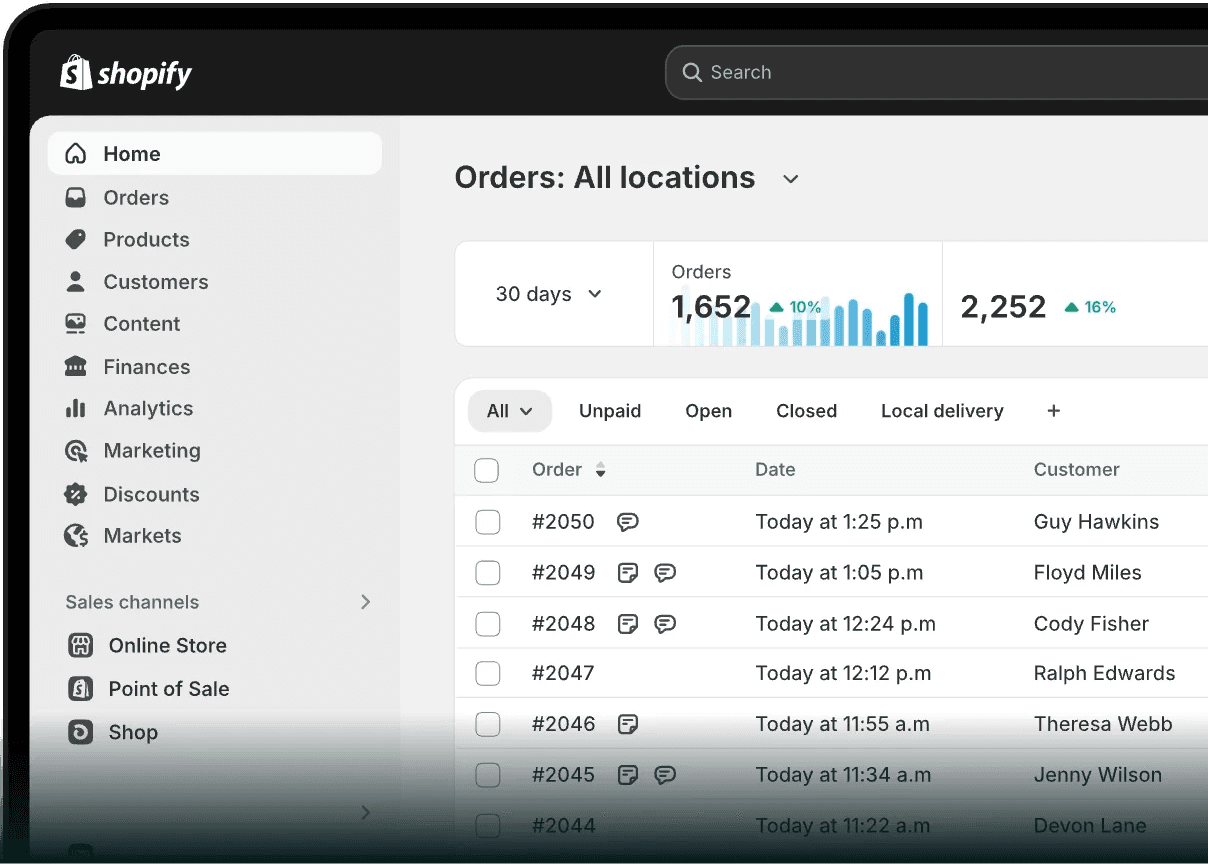
Step 1: Connect Shopify to ActiveCampaign and confirm the right data sync
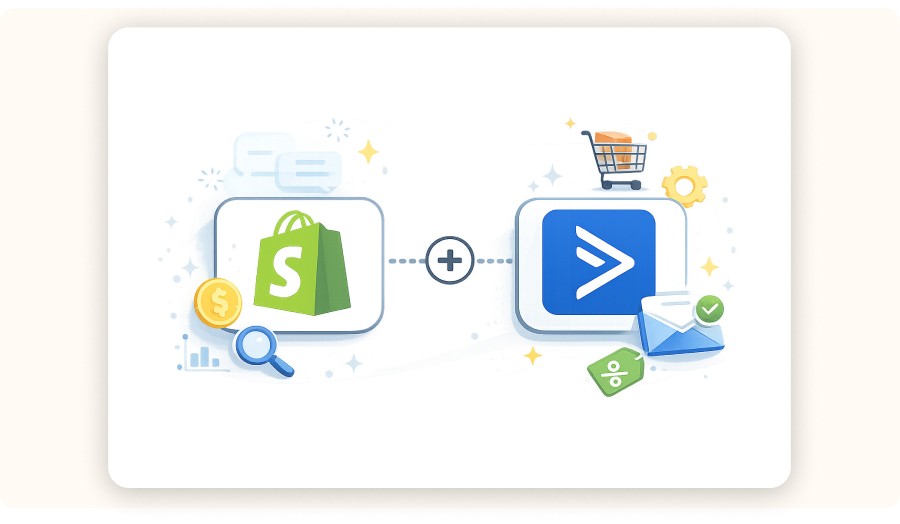
To use ActiveCampaign in a dropshipping setup, you need Shopify behavior data flowing into your account. Connect the Shopify integration, confirm customers + orders are syncing correctly, and double-check how marketing consent is mapped.
Once purchase history and key store events appear, your automations can trigger from real actions (add to cart, checkout started, purchase), not just email opens.
Setup details
Time: 15–25 minutes
Cost: Free
Tool: ActiveCampaign Shopify integration
Do this
In ActiveCampaign, open Apps and select Shopify.
Connect the correct Shopify store using the owner account.
Enable e-commerce data sync.
Confirm you can see store data in ActiveCampaign (at least contacts, orders, and products).
Consent check (deliverability + compliance)
Shopify marketing consent usually maps from Shopify’s “Accepts Marketing” field.
For some Shopify accounts created in early 2024 or later, contacts who accept marketing may sync to the master list by default.
Before scaling your email volume, verify this matches your consent strategy and compliance settings.
The setup is complete once a test order appears on the matching contact record in ActiveCampaign.
Step 2: Build your list, tags, and fields so dropshipping segmentation stays simple
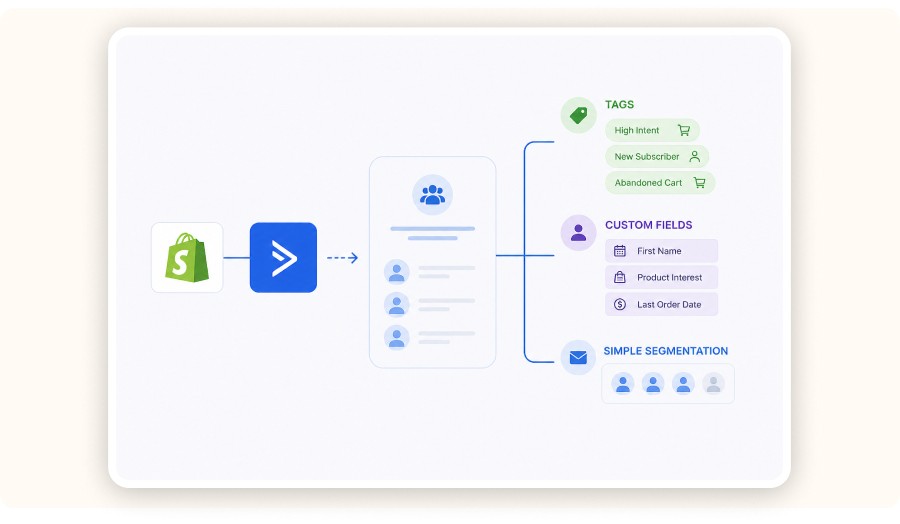
A dropshipping email setup usually breaks down when your list structure gets messy. Keep it lean: one main list, tags for intent + lifecycle, and only a few custom fields you’ll genuinely use.
This keeps your automations reusable across products and your reporting easy to read as you scale.
Setup details
Time: 20–30 minutes
Cost: Free
Tool: ActiveCampaign Lists, Tags, Custom Fields
Recommended minimal structure
One list: Store Newsletter & Customers
Core tags (keep it minimal):
intent:cart
buyer:first-order
buyer:repeat
risk:refund
Useful custom fields:
Last order date
Last order value
Preferred category
The rule that keeps this clean
If you can’t explain why a tag exists in one sentence, don’t create it.
Where Minea fits here
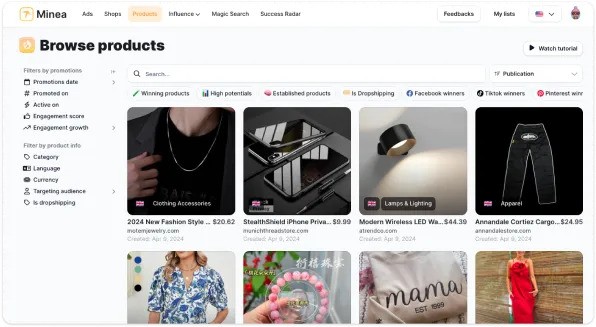
Most dropshipping stores change what they promote in email based on what’s working in paid ads. Minea can give you an external signal before you commit your email real estate.
You’ll often see trending items/categories like posture corrector belts, LED face masks, portable blenders, smart rings, or heated eyelash curlers.
Use that signal to decide which product categories deserve “first-class” email focus, then keep the automation logic stable and simply swap the featured product blocks.
Step 3: Launch an abandoned cart automation that doesn’t rely on hype
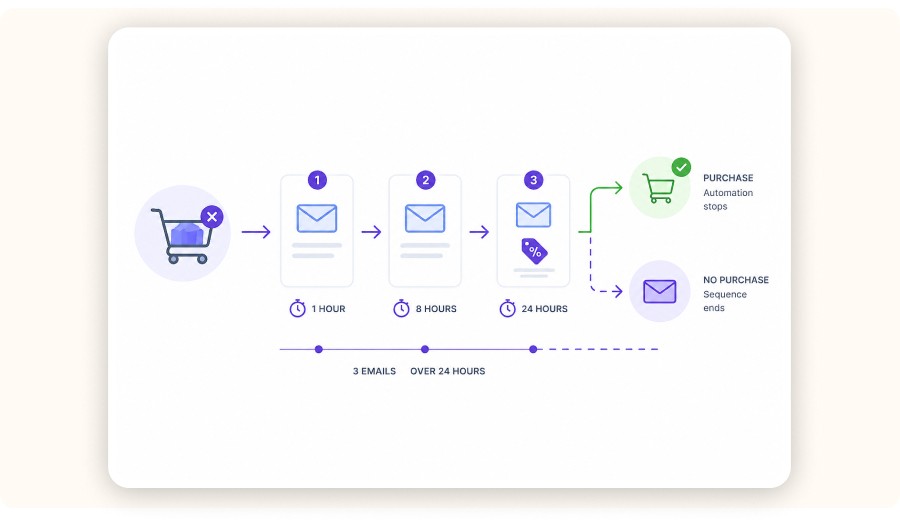
Abandoned cart recovery works when your trigger is tied to a real cart event, your first email goes out fast, and the automation stops immediately after purchase. Keep it simple: run a 3-email sequence over 24 hours, personalize the product block, and only test discount vs. no discount in the final message.
Setup details
Time: 25–35 minutes
Cost: optional (depends on your discount / margin)
Tool: ActiveCampaign Automations with Shopify cart triggers
Sequence blueprint (3 emails / 24 hours)
Email 1 (30–60 minutes after abandonment): product reminder + quick reassurance
Email 2 (8–12 hours later): handle objections (shipping, returns, quality)
Email 3 (20–24 hours later): light urgency or a small offer (only if your margin allows)
Key mechanisms to set correctly
Trigger: cart abandoned
Exit condition: purchase made (end the automation immediately)
Guardrail: don’t send to contacts who never opted in to marketing
Completion criteria
A test cart should trigger the automation.
Completing checkout should stop the automation right away.
Step 4: Add a post-purchase flow that reduces refunds and support load
Dropshipping refunds often come from uncertainty, not the product itself. A strong post-purchase flow sets expectations early, reduces “Where is my order?” tickets, and creates a clean moment to drive a second purchase.
Keep it short, be honest about shipping realities, and tie every message back to the promise that sold the product.
Setup details
Time: 20–30 minutes
Cost: Free
Tool: ActiveCampaign Automations with Shopify order triggers
Flow outline (simple + effective)
Right after purchase: confirm support channel + “what happens next”
Day 2: share a realistic shipping range + set tracking expectations
During the delivery window: provide usage tips + top mistakes to avoid
Day 10–14: offer one relevant add-on, not a full catalog blast
Minea workflow to make this sharper
ActiveCampaign automates the follow-up. Minea helps you choose the angle that actually converts.
Use Minea to review the top ads in your category.
Extract the dominant promise and the top objections.
Reuse that language in your post-purchase emails so customers feel continuity from ad → checkout → inbox.


If you run a Shopify dropshipping store, a well-timed abandoned cart sequence can realistically recover 10–15% of abandoned carts, when the timing and the offer are right. That’s why so many sellers compare the best email marketing tools for Shopify: the real difference isn’t who sends prettier newsletters, it’s who reacts fastest to buyer behavior.
Most stores don’t lose revenue because they “don’t send enough newsletters.” They lose it because they don’t react fast enough when a shopper browses, abandons a cart, or buys once and disappears. That’s where ActiveCampaign shines: it triggers emails based on store behavior, not generic broadcast blasts.
What you’ll achieve
A working Shopify → ActiveCampaign connection that syncs customers and orders
A clean list + tag structure that matches a real dropshipping lifecycle
Three core automations: Abandoned cart, Post-purchase and Win-back
A simple weekly review routine so you improve one lever at a time
Setup snapshot
Time: about 2 hours for a solid first setup
Cost: your ActiveCampaign plan (plus optional SMS fees)
Skill level: intermediate Shopify seller
Before you start: what you need and what to decide
ActiveCampaign works especially well for dropshipping when your Shopify events actually show up in your account, your tagging stays simple, and your first automation stops the moment someone buys.
To set this up properly, you’ll need a Shopify store, an ActiveCampaign account, a working checkout opt-in, and a clear cart recovery stance you can confidently stick to.
You need
A Shopify store with products and checkout enabled
An ActiveCampaign account with e-commerce data enabled (depending on your plan)
A signup source, such as a form, pop-up, or checkout opt-in
A clear cart recovery stance: no discount, free shipping, or a small % off
Make these two decisions now
Discount timing
If you discount, keep it for the last email. It protects your margin and trains fewer shoppers to wait for a deal.
How often you change offers
Dropshippers rotate products constantly. Your flows should be reusable, so you can swap product blocks without rebuilding the automation logic every time.
Create and test your Shopify store for only $1 per day during 90 days
Step 1: Connect Shopify to ActiveCampaign and confirm the right data sync
To use ActiveCampaign in a dropshipping setup, you need Shopify behavior data flowing into your account. Connect the Shopify integration, confirm customers + orders are syncing correctly, and double-check how marketing consent is mapped.
Once purchase history and key store events appear, your automations can trigger from real actions (add to cart, checkout started, purchase), not just email opens.
Setup details
Time: 15–25 minutes
Cost: Free
Tool: ActiveCampaign Shopify integration
Do this
In ActiveCampaign, open Apps and select Shopify.
Connect the correct Shopify store using the owner account.
Enable e-commerce data sync.
Confirm you can see store data in ActiveCampaign (at least contacts, orders, and products).
Consent check (deliverability + compliance)
Shopify marketing consent usually maps from Shopify’s “Accepts Marketing” field.
For some Shopify accounts created in early 2024 or later, contacts who accept marketing may sync to the master list by default.
Before scaling your email volume, verify this matches your consent strategy and compliance settings.
The setup is complete once a test order appears on the matching contact record in ActiveCampaign.
Step 2: Build your list, tags, and fields so dropshipping segmentation stays simple
A dropshipping email setup usually breaks down when your list structure gets messy. Keep it lean: one main list, tags for intent + lifecycle, and only a few custom fields you’ll genuinely use.
This keeps your automations reusable across products and your reporting easy to read as you scale.
Setup details
Time: 20–30 minutes
Cost: Free
Tool: ActiveCampaign Lists, Tags, Custom Fields
Recommended minimal structure
One list: Store Newsletter & Customers
Core tags (keep it minimal):
intent:cart
buyer:first-order
buyer:repeat
risk:refund
Useful custom fields:
Last order date
Last order value
Preferred category
The rule that keeps this clean
If you can’t explain why a tag exists in one sentence, don’t create it.
Where Minea fits here
Most dropshipping stores change what they promote in email based on what’s working in paid ads. Minea can give you an external signal before you commit your email real estate.
You’ll often see trending items/categories like posture corrector belts, LED face masks, portable blenders, smart rings, or heated eyelash curlers.
Use that signal to decide which product categories deserve “first-class” email focus, then keep the automation logic stable and simply swap the featured product blocks.
Step 3: Launch an abandoned cart automation that doesn’t rely on hype
Abandoned cart recovery works when your trigger is tied to a real cart event, your first email goes out fast, and the automation stops immediately after purchase. Keep it simple: run a 3-email sequence over 24 hours, personalize the product block, and only test discount vs. no discount in the final message.
Setup details
Time: 25–35 minutes
Cost: optional (depends on your discount / margin)
Tool: ActiveCampaign Automations with Shopify cart triggers
Sequence blueprint (3 emails / 24 hours)
Email 1 (30–60 minutes after abandonment): product reminder + quick reassurance
Email 2 (8–12 hours later): handle objections (shipping, returns, quality)
Email 3 (20–24 hours later): light urgency or a small offer (only if your margin allows)
Key mechanisms to set correctly
Trigger: cart abandoned
Exit condition: purchase made (end the automation immediately)
Guardrail: don’t send to contacts who never opted in to marketing
Completion criteria
A test cart should trigger the automation.
Completing checkout should stop the automation right away.
Step 4: Add a post-purchase flow that reduces refunds and support load
Dropshipping refunds often come from uncertainty, not the product itself. A strong post-purchase flow sets expectations early, reduces “Where is my order?” tickets, and creates a clean moment to drive a second purchase.
Keep it short, be honest about shipping realities, and tie every message back to the promise that sold the product.
Setup details
Time: 20–30 minutes
Cost: Free
Tool: ActiveCampaign Automations with Shopify order triggers
Flow outline (simple + effective)
Right after purchase: confirm support channel + “what happens next”
Day 2: share a realistic shipping range + set tracking expectations
During the delivery window: provide usage tips + top mistakes to avoid
Day 10–14: offer one relevant add-on, not a full catalog blast
Minea workflow to make this sharper
ActiveCampaign automates the follow-up. Minea helps you choose the angle that actually converts.
Use Minea to review the top ads in your category.
Extract the dominant promise and the top objections.
Reuse that language in your post-purchase emails so customers feel continuity from ad → checkout → inbox.
If you run a Shopify dropshipping store, a well-timed abandoned cart sequence can realistically recover 10–15% of abandoned carts, when the timing and the offer are right. That’s why so many sellers compare the best email marketing tools for Shopify: the real difference isn’t who sends prettier newsletters, it’s who reacts fastest to buyer behavior.
Most stores don’t lose revenue because they “don’t send enough newsletters.” They lose it because they don’t react fast enough when a shopper browses, abandons a cart, or buys once and disappears. That’s where ActiveCampaign shines: it triggers emails based on store behavior, not generic broadcast blasts.
What you’ll achieve
A working Shopify → ActiveCampaign connection that syncs customers and orders
A clean list + tag structure that matches a real dropshipping lifecycle
Three core automations: Abandoned cart, Post-purchase and Win-back
A simple weekly review routine so you improve one lever at a time
Setup snapshot
Time: about 2 hours for a solid first setup
Cost: your ActiveCampaign plan (plus optional SMS fees)
Skill level: intermediate Shopify seller
Before you start: what you need and what to decide
ActiveCampaign works especially well for dropshipping when your Shopify events actually show up in your account, your tagging stays simple, and your first automation stops the moment someone buys.
To set this up properly, you’ll need a Shopify store, an ActiveCampaign account, a working checkout opt-in, and a clear cart recovery stance you can confidently stick to.
You need
A Shopify store with products and checkout enabled
An ActiveCampaign account with e-commerce data enabled (depending on your plan)
A signup source, such as a form, pop-up, or checkout opt-in
A clear cart recovery stance: no discount, free shipping, or a small % off
Make these two decisions now
Discount timing
If you discount, keep it for the last email. It protects your margin and trains fewer shoppers to wait for a deal.
How often you change offers
Dropshippers rotate products constantly. Your flows should be reusable, so you can swap product blocks without rebuilding the automation logic every time.
Create and test your Shopify store for only $1 per day during 90 days
Step 1: Connect Shopify to ActiveCampaign and confirm the right data sync
To use ActiveCampaign in a dropshipping setup, you need Shopify behavior data flowing into your account. Connect the Shopify integration, confirm customers + orders are syncing correctly, and double-check how marketing consent is mapped.
Once purchase history and key store events appear, your automations can trigger from real actions (add to cart, checkout started, purchase), not just email opens.
Setup details
Time: 15–25 minutes
Cost: Free
Tool: ActiveCampaign Shopify integration
Do this
In ActiveCampaign, open Apps and select Shopify.
Connect the correct Shopify store using the owner account.
Enable e-commerce data sync.
Confirm you can see store data in ActiveCampaign (at least contacts, orders, and products).
Consent check (deliverability + compliance)
Shopify marketing consent usually maps from Shopify’s “Accepts Marketing” field.
For some Shopify accounts created in early 2024 or later, contacts who accept marketing may sync to the master list by default.
Before scaling your email volume, verify this matches your consent strategy and compliance settings.
The setup is complete once a test order appears on the matching contact record in ActiveCampaign.
Step 2: Build your list, tags, and fields so dropshipping segmentation stays simple
A dropshipping email setup usually breaks down when your list structure gets messy. Keep it lean: one main list, tags for intent + lifecycle, and only a few custom fields you’ll genuinely use.
This keeps your automations reusable across products and your reporting easy to read as you scale.
Setup details
Time: 20–30 minutes
Cost: Free
Tool: ActiveCampaign Lists, Tags, Custom Fields
Recommended minimal structure
One list: Store Newsletter & Customers
Core tags (keep it minimal):
intent:cart
buyer:first-order
buyer:repeat
risk:refund
Useful custom fields:
Last order date
Last order value
Preferred category
The rule that keeps this clean
If you can’t explain why a tag exists in one sentence, don’t create it.
Where Minea fits here
Most dropshipping stores change what they promote in email based on what’s working in paid ads. Minea can give you an external signal before you commit your email real estate.
You’ll often see trending items/categories like posture corrector belts, LED face masks, portable blenders, smart rings, or heated eyelash curlers.
Use that signal to decide which product categories deserve “first-class” email focus, then keep the automation logic stable and simply swap the featured product blocks.
Step 3: Launch an abandoned cart automation that doesn’t rely on hype
Abandoned cart recovery works when your trigger is tied to a real cart event, your first email goes out fast, and the automation stops immediately after purchase. Keep it simple: run a 3-email sequence over 24 hours, personalize the product block, and only test discount vs. no discount in the final message.
Setup details
Time: 25–35 minutes
Cost: optional (depends on your discount / margin)
Tool: ActiveCampaign Automations with Shopify cart triggers
Sequence blueprint (3 emails / 24 hours)
Email 1 (30–60 minutes after abandonment): product reminder + quick reassurance
Email 2 (8–12 hours later): handle objections (shipping, returns, quality)
Email 3 (20–24 hours later): light urgency or a small offer (only if your margin allows)
Key mechanisms to set correctly
Trigger: cart abandoned
Exit condition: purchase made (end the automation immediately)
Guardrail: don’t send to contacts who never opted in to marketing
Completion criteria
A test cart should trigger the automation.
Completing checkout should stop the automation right away.
Step 4: Add a post-purchase flow that reduces refunds and support load
Dropshipping refunds often come from uncertainty, not the product itself. A strong post-purchase flow sets expectations early, reduces “Where is my order?” tickets, and creates a clean moment to drive a second purchase.
Keep it short, be honest about shipping realities, and tie every message back to the promise that sold the product.
Setup details
Time: 20–30 minutes
Cost: Free
Tool: ActiveCampaign Automations with Shopify order triggers
Flow outline (simple + effective)
Right after purchase: confirm support channel + “what happens next”
Day 2: share a realistic shipping range + set tracking expectations
During the delivery window: provide usage tips + top mistakes to avoid
Day 10–14: offer one relevant add-on, not a full catalog blast
Minea workflow to make this sharper
ActiveCampaign automates the follow-up. Minea helps you choose the angle that actually converts.
Use Minea to review the top ads in your category.
Extract the dominant promise and the top objections.
Reuse that language in your post-purchase emails so customers feel continuity from ad → checkout → inbox.
Step 5: Segment your store by intent, recency, and margin
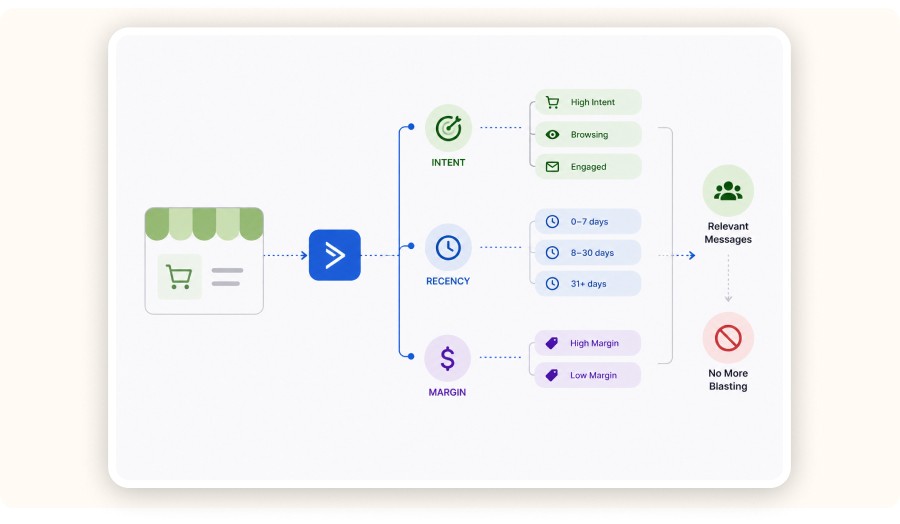
Segmentation is the main reason sellers move beyond basic email tools. In dropshipping, start with intent and recency first, then protect margin by controlling who ever sees discounts. This keeps deliverability healthier and helps you avoid blasting the same offer to everyone.
Setup details
Time: 15–25 minutes
Cost: Free
Tool: ActiveCampaign Segments + conditional content
Start with four segments
Hot intent: cart activity in the last 7 days, no purchase
New buyers: first purchase in the last 30 days
Repeat buyers: 2+ purchases
At-risk: no purchase in 60–90 days, still engaging
Dropshipping reality that matters
Many stores source from places like China, Turkey, and Vietnam, so shipping speed and return handling can vary a lot by SKU. If one product carries a higher refund risk, keep it out of broad discount campaigns and avoid pushing it to the wrong segment.
Step 6: Add SMS only after email triggers and segments are stable
SMS can boost conversion in dropshipping but it also amplifies whatever system you’ve built. Get your email triggers and segments stable first, then add SMS as a simple layer on top.
Start with one cart-recovery SMS, send it only to opted-in contacts, and cap frequency. If your email cart triggers are unreliable, fix that before you spend on texts.
Setup details
Time: 10–15 minutes
Cost: SMS fees per message
Tool: ActiveCampaign SMS (or an SMS add-on)
One safe starting play
Send one SMS 60–90 minutes after cart abandonment to opted-in shoppers.
Keep it to one sentence and one link (no long pitch, no multi-links).
Step 7: Run a weekly review that tells you what to fix this week

ActiveCampaign pays off when you treat it like a weekly operating system—not a “set it and forget it” tool. Track cart recovery, revenue per recipient, and unsubscribe rate by segment. Then change one thing per week. Over time, consistent iteration is what drives real gains in engagement and revenue.
Setup details
Time: 10 minutes to set up, then 30 minutes per week
Cost: Free
Tool: ActiveCampaign reporting + Shopify baseline metrics
Weekly checklist
Cart recovery flow performance by Email 1 / 2 / 3
Revenue per recipient by segment
Unsubscribe spikes after promotions
Bounce and complaint signals
Competitive edge note
ActiveCampaign tells you what happened inside your list and your store. It won’t tell you what’s working across the market.
Use Minea once per week before you change your email angle:
If you spot a surge of new creatives for your product type, rotate the featured product.
If the angle stays the same but objections shift, rewrite your objection-handling sections inside the flows.
Common mistakes (and the fixes that actually move the needle)

Most dropshipping setups fail for the same three reasons: broken triggers, a messy list structure, or discounting too early. Fix those and you capture most of the upside.
Keep sequences short, stop automations on purchase, and add extra channels like SMS only after your email foundation is stable.
Automations before structure: Define tags and segments first so you do not rebuild everything later.
Slow cart timing: Cart intent cools off fast. Email 1 should go out within 60 minutes.
Discount first touch: Save discounts for the last message so you protect margin.
Expected results and timeline
In week 1, your priority is getting clean sync data and confirming that your automations fire reliably (no missing events, no weird delays, no contacts stuck in the wrong step).
Across weeks 2–4, you should start seeing recovered revenue from your abandoned cart flow, and fewer support tickets, especially “Where is my order?”, if your post-purchase messaging sets clear expectations.
Over the following months, segmentation and ongoing testing create compounding gains, because every improvement you make gets applied to every future campaign and every new batch of customers.
Timeframe | What to expect | What to watch |
|---|---|---|
Day 1 to 3 | Sync and triggers working | Test orders and carts appear in ActiveCampaign |
Week 1 | Cart and post-purchase flows live | Clicks and recovered revenue baseline |
Week 2 to 4 | First lift from tests | Cart recovery rate and refund requests |
Month 2 to 3 | Segmentation compounds | Revenue per recipient by segment |
Minea
Reach $1,000 per day or get your money back

ActiveCampaign alternatives for Shopify (email + SMS tools to consider)
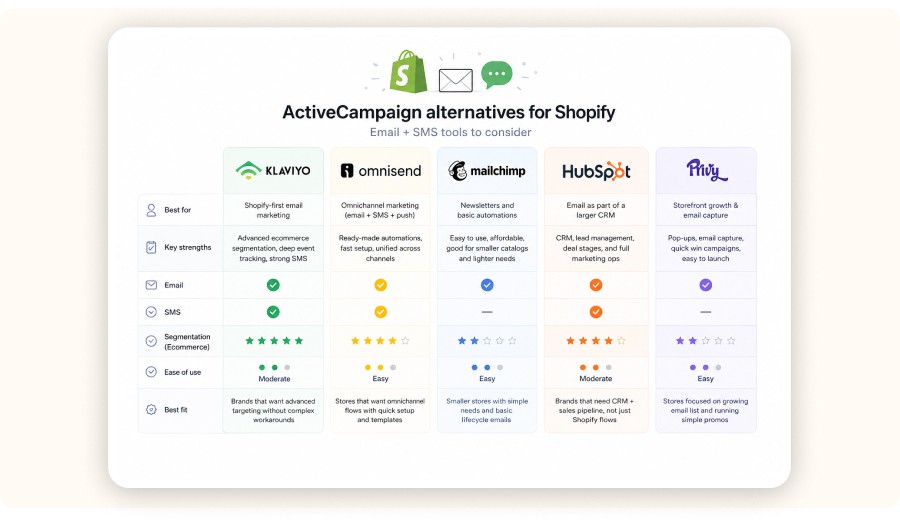
If ActiveCampaign isn’t the right fit for your Shopify store, the best alternative depends on what you’re optimizing for: Shopify-native segmentation, SMS, omnichannel, or a full CRM. Here are the main options worth comparing:
Klaviyo: the go-to choice for Shopify-first email marketing with strong ecommerce segmentation, deep event tracking, and solid SMS. Best if you want advanced targeting (browse/cart/purchase behavior) without building complex workarounds.
Omnisend: built for omnichannel flows (email + SMS + push, depending on plan). Great if you want faster setup, ready-made automation templates, and a unified approach across channels.
Mailchimp: a simple option for newsletters and basic automations. It can work for smaller catalogs and lighter lifecycle needs, but it’s usually less “ecommerce-native” than Klaviyo/Omnisend when you need detailed store behavior segmentation.
HubSpot Email Marketing: best when email is part of a larger CRM + sales pipeline. Strong for brands that need lead management, deal stages, and broader marketing ops, not just Shopify lifecycle flows.
Privy: more “storefront growth” than pure ESP. Strong for pop-ups, email capture, and quick win campaigns. Ideal if your biggest gap is collecting leads and running straightforward email promos without heavy segmentation.
If your goal is cart recovery + post-purchase + win-back, pick one platform that handles behavior-based automation well (then keep everything else, pop-ups, landing pages, SMS, cleanly connected, not duplicated).
Verdict: the simplest ActiveCampaign setup that works for dropshipping
ActiveCampaign works well for Shopify dropshippers when you use it for behavior-based automation, not more newsletters. Keep your foundation simple: Shopify sync, one list, clean tags, and three core automations, abandoned cart, post-purchase expectation setting, and win-back. Then review results weekly and improve one lever at a time.
If you want ActiveCampaign to pay for itself quickly in a dropshipping business, build the cart flow first. That’s where most stores quietly leak revenue.
If you want to reduce bad tests, use Minea before you touch email. Pick products and angles that already show demand, then let ActiveCampaign automate the follow-up once the traffic arrives.
Next step: if your email system is live but your offer rotation feels random, start your next product selection inside Minea, pick a winner, then plug it into this automation stack.
FAQ
Does ActiveCampaign integrate with Shopify?
Yes. ActiveCampaign has a Shopify integration that can sync contacts and e-commerce data so automations trigger from store behavior. After connecting it, verify that orders and consent fields map correctly before relying on cart and purchase triggers.
Is ActiveCampaign good for small businesses?
It can be, especially if you need automation beyond basic newsletters. For a small Shopify dropshipping store, it is most valuable when you use abandoned cart recovery, post-purchase flows, and segmentation.
Is ActiveCampaign good for e-commerce?
Yes, if your plan includes the e-commerce features you need and your store data sync is clean. The platform is built around event-based triggers and conditional logic, which is what e-commerce automation requires.
Is email marketing good for dropshipping?
Yes, because it monetizes traffic you already paid for and reduces reliance on constant ad spend. For dropshipping, email performs best when it focuses on cart recovery, expectation setting, and win-back, not daily promotions.
How do I integrate ActiveCampaign with my dropshipping store?
Connect the Shopify integration, validate the data sync, then build your list and tags before you create automations. Start with one automation, usually abandoned cart recovery, and test timing and messaging before you add more complexity.
What are the best ActiveCampaign automations for dropshipping?
Start with abandoned cart recovery, then add post-purchase delivery expectations and a win-back flow for customers who go inactive. After those are stable, add segmentation-based product campaigns so you stop sending the same offer to everyone.
How much does ActiveCampaign cost for a dropshipping business?
Pricing depends on your contact count and which automation features you need. Many sellers start with a simpler email tool and upgrade when they need deeper segmentation, conditional logic, or CRM-style lifecycle tracking.
Step 5: Segment your store by intent, recency, and margin
Segmentation is the main reason sellers move beyond basic email tools. In dropshipping, start with intent and recency first, then protect margin by controlling who ever sees discounts. This keeps deliverability healthier and helps you avoid blasting the same offer to everyone.
Setup details
Time: 15–25 minutes
Cost: Free
Tool: ActiveCampaign Segments + conditional content
Start with four segments
Hot intent: cart activity in the last 7 days, no purchase
New buyers: first purchase in the last 30 days
Repeat buyers: 2+ purchases
At-risk: no purchase in 60–90 days, still engaging
Dropshipping reality that matters
Many stores source from places like China, Turkey, and Vietnam, so shipping speed and return handling can vary a lot by SKU. If one product carries a higher refund risk, keep it out of broad discount campaigns and avoid pushing it to the wrong segment.
Step 6: Add SMS only after email triggers and segments are stable
SMS can boost conversion in dropshipping but it also amplifies whatever system you’ve built. Get your email triggers and segments stable first, then add SMS as a simple layer on top.
Start with one cart-recovery SMS, send it only to opted-in contacts, and cap frequency. If your email cart triggers are unreliable, fix that before you spend on texts.
Setup details
Time: 10–15 minutes
Cost: SMS fees per message
Tool: ActiveCampaign SMS (or an SMS add-on)
One safe starting play
Send one SMS 60–90 minutes after cart abandonment to opted-in shoppers.
Keep it to one sentence and one link (no long pitch, no multi-links).
Step 7: Run a weekly review that tells you what to fix this week
ActiveCampaign pays off when you treat it like a weekly operating system—not a “set it and forget it” tool. Track cart recovery, revenue per recipient, and unsubscribe rate by segment. Then change one thing per week. Over time, consistent iteration is what drives real gains in engagement and revenue.
Setup details
Time: 10 minutes to set up, then 30 minutes per week
Cost: Free
Tool: ActiveCampaign reporting + Shopify baseline metrics
Weekly checklist
Cart recovery flow performance by Email 1 / 2 / 3
Revenue per recipient by segment
Unsubscribe spikes after promotions
Bounce and complaint signals
Competitive edge note
ActiveCampaign tells you what happened inside your list and your store. It won’t tell you what’s working across the market.
Use Minea once per week before you change your email angle:
If you spot a surge of new creatives for your product type, rotate the featured product.
If the angle stays the same but objections shift, rewrite your objection-handling sections inside the flows.
Common mistakes (and the fixes that actually move the needle)
Most dropshipping setups fail for the same three reasons: broken triggers, a messy list structure, or discounting too early. Fix those and you capture most of the upside.
Keep sequences short, stop automations on purchase, and add extra channels like SMS only after your email foundation is stable.
Automations before structure: Define tags and segments first so you do not rebuild everything later.
Slow cart timing: Cart intent cools off fast. Email 1 should go out within 60 minutes.
Discount first touch: Save discounts for the last message so you protect margin.
Expected results and timeline
In week 1, your priority is getting clean sync data and confirming that your automations fire reliably (no missing events, no weird delays, no contacts stuck in the wrong step).
Across weeks 2–4, you should start seeing recovered revenue from your abandoned cart flow, and fewer support tickets, especially “Where is my order?”, if your post-purchase messaging sets clear expectations.
Over the following months, segmentation and ongoing testing create compounding gains, because every improvement you make gets applied to every future campaign and every new batch of customers.
Timeframe | What to expect | What to watch |
|---|---|---|
Day 1 to 3 | Sync and triggers working | Test orders and carts appear in ActiveCampaign |
Week 1 | Cart and post-purchase flows live | Clicks and recovered revenue baseline |
Week 2 to 4 | First lift from tests | Cart recovery rate and refund requests |
Month 2 to 3 | Segmentation compounds | Revenue per recipient by segment |
Minea
Reach $1,000 per day or get your money back
ActiveCampaign alternatives for Shopify (email + SMS tools to consider)
If ActiveCampaign isn’t the right fit for your Shopify store, the best alternative depends on what you’re optimizing for: Shopify-native segmentation, SMS, omnichannel, or a full CRM. Here are the main options worth comparing:
Klaviyo: the go-to choice for Shopify-first email marketing with strong ecommerce segmentation, deep event tracking, and solid SMS. Best if you want advanced targeting (browse/cart/purchase behavior) without building complex workarounds.
Omnisend: built for omnichannel flows (email + SMS + push, depending on plan). Great if you want faster setup, ready-made automation templates, and a unified approach across channels.
Mailchimp: a simple option for newsletters and basic automations. It can work for smaller catalogs and lighter lifecycle needs, but it’s usually less “ecommerce-native” than Klaviyo/Omnisend when you need detailed store behavior segmentation.
HubSpot Email Marketing: best when email is part of a larger CRM + sales pipeline. Strong for brands that need lead management, deal stages, and broader marketing ops, not just Shopify lifecycle flows.
Privy: more “storefront growth” than pure ESP. Strong for pop-ups, email capture, and quick win campaigns. Ideal if your biggest gap is collecting leads and running straightforward email promos without heavy segmentation.
If your goal is cart recovery + post-purchase + win-back, pick one platform that handles behavior-based automation well (then keep everything else, pop-ups, landing pages, SMS, cleanly connected, not duplicated).
Verdict: the simplest ActiveCampaign setup that works for dropshipping
ActiveCampaign works well for Shopify dropshippers when you use it for behavior-based automation, not more newsletters. Keep your foundation simple: Shopify sync, one list, clean tags, and three core automations, abandoned cart, post-purchase expectation setting, and win-back. Then review results weekly and improve one lever at a time.
If you want ActiveCampaign to pay for itself quickly in a dropshipping business, build the cart flow first. That’s where most stores quietly leak revenue.
If you want to reduce bad tests, use Minea before you touch email. Pick products and angles that already show demand, then let ActiveCampaign automate the follow-up once the traffic arrives.
Next step: if your email system is live but your offer rotation feels random, start your next product selection inside Minea, pick a winner, then plug it into this automation stack.
FAQ
Does ActiveCampaign integrate with Shopify?
Yes. ActiveCampaign has a Shopify integration that can sync contacts and e-commerce data so automations trigger from store behavior. After connecting it, verify that orders and consent fields map correctly before relying on cart and purchase triggers.
Is ActiveCampaign good for small businesses?
It can be, especially if you need automation beyond basic newsletters. For a small Shopify dropshipping store, it is most valuable when you use abandoned cart recovery, post-purchase flows, and segmentation.
Is ActiveCampaign good for e-commerce?
Yes, if your plan includes the e-commerce features you need and your store data sync is clean. The platform is built around event-based triggers and conditional logic, which is what e-commerce automation requires.
Is email marketing good for dropshipping?
Yes, because it monetizes traffic you already paid for and reduces reliance on constant ad spend. For dropshipping, email performs best when it focuses on cart recovery, expectation setting, and win-back, not daily promotions.
How do I integrate ActiveCampaign with my dropshipping store?
Connect the Shopify integration, validate the data sync, then build your list and tags before you create automations. Start with one automation, usually abandoned cart recovery, and test timing and messaging before you add more complexity.
What are the best ActiveCampaign automations for dropshipping?
Start with abandoned cart recovery, then add post-purchase delivery expectations and a win-back flow for customers who go inactive. After those are stable, add segmentation-based product campaigns so you stop sending the same offer to everyone.
How much does ActiveCampaign cost for a dropshipping business?
Pricing depends on your contact count and which automation features you need. Many sellers start with a simpler email tool and upgrade when they need deeper segmentation, conditional logic, or CRM-style lifecycle tracking.
Step 5: Segment your store by intent, recency, and margin
Segmentation is the main reason sellers move beyond basic email tools. In dropshipping, start with intent and recency first, then protect margin by controlling who ever sees discounts. This keeps deliverability healthier and helps you avoid blasting the same offer to everyone.
Setup details
Time: 15–25 minutes
Cost: Free
Tool: ActiveCampaign Segments + conditional content
Start with four segments
Hot intent: cart activity in the last 7 days, no purchase
New buyers: first purchase in the last 30 days
Repeat buyers: 2+ purchases
At-risk: no purchase in 60–90 days, still engaging
Dropshipping reality that matters
Many stores source from places like China, Turkey, and Vietnam, so shipping speed and return handling can vary a lot by SKU. If one product carries a higher refund risk, keep it out of broad discount campaigns and avoid pushing it to the wrong segment.
Step 6: Add SMS only after email triggers and segments are stable
SMS can boost conversion in dropshipping but it also amplifies whatever system you’ve built. Get your email triggers and segments stable first, then add SMS as a simple layer on top.
Start with one cart-recovery SMS, send it only to opted-in contacts, and cap frequency. If your email cart triggers are unreliable, fix that before you spend on texts.
Setup details
Time: 10–15 minutes
Cost: SMS fees per message
Tool: ActiveCampaign SMS (or an SMS add-on)
One safe starting play
Send one SMS 60–90 minutes after cart abandonment to opted-in shoppers.
Keep it to one sentence and one link (no long pitch, no multi-links).
Step 7: Run a weekly review that tells you what to fix this week
ActiveCampaign pays off when you treat it like a weekly operating system—not a “set it and forget it” tool. Track cart recovery, revenue per recipient, and unsubscribe rate by segment. Then change one thing per week. Over time, consistent iteration is what drives real gains in engagement and revenue.
Setup details
Time: 10 minutes to set up, then 30 minutes per week
Cost: Free
Tool: ActiveCampaign reporting + Shopify baseline metrics
Weekly checklist
Cart recovery flow performance by Email 1 / 2 / 3
Revenue per recipient by segment
Unsubscribe spikes after promotions
Bounce and complaint signals
Competitive edge note
ActiveCampaign tells you what happened inside your list and your store. It won’t tell you what’s working across the market.
Use Minea once per week before you change your email angle:
If you spot a surge of new creatives for your product type, rotate the featured product.
If the angle stays the same but objections shift, rewrite your objection-handling sections inside the flows.
Common mistakes (and the fixes that actually move the needle)
Most dropshipping setups fail for the same three reasons: broken triggers, a messy list structure, or discounting too early. Fix those and you capture most of the upside.
Keep sequences short, stop automations on purchase, and add extra channels like SMS only after your email foundation is stable.
Automations before structure: Define tags and segments first so you do not rebuild everything later.
Slow cart timing: Cart intent cools off fast. Email 1 should go out within 60 minutes.
Discount first touch: Save discounts for the last message so you protect margin.
Expected results and timeline
In week 1, your priority is getting clean sync data and confirming that your automations fire reliably (no missing events, no weird delays, no contacts stuck in the wrong step).
Across weeks 2–4, you should start seeing recovered revenue from your abandoned cart flow, and fewer support tickets, especially “Where is my order?”, if your post-purchase messaging sets clear expectations.
Over the following months, segmentation and ongoing testing create compounding gains, because every improvement you make gets applied to every future campaign and every new batch of customers.
Timeframe | What to expect | What to watch |
|---|---|---|
Day 1 to 3 | Sync and triggers working | Test orders and carts appear in ActiveCampaign |
Week 1 | Cart and post-purchase flows live | Clicks and recovered revenue baseline |
Week 2 to 4 | First lift from tests | Cart recovery rate and refund requests |
Month 2 to 3 | Segmentation compounds | Revenue per recipient by segment |
Minea
Reach $1,000 per day or get your money back
ActiveCampaign alternatives for Shopify (email + SMS tools to consider)
If ActiveCampaign isn’t the right fit for your Shopify store, the best alternative depends on what you’re optimizing for: Shopify-native segmentation, SMS, omnichannel, or a full CRM. Here are the main options worth comparing:
Klaviyo: the go-to choice for Shopify-first email marketing with strong ecommerce segmentation, deep event tracking, and solid SMS. Best if you want advanced targeting (browse/cart/purchase behavior) without building complex workarounds.
Omnisend: built for omnichannel flows (email + SMS + push, depending on plan). Great if you want faster setup, ready-made automation templates, and a unified approach across channels.
Mailchimp: a simple option for newsletters and basic automations. It can work for smaller catalogs and lighter lifecycle needs, but it’s usually less “ecommerce-native” than Klaviyo/Omnisend when you need detailed store behavior segmentation.
HubSpot Email Marketing: best when email is part of a larger CRM + sales pipeline. Strong for brands that need lead management, deal stages, and broader marketing ops, not just Shopify lifecycle flows.
Privy: more “storefront growth” than pure ESP. Strong for pop-ups, email capture, and quick win campaigns. Ideal if your biggest gap is collecting leads and running straightforward email promos without heavy segmentation.
If your goal is cart recovery + post-purchase + win-back, pick one platform that handles behavior-based automation well (then keep everything else, pop-ups, landing pages, SMS, cleanly connected, not duplicated).
Verdict: the simplest ActiveCampaign setup that works for dropshipping
ActiveCampaign works well for Shopify dropshippers when you use it for behavior-based automation, not more newsletters. Keep your foundation simple: Shopify sync, one list, clean tags, and three core automations, abandoned cart, post-purchase expectation setting, and win-back. Then review results weekly and improve one lever at a time.
If you want ActiveCampaign to pay for itself quickly in a dropshipping business, build the cart flow first. That’s where most stores quietly leak revenue.
If you want to reduce bad tests, use Minea before you touch email. Pick products and angles that already show demand, then let ActiveCampaign automate the follow-up once the traffic arrives.
Next step: if your email system is live but your offer rotation feels random, start your next product selection inside Minea, pick a winner, then plug it into this automation stack.
FAQ
Does ActiveCampaign integrate with Shopify?
Yes. ActiveCampaign has a Shopify integration that can sync contacts and e-commerce data so automations trigger from store behavior. After connecting it, verify that orders and consent fields map correctly before relying on cart and purchase triggers.
Is ActiveCampaign good for small businesses?
It can be, especially if you need automation beyond basic newsletters. For a small Shopify dropshipping store, it is most valuable when you use abandoned cart recovery, post-purchase flows, and segmentation.
Is ActiveCampaign good for e-commerce?
Yes, if your plan includes the e-commerce features you need and your store data sync is clean. The platform is built around event-based triggers and conditional logic, which is what e-commerce automation requires.
Is email marketing good for dropshipping?
Yes, because it monetizes traffic you already paid for and reduces reliance on constant ad spend. For dropshipping, email performs best when it focuses on cart recovery, expectation setting, and win-back, not daily promotions.
How do I integrate ActiveCampaign with my dropshipping store?
Connect the Shopify integration, validate the data sync, then build your list and tags before you create automations. Start with one automation, usually abandoned cart recovery, and test timing and messaging before you add more complexity.
What are the best ActiveCampaign automations for dropshipping?
Start with abandoned cart recovery, then add post-purchase delivery expectations and a win-back flow for customers who go inactive. After those are stable, add segmentation-based product campaigns so you stop sending the same offer to everyone.
How much does ActiveCampaign cost for a dropshipping business?
Pricing depends on your contact count and which automation features you need. Many sellers start with a simpler email tool and upgrade when they need deeper segmentation, conditional logic, or CRM-style lifecycle tracking.
Similar articles
Omnisend Email Marketing for a Dropshipping Business : Setup That Actually Sells
Best Email Marketing Tools
Omnisend Email Marketing for a Dropshipping Business : Setup That Actually Sells
Best Email Marketing Tools
Omnisend Email Marketing for a Dropshipping Business : Setup That Actually Sells
Best Email Marketing Tools
Omnisend Email Marketing for a Dropshipping Business : Setup That Actually Sells
Best Email Marketing Tools
How to Use Privy Email Marketing for a Dropshipping Store in 60 Minutes (2026)
Best Email Marketing Tools
How to Use Privy Email Marketing for a Dropshipping Store in 60 Minutes (2026)
Best Email Marketing Tools
How to Use Privy Email Marketing for a Dropshipping Store in 60 Minutes (2026)
Best Email Marketing Tools
How to Use Privy Email Marketing for a Dropshipping Store in 60 Minutes (2026)
Best Email Marketing Tools


Our Free Adspys

Find winning products on our Tiktok adspy today!
Find winning products on our Facebook adspy today!
Find winning products on our Tiktok adspy today!
Find winning products on our Facebook adspy today!
Find winning products on our Tiktok adspy today!
Find winning products on our Facebook adspy today!
Find winning products on our Tiktok adspy today!
Find winning products on our Facebook adspy today!
1 winning product everyday.
Follow us!






Find out more
Read more
Minea © 2026
Find out more
Read more
Minea © 2026
Find out more
Read more
Minea © 2026
Find out more
Read more
Minea © 2026
Find out more
Read more
Minea © 2026
Find out more
Read more
Minea © 2026